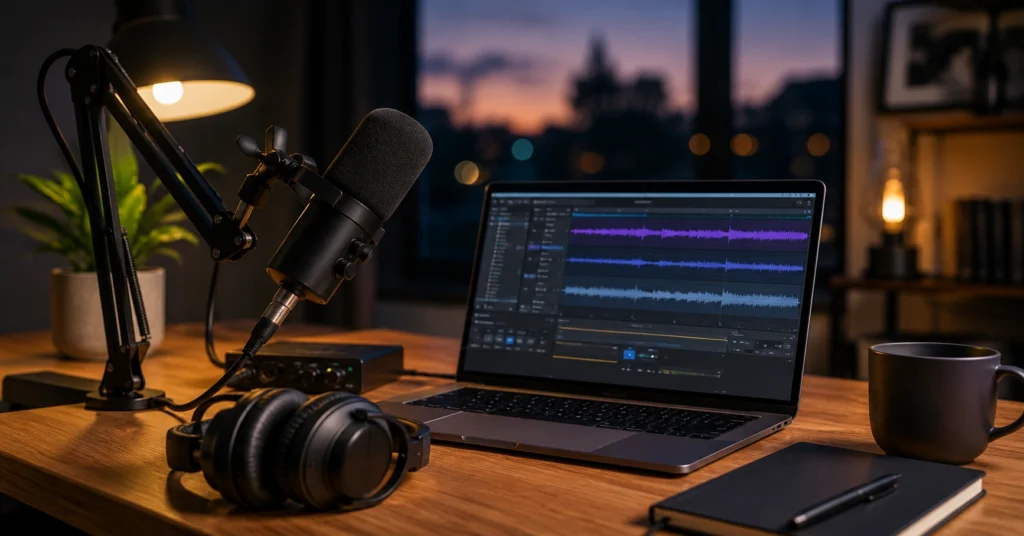
You don’t need expensive gear to start a podcast. You need a clear concept, a format you can repeat, and a workflow that doesn’t collapse when life gets busy. I launched my first episode with a $69 microphone and free software. The audio wasn’t studio-quality, but it was clear enough that listeners cared about the content.
That’s the real barrier most beginners face—not the equipment, but the belief that they need perfect conditions before hitting record.
This guide shows you exactly how to start a podcast in 2026: what to plan before buying gear, which tools actually save time, and the publishing sequence that gets your show into Apple Podcasts and Spotify. You’ll learn how to start a podcast without overspending, how to structure episodes that retain listeners, and what mistakes cost weeks of wasted effort.
Overview: What Starting a Podcast Actually Requires
Podcasting rewards clarity and consistency more than production polish. A show with clear topic boundaries, predictable episode length, and reliable publishing will outperform a technically perfect show that publishes sporadically.
Most new podcasts fail within the first 10 episodes—not because the audio is bad, but because the creator never defined what problem the show solves or who it’s for.
What you need before you buy anything:
- A specific niche (not “business” or “health,” but “marketing for independent therapists” or “nutrition for endurance cyclists over 40”)
- A format you can sustain (solo, interview, co-hosted, or narrative)
- Episode length you can produce weekly (20–30 minutes is the beginner sweet spot)
- A publishing cadence you won’t abandon (weekly, not daily)
What you need to spend money on (in order):
- Microphone ($69–150 for beginner)
- Headphones ($100–150)
- Podcast hosting ($5–15/month)
- Optional: audio interface, boom arm, pop filter ($100–200)
The total to start: $150–300 for the first year. You can spend $2,000+ on gear, but it won’t make your show more listenable if the concept is unfocused.
YouTube & Video Creation Hub houses related guides on video podcasting, editing workflows, and distribution strategies.
Step-by-Step Guide: How to Start a Podcast in 7 Steps
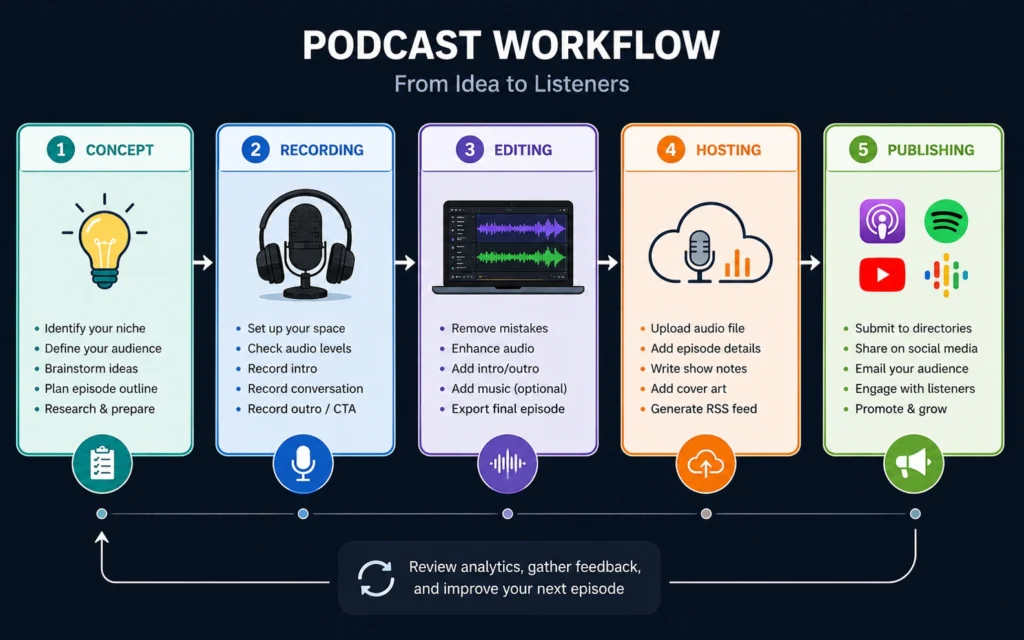
Here’s the exact sequence for how to start a podcast without wasting time or money. Each step is one action. Don’t skip ahead.
Step 1: Define your podcast’s specific problem and audience
Choose a niche narrow enough that you can name 50 episode topics without repeating yourself. If you can’t, it’s too broad. “Productivity for entrepreneurs” is too wide. “Time-blocking for freelance designers managing 3+ clients” is specific enough to build a show around.
Write this down:
- Who is this for? (Be specific: job title, industry, life stage)
- What problem does this solve? (What will listeners do differently after episodes?)
- What action should they take? (Apply a framework, book a consultation, join a community)
This clarity determines your format, episode length, and even your microphone choice. An interview show needs different setup than a solo narrative show.
Step 2: Choose your podcast format and episode length
Solo show: You record alone. Fastest to produce (30–60 minutes per episode including editing). Best for teaching frameworks or sharing expertise. Harder to sustain if you run out of topics.
Interview show: You host guests. Builds networks and cross-promotion. Takes 2–3 hours per episode (outreach, scheduling, recording, editing). Requires consistent guest pipeline.
Co-hosted show: Two or more regular hosts. Feels conversational, reduces solo recording pressure. Needs schedule alignment and chemistry.
Narrative/storytelling: Scripted, edited heavily. Highest production time (8–15 hours per episode). Best for journalism or deep-dive series.
Episode length: Start with 20–30 minutes. This is manageable for beginners, gives enough depth without testing listener patience, and lets you produce weekly without burnout. You can adjust after reviewing retention data from your first 10 episodes.
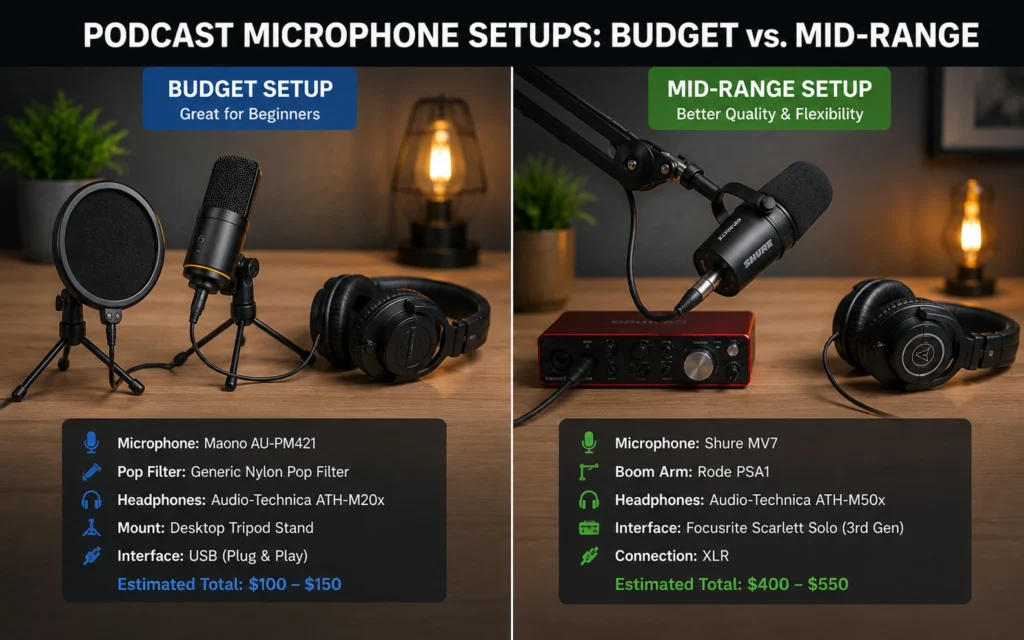
Step 3: Set up your recording equipment
Minimum setup (under $250):
- Microphone: Samson Q2U ($69) — USB/XLR hybrid, works with computer directly or through audio interface
- Headphones: Audio-Technica ATH-M50x ($149) — closed-back, isolates playback sound from mic
- Software: QuickTime (Mac) or Sound Recorder (Windows) — both free
Mid-range setup ($400–600):
- Microphone: Shure MV7 ($250) — better noise rejection, USB/XLR
- Audio interface: Focusrite Scarlett 2i2 ($180) — better preamps, phantom power
- Boom arm + pop filter ($50–70)
Recording for remote guests: Use SquadCast or Riverside.fm. These capture each person’s audio locally before uploading, so internet glitches don’t ruin the recording. Built-in Zoom/Skype recording compresses audio and degrades quality.
best microphone for podcasting breaks down the top 5 microphones for different budgets and use cases.
Step 4: Record your first episode
Before recording:
- Test your mic levels. Speak at your normal volume. Peaks should hit -12dB to -6dB, never 0dB (clipping).
- Record in a quiet room. Close windows. Turn off AC/fans if they hum.
- Record 30 seconds of silence for noise profiling.
During recording:
- Speak 6–8 inches from the mic. Use a pop filter if you have one.
- Don’t stop if you make a mistake. Pause for 3 seconds, repeat the sentence, keep going. Editing handles the fix.
- Say your show name and episode number at the start. This helps with archival and RSS metadata.
Solo recording workflow:
- Open QuickTime (Mac) → File → New Audio Recording
- Select your microphone
- Hit record, speak, stop
- Save as episode-001-original.wav
Interview recording workflow:
- Send guests SquadCast link 24 hours before
- Ask them to use headphones (non-negotiable)
- Record locally on your end as backup
- Download separate audio tracks for each guest
Step 5: Edit your audio
Recommended editing software: Descript ($12–24/month). It edits audio by editing text. Delete a word in the transcript → it deletes from audio. Removes filler words (“um,” “uh”) with one click. Adds silence fills automatically. Steep learning curve for first 2 episodes, then cuts editing time from 3 hours to 45 minutes.
Free alternative: Audacity (free). Traditional waveform editing. steeper learning curve for beginners, but powerful once you learn the shortcuts.
Editing checklist:
- Remove long pauses (>2 seconds)
- Cut mouth clicks and loud breaths
- Normalize audio to -16 LUFS (podcast standard)
- Remove background noise using noise profile from your 30-second silence clip
- Add intro/outro music (ensure you have a license)
Typical editing time: 3:1 ratio (3 hours editing for 1 hour of audio) for beginners. With Descript and practice, this drops to 1.5:1 or better.
how to edit a podcast gives the full Descript workflow with screenshots.
Step 6: Choose podcast hosting and generate your RSS feed
You can’t upload directly to Apple Podcasts or Spotify. You need a hosting platform that generates your RSS feed and distributes to directories.
Hosting options:
- RSS.com: $5/month basic, unlimited uploads, includes basic analytics. Best for beginners wanting simplicity.
- Buzzsprout: $12/month starter, 3-month free trial, excellent guides, automatic chapter markers.
- Libsyn: $5/month starter, industry veteran, more control, steeper interface.
- Anchor (Spotify for Podcasters): Free, but Spotify owns the platform and pushes you toward Spotify-only distribution.
Publishing checklist:
- Show title (clear, keyword-rich)
- Show description (200–400 words, explain who it’s for)
- Cover art (3000×3000px, JPEG or PNG, readable at thumbnail size)
- Episode title (specific, not clever)
- Episode description (200–300 words, include key takeaways)
- Episode audio file (MP3, 128kbps mono, named episode-001.mp3)
- Submit RSS feed to Apple Podcasts, Spotify, Google Podcasts
podcast hosting platforms compares 7 hosts by price, features, and ease of use.
Step 7: Publish and promote your first 5 episodes
Before launch:
- Record 3 episodes before publishing episode 1. This gives you buffer for life emergencies.
- Submit to Apple Podcasts 3–5 days before launch (they manually review).
- Submit to Spotify (instant approval via hosting platform).
After publishing:
- Create show notes on your website (SEO benefit, ownership beyond platforms)
- Share episode clips on social media (turn 60-second audio snippets into short-form video)
- Email your list if you have one
- Ask 3–5 people you know to subscribe and leave a review (not friends/family—strangers who care about the topic)
Publishing cadence: Weekly. Consistency builds listener habit. Monthly is too slow for momentum. Bi-weekly works if weekly feels unsustainable.
turn podcast into short-form video shows how to repurpose audio into TikTok/Reels/Shorts.
Tips & Examples: How to Start a Podcast Without wasting Months
Most guides tell you what to do. They don’t tell you where people actually get stuck. Here’s what happens when you start a podcast, based on real creator workflows.
Mistake 1: Spending 6 weeks on gear before recording
You don’t need a $500 microphone for episode 1. The Samson Q2U at $69 sounds good enough that listeners care about content, not audio quality. I spent 3 weeks researching microphones before my first episode. Those 3 weeks could’ve been 3 episodes. Start cheap, upgrade when you know you’ll stick with it.
Mistake 2: Naming your show something clever but unsearchable
“The Pulse” tells nobody what your show is about. “The Pulse: Marketing for Independent Therapists” does. Your show name is SEO. Make it work for discovery, not just branding. When someone searches “marketing for therapists,” they should find you.
Mistake 3: Publishing inconsistently
You’ll publish episodes 1–3 like a machine. Episode 4 arrives 3 weeks later because life happened. Episode 5 never comes. Listener habit breaks after 2 missed weeks. Weekly publishing isn’t about frequency—it’s about trust. If you can’t do weekly, start with bi-weekly and stick to it.
Example: What a realistic first 30 days looks like
- Week 1: Define concept, choose format, buy mic/headphones
- Week 2: Record episode 1 and 2, edit episode 1
- Week 3: Edit episode 2, record episode 3, set up hosting
- Week 4: Publish episode 1, submit to directories, promote
Total time invested: 15–20 hours. Total cost: $220–300. By day 30, you have a live show with 3 episodes and a workflow.
Honest admission: My first 5 episodes had terrible audio. I recorded in a room with echo, no pop filter, and my laptop fan running. I kept them online because deleting them felt like admitting failure. The turning point came when a stranger emailed saying episode 3 helped them land a client. Audio quality mattered less than the framework I shared. But I still wish I’d known the noise-reduction trick I use now.
podcast recording software compares QuickTime, SquadCast, Riverside, and Audacity by use case.
Tools to Use: What Actually Saves Time (and What Doesn’t)
Not all tools are equal. Some cut editing time from 3 hours to 45 minutes. Others add friction without measurable benefit. Here’s what works in real production.
Microphones (budget to mid-range):
| Microphone | Price | USB/XLR | Best For |
|---|---|---|---|
| Samson Q2U | $69 | Both | Beginners, solo or interview |
| Audio-Technica ATR2100x | $79 | Both | Similar to Q2U, slightly better build |
| Shure MV7 | $250 | Both | Better noise rejection, mid-range |
| Rode PodMic | $99 | XLR only | Podcast-specific, needs interface |
The Samson Q2U is the entry point. It’s USB for starting, XLR for upgrading. You won’t outgrow it before you know if you’ll stick with podcasting.
Headphones (non-negotiable):
Closed-back only. Open-back lets playback leak into your mic.
- Audio-Technica ATH-M50x ($149) — industry standard, flat response
- Sony MDR-7506 ($99) — slightly cheaper, same isolation
- Audio-Technica M20x ($50) — budget option, acceptable for beginners
Recording software:
- QuickTime (Mac): Free, no-frills, works for solo. Can’t record multiple tracks.
- Sound Recorder (Windows): Free, same limitations.
- SquadCast: $15–30/month, records each guest locally, separate tracks, 4K video option. Best for interviews.
- Riverside.fm: $15–39/month, similar to SquadCast, better video quality.
Editing software:
- Descript: $12–24/month. Text-based editing, filler word removal, AI voice cloning (optional). Best for speed once you learn it.
- Audacity: Free. Traditional editing, more manual work, no text-based features.
- Adobe Audition: $21/month. Professional-grade, overkill for beginners.
Hosting platforms:
- RSS.com: $5/month unlimited. Best value for beginners.
- Buzzsprout: $12/month starter. Best guides and support.
- Libsyn: $5/month starter. Best for serious creators wanting control.
What you don’t need yet:
- Acoustic treatment panels ($200–500): Record in a closet or room with furniture instead.
- Bluetooth microphone: Latency and compression ruin audio. Use wired.
- Multiple microphones: Master one mic before adding complexity.
- Professional voiceover: Your voice is fine. Speak clearly, edit poorly pronounced words.
best microphone for podcasting ranks 10 microphones with audio samples and real-world testing.
Real cost breakdown for first year:
| Item | Cost |
|---|---|
| Samson Q2U mic | $69 |
| ATH-M50x headphones | $149 |
| RSS.com hosting (12 months) | $60 |
| Descript (3 months while learning) | $36 |
| Total | $314 |
You can go cheaper (free software, budget headphones), but this setup sounds professional enough that audio never becomes the reason someone stops listening.
Common Questions About Starting a Podcast
How much does it cost to start a podcast?
You can start a podcast for under $250: Samson Q2U microphone ($69), Audio-Technica ATH-M50x headphones ($149), and free recording/editing software. Hosting starts at $5–15/month. Total first-year cost: $150–300. You can spend more on gear, but it won’t make your show more listenable if the concept is unfocused.
What equipment do I need to start a podcast?
Minimum: USB/XLR microphone (Samson Q2U), closed-back headphones (ATH-M50x), computer with recording software. Optional but helpful: audio interface (Focusrite Scarlett 2i2), pop filter, boom arm. You can record solo with just the mic and headphones—everything else is incremental improvement.
How long should my first podcast episode be?
Aim for 20–30 minutes for your first 5 episodes. This length is manageable for beginners, gives you enough content to establish rhythm, and respects listener attention. You can adjust after reviewing retention data. Episodes longer than 45 minutes require stronger editing to maintain engagement.
Do I need podcast hosting to start?
Yes. You need a podcast hosting platform to generate your RSS feed and distribute to Apple Podcasts, Spotify, and other directories. You can’t upload directly to these platforms. Popular hosts: RSS.com ($5/month), Buzzsprout ($12/month), Libsyn ($5/month). Hosting is non-negotiable.