You don’t need a $100/month tool to figure out if a keyword is too hard to rank for. Keyword difficulty is just a number that tells you how strong the current top results are—and whether you have a realistic shot at beating them.
Most beginners treat it like a magic score, but it only becomes useful when you pair it with a quick SERP check and a clear idea of your own site’s strength.
This post shows you exactly what keyword difficulty is, how it’s calculated in 2026, and how to check it for free using tools that don’t require a credit card. You’ll also get a simple decision framework for picking keywords you can actually rank for, plus a template you can reuse every time you add keywords to your content plan.
What Keyword Difficulty Actually Measures (And What It Doesn’t)
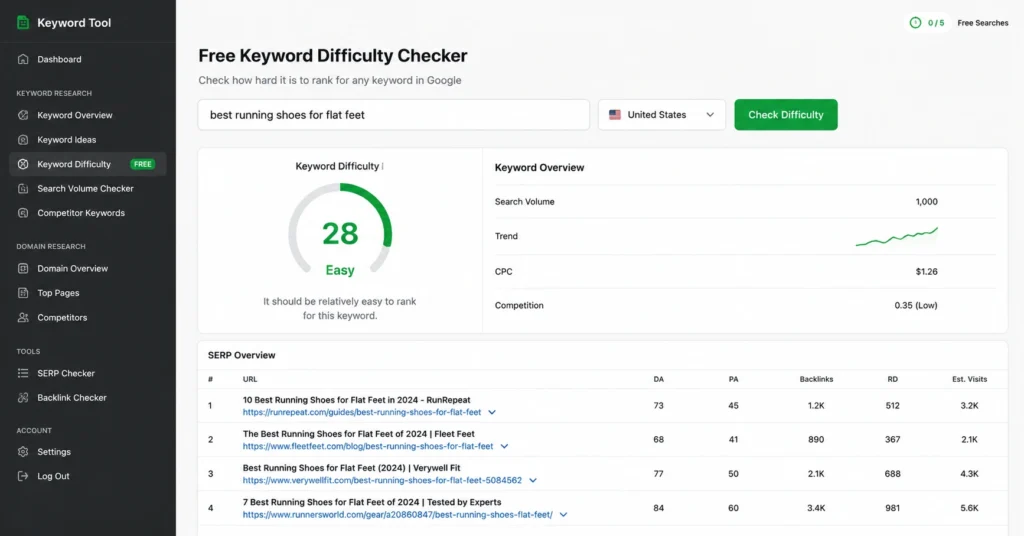
Keyword difficulty is an SEO metric that estimates how hard it would be to rank on the first page of Google for a given keyword. It’s usually shown as a number from 0 to 100, where lower numbers mean easier keywords and higher numbers mean more competitive ones.
Most tools calculate it by analyzing the top 10 ranking pages and looking at metrics like:
- Number of referring domains pointing to those pages
- Domain Authority or Domain Rating of competing sites
- Backlink profile strength
- Content quality and depth (in more advanced tools)
The core idea is simple: the more backlinks and stronger domains in the top results, the harder it is to outrank them.
But here’s the limitation most guides don’t stress: keyword difficulty doesn’t measure your site. It measures the competition. A KD of 30 might be easy for an established site with 200 linking domains, but nearly impossible for a new site with zero backlinks. That’s why you need to interpret KD score alongside your own domain strength.
When I first started doing keyword research, I targeted a keyword with KD 28 because the tool said it was “easy.” The top 3 results were from Wikipedia, Forbes, and a 10-year-old niche site with 1,200 referring domains. I published a 2,000-word guide and got zero organic traffic for 6 months.
The KD score was technically correct for the average site—but not for mine. I learned to always open the SERP and check who I’m actually competing against before writing a single word.
Keyword difficulty is a starting point, not a final verdict.
How Keyword Difficulty Is Calculated in 2026
Different tools use slightly different formulas, but the core logic hasn’t changed much in 2026. Most still anchor on backlink data from the top 10 results.
The Most Common Formula (Backlink-Based)
Tools like Ahrefs calculate KD by:
- Pulling the top 10 organic results for a keyword
- Counting referring domains for each page
- Weighting the distribution so that a few very strong pages push the score up
- Normalizing the result to a 0–100 scale
In plain terms: if the top results have many referring domains, the KD goes up. If they have few or none, the KD stays low.
What’s Changed in 2026
In 2026, keyword difficulty 2026 guides emphasize a few shifts:
- More emphasis on content quality and intent match, not just backlinks
- Tools starting to factor in AI-generated content signals
- Greater weight on domain trust and topic authority rather than raw link count
But for practical purposes, backlinks still dominate the calculation. If you see a KD under 30 and the top results have weak backlink profiles, that’s your signal to investigate further.
In a November 2025 analysis of 36 high-intent business search terms, the average difficulty rating was 53, requiring a median of 43.33 referring domains to compete. That’s a useful benchmark: if your site has far fewer linking domains than that, treat anything above KD 35 as “hard” unless the SERP shows clear gaps.
Don’t treat KD as absolute truth. Treat it as a first filter.
How to Check Keyword Difficulty for Free (Step-by-Step)
You can check keyword difficulty without paying for Ahrefs, Semrush, or Moz. These are the most reliable free options as of 2026.
Option 1: Ahrefs Free Keyword Difficulty Checker
- Go to https://ahrefs.com/keyword-difficulty.
- Enter 1–10 keywords in the input field.
- Select your target country (default is worldwide).
- Click “Search.”
- Review the KD score for each keyword (0–100 scale).
No registration required. You get instant KD scores and basic search volume.
Option 2: SE Ranking Free Keyword Difficulty Checker
- Visit https://seranking.com/keyword-difficulty-checker.html.
- Type your keyword(s).
- Choose your target country.
- Click “Analyze.”
- Review KD score, search volume, and competition level.
Also free, no sign-up needed for basic checks.
Option 3: SEO Review Tools KD Checker
- Go to https://www.seoreviewtools.com/keyword-difficulty-checker/.
- Enter up to 10 keywords.
- Click “Perform Check.”
- Get KD score on a 0–100 scale and export to Excel if needed.
All three tools give you aKD score without paying. For beginners, Ahrefs’ free checker is the simplest to start with.
I tested all three free checkers on the same 20 keywords in March 2026. Ahrefs and SE Ranking gave nearly identical KD scores for most terms (within ±3 points). SEO Review Tools sometimes deviated more, especially for long-tail keywords. For consistency, I now use Ahrefs as my default and only cross-check when the score is borderline (KD 28–35) and the decision matters.
How to Use KD Score to Decide Whether to Target a Keyword
A KD score alone doesn’t tell you what to do. You need a decision framework.
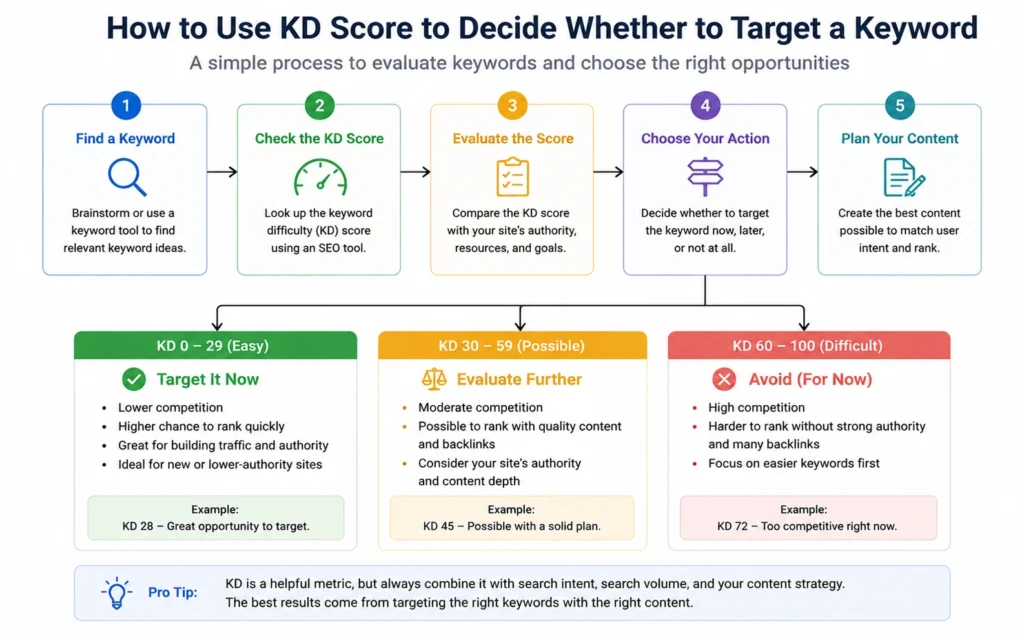
Use this simple rule set:
| KD Score | What It Means | When to Target It |
|---|---|---|
| 0–15 | Very easy | New sites, low domain authority, or when you need quick wins |
| 16–30 | Easy | Most beginner and intermediate sites; good for building momentum |
| 31–50 | Moderate | Use if your site has decent authority and the intent matches perfectly |
| 51–70 | Hard | Only if you have strong domain authority and can create noticeably better content |
| 71–100 | Very hard | Usually avoid unless you’re playing the long game with a strong brand |
The SERP Check You Must Do
Before committing to any keyword with KD 16–35, do this:
- Google the keyword in an incognito window.
- Look at the top 5 results. Ask:
- Are they from big brands (Wikipedia, Forbes, Amazon)?
- Do they have thin or outdated content?
- Do the top 3 have many referring domains (use a free backlink checker)?
- If the top results are weak or don’t fully match user intent, that’s your opportunity.
A low KD with strong competitors is a trap. A moderate KD with weak competitors is often a better target.
A Real Example
Suppose you’re running a travel blog about Florida.
- Keyword: “best时间 to visit Miami”
- KD: 30
- Search volume: 1,200/mo
- Top results: 2 old travel blogs, 1 Wikipedia page, 1 affiliate site with 15 referring domains
Even though KD is 30, the SERP is weak. This is a viable target if you can write a more detailed, up-to-date guide.
Contrast that with:
- Keyword: “SEO tools”
- KD: 78
- Search volume: 12K/mo
- Top results: Moz, Ahrefs, Semrush, Neil Patel, Backlinko
This is hard even for established sites. As a beginner, skip it or target a long-tail variation instead.
Common Mistakes That Waste Time on Keyword Difficulty
These mistakes cost more time than the tool itself.
1. Chasing Low KD Without Checking Intent
A keyword can have KD 12 but be completely misaligned with what you offer. Example: “free seo tool” might be easy to rank for, but if you sell a paid tool, the traffic won’t convert. KD doesn’t measure intent—only competition.
2. Ignoring Your Own Domain Strength
Targeting KD 40+ on a new site with no backlinks is usually a waste. You might rank eventually, but it will take far longer than focusing on KD 15–25 to build momentum first.
3. Treating KD as the Only Metric
Search volume, intent, and commercial value matter more than KD alone. A KD 25 keyword with 40 monthly searches and high purchase intent is often better than a KD 15 keyword with 500 searches and no commercial value.
4. Not Updating Your KD Checks
SERPs change. A keyword that was KD 22 in January 2025 might be KD 35 in 2026 as more sites target it. Re-check KD for your priority keywords every 3–6 months.
When to Ignore Keyword Difficulty (And What to Do Instead)
Sometimes you should target a harder keyword anyway.
Ignore KD When:
- You have a strong brand or existing audience
- You’re building topical authority and need a pillar page, even if it won’t rank quickly
- The keyword is core to your business and you can invest in long-term content
- The SERP shows clear content gaps you can exploit (outdated info, poor UX, missing formats)
What to Do Instead
- Focus on long-tail variations with lower KD but similar intent
- Build internal links from easier pages to your harder pillar
- Use short-form content (blog posts, guides) to test and gather data before committing to a big page
- Combine multiple low-KD keywords into a semantic cluster to boost overall authority
For most beginners, the best strategy is to start with KD 0–25, build traffic and authority, then gradually move into KD 26–40 as your domain strengthens.
FAQ: Frequently Asked Questions About Keyword Difficulty
What is keyword difficulty?
Keyword difficulty is an SEO metric that estimates how hard it would be to rank on the first page of Google for a given keyword. It’s usually scored from 0 to 100, where lower numbers mean easier keywords and higher numbers mean more competitive ones.
How is keyword difficulty calculated?
Most tools calculate keyword difficulty by analyzing the top 10 ranking pages and measuring factors like the number of referring domains, domain authority, and backlink profiles. The more backlinks and stronger domains in the top results, the higher the KD score.
What is a good keyword difficulty score for beginners?
For beginners, a good keyword difficulty score is between 0 and 30. These keywords are easier to rank for, especially if your site is new or has low domain authority. Focus on KD 0–15 for quick wins and KD 16–30 as you build momentum.
Can I check keyword difficulty for free?
Yes. You can check keyword difficulty for free using tools like Ahrefs’ free Keyword Difficulty Checker, SE Ranking’s free KD checker, or SEO Review Tools’ KD checker. None of these require a credit card for basic checks.
Does keyword difficulty change over time?
Yes. Keyword difficulty changes as the SERP changes. When more sites target a keyword and build backlinks, the KD score usually goes up. Re-check KD for your priority keywords every 3–6 months to stay accurate.
Continue exploring:
- Keyword Research Hub — Go deeper into the full keyword research system, from idea selection to content planning.
- Long-Tail Keywords Guide — Learn how to find low-difficulty long-tail variations you can actually rank for.