The issue usually isn’t Google. It’s the publishing workflow. Someone downloads a stock image called IMG_4927.jpg, uploads a 4.8 MB file, skips alt text, and publishes. Then six months later the page is slow, image search traffic is nonexistent, and nobody remembers where the image came from.
I’ve seen teams spend hours adjusting title tags while uploading dozens of images with filenames that tell search engines nothing. The ranking problem wasn’t the page. The page simply wasn’t helping search engines understand its visual content.
Image SEO works best when it becomes part of publishing rather than a separate optimization project.
This guide shows what actually matters, what can be ignored, and how to build a repeatable workflow that makes every image easier to understand, faster to load, and more useful for both readers and search engines.
Image SEO rewards clarity and punishes lazy publishing habits
Search engines cannot “see” images the way people do.
Modern image recognition is far better than it was years ago, but search engines still rely on supporting signals:
- File names
- Alt text
- Surrounding content
- Captions
- Structured page context
- Technical accessibility signals
A page about trail running shoes that contains an image called:
IMG_8473.jpg
provides very little context.
A file named:
mens-trail-running-shoes-waterproof.jpg
provides immediate context before the image is even rendered.
That doesn’t mean stuffing keywords into every file name. It means describing the image honestly.
The practical rule:
Describe what the image actually shows.
Not what you wish the page ranked for.
The image workflow that prevents most SEO mistakes
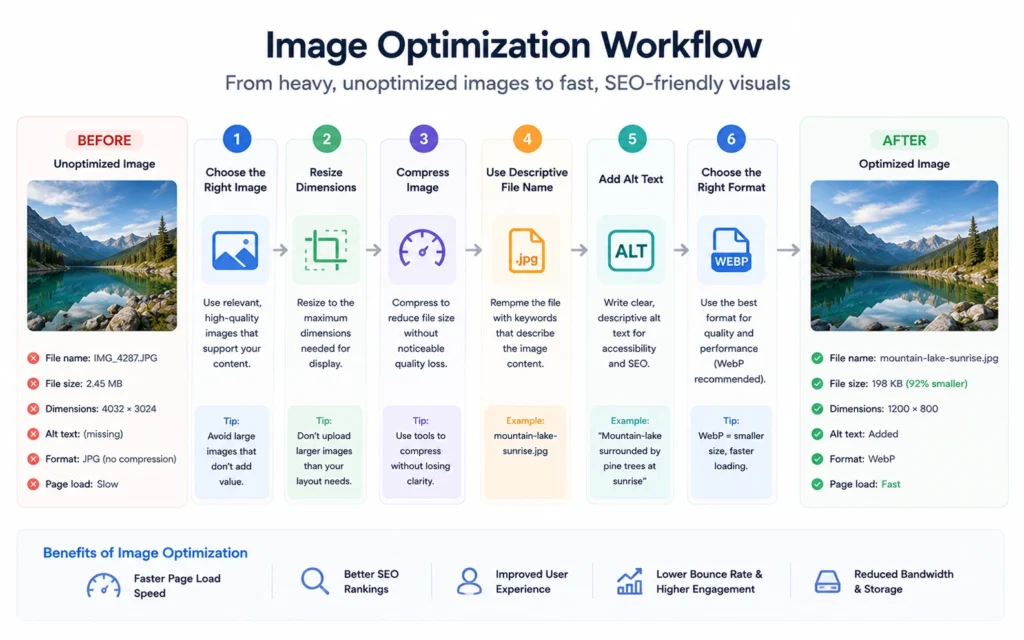
Most beginners think image SEO starts after publication.
It starts before upload.
The workflow I use looks like this:
Step 1: Choose the right image
The image must support the page’s purpose.
A tutorial should show the process.
A product page should show the product.
A local business page should show the location, service, or team.
Generic images create generic signals.
Step 2: Rename the file
Before uploading:
Bad:
- IMG_3022.jpg
- Screenshot1.png
- Final-Final-New.jpg
Better:
- wordpress-image-settings.jpg
- coffee-roaster-control-panel.jpg
- ecommerce-product-page-layout.jpg
The filename becomes a small relevance signal.
Not powerful alone.
Helpful when combined with everything else.
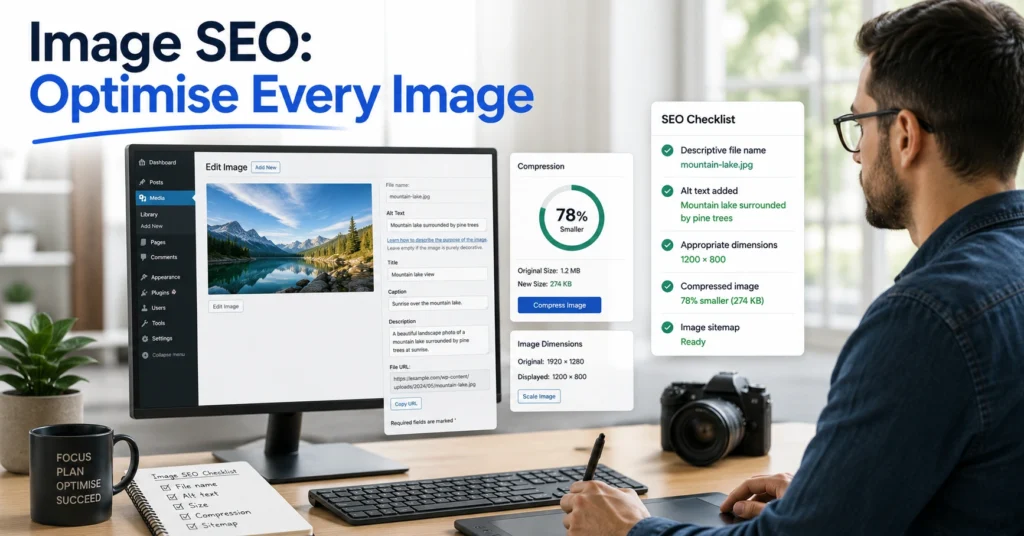
Step 3: Compress the image
Large files slow pages.
Slow pages increase friction.
The goal isn’t the smallest file possible.
The goal is the smallest file that still looks good.
Step 4: Add alt text
Describe the image.
Don’t write:
“image of”
“photo of”
“picture showing”
Screen readers already know it’s an image.
Write:
“WordPress media settings panel showing image upload options.”
Simple.
Specific.
Useful.
Step 5: Publish within relevant content
Images gain meaning from nearby text.
A diagram about canonical tags belongs inside content about canonical tags.
Context matters.
Why alt text is often misunderstood
Alt text has become one of the most abused parts of image SEO.
Many guides teach people to treat it like a keyword field.
That creates descriptions nobody would naturally write.
Bad example:
“image SEO image optimization image SEO tips 2026”
That isn’t helping anyone.
Good alt text serves two jobs:
- Accessibility
- Context
Imagine describing the image to someone on a phone call.
That’s usually close to what good alt text sounds like.
Example:
“Google Search Console performance report showing image impressions increasing over three months.”
That description tells both humans and search engines something useful.
The strongest alt text is descriptive first and optimized second.
File names matter less than people think—and more than they use them
A filename alone will not transform rankings.
That’s the wrong expectation.
But filenames are one of the easiest signals to improve because they cost almost nothing.
A useful template:
primary-subject-descriptor.jpg
Examples:
- technical-seo-site-audit.jpg
- ecommerce-category-page.jpg
- image-compression-settings.webp
- local-seo-review-management.jpg
The trade-off is time.
Renaming hundreds of existing images rarely produces enough value to justify a large migration project.
For new content, though, there is almost no reason not to do it.
That’s where the return lives.
Compression usually creates bigger gains than keyword tweaks
Here’s a mistake I made years ago.
I spent nearly an hour rewriting image metadata on a page.
The page gained nothing.
Later I reduced image weight by over 70%.
Load time improved noticeably.
Engagement metrics improved.
The lesson was simple.
Performance often matters more than micro-optimizations.
For most sites:
- Compress images
- Use modern formats
- Reduce dimensions
- Avoid unnecessary uploads
Do those first.
Then worry about smaller SEO signals.
The order matters.
Why WebP has become the default choice for most websites
Many publishers still upload PNG files for images that could be half the size.
WebP solves that problem in many situations.
Benefits include:
- Smaller file sizes
- Faster loading
- Broad browser support
- Better performance scores
JPEG still has a place.
PNG still has a place.
But for standard website content, WebP is usually the practical default.
Image SEO 2026 discussions increasingly focus on performance because search engines continue rewarding pages that reduce friction for users.
Smaller files help accomplish that.
Image dimensions should match the actual display size
Uploading oversized images is common.
A page displays an image at 800 pixels wide.
The uploaded file is 4000 pixels wide.
The extra size often provides no visible benefit.
Yet visitors still download it.
A practical rule:
Upload images close to their intended display dimensions.
Not dramatically larger.
Not dramatically smaller.
This reduces bandwidth usage and helps pages load faster.
The benefit compounds across dozens of images.
Captions are optional—but powerful when the image carries information
Many sites ignore captions entirely.
That’s fine for decorative images.
Not fine for instructional images.
If the image teaches something, the caption often becomes part of the explanation.
Examples:
Good use cases:
- Charts
- Process diagrams
- Product comparisons
- Screenshots
- Data visualizations
Weak use cases:
- Decorative hero images
- Background visuals
- Generic stock photography
The test is simple.
Would the reader lose understanding if the image disappeared?
If yes, a caption often helps.
Structured content helps images rank more often than image tweaks
This surprises beginners.
Images rarely rank because the image was optimized perfectly.
They rank because the page surrounding them is useful.
A screenshot inside a detailed tutorial often performs better than a perfectly optimized image sitting on a weak page.
The page creates context.
The image benefits from that context.
That’s why image SEO should always sit inside broader on-page SEO.
Understanding page relevance makes image optimization decisions easier because images inherit context from the content around them.
What to skip—and what to do instead
Some image SEO advice survives because it sounds technical.
Not because it produces meaningful results.
Skip:
- Keyword stuffing alt text
- Uploading giant files
- Writing filenames after publication
- Adding metadata nobody uses
- Treating images separately from page intent
Do instead:
- Use descriptive filenames
- Compress before upload
- Write accessible alt text
- Match dimensions to display size
- Place images beside relevant content
The blunt verdict:
A fast, useful image with accurate context beats an over-optimized image every time.
Tools that actually help image SEO
You don’t need ten tools.
You need a workflow.
Useful categories:
Compression
- TinyPNG
- Squoosh
Editing
- Canva
- Photoshop
Technical checks
- Google PageSpeed Insights
- Browser DevTools
Search performance
- Google Search Console
The best setup for beginners is often one compression tool, one editing tool, and Search Console.
Anything beyond that should solve a real problem.
Not satisfy curiosity.
What image SEO costs in time, effort, and attention
The good news is that image SEO rarely requires additional budget.
The real cost is consistency.
Per image:
- File naming: 10–20 seconds
- Alt text: 15–30 seconds
- Compression: under 1 minute
- Dimension checks: under 1 minute
For most publishers, the entire process takes less than three minutes per image.
The expensive version is fixing thousands of poorly optimized images later.
Build the workflow early.
Future you won’t need a cleanup project.
When image SEO matters most—and when it matters less
Image SEO matters most for:
- Ecommerce
- Recipe sites
- Travel content
- Tutorials
- Local business websites
- Product documentation
It matters less when:
- Images are decorative only
- The page contains little visual content
- The image provides no informational value
Still, performance optimization remains worthwhile almost everywhere.
Even when image search traffic isn’t the goal.
Frequently Asked Questions About Image SEO
Does image SEO help rankings?
Indirectly, yes.
Image SEO improves page understanding, accessibility, and performance. Those improvements support overall page quality. The image itself rarely causes a ranking increase alone.
How long should alt text be?
Usually one concise sentence.
The goal is description, not word count. Most effective alt text falls between 5 and 20 words because it communicates the image clearly without unnecessary detail.
Should every image have alt text?
Informative images should.
Decorative images can use empty alt attributes so screen readers skip them. The decision depends on whether the image contributes information.
Is WebP better than JPEG for SEO?
Usually because it reduces file size while maintaining quality. Smaller files often improve page speed, which reduces friction for visitors.
Can images rank in Google Images without alt text?
Yes.
Search engines use multiple signals, including page content, filenames, and surrounding context. Still, alt text remains one of the clearest image-specific signals available.
Continue Exploring
- On-Page SEO Hub: This is the next stop if you want to understand how images fit into headings, internal links, metadata, and page structure.