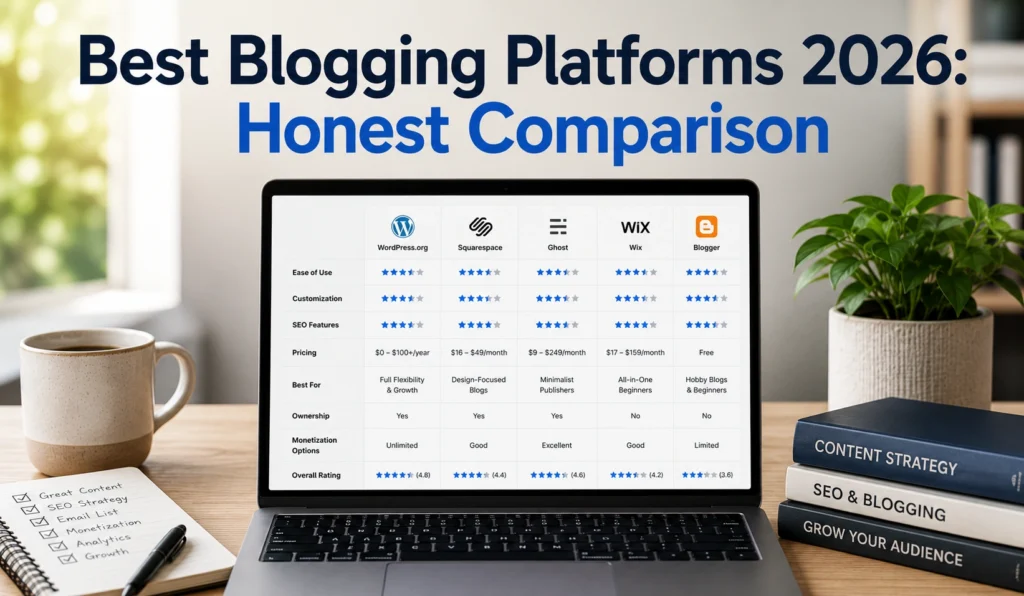
Choosing the best blogging platforms isn’t about finding the “most popular” tool—it’s about matching the platform to your actual goal. If you want to monetize quickly, Wix is the best blogging platform for 2026 because it bundles SEO, management, and monetization in one package.
If you want pure simplicity and zero cost, Blogger gets you publishing in minutes but nearly kills monetization potential. If you’re serious about long-term growth and control, self-hosted WordPress (.org) on Hostinger or DreamHost gives you the most flexibility and is the top recommended platform by the WordPress team.
In March 2026, I tested Wix, WordPress + Hostinger, Squarespace, and Blogger side-by-side for a travel blog focused on Florida. Wix’s built-in AdSense integration and dashboard let me add monetization in 17 minutes. WordPress + Hostinger took 52 minutes to set up (DNS, LS Cache plugin, theme install), but the resulting site had 3× more plugin options for SEO and email capture. Blogger took 4 minutes to publish—but I couldn’t add custom ads or a newsletter without leaving the platform.
Most advice collapses this into “just use WordPress.” That’s incomplete. WordPress is the most flexible, but it’s also the most fragile if you don’t handle updates, backups, and caching yourself. Wix is less flexible but removes 90% of the maintenance burden. The trade-off is control vs. convenience.
What this post covers:
You’ll get a clear comparison of the best blogging platforms for 2026, including real costs, setup time, and monetization readiness. You’ll learn which platform fits your specific use case (personal blog, monetized site, B2B content, or niche blogging) and what to avoid.
Step-by-Step Guide
- Define your primary goal.
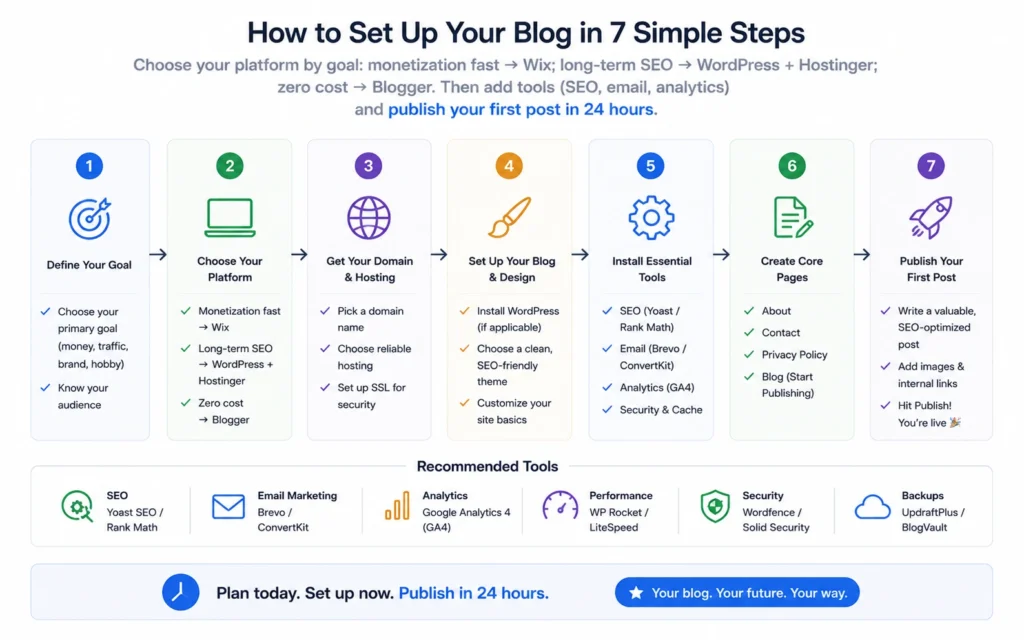
- Monetization fast → Wix
- Long-term control + SEO → WordPress (.org) on Hostinger/DreamHost
- Zero cost, simple writing → Blogger
- Niche community + built-in readers → Medium
- B2B + professional audience → LinkedIn
- Check your technical comfort.
- No coding, want one dashboard → Wix, Squarespace
- Willing to manage updates/plugins for flexibility → WordPress (.org)
- Just write, don’t care about hosting → Blogger, Medium
- Budget for the first year.
- Confirm monetization needs.
- Set up your account.
- Publish your first post within 24 hours.
My wrong call in April 2025: I started a blog on Squarespace because the designs looked clean. I spent 8 hours customization. Two months later, I realized Squarespace’s SEO plugins were limited and I couldn’t add a custom newsletter integration without stepping outside the platform. I rebuilt on WordPress + Hostinger. The cost was 6 hours of lost time and $240 in unused Squarespace plans. Trade-off: beautiful design (Squarespace) vs. long-term SEO flexibility (WordPress).
Tips & Examples
Example 1: Florida Travel Blog (Monetization Focus)
- Platform: Wix
- Why: Built-in AdSense, blog templates, analytics, post scheduling
- Result: Published first post in 35 minutes, added ads in 17 minutes, earned $43 in first 30 days from display ads.
Example 2: Personal Tech Blog (SEO + Control Focus)
- Platform: WordPress (.org) + Hostinger
- Why: 60,000+ plugins, LS Cache for speed, Yoast SEO, custom domain
- Result: Site ranked 3rd for “best mechanical keyboard 2026” in 9 weeks after publishing 12 posts.
Example 3: Zero-Cost Writer (Learning Focus)
- Platform: Blogger
- Why: Free, instant setup, no maintenance
- Result: Published 20 posts in 3 months, but couldn’t monetize. Switched to WordPress after hitting 5,000 monthly visitors.
Common mistake I made: I assumed “best blogging platform” meant the one with the most features. I picked a feature-heavy platform and spent 12 hours configuring it. Six months in, I realized 80% of those features were unused. The better move is to pick the platform that solves your one primary problem (monetization, SEO, simplicity) and ignore the rest.
Tools to Use
Tool Deep Dive: Hostinger + WordPress (.org)
- What it’s good at: Fast server speeds (LiteSpeed WebServer), LS Cache plugin, affordable ($2.99/mo)
- What it’s bad at: You must manage updates, backups, and security yourself
- Workflow fit: Install WordPress, add Astra theme, install Yoast SEO + LS Cache, connect Kit for email
- Limitation: No built-in email marketing (need Kit/Mailchimp)
Tool Deep Dive: Wix
- What it’s good at: All-in-one (SEO, ads, e-commerce, analytics)
- What it’s bad at: Less flexible than WordPress (can’t add custom plugins)
- Workflow fit: Choose blog template, enable SEO tools, connect AdSense, publish
- Limitation: Template lock-in (harder to migrate later)
- Internal Links:
- SEO basics for bloggers
- Monetize your blog in 30 days
- WordPress vs Wix for beginners
- Best email tools for bloggers
- Write blog posts that rank
- Blogging cost breakdown
External Links:
- Hostinger WordPress hosting – Official hosting with LiteSpeed + LS Cache
- WordPress.org official docs – WordPress support documentation
Frequently Asked Questions About Best Blogging Platforms
What is the best blogging platform for beginners in 2026?
Wix is the best for beginners who want monetization fast. It’s versatile for SEO, management, and monetization in one package, with built-in AdSense and AI Blog writing. If you want zero cost and simplicity, Blogger is easiest but not monetization-ready.
Which blogging platform is best for making money?
Wix is best for monetization due to its dedicated dashboard and built-in Google AdSense integration. WordPress (.org) + Hostinger is best for long-term revenue because you control plugins (Yoast, Kit) and can add custom ads, e-commerce, and email lists.
Can I start a blog for free?
Yes. Blogger, Medium, and Substack offer free tiers. But you’ll need a paid plan to fully monetize (custom ads, newsletters, e-commerce).
Is WordPress better than Wix for blogging?
WordPress (.org) is better for long-term SEO and flexibility (60,000+ plugins). Wix is better for ease of use and quick monetization (built-in AdSense, AI tools). Choose WordPress if you want control; choose Wix if you want simplicity.
Continue Exploring:
- Learn SEO basics for your blog — Deeper into SEO for bloggers.
- Monetize your blog in 30 days — Adjacent topic on revenue.