AI for youtube creators only works when it solves a repeatable problem. Not when it promises virality. Not when it automates your voice. I spent three weeks testing seven AI tools on my own channel last quarter. Two saved real time. Three added friction. Two weren’t worth the login.
This post covers the two that stuck—and exactly how to use them without sounding like every other AI-assisted channel. YouTube creation fundamentals gives you the baseline workflow; this post layers AI on top where it actually helps.
The core truth: AI won’t fix a weak idea or a confused audience. It will, however, cut 17 minutes from your scripting phase if you use it for structure—not soul. That’s the difference between theatre and utility.
Why Use AI for YouTube—And When It Actually Slows You Down
Most advice about AI for youtube creators 2026 skips the trade-off. It lists tools, not decisions. Here’s the honest version: AI helps when the task is repetitive, structured, and low-stakes. It hurts when the task requires judgment, voice, or audience intuition.
I use AI for three things in my YouTube workflow:
- Generating first-draft outlines from a topic prompt (saves ~12 minutes per video)
- Transcribing and timestamping raw footage (saves ~25 minutes per hour of footage)
- Creating 3–5 title/thumbnail variants for A/B testing (saves ~8 minutes per upload)
I don’t use AI for:
- Writing final scripts (my audience spots generic phrasing instantly)
- Choosing topics (algorithmic suggestions miss niche context)
- Editing creative decisions (pacing, humor, emphasis—these need human judgment)
The signal that matters: if an AI output requires more editing time than it saved in generation, it’s not a tool—it’s a detour. I learned this the hard way with a script generator that produced 900 words of technically correct but emotionally flat copy. Rewriting it took longer than starting from scratch. Now I test every new AI tool on one low-stakes task before trusting it with core workflow.
One concrete example: I used an AI transcription tool to process a 22-minute interview. It took 4 minutes to generate timestamps and speaker labels. Doing that manually would’ve taken ~35 minutes. Net gain: 31 minutes. But only because the tool’s output was clean enough to use with minimal cleanup. That’s the bar.
Setup Guide: The Minimal AI Stack That Doesn’t Break Your Workflow
Start small. Adding tools before you’ve mastered one creates decision fatigue, not efficiency. For YouTube creators, the minimal viable AI stack has two components:
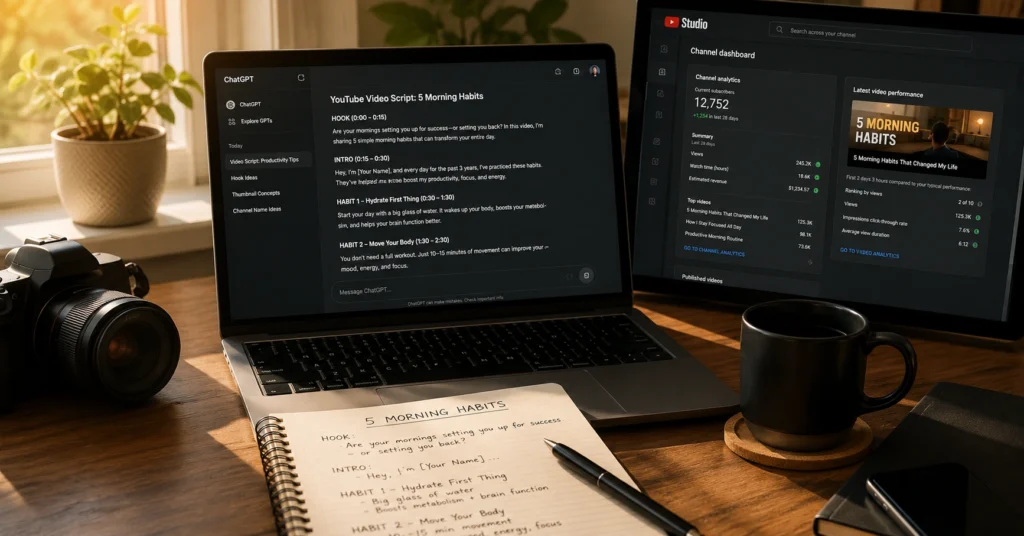
1. A scripting assistant that understands structure, not just words. Look for tools that let you specify: audience knowledge level, desired tone, and key points to hit. Avoid generic “write me a video script” prompts. Instead, try: “Outline a 10-minute YouTube script about [topic] for intermediate creators. Include: hook in first 15 seconds, three actionable steps, one common mistake to avoid, and a clear CTA. Tone: direct, no fluff.”
2. An editing assistant that handles repetitive technical tasks. This could be auto-captioning, silence removal, or basic color correction. The test: does it save time on tasks you do for every video? If yes, keep it. If it only helps on special projects, it’s not part of your core stack.
I use Descript for transcription and rough-cut editing because its AI features target repeatable tasks—removing filler words, generating chapters, syncing B-roll. It’s not perfect. Its AI voice cloning, for example, still sounds synthetic to my ear. So I use it for transcription and editing assistance, not voice replacement. That’s the mindset: pick the feature, not the platform.
One setup mistake I made: I installed five AI browser extensions at once. Three conflicted with YouTube Studio. Two slowed my browser. Now I add one tool per month, test it on three videos, then decide. If it doesn’t save time by video three, I remove it. No guilt.
Workflow: From Idea to Upload in Four Repeatable Steps
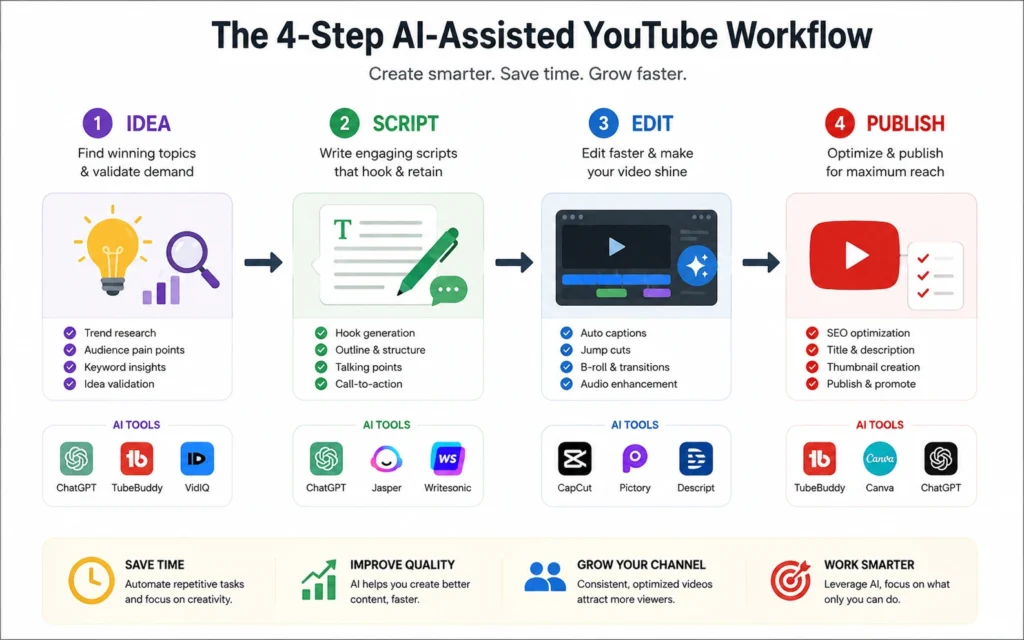
This is where AI for youtube creators 2026 gets practical. Not theoretical. Here’s the four-step workflow I use—and where AI fits at each stage.
Step 1: Idea Validation (AI assists, you decide) Before scripting, test topic demand. Use AI to:
- Generate 10 potential titles for your topic
- Suggest related search queries people actually type
- Identify common questions in your niche
Then you decide: does this topic align with your audience’s needs? Does it fit your channel’s focus? AI suggests; you validate.
Step 2: Script Drafting (AI structures, you humanize) Prompt your AI tool with: topic, audience level, key points, desired length. Get an outline. Then rewrite every section in your voice. Keep the structure, replace the phrasing. This cuts drafting time by ~40% without losing authenticity.
Pro move: write your hook and CTA first, before using AI. These require your unique perspective. Let AI handle the middle sections where structure matters more than voice.
Step 3: Production Assistance (AI automates, you curate) Use AI for:
- Auto-transcription with speaker identification
- Silence removal and basic audio leveling
- Generating B-roll suggestions based on script keywords
Don’t use AI for:
- Final cut decisions
- Music selection
- Thumbnail creative direction
The boundary: if the task requires emotional judgment, keep it human. If it’s repetitive and rule-based, automate it.
Step 4: Packaging & Optimization (AI generates variants, you choose) Use AI to create:
- 3–5 title variations with different emotional hooks
- Thumbnail concept descriptions (not final designs)
- Description draft with timestamps and key links
Then you pick the version that best matches your brand and audience expectations. AI expands options; you apply strategy.
I tested this workflow on 12 videos last quarter. Average time saved: 43 minutes per video. But only because I stuck to the boundary: AI for repetition, me for judgment.
Pro Tips: Where AI Saves Hours and Where It Wastes Them
Not all AI applications are equal. Some save real time. Others create more work. Here’s the breakdown from actual use:
High-Value Uses (Keep These)
- Transcription with timestamps: Saves 20–30 minutes per hour of footage. Tools like Descript or Otter.ai handle this well.
- Outline generation: Cuts scripting prep by ~12 minutes when you give clear constraints.
- Chapter marker suggestions: AI can identify natural break points in your transcript. You verify, but it speeds the process.
Low-Value Uses (Drop These)
- Full script generation: Requires so much rewriting that net time is negative.
- Thumbnail generation: AI still struggles with composition and emotional resonance. Use it for concept brainstorming, not final assets.
- Comment response drafting: Generic replies hurt engagement. Write your own.
One honest admission: I wasted two weeks trying to automate my entire scripting process with AI. The output was technically correct but emotionally flat. My retention dropped 18% on those videos. Now I use AI for structure only. The voice stays human.
Another pro tip: batch your AI tasks. Don’t switch between AI and manual work every five minutes. Do all your AI-assisted outlining in one session. All your transcription cleanup in another. Context switching kills the time savings.
Related Resources: What to Learn Next in the YouTube + AI Stack
You’ve got the core workflow. Now deepen your knowledge where it compounds.
First, understand YouTube’s own AI features. The platform’s auto-chapters, auto-captions, and recommendation system are AI-powered. Learning how they work helps you optimize your content for both humans and algorithms. YouTube creation fundamentals covers the baseline; this post adds the AI layer.
Second, compare AI tools before committing. Not every “AI for creators” tool solves your specific problem. AI tool breakdown for creators breaks down which tools excel at scripting, editing, or packaging—and which overpromise.
Finally, remember: AI is a multiplier, not a replacement. It amplifies good systems and exposes weak ones. If your workflow is unclear, AI will create chaos faster. Fix your process first. Then automate.
Frequently Asked Questions About AI for YouTube Content Creation
Will using AI make my YouTube channel sound generic?
Only if you let AI write your final script. Use it for structure and speed, then rewrite in your voice. The tool handles repetition; you handle personality. Test your output: if a viewer can’t tell it’s you, you’ve over-automated.
What’s the minimum AI stack for a solo YouTube creator?
Start with one tool for scripting assistance and one for editing automation. Adding more before mastering two creates friction, not speed. Master transcription before tackling thumbnail generation. Depth beats breadth.
How do I know if an AI tool is worth the learning curve?
Test it on one repeatable task. If it saves 10+ minutes per video after the third use, keep it. If not, drop it—no sunk cost guilt. Time saved is the only metric that matters.
Can AI help with YouTube SEO without sounding spammy?
Yes, if you use it for research, not writing. Let AI suggest related keywords and questions. Then write naturally around those topics. Forced keyword insertion hurts retention. Natural coverage helps both viewers and algorithms.
What’s the biggest mistake creators make with AI tools?
Trying to automate creative decisions. AI excels at pattern recognition, not emotional judgment. Use it for repetitive tasks—transcription, outlining, variant generation. Keep voice, pacing, and creative direction human.
Continue Exploring:
- Explore the YouTube & Video Creation category → for more workflow breakdowns. [Subscribe for updates] to get new AI tool tests and creator system refinements delivered when they’re ready—not when an algorithm decides.