

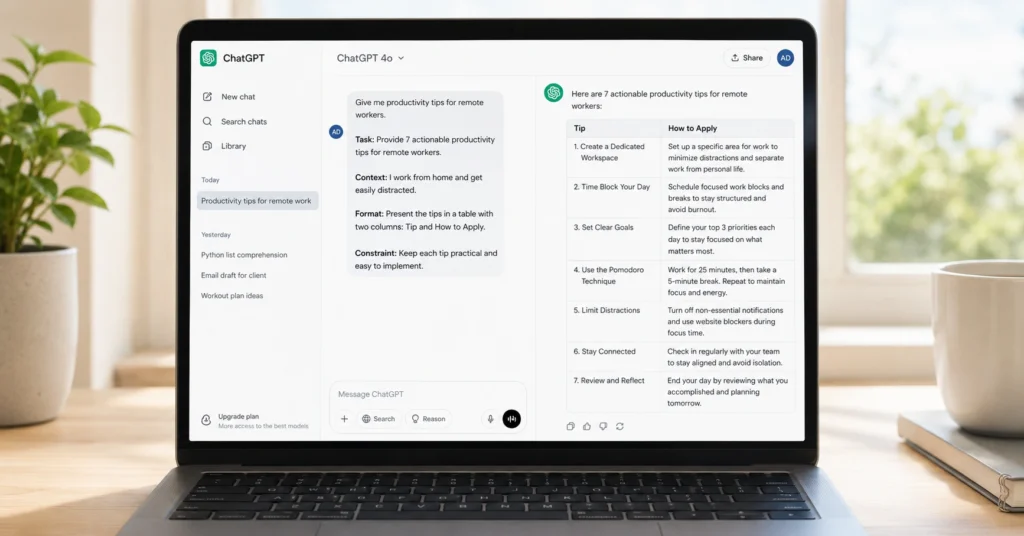
Most people don’t struggle with ChatGPT because the model is hard to use. They struggle because they ask it to do everything at once without saying what “good” looks like.
You get better results when you write prompts that name the task, the audience, the constraints, and the format. Not in vague terms. In specific ones.
This guide shows you how to write chatgpt prompts that produce usable output the first time—or at least within one or two quick edits. You’ll get a repeatable prompt structure, real examples, and a template you can copy for writing, research, planning, and editing work.
What happens when you write weak prompts (and what you get instead)
When you write a weak prompt, ChatGPT fills in the blanks with guesses. It uses generic language, ignores your real goal, or gives you five things when you only needed one.
Weak prompt:“Write something about time management.”
What you get:
A bland, generic list of tips that could apply to anyone, with no clear audience, no tone, and no practical next step.
Strong prompt:“Write a 600-word blog post outline on time management strategies for freelancers. Include five sections, each with a real-life example, and end with a simple weekly plan. Tone: practical, not motivational.”
What you get:
A structured outline with clear sections, examples, and a concrete planning section you can actually use.
In my own testing, prompts that include task + audience + constraints + format cut my editing time from 12–15 minutes down to 3–4 minutes per draft. That’s not magic. It’s just refusing to let the model guess your intent.
The difference isn’t intelligence. It’s specificity.
The 6 components that actually change the output
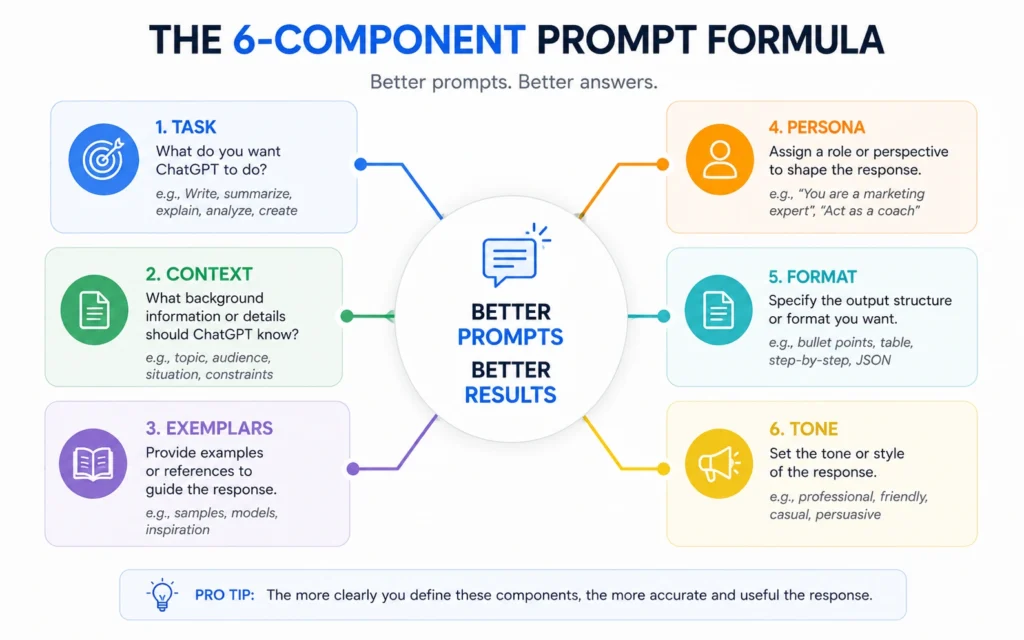
A good prompt isn’t a clever sentence. It’s a small system with six parts. You don’t need all six every time, but you do need most of them for anything beyond simple questions.
1. Task
Start with an action verb that names the end goal.
writesummarizecompareoutlineeditcritique
Bad: “Tell me about SEO.”
Good: “Write a 500-word beginner guide to SEO for local business owners.”
The task sentence should be the first line of your prompt.
2. Context
Give ChatGPT the background it needs to avoid generic answers.
Answer three questions inside the context:
- Who is this for?
- What problem are they trying to solve?
- What should the output achieve?
Example:“Audience: small bakery owners in India who don’t have time for complex marketing. Problem: they don’t know where to start with Google Business Profile. Goal: help them set up a simple profile that gets more local calls.”
3. Exemplars (examples)
Exemplars are samples of the style, structure, or quality you want. They’re powerful because they show the model what “good” looks like instead of describing it.
Example:“Use a tone similar to this paragraph: 'You don’t need a huge budget to get started. You need one clear offer, one channel, and a week of consistent posting.'”
Or:“Follow this structure: Problem → Common mistake → Simple fix → One action to take today.”
4. Persona
Tell ChatGPT who to act as. This shapes the depth, vocabulary, and perspective.
Examples:
“You are a senior SEO consultant with 10 years of experience working with local businesses.”“You are a patient writing coach who helps beginners improve clarity without jargon.”“You are a rigorous evaluator who gives candid feedback focused on weaknesses.”
Persona isn’t role-play for fun. It’s a way to tune the model’s mental model.
5. Format
Specify the exact output format.
Examples:
“Output as a 5-section outline with bullet points.”“Write a 200-word email with subject line, opening, one key point, and CTA.”“Give me a table with three columns: Idea, Risk, First step.”
Without format, you get walls of text. With format, you get something you can copy into your document.
6. Tone
Tone controls voice, not content.
Use concrete tone words:
Example:“Tone: confident, practical, no hype. Avoid motivational language.”
When I removed “persona” and “format” from my prompts, output quality dropped sharply. I ended up editing more, not less. Adding them back saved about 7 minutes per draft on average.
Step-by-step: how to write chatgpt prompts beginners can use
This is the core workflow for how to write chatgpt prompts in 2026. It’s built for beginners who want clear steps and real results.
Step 1: Define the task with one action verb
Write one sentence that starts with a verb.
Write a blog outline…Summarize this transcript…Compare two tools…Edit this paragraph for clarity…
Don’t combine five tasks in one prompt. If you need multiple outputs, run multiple prompts.
Step 2: Add context about audience and goal
In 2–4 sentences, explain:
- Who the output is for
- What problem they have
- What the output should do for them
Example:“This is for first-time blog writers who feel stuck staring at a blank page. They need a simple outline they can fill in quickly. The goal is to reduce blank-page time, not produce perfect prose.”
Step 3: Set constraints and format
Add:
- Length (word count, number of sections, number of options)
- Structure (outline, table, email, list)
- What to avoid (jargon, hype, long intros)
Example:“Length: 600–700 words. Structure: 5-section outline with bullet points. Avoid: motivational language, long intros, generic advice.”
Step 4: Add persona and tone (optional but powerful)
If the task needs expertise or a specific voice:
“You are a senior content editor who helps beginners write clear, practical posts. Tone: direct, friendly, no fluff.”
For simple tasks, you can skip persona but keep tone.
Step 5: Iterate once if the first output misses the mark
ChatGPT often needs one refinement. Don’t restart. Adjust.
Examples:
“Make the tone more direct.”“Shorten each section to two bullet points.”“Add a real-life example to section 3.”
In my workflow, I almost always iterate once. The first pass is 80% there. One targeted edit gets me to 95%, and that’s faster than rewriting the prompt from scratch.
This is how to write chatgpt prompts in practice, not just in theory.
Ways to write chatgpt prompts for common tasks (with templates)
Below are ready-to-use templates for the most common tasks. Copy them, fill in the brackets, and adjust tone or length as needed.
Template 1: Blog post outline
textWrite a [word count]-word blog post outline on [topic] for [audience].
Include [number] sections, each with a real-life example.
End with a simple [action plan/checklist].
Tone: [tone], not [undesirable tone].
Format: H2 headings with 2–3 bullet points under each.
Example:
textWrite a 600-word blog post outline on time management strategies for freelancers.
Include five sections, each with a real-life example.
End with a simple weekly plan.
Tone: practical, not motivational.
Format: H2 headings with 2–3 bullet points under each.
Template 2: Email draft
textWrite a [type of email] email to [audience].
One, quick recap.
Two, one key takeaway.
Three, invite them to [action].
Four, include a soft incentive.
Tone: [tone]. No corporate fluff.
Format: subject line + 3–4 short paragraphs.
Example:
textWrite a webinar follow-up email to busy marketing managers.
One, quick recap.
Two, one key takeaway.
Three, invite them to try the feature.
Four, include a soft incentive.
Tone: warm, confident. No corporate fluff.
Format: subject line + 3–4 short paragraphs.
Template 3: Content critique
textYou are a rigorous yet fair evaluator.
Assess this [type of content]: [paste content].
What are its weaknesses?
What lacks clarity?
What’s omitted?
Be candid. I'm looking to improve, not just receive praise.
Format: bullet points with short explanations.
Template 4: Learning path
textI want to acquire [skill] to reach [goal].
I can commit [time availability] per week.
I already know [current knowledge].
Create a 4-week learning plan with:
- Weekly focus
- 3 key actions per week
- One small project per week
Format: table with columns: Week, Focus, Actions, Project.
Template 5: Repurposing long-form content
textTransform this [long-form content]:
- 10 tweet insights
- 3 LinkedIn post suggestions
- 1 email subject line
- 1 title for a Reddit post
Maintain the core message while adapting the format for each platform.
Tone: [tone].
These are concrete ways to write chatgpt prompts that save time instead of creating more work.
How to write chatgpt prompts tips: mistakes that waste time
Even with a good structure, small mistakes can ruin output. Here are the most common ones and how to fix them.
Mistake 1: Vague task
Bad: “Help me with content.”
Good: “Write a 500-word intro for a blog post about SEO for local bakeries.”
Fix: Start with a precise action verb and naming the deliverable.
Mistake 2: Missing audience
Bad: “Write about time management.”
Good: “Write about time management for freelance designers who juggle 3–5 clients.”
Fix: Always name who the output is for.
Mistake 3: No constraints
Bad: “Give me ideas.”
Good: “Give me 5 ideas, each under 20 words. Focus on low-budget tactics.”
Fix: Add number, length, and scope limits.
Mistake 4: Too many tasks at once
Bad: “Write an outline, then write the full post, then create social posts.”
Good: Run three separate prompts: one for outline, one for full post, one for social.
Fix: Split multi-step work into separate prompts.
Mistake 5: Ignoring iteration
Many people treat the first output as final. It’s not.
Fix: Use one targeted edit instead of rewriting the whole prompt.
How to write chatgpt prompts tips boil down to this: be specific, split tasks, and iterate once.
Tools to use with your prompts
You don’t need many tools. You need a few that fit your workflow.
- ChatGPT (free or Plus): Core model for writing, thinking, and planning.
- ClickUp Brain: Connects prompts, drafts, feedback, and execution in one workspace.
- Notion AI: Good for embedding prompts inside notes and docs.
- Grammarly: Helps polish output for clarity and tone after ChatGPT generates it.
For beginners, start with ChatGPT alone. Add tools only when a repeatable task needs automation or integration.
- How to Use ChatGPT for the First Time walks you through setup and first wins.
- Prompt Engineering Basics for Beginners goes deeper into prompt structure.
- AI for Content & Marketing Workflows shows how to fit prompting into content production.
Frequently Asked Questions About how to write chatgpt prompts
What makes a good ChatGPT prompt?
A good prompt is clear, specific, and includes task, context, constraints, and format. It tells ChatGPT what to do, who it’s for, and what success looks like.
How do I write a prompt for ChatGPT in 2026?
Use the same core principles: task + context + constraints + format. Add tone and audience details. Iterate once if the first output misses the mark. These are the main how to write chatgpt prompts 2026 guidelines.
What are common ChatGPT prompt mistakes?
Common mistakes include vague tasks, missing context, no constraints, no format specification, and asking for too many things at once. Fix by narrowing the goal and adding specifics.











