

Learning how to use ChatGPT is less about learning a tool and more about learning a working style. The interface is simple. The difficult part is figuring out what kind of instructions produce useful output instead of polished nonsense.
Most beginners make the same mistake during the first hour. They treat ChatGPT like Google with better grammar. Then they get generic answers, awkward writing, or advice so broad it could apply to anything.
I made the same mistake the first time I used it for content planning in early 2024. The output looked clean. It also ignored half the constraints I cared about because I never gave them.
That changes once you understand what ChatGPT actually responds to:
- context
- structure
- examples
- constraints
- iteration
And once you learn that, the tool becomes useful fast.
This guide teaches how to use ChatGPT from absolute beginner level through more advanced workflows. You’ll learn:
- what ChatGPT actually does
- how prompts work
- where beginners waste time
- practical ways to use ChatGPT in real work
- how experienced users get better output without writing giant prompts
By the end, you should understand not just what to type, but why certain prompts work better than others.
What ChatGPT Actually Does Better Than a Search Engine
ChatGPT predicts useful language based on your instructions. That sounds technical, but the practical meaning matters more: it builds responses dynamically instead of retrieving fixed pages like a search engine.
Google helps you find information sources.
ChatGPT helps you process, organize, rewrite, compare, explain, and structure information.
That difference changes how you should use it.
A search engine works well when:
- you need a factual source
- you need recent news
- you need official documentation
- you want verification
ChatGPT works well when:
- you need a first draft
- you want something simplified
- you need to compare ideas
- you want help organizing messy thoughts
- you need multiple versions quickly
- you want a framework before doing deeper work
One of the most useful beginner shifts is this:
Stop asking ChatGPT for “the answer.”
Start asking it to help you think through the task.
That usually produces stronger output immediately.
For example, this weak beginner prompt:
“Write a blog post about fitness.”
Produces broad filler because the task itself is broad.
This version works better:
“Write a beginner-friendly 800-word article for office workers who sit 8+ hours daily. Focus on reducing lower back stiffness with simple routines that take under 10 minutes.”
Now the system has:
- audience
- constraint
- goal
- scope
The output changes because the instruction changed.
That is the core mechanism behind nearly every useful ChatGPT workflow.
prompt structure matters more than clever wording because better instructions usually improve output faster than changing tools.
Why ChatGPT Matters Even If You Never Become an “AI Person”
Most people do not need advanced AI workflows. They need fewer repetitive tasks.
That is where ChatGPT earns its place.
Used properly, ChatGPT reduces:
- blank-page time
- repetitive drafting
- summarization work
- formatting effort
- comparison fatigue
- first-pass research time
It does not replace expertise. It reduces friction around expertise.
That distinction matters because many beginners expect too much too early. They ask ChatGPT to do final-stage work without giving it the inputs a real collaborator would need.
Then they conclude the tool is overrated.
Sometimes it is. But often the workflow is the problem.
A practical example:
A founder writing customer emails manually every week might spend 2 hours drafting updates. With ChatGPT, they can reduce the first draft phase to 20 minutes — then spend their energy editing tone and specifics instead of staring at a cursor.
That is a real productivity gain.
But asking ChatGPT to “run marketing” usually creates generic output that sounds acceptable until you compare it to work written by someone who understands the audience.
The strongest ChatGPT users are rarely the most technical people. They are usually the clearest thinkers.
Because clarity transfers.
How to Get Started Without Overcomplicating It
Most beginners should ignore prompt libraries, automation systems, and “secret techniques” during the first week.
Use the tool daily first.
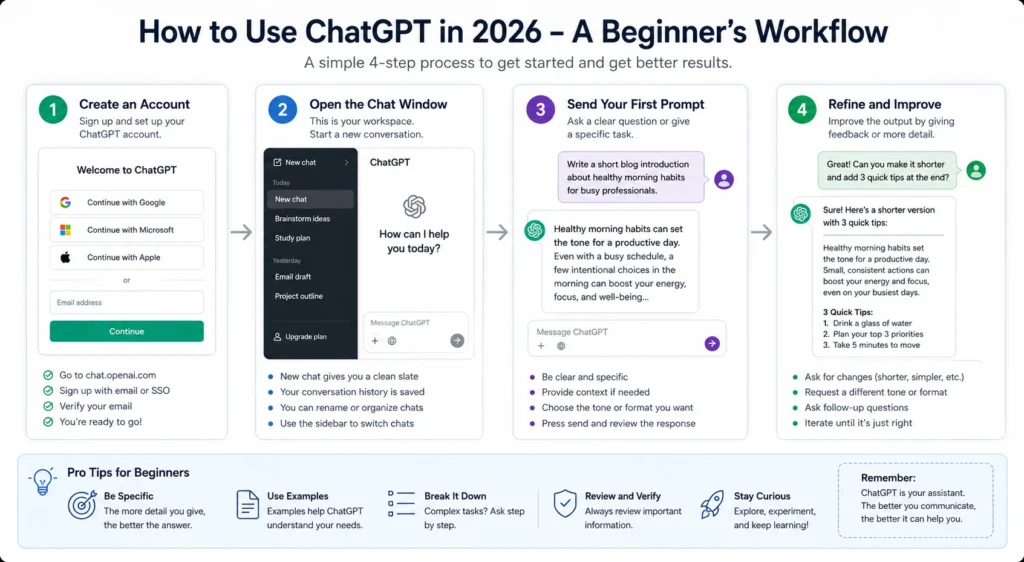
The fastest way to learn how to use ChatGPT for beginners is simple:
- Pick one repeatable task
- Describe the task clearly
- Ask for structured help
- Refine the result
- Repeat
That loop teaches more than reading 50 prompt collections.
Step 1 — Create an Account and Learn the Interface
The interface is intentionally simple:
- left sidebar = conversation history
- center area = current chat
- input box = prompt entry
- model selector = different AI models or modes
Do not worry about model selection initially. Beginners lose hours debating model differences before learning how instruction quality affects output.
Start with normal usage first.
Step 2 — Use ChatGPT for One Real Task Immediately
Do not test it with trivia questions.
Use a real problem:
- rewrite an email
- summarize meeting notes
- explain a confusing topic
- brainstorm YouTube titles
- organize study notes
- create a workout outline
- compare software options
Real tasks teach faster because you already know what “good output” looks like.
A useful beginner exercise:
Paste a rough piece of writing and ask:
“Rewrite this more clearly for someone with no technical background. Keep the tone direct and simple.”
Then compare:
- your original version
- the AI version
- what improved
- what became weaker
That comparison process matters more than the tool itself.
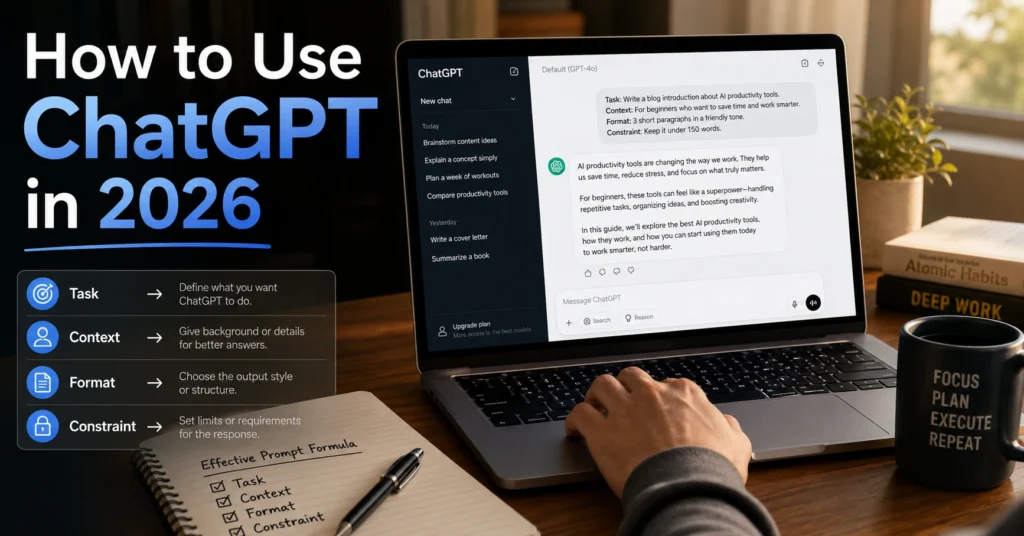
Step 3 — Learn the Four-Part Prompt Structure
Most strong prompts contain four ingredients:
1. Task
What should ChatGPT do?
Example:
“Summarize this article.”
2. Context
What background matters?
Example:
“The audience is first-year university students.”
3. Format
How should the result appear?
Example:
“Use bullet points.”
4. Constraint
What limits apply?
Example:
“Keep it under 150 words.”
Beginners often skip context and constraints. That is why outputs drift.
A short but structured prompt usually beats a long unfocused one.
Why Most Beginners Get Weak Results From ChatGPT
The biggest beginner mistake is assuming the AI “understands what you mean.”
It does not.
It responds to patterns in your instructions. Missing detail changes the outcome fast.
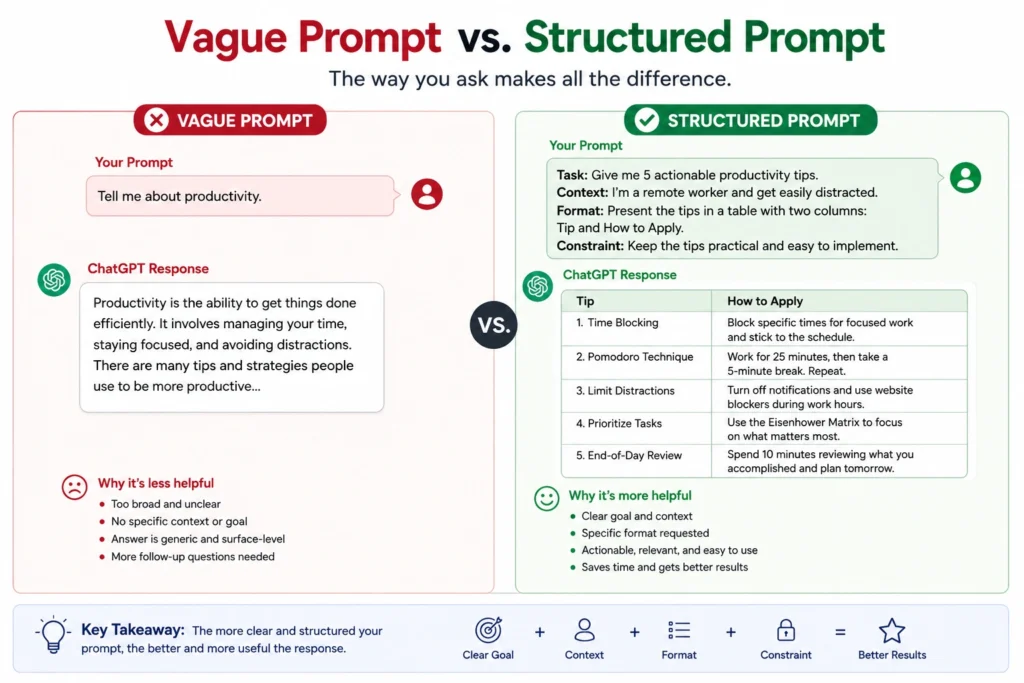
Here is a real example from a content workflow test I ran in February 2026.
Weak prompt:
“Give me content ideas for Instagram.”
Result:
- broad
- repetitive
- generic
- no audience fit
Improved prompt:
“Give me 15 Instagram content ideas for a freelance graphic designer who wants more local business clients. Prioritize educational carousel ideas that can be created in under 45 minutes.”
The second result was immediately more usable because the instruction narrowed the problem.
Most poor ChatGPT results come from one of these five issues:
Vague prompts
Weak:
“Help me write better.”
Better:
“Rewrite this paragraph so it sounds clearer and less corporate.”
Too many tasks at once
Beginners often stack instructions:
- write
- summarize
- optimize
- explain
- research
- format
All inside one giant paragraph.
Separate the tasks.
ChatGPT performs better when the job is clear.
No examples
Examples dramatically improve output consistency.
If you want a certain tone, structure, or style, show one.
Even one sample paragraph changes the response quality.
Expecting factual accuracy automatically
ChatGPT sounds confident even when incorrect.
Never treat it as automatic truth for:
- medical advice
- legal advice
- financial decisions
- statistics
- citations
- breaking news
Use verification for anything important.
Stopping after the first output
Experienced users rarely use the first draft unchanged.
They iterate:
- clarify
- shorten
- reshape
- constrain
- reframe
The second or third round is usually where the useful version appears.
That is one of the biggest differences between beginner and intermediate usage.
The Beginner-to-Advanced Skill Progression Model
Most people think AI skill comes from memorizing prompts.
It usually comes from learning how to structure thinking.
The progression looks more like this:
Beginner Stage — Asking
You use ChatGPT like an assistant.
Typical tasks:
- explanations
- summaries
- rewriting
- brainstorming
- email drafting
At this stage, your biggest improvement comes from specificity.
Focus on:
- clearer instructions
- one task at a time
- context
- constraints
Do not obsess over advanced prompting yet.
Intermediate Stage — Directing
This is where ChatGPT becomes substantially more useful.
Instead of asking random questions, you start building workflows.
Example:
- Generate ideas
- Select strongest option
- Expand outline
- Rewrite for audience
- Shorten
- Format for publishing
Now the AI becomes part of a process instead of a one-off tool.
This stage saves the most time in real work.
I noticed this shift personally while building article structures. The first improvement did not come from “better prompts.” It came from separating ideation, outlining, and editing into different conversations instead of forcing one prompt to do everything.
That single workflow change reduced editing time noticeably.
Advanced Stage — Designing Systems
Advanced users stop focusing on prompts alone.
They focus on:
- reusable workflows
- repeatable outputs
- templates
- evaluation systems
- decision frameworks
- context management
This is where AI becomes operational infrastructure instead of novelty software.
A content team, for example, might use:
- one prompt for research extraction
- another for outline generation
- another for tone refinement
- another for formatting
Each stage has a job.
That separation improves consistency dramatically.
And importantly — advanced usage often looks simpler, not more complicated.
The Best Ways to Use ChatGPT in Daily Work
Many beginners ask what ChatGPT is “best” for.
That depends on the friction point in your workflow.
The strongest ways to use ChatGPT usually involve repeated mental tasks, not final execution.
Writing First Drafts Faster
ChatGPT is excellent at reducing blank-page resistance.
Useful for:
- blog outlines
- newsletters
- product descriptions
- social captions
- meeting summaries
- rough scripts
Weak for:
- final emotional nuance
- original reporting
- deeply personal writing
- precise expertise without review
A good workflow:
- Generate rough structure
- Edit heavily
- Add specificity manually
- Remove generic phrasing
- Fact-check
Skipping step 3 is where most AI writing starts sounding identical.
Explaining Difficult Topics
One of the best beginner use cases.
Example:
“Explain DNS like I’m a small business owner with no technical background.”
Then refine:
“Now explain it with a restaurant analogy.”
This layered explanation method works well for:
- coding concepts
- finance basics
- health terminology
- software workflows
- legal processes
- academic subjects
Organizing Messy Information
Underrated use case.
Paste:
- notes
- transcripts
- ideas
- research fragments
Then ask:
“Group these into themes and identify overlaps.”
This saves enormous sorting time.
Especially for:
- students
- researchers
- marketers
- founders
- consultants
Comparing Options
Useful prompt:
“Compare these project management tools for a 5-person remote marketing team. Prioritize onboarding speed and low maintenance.”
This produces more useful comparisons than:
“What’s the best project management tool?”
Because “best” without constraints means almost nothing.
Turning Rough Thinking Into Structure
This is where many experienced users quietly get the most value.
You can dump incomplete thinking into ChatGPT and ask it to:
- organize
- categorize
- sequence
- clarify
- simplify
That does not replace thinking.
It helps shape it faster.
ractical prompt structures for repeated work goes deeper into reusable prompt patterns that reduce repetitive thinking tasks.
How Prompting Actually Works — Without the Mythology
Prompt engineering gets overcomplicated quickly online.
Most useful prompting is not magic phrasing. It is instruction clarity.
A strong prompt usually does four things:
- defines the role
- explains the task
- gives context
- specifies the output
Example:
“You are a customer support manager. Write a short response to a frustrated customer whose order arrived late. Tone should be calm, direct, and apologetic without sounding scripted.”
That works because it reduces ambiguity.
Many beginners assume longer prompts are automatically better.
Not true.
Long prompts help only when the added detail changes the outcome.
Otherwise they become noise.
One practical rule:
If a human assistant would need the detail, include it.
If they would ignore it, remove it.
That rule prevents prompt bloat fast.
Few-Shot Prompting — Showing Examples Instead of Explaining
One of the highest-leverage techniques for beginners.
Instead of describing the style you want, provide examples.
Weak:
“Write in a professional tone.”
Better:
“Write in a tone similar to this example: [paste sample].”
Examples anchor the output more reliably than adjectives.
This matters especially for:
- brand voice
- formatting
- email style
- social media writing
- structured outputs
Iteration Beats One-Shot Perfection
Most strong ChatGPT sessions involve refinement.
Example sequence:
- Generate
- Simplify
- Shorten
- Add examples
- Remove repetition
- Change tone
- Format
That iterative approach consistently outperforms giant “perfect prompts.”
And it feels more natural once you stop expecting one-message perfection.
Where ChatGPT Fails — And What To Use Instead
This section matters because beginner AI content often avoids saying where the tool struggles.
ChatGPT is useful. It is not universally reliable.
Real-Time Information
ChatGPT can lag behind current events depending on the model and browsing setup.
Use:
- search engines
- official documentation
- live databases
For anything time-sensitive.
Precise Fact Verification
The model can invent:
- statistics
- citations
- quotes
- studies
- references
Confidently.
Always verify important claims manually.
Deep Domain Expertise
ChatGPT can imitate expertise well enough to sound convincing.
That is not the same as genuine expertise.
A licensed attorney, surgeon, or experienced engineer will notice gaps quickly in high-stakes contexts.
Use AI to:
- simplify
- organize
- draft
- compare
Not replace specialist judgment.
Emotional Originality
AI writing often sounds emotionally flattened after long outputs.
You especially notice this in:
- memoir writing
- storytelling
- speeches
- nuanced persuasion
The structure might work. The human texture often disappears.
That is why experienced writers still edit heavily.
One blunt verdict:
If your workflow removes human judgment entirely, the output usually becomes average fast.
Better Alternatives for Specific Jobs
Sometimes another tool fits better.
Examples:
- Google Search → factual lookup
- Notion AI → workspace summarization
- Claude → long-document analysis
- Perplexity → citation-oriented research
- Grammarly → sentence refinement
The best AI workflow is usually multi-tool, not tool-loyal.
where different AI models fit different writing tasks helps explain these workflow differences more clearly.
How to Use ChatGPT Without Becoming Dependent on It
This problem appears faster than most beginners expect.
Once ChatGPT becomes convenient, it is easy to outsource too much thinking.
You can feel it happening:
- weaker first drafts
- slower independent writing
- less patience for problem-solving
- constant prompt reliance
The healthiest workflow keeps you involved in decisions.
Use ChatGPT to:
- accelerate
- organize
- compare
- test structures
- reduce repetition
Do not use it to avoid understanding the work itself.
A useful rule:
If you cannot explain why the output is good, you probably should not publish it.
That single principle prevents a surprising amount of low-quality AI usage.
The “Thinking First” Workflow
A better approach:
- Write rough thoughts manually
- Use ChatGPT to organize them
- Refine together
- Finalize yourself
This preserves your judgment while still saving time.
I started using this approach after noticing something frustrating in long-form writing workflows: AI-generated first drafts were fast, but editing them sometimes took longer than writing from scratch because the structure never matched the actual goal.
Now I often outline manually first.
The editing burden drops immediately.
That trade-off matters more than raw generation speed.
Advanced Strategies That Actually Improve Results
Most “advanced ChatGPT tips” online are cosmetic.
The workflows below produce measurable improvements instead.
Use Separate Chats for Separate Objectives
Beginners pile everything into one conversation.
That creates context drift.
Better:
- one chat for research
- one for outlining
- one for editing
- one for summaries
This improves consistency noticeably.
Use Constraints Aggressively
Constraints improve quality.
Examples:
- word count
- audience
- tone
- reading level
- format
- excluded topics
- platform limitations
Without constraints, outputs drift toward generic averages.
Ask ChatGPT to Critique Its Own Output
Useful prompt:
“Identify the three weakest parts of this draft and explain why they weaken clarity.”
This works surprisingly well for:
- writing
- positioning
- explanations
- messaging
- outlines
Not perfect. But useful.
Build Reusable Prompt Templates
Instead of reinventing prompts constantly, save structures that work.
Example template:
Task:
Audience:
Goal:
Constraints:
Output format:
Example tone:
This improves consistency while reducing mental overhead.
Use AI for Decision Framing, Not Just Generation
One of the strongest advanced use cases.
Example:
“What assumptions am I making in this business decision that could be wrong?”
That reframing ability is often more useful than content generation itself.
Because the value comes from perspective expansion.
Not just text production.
Common ChatGPT Myths That Waste Beginner Time
“There Is a Perfect Prompt”
There is not.
Good prompting is iterative.
Even experienced users refine constantly.
“AI Will Replace All Writing”
Most AI writing still needs:
- editing
- verification
- specificity
- audience awareness
- judgment
AI reduces friction. It does not automatically create quality.
“Longer Prompts Always Work Better”
Only if the detail matters.
Many prompts improve after removing unnecessary instructions.
“You Need Technical Skills to Use ChatGPT”
You do not.
Clear communication matters more than coding knowledge for most beginner workflows.
“Using AI Is Cheating”
Depends on the task.
Using ChatGPT to summarize meeting notes is different from submitting AI-generated academic work dishonestly.
The tool itself is neutral.
The workflow determines the ethical line.
Frequently Asked Questions About How to Use ChatGPT
Can beginners use ChatGPT without technical knowledge?
Yes. Most beginners can start using ChatGPT in under 15 minutes because the interface works like a normal chat window. The difficult part is learning how to structure instructions clearly enough to produce useful output.
What is the best way to write prompts in ChatGPT?
Use four components:
1. task
2. context
3. format
4. constraint
That structure improves output reliability faster than trying to memorize “viral prompts.”
Is ChatGPT accurate all the time?
No. ChatGPT can produce incorrect information confidently. Use it for drafting, organizing, explaining, and brainstorming — then verify important facts separately.
What are the best ways to use ChatGPT for beginners?
Good beginner workflows include:
1. rewriting emails
2. summarizing notes
3. explaining difficult topics
4. brainstorming ideas
5. organizing information
6. outlining content
Start with repeated real tasks instead of random experiments.
Does ChatGPT replace Google?
No. Search engines retrieve information sources. ChatGPT helps process and structure information. They solve different problems.
Key Takeaways — What Actually Makes ChatGPT Useful
The biggest shift is understanding that ChatGPT is not valuable because it “knows everything.”
It becomes valuable when it reduces friction around thinking and repetitive work.
Beginners improve fastest when they:
- use real tasks
- write clearer prompts
- separate workflows into stages
- iterate instead of expecting perfection
- verify important information
- stay involved in the decision-making process
And the strongest users usually follow a surprisingly simple principle:
Use AI to speed up the parts that waste time.
Keep humans responsible for judgment, taste, accuracy, and decisions.
That balance is where the tool becomes practical instead of distracting.
Continue Exploring
- prompt engineering becomes much easier once you understand why context and constraints shape output.
- reusable prompt structures help reduce repetitive work without turning every task into a giant workflow.











