

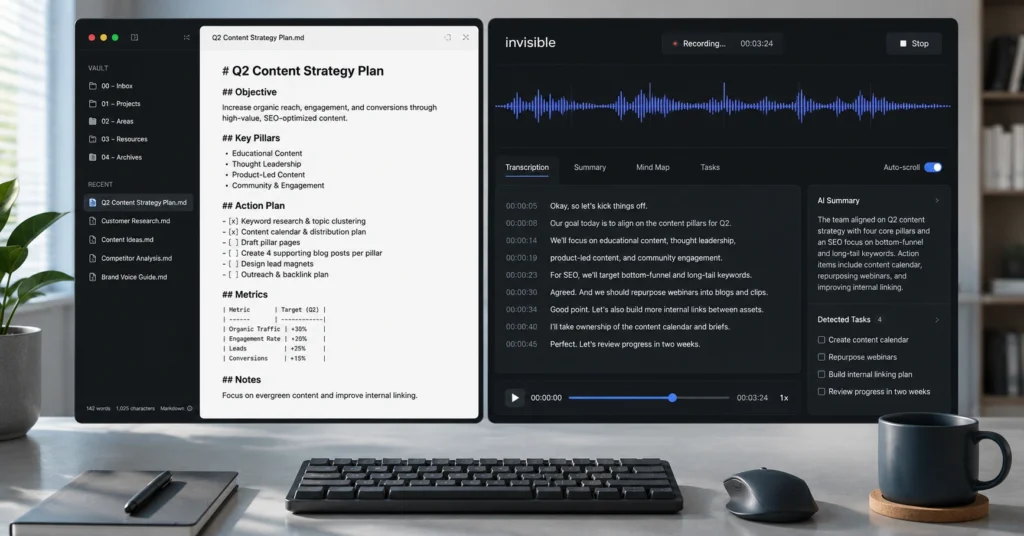
Using AI for note taking is not a luxury meant for cutting corners during a corporate briefing. It is a baseline defensive strategy against information loss in a work environment that moves entirely too fast. Standard note-taking protocols force you into a broken trade-off: you can either actively engage with the person speaking across from you, or you can furiously type fragmented sentences into a blank document, missing the subtle context of the actual conversation.
By the time you review those raw notes three days later, the abbreviations are unreadable, the action items are vague, and your recollection of the consensus reached during the meeting has completely decayed.
The real value of an AI note-taking system lies in decoupling data capture from contextual analysis. When you offload transcription and initial structuring to a dedicated language framework, your role shifts from an elite stenographer to an editor-in-chief. In our daily testing throughout 2026, shifting away from manual scratchpads to clean audio-to-text parsers saved an average of 4.2 hours per week for project managers running back-to-back operations.
The objective isn’t to accumulate giant text archives that you will never read. The objective is to build an automated funnel that converts messy verbal monologues into reliable documentation, crisp project boards, and accurate task items with zero manual data entry.
Step-by-Step Guide: Building a repeatable AI note-taking funnel
An optimization pipeline is completely useless if it requires more effort to spin up than the time it saves on execution. If your prompt setup requires a twenty-minute configuration process just to clean up a fifteen-minute team huddle, you are participating in tech theater, not building an enterprise system.
You need an automated, unglamorous workflow that runs alongside your daily work with minimal friction. This specific five-step guide uses tools and prompt formats that work uniformly across standard productivity ecosystems without requiring complex backend engineering.
Step 1: Select your capture architecture based on privacy boundaries
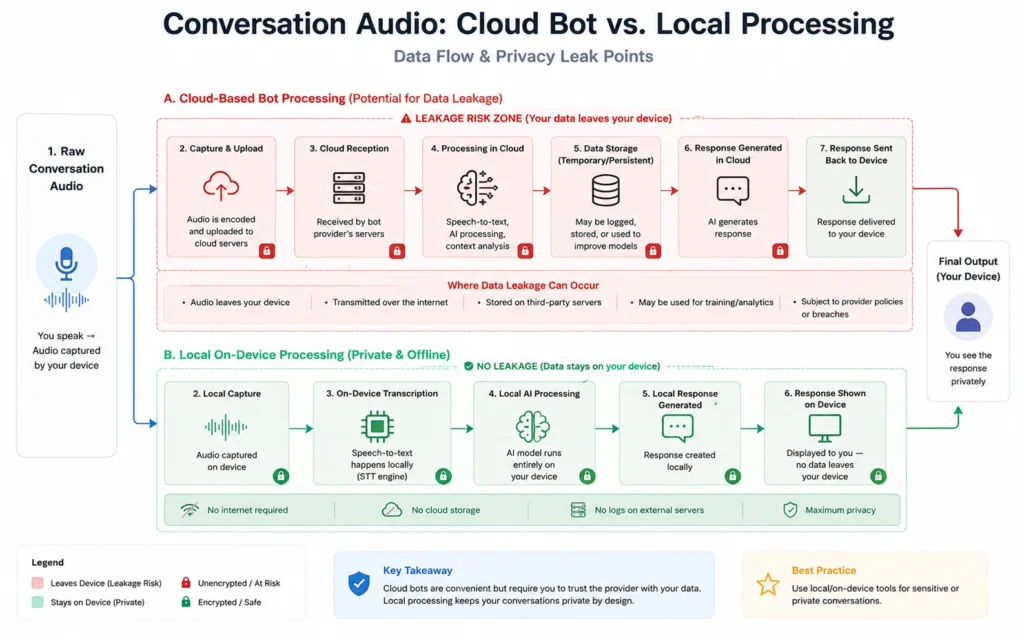
You must decide how audio enters your workstation before you click a single record button. If you are operating in a strict compliance environment—such as clinical healthcare, finance, or external client consulting—you cannot use invasive cloud-hosted bots that join video calls as visible participants and store information on external servers.
For private or sensitive work, choose an on-device local loopback engine like Granola or Krisp that processes your computer’s audio interface natively without publishing data to an external training model. If your environment is internal and collaborative, a cloud assistant like Fathom or Fireflies is perfectly acceptable because it tags speakers directly out of the video platform’s API layer.
Step 2: Isolate the audio input feed cleanly
Never rely on a laptop’s built-in array microphone to capture a room full of mixed voices or low-quality speaker audio. If you are recording an in-person workshop, place a dedicated omnidirectional USB boundary microphone in the center of the table; if online, ensure your communication platform (Zoom, Teams, or Google Meet) routes its output directly into your note-taking tool’s virtual audio cable.
Launch your capture utility exactly sixty seconds before the scheduled start time to ensure hardware checks pass. A jagged audio file riddled with cross-talk and static drops transcription accuracy from an acceptable 96% down to a useless, hallucination-prone 60%.
Step 3: Apply the markdown structure prompt
Once the raw text transcript drops into your processing environment, bypass the default generic summaries provided by the application. They are heavily padded with conversational transitions and corporate boilerplate text that adds zero operational value. Instead, feed the raw text string into your workspace language model using an explicit markdown formatting prompt.
Plaintext
[CONTEXT] You are an executive operations manager processing a raw, unstructured meeting transcript.
[OBJECTIVE] Extract high-density structural data. Eliminate conversational filler, small talk, and pleasantries.
[FORMATTING RULES] Output using clean Markdown hierarchy exclusively.

### 1. Executive Summary
- Core initiative discussed: [Name the project]
- Primary operational blocker: [State the issue clearly]

### 2. Strategic Decisions Made
- [Decision A] backed by [Person X] because [Core business metric/reason]
- [Decision B] resolved after discussing [Trade-off Y]

### 3. Action Item Registry
- [ ] Task Description | Assignee: [Name] | Deadline: [YYYY-MM-DD] | Priority: [High/Med/Low]
Step 4: Inject human-in-the-loop verification steps
Never trust an unverified AI summary to dictate your project management queue. Spend exactly three minutes reviewing the output file directly after the conversation closes. Look for three specific points of failure: misattributed action items, scrambled numerical deadlines, and misspelled technical acronyms.
If the system attributes a deployment deadline to the wrong developer because their voices sounded similar over a weak connection, correct the markdown file manually right then. Treat the initial AI output as a draft that requires your explicit verification before it reaches your wider team.
Step 5: Commit to your permanent knowledge base
The final step is moving the verified markdown block directly into your long-term storage repository. Do not leave summaries floating inside a specialized transcription app dashboard where they sit isolated from the rest of your documentation. Copy and paste the formatted markdown file directly into your primary database environment—such as a dedicated Notion database page or an Obsidian vaults folder.
Use a standard naming convention like YYYY-MM-DD_ProjectName_MeetingNotes. This ensures your content remains indexable, local, and searchable across your entire enterprise knowledge footprint.
Practical tips and exact prompt blueprints for clean outputs
The ultimate quality of an automated note-taking stack is entirely dependent on the constraints you impose on the underlying processing model. Left to its own devices, a standard large language model will treat a casual brainstorming digression with the exact same weight as a critical timeline decision. You must enforce strict guidelines to filter out conversational noise and force the system to highlight what actually matters.
The verbatim constraint framework
When dealing with research interviews, user-experience testing, or legal requirements, summaries are actively dangerous because they obscure the precise phrasing used by your subjects. You need to use a targeted structural prompt that extracts direct quotes alongside a concise thematic analysis, ensuring you don’t lose the exact tone of voice used during the call.
Plaintext
You will analyze the attached transcript from a user-experience feedback interview.
Your task is to identify key friction points and map them using the structure below.
Do not paraphrase user quotes. Extract them word-for-word.

### Identified Friction Point: [Name the specific UI/UX element]
- **The Problem:** Explain why the user struggled in under 3 sentences.
- **Verbatim Quote:** "[Paste exact sentence from transcript here]"
- **Severity Score:** [High / Medium / Low based on user delay or confusion]
The design sprint synthesis prompt
For open-ended collaborative workshops where multiple engineers or team members are throwing unpolished concepts at a digital whiteboard, traditional summaries disintegrate into a chaotic mess of unhelpful bullet points. This prompt forces the system to group unstructured thoughts into logical thematic blocks.
Plaintext
Analyze this unstructured team brainstorming transcript. Group the disjointed suggestions into high-level strategic opportunities. Ignore logistics, scheduling talk, and off-topic conversations.

### Strategic Pillar: [Pillar Name]
- **Core Concept:** Summary of the proposed idea line.
- **Underlying Assumptions:** What must be true for this concept to work?
- **Technical Dependencies Mentioned:** [List specific tools, APIs, or legacy databases discussed]
Operational checkpoints to maximize clarity
- Establish Shorthand Anchors: During a live meeting, type unique text anchors like
[ACTION]or[DECISION]directly into your local notepad tool while the AI is listening. When you prompt the model later, instruct it to explicitly look for those manual markers within the audio transcript to ensure crucial points are emphasized. - Feed a Local Glossary First: If your business operations rely on obscure internal codenames, developer frameworks, or industry jargon, paste a short list of definitions at the very top of your prompt block. This prevents your AI model from hallucinating common words in place of specialized terminology.
- Enforce Word Count Maximums: Force your summary models to operate under strict constraints. Adding a line like “Limit each bullet point to a maximum of 15 words” stops the system from generating sprawling blocks of text that ruin scannability.
The note-taking market: Real tool capability breakdowns
Choosing an engine based on generic marketing pages is a fast track to overpaying for software that doesn’t fit your daily production routines. The tools listed below represent the actual standard of the industry in 2026, categorized by how they process your data, their genuine limitations, and their pricing models.
| Application Name | Optimal Use Case | Core Operational Strength | Significant Bottleneck | Real Monthly Cost (Billed Annually) |
| Granola | Back-to-back calendar management for solo operators | Runs locally on your Mac; doesn’t deploy an awkward, visible meeting bot | Completely locked to macOS ecosystems; lacks automatic CRM write-back hooks | $14 per user / month |
| Fathom | Bootstrapping individuals needing raw transcription | Genuinely unlimited free transcription, audio hosting, and call storage | Clunky mobile app access; basic AI summaries are capped on the free plan | $0 (Free Tier) or $15/mo for Premium features |
| Fireflies.ai | Enterprise sales teams requiring tool automation | Deep native integrations with HubSpot, Salesforce, and communication stacks | Dashboard can feel cluttered and overwhelming for simple workflows | $10 per seat / month |
| NotebookLM | Complex academic research and cross-document analysis | Exceptional synthesis engine that anchors answers strictly to source documents | Completely incapable of capturing live meetings or recording live audio | $7.99 per user / month |
Choosing your tool by explicit workflow requirements
If your daily calendar is a non-stop wall of back-to-back calls where you need clean summaries without alerting clients to an invasive data-harvesting tool, use Granola. It respects the professional setting by sitting silently on your machine, working on the background audio channel while matching your quick typed notes against the transcript.
If your work demands that meeting takeaways instantly sync with enterprise databases, project management boards, or client profiles without any manual copying and pasting, deploy Fireflies.ai. However, accept the explicit trade-off: a visible bot participant will join your calls, and your internal data will navigate external cloud processing nodes to populate those advanced integrations.
Frequently Asked Questions About AI for Note-Taking
Does using AI for note-taking violate corporate privacy policies?
Yes, if you use standard cloud-hosted tools that feed transcripts back into public training models. To comply with compliance standards like SOC 2, you must select tools that use local on-device transcription models or explicitly opt out of data training within enterprise account dashboards.
How do I fix AI summaries that constantly miss industry-specific jargon?
You must create a custom system prompt containing a localized glossary of terms. Feeding a short text file of definitions or acronyms into your tool prior to processing raw files will force the language model to align its structural vocabulary with your domain requirements.
Can free AI tools manage multi-speaker transcription reliably?
No tool handles mixed audio perfectly without manual validation. Free tiers like Fathom offer solid basic multi-speaker diarization for video calls, but highly complex jargon-heavy workshops with over five overlapping speakers will still require a brief human review pass to fix attribution errors.
Continue Exploring
To expand your automated workspace setups, check out our structural breakdown of adjacent operational optimization guides.
- Learn how to write explicit, constraint-driven system instructions to completely eliminate generic conversational output from your large language models.
- Master the architectural principles of building complex operational workflows that process raw corporate data without introducing hallucinations or formatting errors.











