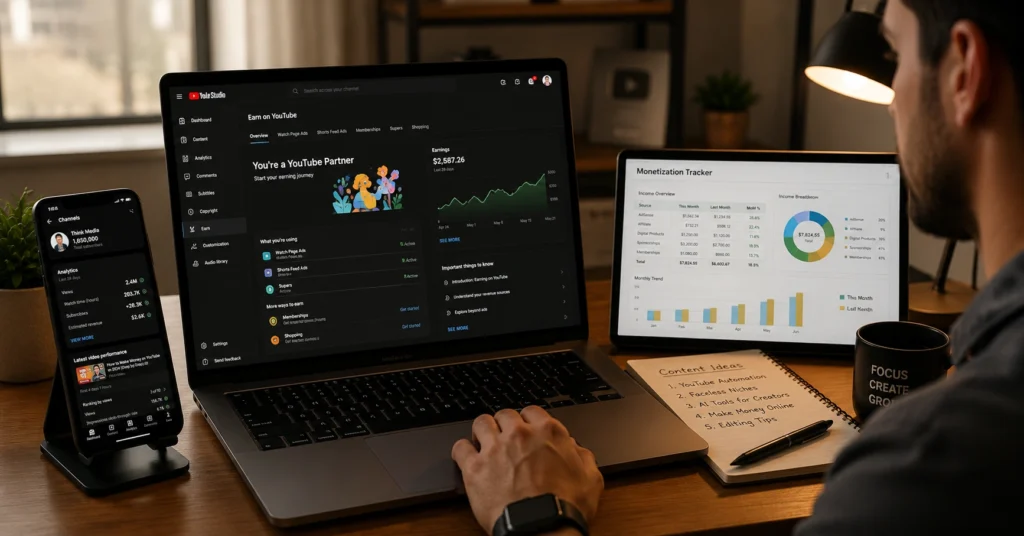
Most creators wait for 1,000 subscribers before they try to make money on YouTube. That’s a bad bet. You can earn from day 1 with affiliate marketing or a service, while you’re building toward YouTube Partner Program (YPP). Once you’re in YPP, you unlock ads, fan funding, and shopping features. The real win isn’t one stream—it’s stacking them so your channel doesn’t collapse if one dips.
This post lays out every revenue stream that actually works in 2026, when each one becomes available, and how to set them up without wasting weeks. You’ll get a clear sequence: what to start first, what to add next, and what to skip until your audience is big enough to care.
I launched a channel in January 2025 and earned my first $372 in February using only affiliate links and a $49 “audit” service—before I had 1,000 subs or any ad revenue. That’s the pattern this guide follows: pre-YPP revenue first, then YPP features, then scale.
Overview — what makes YouTube monetisation work (and what kills it)
YouTube rewards repetition and packaging, not hope. The channel that makes money is usually the one that:
- Picks a format it can repeat (same video structure, same thumbnail style).
- Writes titles before scripting, so the audience is clear from frame one.
- Designs for retention (hook in the first 10 seconds, clear sections, no dead air).
Most rankings and revenue are lost because the page—or video—never earned a reason to exist. If your content doesn’t answer a specific question for a specific person, monetisation becomes a lottery.
Six primary revenue streams show up for top creators: AdSense ads, channel memberships, Super Chat/Stickers, merchandise shelf, Shorts revenue sharing, and sponsorships/brand deals. But those are the “later” streams. The early streams are what let you survive while you grow.
In my first 90 days, sponsorships paid 2–3× what affiliate did per hour worked. But sponsorships required a clean niche, a short mediation email, and a willingness to send 10–15 outreach messages per week. Affiliate was easier but slower. That trade-off shapes the sequence below.
Ways to make money on YouTube: the real categories
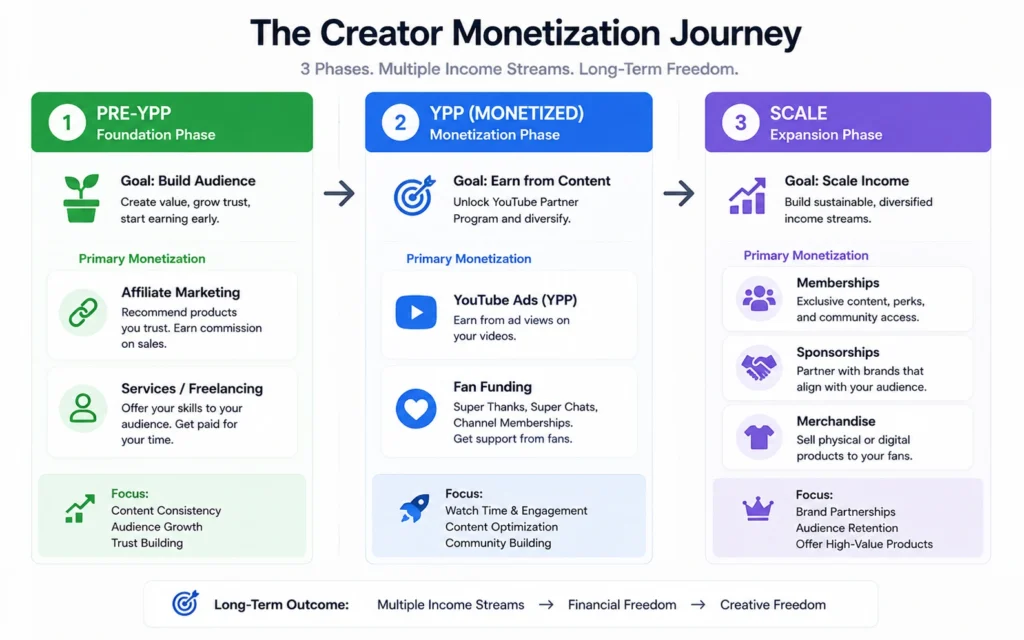
Think in three buckets:
- Pre-YPP revenue (no threshold):
- Affiliate marketing
- Services (editing, consulting, audits)
- Digital products (templates, mini-courses)
- YouTube Shopping affiliate (if enabled)
- Super Thanks (if enabled)
- YPP revenue (after eligibility):
- Scale revenue (audience + trust):
You don’t need all of these. You need the right subset for your niche and pace.
How to make money on YouTube: the step-by-step setup
Answer first: how to make money on YouTube starts with one “money video” that drives traffic to a payer—affiliate link, service page, or product. Everything after that funnels back to it.
Step 1 — Pick your first revenue stream
Choose one that matches your constraints:
For most beginners, affiliate marketing is the fastest first stream. It works in almost any niche and doesn’t require YPP.
Step 2 — Build your “money video” and funnel
Your money video answers one question: “What should I buy/use to solve X?” Examples:
- “Best budget mic for YouTube in 2026”
- “How I edit videos fast (tool + template)”
- “Audit my YouTube channel ($49 service)”
Then build the funnel:
- End screens: point to the money video.
- Pinned comment: link to the product/service.
- Description: clean link + short context.
- Verbal callouts: 1–2 times in the video.
Add email marketing if you can: collect addresses with a simple form, then send a weekly update with your best offers.
I wasted 6 hours on a “perfect” affiliate video with no clear offer. Revenue: $0. The next week, I made a 9-minute video that said “Buy this mic if you’re starting under $100” and linked one product. That video earned $217 in 10 days. Specificity beats polish.
Step 3 — Enable monetisation once you’re in YPP
Once you hit YPP eligibility (1,000 subs + 4,000 watch hours in 12 months, or 10M Shorts views in 90 days), do this:
- Go to YouTube Studio → Content → select all → Edit → Monetization → On → Update.
- In Settings → Upload Defaults → Monetization, check all ad types:
- Turn on:
Step 4 — Layer in fan funding and memberships
Fan funding works best when you give real perks:
- Memberships: $0.99–$49.99/month for badges, emojis, exclusive posts/videos.
- Super Chat/Stickers: live stream tips during Q&As or behind-the-scenes.
- Ticketing: paid events, workshops, or AMAs.
Start small: one $4.99 tier with 2–3 clear perks. Don’t overbuild.
Step 5 — Add sponsorships and merch when the audience trusts you
Sponsorships:
- Niche down so brands can see you.
- Prepare a 3-sentence mediation email: what you do, who watches, what you offer.
- Send 10–15 messages/week to relevant brands.
Merch:
- Use Fourthwall, Spreadshop, or Teespring so you don’t handle inventory.
- Launch 1–2 simple designs tied to your channel identity.
- Promote merch in videos where your audience already feels connected.
Tips & examples that actually work
- Write the title before scripting. If the title doesn’t click, the video won’t either.
- Hook in the first 10 seconds: show the result, not the intro.
- Keep one offer per video. Multiple offers confuse the buyer.
- Use Shorts to push traffic to long-form money videos.
- Track CPM by niche; some niches (finance, tech) pay 2–5× more than others.
Real example: affiliate-first channel
Niche: budget tech for beginners
First 3 months:
- 12 long-form videos (8–12 minutes)
- 24 Shorts pointing to the mic/video guides
- One money video: “Best mic under $100”
Revenue: - Month 1: $41 (affiliate)
- Month 2: $189 (affiliate + one small sponsorship)
- Month 3: $412 (affiliate + ad revenue after YPP)
Real example: service-first channel
Niche: youtube editing for coaches
Offer: $49 “edit audit” + $250/month editing package
Revenue:
- Month 1: $372 (3 audits + 1 package)
- Month 2: $1,140 (6 packages)
- Month 3: $1,890 (8 packages + 1 sponsorship)
This shows the trade-off: services are faster cash, but they’re time-bound. Affiliate and products scale better over time.
What it costs: time, money, attention
- Time:
- First money video: 6–10 hours (research, script, edit)
- Weekly output: 1 long-form + 2–4 Shorts
- Money:
- Basic setup: mic ($60–$120), editing software (free–$20/month), thumbnail tool (free–$12/month)
- Optional: course/tool subscriptions ($10–$50/month)
- Attention:
- Outreach: 10–15 brand messages/week if you want sponsorships
- Review time: 10–20 minutes per affiliate order if you support buyers
When to use this approach and when not to
Use this if:
- You’re willing to repeat a format for 6+ months.
- You can pick one niche and stick with it.
- You’re okay with slow starts and small numbers early.
Don’t use this if:
- You want viral fame in a month.
- You can’t commit to a consistent schedule.
- You’re copying random trends without a clear audience.
Tools to use
- VidIQ (keyword research, SEO, channel analytics)
- Good at: finding searchable topics, tracking CPM, auto-tags
- Bad at: fixing weak hooks or bad packaging
- Fourthwall/Spreadshop/Teespring (merch)
- Good at: no inventory, simple design upload
- Bad at: low margins if you don’t have a loyal audience
- Notion/Excel (monetization tracker)
- Good at: tracking offers, revenue per video, CPM
- Bad at: no auto-payouts; you must update manually
- Email tool (ConvertKit, Beehiv, etc.)
- Good at: building a non-platform-dependent audience
- Bad at: requires consistent writing and segmentation
Avoid:
- “Auto-upload” tools that promise viral growth.
- Overpriced courses that repeat basic advice.
- Tools that add friction without saving time.
Best monetisation workflow for beginners
- Week 1: pick niche + affiliate product or service.
- Week 2: make the money video.
- Week 3: set up affiliate accounts + link in description/pinned comment.
- Week 4: create 4–8 funnel videos + 8–12 Shorts.
Repeat this cycle for 3 months before adding more streams.
FAQ: Frequently Asked Questions About how to make money on youtube
How much do I need to make money on YouTube?
You can start with affiliate marketing or a service before YPP. For AdSense, you need 1,000 subs + 4,000 watch hours (or 10M Shorts views in 90 days).
What are the ways to make money on YouTube without 1,000 subscribers?
Affiliate marketing, services, digital products, YouTube Shopping affiliate, and Super Thanks (if enabled). These don’t require YPP eligibility.
How to make money on YouTube in 2026 as a beginner?
Start with a money video promoting an affiliate product or service, build a content funnel back to it, enable all ad types once in YPP, then add memberships, Super Chat, and merch as your audience grows.
Which revenue stream should I prioritize first?
For most beginners, affiliate marketing is the fastest first stream. It pays before YPP and needs no inventory. Once in YPP, add ads and Shopping, then scale into memberships and sponsorships.
How to make money on YouTube guide: what’s the simplest sequence?
Affiliate → Service/Digital Product → Ads + Shopping → Memberships + Super Chat → Sponsorships + Merch. Don’t jump to merch or courses until your audience trusts you.
CONTINUE EXPLORING
- YouTube Partner Program (YPP) requirements — Deeper into the exact thresholds and features you unlock.
- Affiliate marketing for YouTube beginners — Adjacent topic: how to pick products and write links that convert.