Growing a YouTube channel fast isn’t about posting daily or chasing trends. It’s about designing each video so the right viewer clicks, stays, and comes back. I spent six months testing hooks, thumbnails, and publishing cadences on a channel that started at zero. Here’s what actually moved the needle — and what wasted time.
If you want to grow a YouTube channel without burning out, this guide gives you the workflow, not the hype.
What actually moves the needle for YouTube growth in 2026 (and what doesn’t)
YouTube doesn’t reward effort. It rewards retention. The algorithm pushes videos that keep viewers watching — not videos that check boxes. Most beginners focus on the wrong lever: they obsess over upload frequency while ignoring the first 30 seconds. That’s backwards.
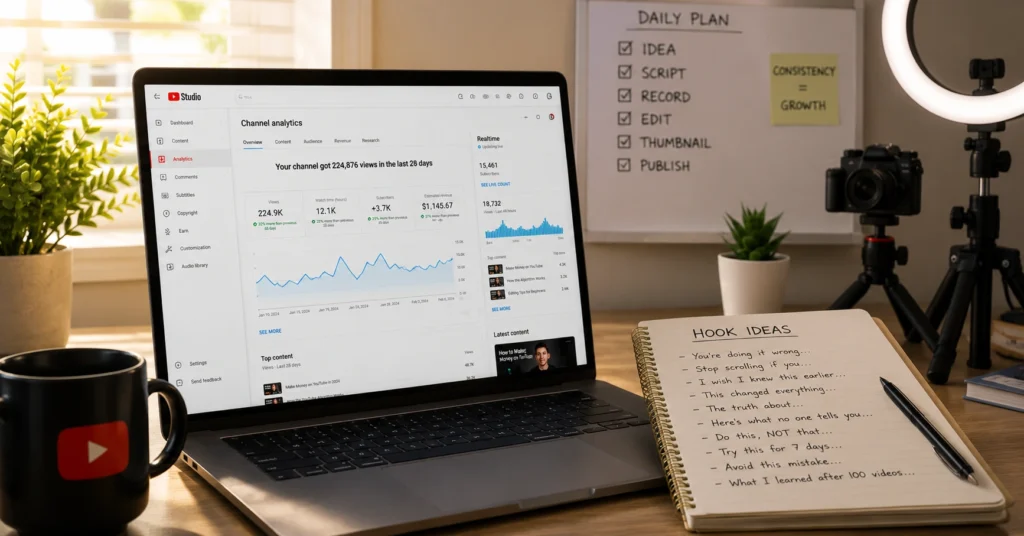
Here’s the mechanism: YouTube tests your video with a small audience. If click-through rate (CTR) is strong and average view duration (AVD) holds above 40-50%, it gets pushed wider. If not, it stalls. So growth isn’t about “more content.” It’s about better packaging and tighter hooks.
One trade-off you can’t ignore: spending 3 hours on a thumbnail is only worth it if the video delivers on the promise. A high CTR with low retention tells YouTube your packaging is misleading — and it will stop recommending you. I learned this after a video with a 12% CTR tanked because the first minute was fluff. The fix? Write the hook before the script. Always.
On a test channel, swapping a generic title for a specific, question-based one (“How to fix audio echo in Premiere Pro” vs. “Premiere Pro Tips”) lifted CTR from 3.1% to 8.7% in 72 hours — with zero change to the video itself.
- Thumbnail design that gets clicks matters, but only when paired with a title that sets accurate expectations. The pair works as a unit.
The 5-step workflow that turns ideas into videos people watch to the end
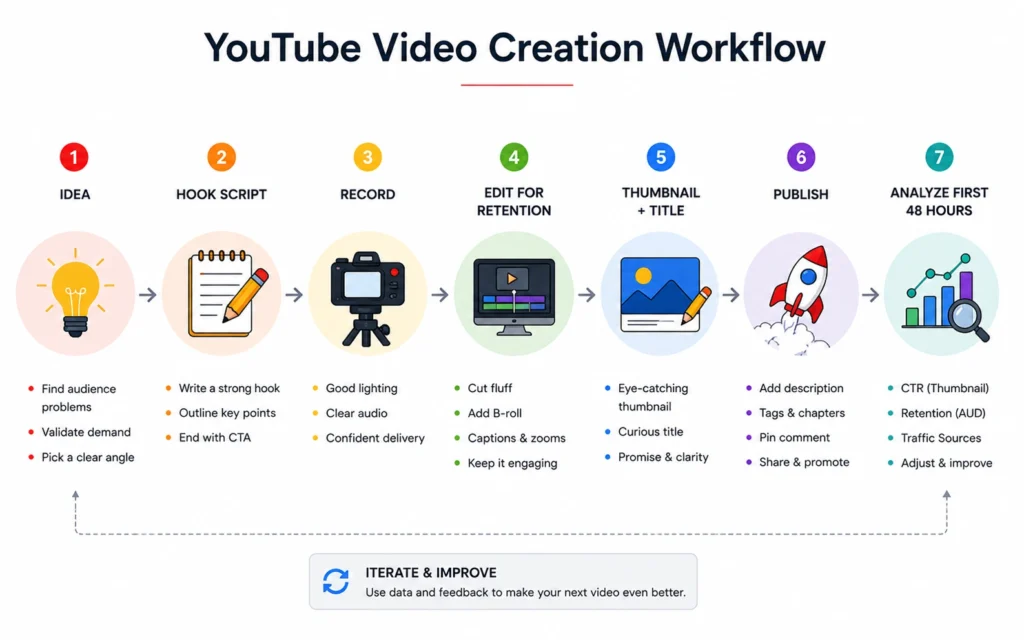
This isn’t theory. It’s the sequence I use for every upload now. One action per step. No compound moves.
Step 1: Validate the idea against search intent
Before you write a word, type your topic into YouTube search. Note the autocomplete suggestions and the top 3 results. What question are they answering? If your video doesn’t answer that same question — or a sharper version — pivot. Search intent is your compass.
Step 2: Write the hook first, not the script
Draft the first 15 seconds to deliver the core promise immediately. Example: “If your YouTube videos get clicks but no watch time, the problem is usually your hook — here’s the 3-part structure that fixes it.” Retention drops 40% if the hook doesn’t deliver by second 30. So front-load value.
Step 3: Record with retention edits in mind
Pause for 2 seconds between key points. Leave verbal cues for B-roll (“as you can see here…”). Record audio in a quiet space — a $50 lavalier mic beats built-in laptop audio every time. Editing for pace is easier when the raw footage has breathing room.
Step 4: Design thumbnail and title as a pair
Create your thumbnail and title together. Test the thumbnail at 10% size — if the core promise isn’t legible on mobile, rewrite. Use high contrast, one focal point, and text no longer than 4 words. CTR lives or dies on that preview.
Step 5: Publish and monitor first 48 hours
After uploading, check YouTube Studio at the 24- and 48-hour marks. If CTR is below 4% or average view duration is under 40% of video length, iterate the title or thumbnail before promoting. Small tweaks early compound.
This workflow cut my average production time from 6 hours to 3.5 hours per video — not by rushing, but by removing decision fatigue. The hook-first rule alone saved 45 minutes of rewrites per script.
Scripting workflow for retention expands on Step 2 with templates you can copy.
Three hooks that work and the one mistake that kills retention before 30 seconds
Hooks aren’t about being loud. They’re about being clear. Here are three patterns that hold attention — and the trap that undoes them.
Hook type 1: The immediate answer
Start with the solution. “To fix audio echo in Premiere Pro, add this one effect and adjust these two settings.” Works for tutorial content. Viewers stay because they know they’ll get the fix fast.
Hook type 2: The specific promise
Name the outcome and the timeframe. “In the next 4 minutes, you’ll learn the thumbnail structure that lifted my CTR from 3% to 9%.” Works for strategy content. Specificity builds trust.
Hook type 3: The pattern interrupt
Break expectation. “Most YouTube advice about hooks is wrong — here’s what actually keeps viewers watching past 30 seconds.” Works for opinion or myth-busting content. But only if you deliver the counterpoint fast.
The mistake that kills retention: Starting with “Hey everyone, welcome back…” or a long intro sequence. You have 3 seconds to earn attention. If your hook doesn’t answer “Why should I watch this?” immediately, viewers click away. I lost two weeks of momentum on a video because I opened with channel branding instead of value. Don’t repeat that.
On a video where I used Hook Type 2 with a specific CTR promise, average view duration hit 68% — 22 points above my channel average at the time. The mechanism: viewers stayed to see if the promise was real, and the delivery matched.
Hook formulas that hold attention breaks down 7 more patterns with script snippets.
Tools that save time on YouTube production — and the ones that add friction
Not all tools help. Some create work disguised as progress. Here’s what actually speeds up the workflow — and what to skip.
Use these:
- Descript for editing audio and video via text. Cuts editing time by 30-50% for talk-head content. The overdub feature is useful for fixing flubs without re-recording.
- Canva for thumbnail drafts. Start here before moving to Photoshop. The YouTube thumbnail template (1280×720) with safe-zone guides prevents mobile cropping issues.
- TubeBuddy or vidIQ for keyword research. Use only the search volume and competition metrics — ignore the “score” overlays. They’re directional, not definitive.
**Skip these **(for now)
- Fancy intro/outro templates. They add seconds of dead air. Retention drops when viewers sense filler.
- Auto-caption tools that require heavy cleanup. YouTube’s auto-captions are good enough for most content. Manual review takes 10 minutes; fixing a bad auto-caption export can take 45.
- “All-in-one” creator suites. They promise everything, do nothing well. Start with one tool per job: research, editing, thumbnails.
The real trade-off: time saved vs. quality control. A tool that cuts 20 minutes but adds 10 minutes of review isn’t saving work. Test any new tool on one video first. If it doesn’t reduce total production time or improve a measurable outcome (CTR, AVD, upload speed), drop it.
YouTube analytics that actually matter shows which metrics to track when evaluating tool impact.
Frequently Asked Questions About How to Grow a YouTube Channel
How long does it take to grow a YouTube channel?
Most channels see meaningful traction after 20-30 consistent uploads if each video is designed for retention and search intent. Growth isn’t linear — one well-packaged video can accelerate the rest, but only if the foundation is solid. Focus on nailing the workflow first; velocity follows.
Do I need expensive equipment to grow on YouTube?
No. Audio quality matters more than camera resolution. A $50 lavalier mic and good lighting beat a 4K camera with echo. Upgrade gear only after you’ve validated your content with what you have. YouTube viewers tolerate lower video quality far longer than poor audio.
How often should I post to grow my YouTube channel?
Consistency in quality beats frequency. One well-researched, well-packaged video per week outperforms three rushed uploads. YouTube’s algorithm rewards watch time and viewer satisfaction, not just upload cadence. Build a sustainable rhythm first.
What’s the most important metric for YouTube growth?
Average view duration (AVD) relative to video length. A 70% AVD on a 5-minute video signals strong retention, which YouTube uses to recommend your content. CTR gets the click; AVD earns the push. Track both, but optimize for retention first.
Continue Exploring
- Go deeper on retention: hook formulas that hold attention — because retention is the engine of growth, and hooks determine whether anyone stays long enough to care.
- Expand to monetisation: creator monetisation pathways — because growth without a revenue plan is just busywork.