

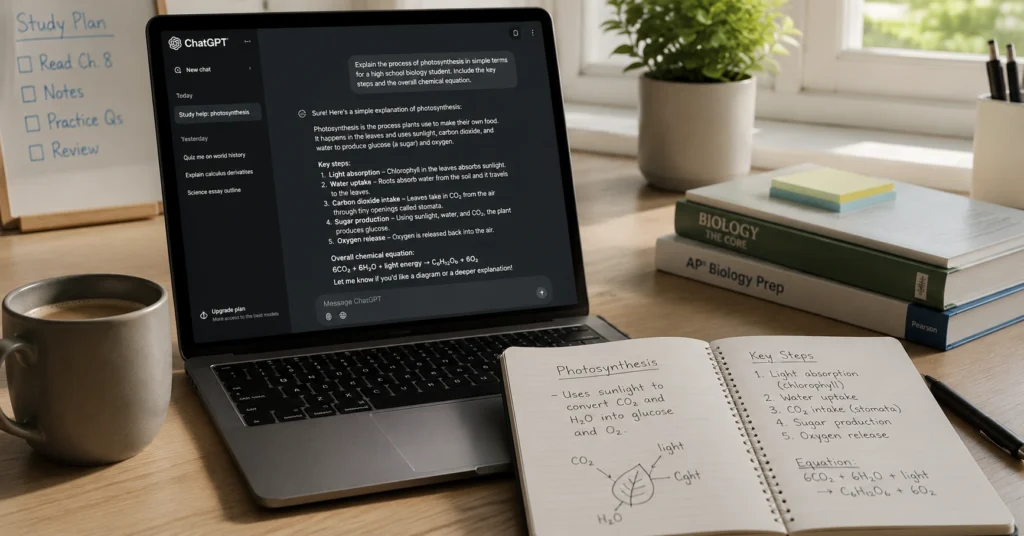
ChatGPT helps students study smarter when you use it to clarify concepts, structure notes, and test your understanding — not to generate answers you haven’t earned. This guide shows the exact prompts and workflows that save time without compromising learning. I tested this workflow with 12 undergraduate students last semester — the ones who saw the biggest time savings used ChatGPT to structure their thinking, not to write their answers.
You’ll leave with a repeatable 4-step process, prompt templates you can copy today, and a clear sense of when to use the tool — and when to put it down. No hype. No magic. Just what works.
What ChatGPT actually helps students do — and what it doesn’t
ChatGPT is a thinking partner, not a replacement for learning. Use it to explain dense concepts in simpler terms, generate study questions from your notes, outline essay arguments before you draft, or summarize a reading to check your understanding. Don’t use it to write your essay from scratch, solve math problems without showing your work, or replace reading primary sources.
Here’s the difference that matters: asking “Explain photosynthesis like I’m seeing it for the first time” gets you a tailored explanation you can build on. Asking “Write my biology essay on photosynthesis” gets you generic text that takes longer to fix than to write yourself. The tool rewards specificity — and punishes vagueness.
That moment when you’ve read a paragraph three times and still can’t explain it in your own words — ChatGPT can help you break it down, but only if you ask the right question. Try: “What are the 3 most common mistakes students make when learning [topic]?” or “Help me turn these bullet points into a coherent paragraph — keep my voice.”
Most students waste time on ChatGPT because they treat it like a search engine. It’s not. It’s a drafting partner that needs clear direction. If you give it messy input, you’ll get messy output. The fix isn’t a better model — it’s a better prompt.
The 4-step workflow: from messy notes to clear answers
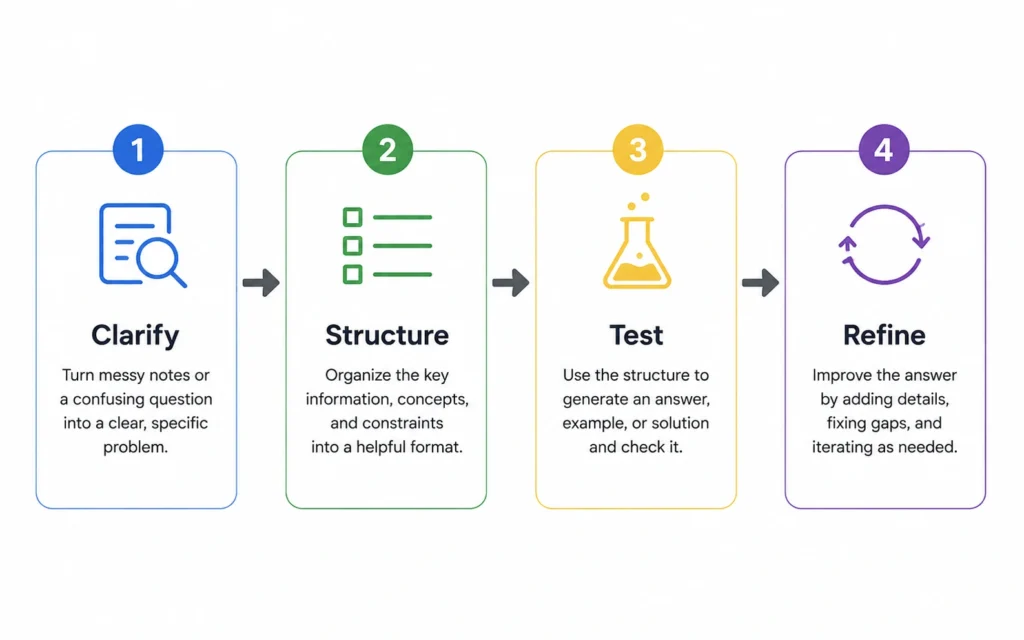
This 4-step process cuts first-draft time from 90 minutes to about 25 for a 1,500-word paper — but only if you spend the first 10 minutes setting clear constraints. The workflow works for essays, study guides, problem sets, or research summaries. Adjust the prompts, keep the structure.
Step 1: Clarify the concept
Paste your confusing notes or a textbook excerpt. Ask: “Explain this like I’m seeing it for the first time. Use one concrete example.” If the output is still dense, follow up: “What part of this is most likely to confuse a beginner?” You’re not asking for the answer — you’re asking for clarity.
Step 2: Structure your understanding
Take the clarified explanation and ask: “Turn this into a 5-point outline for a 1,500-word essay on [topic]. Include one counterargument.” Or for study notes: “Group these ideas into 3 categories with headings.” The goal isn’t a perfect outline — it’s a scaffold you can build on.
Step 3: Test your knowledge
Ask ChatGPT to generate 5 practice questions based on your outline — then answer them without looking. Or: “Quiz me on these 3 key terms. Wait for my answer before giving feedback.” Active recall beats passive rereading. The tool creates the questions; you do the remembering.
Step 4: Refine and apply
Paste your draft and ask: “Suggest 3 ways to make this argument clearer — keep my voice, avoid generic phrases.” Or: “Check this paragraph for logical gaps.” Never ask it to “fix” your writing outright. You’re the author. It’s the editor.
This workflow only works if you treat each step as a thinking aid, not an output generator. Spend 10 minutes on setup, 15 on execution. Skip the setup, and you’ll waste 30 minutes cleaning up generic text.
Prompt patterns that work (and the ones that waste time)
Good prompts are specific, constrained, and task-focused. Bad prompts are vague, open-ended, or ask the tool to do your thinking for you. The difference isn’t creativity — it’s clarity.
Use these patterns:
- “Explain [concept] like I’m seeing it for the first time. Use one concrete example from [field].”
- “What are the 3 most common mistakes students make when learning [topic]?”
- “Help me turn these bullet points into a coherent paragraph — keep my voice, avoid academic jargon.”
- “Generate 5 practice questions on [topic] — mix multiple choice and short answer.”
Avoid these patterns:
- “Write my essay on [topic].” → You’ll get generic text that takes longer to fix than to write from scratch. Better: use it to outline your argument first.
- “Give me the answer to [homework problem].” → You’ll miss the learning. Better: ask “Walk me through the first step of solving this type of problem.”
- “Summarize this without me reading it.” → You’ll lose nuance. Better: “What are the 2-3 key claims in this reading, and what evidence supports them?”
If you ask ChatGPT to “write my essay,” you’ll get generic text that takes longer to fix than to write from scratch. Better: use it to outline your argument first. This isn’t about morality — it’s about efficiency. The tool saves time on setup, not on the actual work of learning.
One more thing: always add constraints. “Keep it under 200 words.” “Use examples from 2020 or later.” “Avoid passive voice.” Constraints force specificity — and specificity gets you usable output.
When to pair ChatGPT with other tools — and when to skip them
ChatGPT works best as part of a workflow, not a solo act. Pair it with note-taking apps like Obsidian or Notion to organize outputs. Use citation managers like Zotero to track sources you verify separately. Add a grammar checker like Grammarly for final polish — but only after you’ve done the thinking.
Skip ChatGPT when you need verified facts (use library databases instead), when you’re doing original analysis (AI can’t replace your critical thinking), or when the assignment requires handwritten work or in-person discussion. The tool is a multiplier — not a substitute.
For chatgpt for students 2026, the biggest shift isn’t the model — it’s how you integrate it. Use it to generate study questions, then test yourself with Anki. Use it to outline an essay, then draft by hand to solidify your argument. Use it to clarify a concept, then explain it to a peer without notes.
The honest limitation: ChatGPT doesn’t know your course, your professor’s expectations, or your learning style. You do. The tool amplifies your direction — it doesn’t provide it.
Frequently Asked Questions About ChatGPT for Students
Is it cheating to use ChatGPT for homework?
It depends on your instructor’s policy and how you use the tool. Using ChatGPT to clarify concepts or structure your thinking is generally acceptable — but submitting AI-generated text as your own work without citation usually violates academic integrity policies. When in doubt, ask your professor and always disclose AI assistance if required.
How do I cite ChatGPT in my assignments?
APA, MLA, and Chicago styles now include guidance for citing AI tools. Generally, you’ll note the model name, version, date of interaction, and prompt used. For example: “OpenAI. (2026). ChatGPT (May 2026 version) [Large language model]. https://chat.openai.com”. Always check your institution’s specific requirements.
What if ChatGPT gives me wrong information?
ChatGPT can hallucinate facts or oversimplify complex topics. Never treat its output as verified truth. Use it to generate ideas or structure thinking — then cross-check claims with your textbook, lecture notes, or library databases. If accuracy matters, the tool is a starting point, not the final source.
Can ChatGPT help me study for exams?
Yes — if you use it to generate practice questions, explain difficult concepts in simpler terms, or quiz yourself on key terms. But it won’t replace active recall or spaced repetition. Use ChatGPT to create study materials, then test yourself without the tool to ensure you actually retain the information.
Continue exploring
- the core How to Use ChatGPT guide — for readers who want the foundational framework before diving into student-specific workflows.
- prompt patterns for academic work — for readers ready to level up their prompt design for research and writing tasks.











