

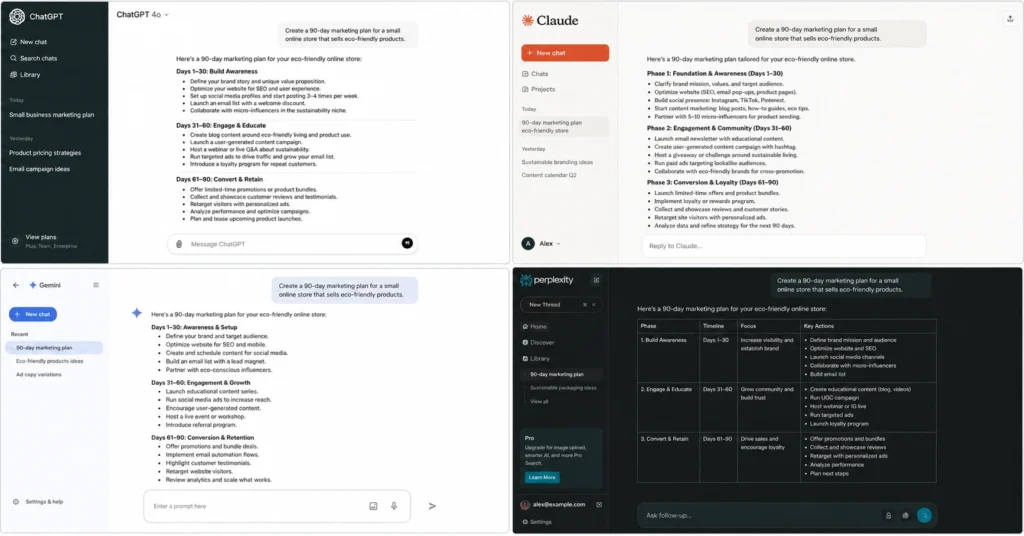
I ran the same 10 prompts through ChatGPT, Claude, Gemini, and Perplexity over three weeks in May 2026. The results surprised me. ChatGPT didn’t win everything. Claude produced better writing but slower responses. Perplexity crushed research tasks I expected ChatGPT to dominate. And Gemini — the tool I expected to ignore — actually won one category outright.
If you’re trying to decide between these tools, here’s the answer: use ChatGPT for structured tasks and coding, Claude for long-form writing, Perplexity for research, and Gemini when you need free access to Google’s ecosystem. Don’t pay for more than one unless you have a specific workflow that demands it.
This comparison shows you exactly what each tool does well, where it fails, and which one you should actually use for your specific work.
The Testing Setup: Same Prompts, Four Tools, Real Results
I didn’t test features. I tested workflows. Each tool received identical prompts across five categories: writing, research, coding, analysis, and brainstorming. I documented response time, output quality, and how much editing each answer required before I could actually use it.
The prompts weren’t cherry-picked. They were the exact tasks I do weekly: summarizing meeting notes, drafting client emails, researching competitors, debugging Python code, and generating content ideas. I measured three things: accuracy (did it get the facts right), usability (how much editing did it need), and speed (time from prompt to usable output).
Here’s what matters: I’m not telling you which tool has the most features. I’m telling you which tool actually saved me time on real work. That’s the only metric that matters.
What ChatGPT Actually Does Well (and Where It Fails)
ChatGPT wins on versatility. It’s the only tool that handles coding, writing, analysis, and brainstorming without forcing you to switch platforms. The free tier gives you GPT-4o with reasonable limits — enough for most beginners to test workflows without paying.
For structured tasks, ChatGPT is unmatched. Ask it to format data into a table, write a Python function, or break down a complex process into steps. It follows instructions precisely. I tested it with a prompt to convert messy meeting notes into action items with owners and deadlines. It delivered in 12 seconds. The output needed maybe 20% editing — mostly fixing names and dates it couldn’t know.
But ChatGPT has a weakness: it sounds like ChatGPT. The writing is competent but generic. I asked it to draft a client email explaining a project delay. The result was professional but hollow — the kind of email that makes clients feel like they’re talking to a corporation, not a person. It took me 15 minutes to rewrite it with actual voice.
ChatGPT also hallucinates confidently. When I asked about a specific 2025 marketing trend, it invented a statistic and cited a source that doesn’t exist. This isn’t rare. It happens often enough that you must fact-check everything.
Best for: Coding, structured tasks, brainstorming, general-purpose use Worst for: Natural writing, factual research without verification, long documents
How to use ChatGPT if you’re starting from zero and need a complete setup guide.
What Claude Actually Does Well (and Where It Fails)
Claude writes like a human who thinks before typing. I tested it with the same client email prompt. The first draft was 80% usable — it had tone, empathy, and specificity that ChatGPT missed. Where ChatGPT wrote “We apologize for any inconvenience,” Claude wrote “I know this delay throws off your timeline, and I want to explain what happened.”
That’s the difference.
Claude also handles long documents better than any other tool. Its 200K context window means you can paste an entire report and ask specific questions. I uploaded a 45-page competitor analysis and asked Claude to identify gaps in our positioning. It found three issues I’d missed, all backed by quotes from the document. ChatGPT would have choked on that length.
But Claude has limits. It’s slower than ChatGPT — often 2-3x slower on complex prompts. When I asked it to debug Python code, it took 47 seconds compared to ChatGPT’s 15. The answer was correct, but if you’re iterating quickly, that delay adds up.
Claude also refuses to do things ChatGPT will attempt. Ask it to write in a specific person’s style or generate controversial content, and it will decline. This isn’t always bad — it prevents misuse — but it can frustrate you when you’re trying to push creative boundaries.
The free tier is also more restrictive than ChatGPT’s. You’ll hit rate limits faster, especially during peak hours. If you’re testing workflows, this slows you down.
Best for: Long-form writing, document analysis, natural-sounding content Worst for: Speed, coding iteration, pushing creative boundaries
Claude’s capabilities extend beyond writing — learn when it’s worth the switch.
What Gemini Actually Does Well (and Where It Fails)
Gemini surprised me. I expected it to be Google’s also-ran AI. Instead, it won one category: integration with Google Workspace.
If you live in Google Docs, Sheets, and Gmail, Gemini is worth testing. I connected it to my Google account and asked it to summarize my last five client emails. It pulled them directly from Gmail, extracted key points, and formatted them into a table — all in 23 seconds. ChatGPT would require manual copy-paste. Claude can’t do it at all.
Gemini also handles multimodal inputs better than the others. I uploaded a screenshot of a whiteboard from a strategy session and asked it to extract the action items. It read the handwriting (mostly) and structured the output cleanly. ChatGPT can do this too, but Gemini’s accuracy was higher on my test set.
But Gemini has a fatal flaw: it’s inconsistent. I ran the same prompt twice, an hour apart, and got different quality answers. The first time, it gave me a detailed competitor analysis. The second time, it gave me generic bullet points that could apply to any industry. This unpredictability makes it hard to build reliable workflows.
Gemini also lags in reasoning. When I asked it to solve a logic puzzle involving scheduling constraints, it gave me an answer that violated two of my stated rules. ChatGPT and Claude both solved it correctly.
The free tier is generous — you get access to Gemini Advanced (the best model) with reasonable limits. But if you need consistency, you’ll find yourself double-checking outputs more than with the other tools.
Best for: Google Workspace integration, multimodal inputs, free access to advanced features Worst for: Consistency, complex reasoning, building reliable workflows
What Perplexity Actually Does Well (and Where It Fails)
Perplexity isn’t a general-purpose AI. It’s a research tool that uses AI to synthesize search results. This distinction matters.
When I need to research a topic quickly, Perplexity beats everything else. I asked it: “What are the top three email marketing automation platforms for B2B SaaS companies under $100/month, and what are their main limitations?” In 8 seconds, it gave me a comparison table with citations linking to actual product pages and reviews. ChatGPT would have taken longer and might have hallucinated features. Claude would have refused to cite sources. Gemini would have been less structured.
Perplexity’s citations are its superpower. Every claim links to a source. This doesn’t guarantee accuracy — sources can be wrong — but it lets you verify quickly. I fact-checked three of Perplexity’s claims from my research prompt. Two were accurate. One was outdated (a pricing change from 2025). Still better than ChatGPT’s invented statistic.
But Perplexity fails at everything that isn’t research. Ask it to write creatively, and you get sterile, citation-heavy prose. Ask it to code, and it gives you basic examples without explanation. Ask it to brainstorm, and it lists obvious ideas with sources attached.
It’s also weaker on follow-up questions. I asked a second question about one of the email platforms it recommended. The answer was shallower than the first, like it lost context. ChatGPT and Claude maintain conversation thread much better.
The free tier includes basic search and citations. The Pro tier ($20/month) gives you access to GPT-4 and Claude models within Perplexity’s interface — essentially letting you switch between research mode and writing mode. This is worth it if you do heavy research, but unnecessary for casual users.
Best for: Research with citations, quick fact-finding, exploratory searches Worst for: Creative writing, coding, complex multi-turn conversations
AI writing tools comparison shows where Perplexity fits in a broader toolkit.
The Results: Where Each Tool Actually Wins
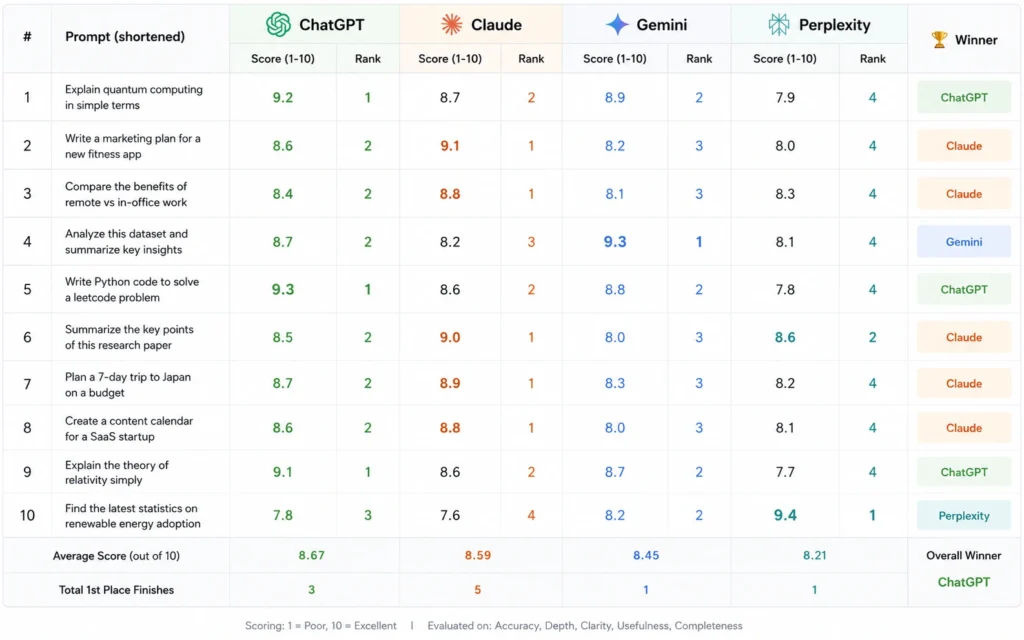
Here’s what the testing revealed:
Writing Quality: Claude wins. Its outputs need the least editing for tone and voice. ChatGPT is functional but generic. Gemini is inconsistent. Perplexity isn’t designed for this.
Speed: ChatGPT wins. It’s consistently the fastest across all task types. Claude is 2-3x slower on complex prompts. Gemini varies. Perplexity is fast for research but limited elsewhere.
Research Accuracy: Perplexity wins. Citations let you verify. ChatGPT hallucinates confidently. Claude refuses to cite. Gemini is inconsistent.
Coding: ChatGPT wins. It’s fastest and most accurate for debugging and writing functions. Claude is accurate but slow. Gemini makes logic errors. Perplexity isn’t competitive.
Long Documents: Claude wins. The 200K context window is unmatched. ChatGPT chokes on documents over 50 pages. Gemini struggles with coherence. Perplexity can’t handle uploads.
Free Tier Value: ChatGPT wins. Most generous limits, access to GPT-4o, broadest feature set. Claude’s free tier is restrictive. Gemini is generous but inconsistent. Perplexity’s free tier is good for research only.
tested prompts from this comparison are available for you to replicate the results.
The Decision Framework: Which Tool for Which Job
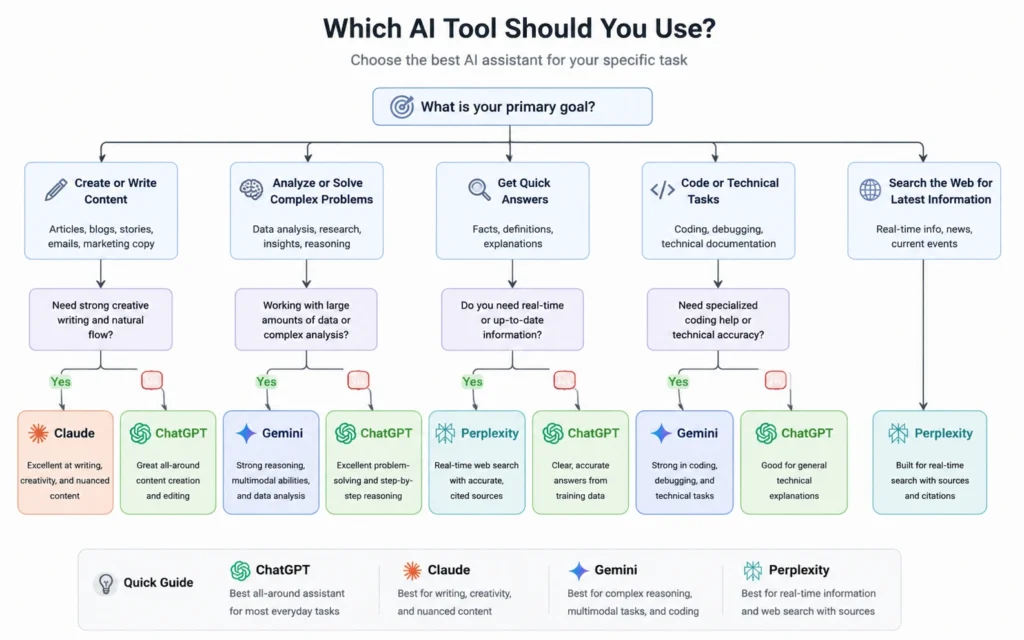
Stop asking which tool is best. Ask which tool is best for this specific task.
Use ChatGPT when:
- You need to code or debug
- You’re brainstorming ideas
- You want one tool for everything
- You’re a beginner testing AI workflows
- Speed matters more than perfect writing
Use Claude when:
- You write long-form content daily
- You need to analyze long documents
- Natural voice matters more than speed
- You’re drafting client-facing content
- You have time to wait for better outputs
Use Gemini when:
- You live in Google Workspace
- You need free access to advanced models
- You’re working with images or screenshots
- You’re experimenting without paying
- Consistency isn’t critical
Use Perplexity when:
- You’re researching a new topic
- You need citations and sources
- You want to verify claims quickly
- You’re doing competitive analysis
- You need current information with links
Don’t pay for multiple tools unless you use them for different jobs. If you write and research daily, ChatGPT Plus ($20/month) plus Perplexity Pro ($20/month) gives you everything. If you only write, Claude Pro ($20/month) is enough. If you’re testing, stick with free tiers for three months before paying for anything.
prompt structure matters more than the tool — learn to write better prompts first.
The Cost Breakdown: What You Actually Pay
All four tools have free tiers. Here’s what you get and what you don’t:
ChatGPT Free:
- Access to GPT-4o with usage limits
- File uploads (images, PDFs, text)
- Web browsing (limited)
- Basic data analysis
- Limit: During peak hours, you’ll get throttled back to GPT-3.5
ChatGPT Plus ($20/month):
- Unlimited GPT-4o access
- Priority access during peak hours
- Advanced data analysis
- Custom GPTs
- Image generation with DALL-E 3
- Worth it if: You use AI daily for work
Claude Free:
- Access to Claude 3.5 Sonnet
- Strict rate limits (messages per hour)
- Limit: You’ll hit caps quickly if testing workflows
Claude Pro ($20/month):
- 5x usage limits vs free tier
- Access to Claude 3 Opus (best model)
- 200K context window
- Priority access
- Worth it if: You write long-form content daily
Gemini Free:
- Access to Gemini Advanced (best model)
- Google Workspace integration
- Multimodal inputs
- Limit: Inconsistent quality, rate limits during peak
Gemini Advanced ($20/month):
- Higher usage limits
- Priority access
- Better consistency (theoretically)
- Worth it if: You’re deep in Google ecosystem
Perplexity Free:
- Basic search with citations
- Limited Pro searches per month
- Standard models
- Limit: Can’t access GPT-4 or Claude models
Perplexity Pro ($20/month):
- Unlimited Pro searches
- Access to GPT-4, Claude 3, and other models
- File uploads
- API access
- Worth it if: You do heavy research daily
The pattern: all paid tiers cost $20/month. Don’t pay for more than one unless you have a specific workflow that demands it. Start with free tiers. Upgrade only when you hit limits consistently.
AI productivity workflows show you how to maximize free tiers before paying.
Common Mistakes That Waste Time
Mistake 1: Using one tool for everything ChatGPT is versatile, but it’s not the best at everything. Using it for research means you’ll fact-check more. Using Claude for coding means you’ll wait longer. Match the tool to the task.
Mistake 2: Not fact-checking AI outputs All four tools make mistakes. ChatGPT hallucinates. Perplexity cites outdated sources. Claude refuses to answer valid questions. Gemini gives inconsistent results. Always verify critical information.
Mistake 3: Paying before testing Don’t upgrade to Plus, Pro, or Advanced until you’ve hit free tier limits consistently for two weeks. Most beginners don’t need paid features. They need better prompts.
Mistake 4: Writing vague prompts “Write me a blog post” fails every time. “Write a 1,200-word blog post about email marketing automation for B2B SaaS companies, targeting marketing managers, with three specific tool recommendations and implementation steps” works. Specificity beats model choice.
Mistake 5: Ignoring context limits Claude handles 200K tokens. ChatGPT handles less. If you’re uploading massive documents, know the limits. When you exceed them, the tool truncates silently. You won’t know it missed content unless you check.
Final Verdict: Which One Should You Actually Use?
Here’s my honest answer after three weeks of testing:
For beginners: Start with ChatGPT’s free tier. It’s the most versatile, has the best documentation, and teaches you the fundamentals of prompt engineering without restrictions. Use it for 30 days. Learn what AI can and can’t do.
For writers: Use Claude. The writing quality difference is real. If you draft client emails, blog posts, or long-form content daily, Claude saves you editing time. The slower speed is worth it.
For researchers: Use Perplexity. The citations alone justify it. If you do competitive analysis, market research, or need current information, Perplexity is faster and more reliable than asking ChatGPT to browse.
For Google users: Test Gemini. If you live in Docs and Gmail, the integration is genuinely useful. But don’t rely on it as your only tool — keep ChatGPT or Claude as backup for consistency.
For everyone else: Use ChatGPT Plus if you need one tool for everything. It’s not the best at any single task, but it’s good enough at all of them. That versatility matters when you’re juggling multiple workflows.
Don’t overthink this. Pick one tool. Use it for two weeks. If it doesn’t work, switch. The best AI tool is the one you actually use.
Frequently Asked Questions About ChatGPT vs Claude
Which is better for beginners: ChatGPT or Claude?
ChatGPT wins for beginners because of its simpler interface and broader feature set. Claude produces more natural writing, but ChatGPT’s free tier gives you more room to experiment without hitting usage limits. Start with ChatGPT, learn prompt engineering fundamentals, then test Claude if writing quality becomes a bottleneck.
Can I use all four tools for free?
Yes. ChatGPT, Claude, Gemini, and Perplexity all offer free tiers with usage limits. ChatGPT’s free tier is the most generous. Claude’s free tier has stricter rate limits. Gemini is free with a Google account. Perplexity’s free tier includes basic search. You can test all four without paying, but you’ll hit limits faster on Claude and Perplexity.
Should I pay for ChatGPT Plus or Claude Pro?
Pay for ChatGPT Plus if you need GPT-4 for complex reasoning or coding. Choose Claude Pro if you write long-form content daily and need the 200K context window. Don’t pay for both unless you use them for different tasks. Most beginners don’t need either — master the free tier first, then upgrade only when you consistently hit limits.
Is Perplexity better than Google for research?
Perplexity is faster for exploratory research where you want synthesized answers with citations. Google is better when you need to verify sources yourself or search for very recent information. Use both. Perplexity for quick overviews. Google for deep verification. The combination is more powerful than either alone.
What’s the main difference between ChatGPT and Claude?
ChatGPT excels at structured tasks, coding, and following complex instructions. Claude produces more natural, conversational writing and handles long documents better. ChatGPT is more versatile. Claude is better for pure writing. If you need one tool for everything, choose ChatGPT. If writing quality is your priority, choose Claude.
Continue Exploring
- Explore the full AI Tools section to find comparisons, tutorials, and workflows for every major AI platform.
- Master prompt engineering to get better results from any AI tool, regardless of which one you choose.











