The mistake is easy to spot. Someone adds five new AI tools to their stack, spends two hours building prompts, and saves almost no time. The output looks different, but the workload stays the same.
I made this mistake myself when AI writing tools first became useful. I spent nearly 90 minutes refining prompts for blog outlines that would have taken 45 minutes to create manually. The tool worked. The workflow didn’t.
That’s the difference that matters in 2026.
The best AI tools for content creators aren’t the ones with the longest feature list. They’re the ones that remove friction from work you repeat every week: research, scripting, editing, repurposing, publishing, and analysis.
Use fewer tools. Use them more deliberately.
This article focuses on where AI genuinely helps creators, where it wastes time, and how to build a practical content workflow around it.
Why Most AI Tools for Content Creators Are Solving the Wrong Problem
The strongest AI tools rarely replace creative judgment.
They replace repetitive effort.
Many creators start by asking, “Can AI write my content?”
A better question is: “Which part of my process keeps repeating?”
That shift changes everything.
If you produce YouTube videos, the bottleneck may be research. If you publish blogs, it may be outlining. If you create short-form content, it may be repurposing and caption generation.
AI works best when the task follows a pattern.
For example:
- Turning a transcript into platform-specific posts
- Generating headline variations
- Summarizing research
- Organizing interview notes
- Producing first-draft outlines
- Creating content briefs
Notice what’s missing.
Strategy.
Audience positioning.
Topic selection.
Strong creative instincts.
Those still belong to you.
The blunt verdict: creators who use AI to accelerate decisions outperform creators who use AI to avoid decisions.
Why Use AI Tools for Content Creators in 2026
The biggest advantage isn’t speed.
It’s throughput.
A creator publishing one YouTube video each week now has enough AI support to convert that single asset into:
- Blog posts
- LinkedIn posts
- X threads
- Email newsletters
- Short-form clips
- Content summaries
Without rebuilding everything from scratch.
One publishing session can produce a week’s worth of content.
That’s where most time savings appear.
A workflow I tested recently reduced content repurposing from roughly 70 minutes to 18 minutes. The improvement didn’t come from better prompts. It came from eliminating manual formatting and restructuring.
That’s an important distinction.
AI helps when the output format changes but the underlying information stays the same.
It struggles when originality is the product.
Use AI for transformation more than creation.
Setup Guide: Build Around Jobs, Not Features
Most creator tool stacks become bloated because tools are chosen for features.
Choose them for jobs instead.
A simple creator stack usually covers five functions:
Research
Tools like ChatGPT help summarize sources, organize notes, and explore angles.
Writing
Draft generation, headline testing, content briefs, and structural editing.
Video Production
Script refinement, shot planning, and transcript generation.
Design
Thumbnail concepts, visual ideation, and asset creation.
Repurposing
Transforming long-form content into platform-specific formats.
The setup I recommend for most intermediate creators is surprisingly small:
- One AI assistant
- One transcription tool
- One design tool
- One publishing platform
Everything else should earn its place.
I’ve seen creators spend more time managing subscriptions than creating content.
That’s not efficiency.
That’s administration disguised as productivity.
Workflow: A Practical AI Content System That Actually Scales
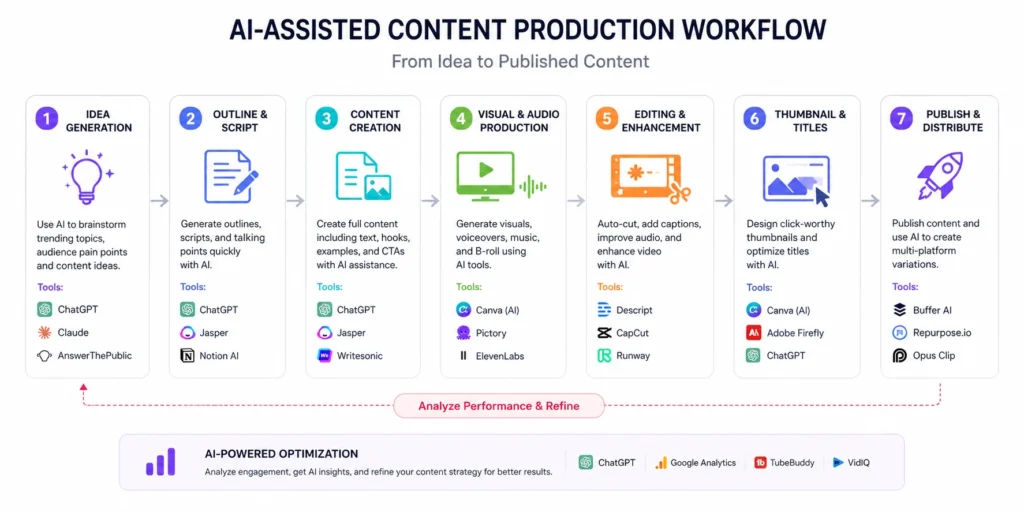
The strongest creator workflows follow a simple sequence.
Not because it’s perfect.
Because it’s repeatable.
Step 1: Research Before Generation
Gather source material first.
Articles.
Notes.
Transcripts.
Interviews.
AI performs better when it works from information instead of imagination.
This is where many weak outputs begin.
The model isn’t wrong.
It’s under-informed.
Step 2: Build the Primary Asset
Create the largest content piece first.
Usually:
- YouTube video
- Podcast episode
- Long-form article
Everything else becomes easier afterward.
A 15-minute video contains enough material for multiple content formats.
A tweet rarely expands into a strong video.
Work from large to small.
Step 3: Repurpose Systematically
Now use AI for transformation.
Examples:
Video transcript → Blog article
Blog article → Newsletter
Newsletter → LinkedIn post
Video transcript → Short-form clips
This is one of the few places where AI consistently delivers obvious returns.
The information already exists.
The structure changes.
Step 4: Human Review
Always.
No exceptions.
AI frequently introduces subtle mistakes that survive basic editing.
Especially in examples.
Especially in statistics.
Especially in explanations that sound correct.
The review stage protects credibility.
Skip it and the time savings disappear later.
The AI Tools for Content Creators That Consistently Earn Their Place
Not every tool deserves a subscription.
The following categories repeatedly justify their cost.
AI Writing Assistants
Best for:
- Outlines
- Drafts
- Research assistance
- Content planning
Weak for:
- Original opinions
- Industry-specific expertise
- Strong storytelling
The trade-off is straightforward.
You gain speed but lose some distinctiveness unless you edit aggressively.
AI Transcription Tools
This category often delivers the fastest return.
A one-hour interview can become searchable text in minutes.
That unlocks newsletters, articles, social posts, and summaries.
Creators underestimate how valuable searchable transcripts become over time.
AI Video Editing Tools
These tools help with:
- Silence removal
- Clip selection
- Caption generation
- Basic editing
They save time.
They do not replace editing judgment.
Good pacing still requires human decisions.
AI Image Generation Tools
Useful for:
- Concept visualization
- Thumbnail ideation
- Creative mockups
Less useful for:
- Highly specific branded assets
- Consistent visual identity systems
Many creators discover this after generating dozens of attractive images that don’t fit their brand.
Pro Tips That Make AI More Useful Than Most Tutorials Suggest
Most prompt advice focuses on wording.
Workflow advice creates larger gains.
Give AI Context Before Tasks
A 500-word brief usually produces better results than a clever prompt.
Context beats prompt tricks.
Almost every time.
Create Reusable Inputs
Build templates.
Not prompts.
Templates capture:
- Audience
- Goal
- Format
- Constraints
This reduces variation and improves consistency.
Measure Review Time
A workflow only works if review time stays reasonable.
I use a simple rule:
If AI saves 20 minutes but adds 18 minutes of review, it isn’t helping much.
Track the entire process.
Not just generation speed.
Don’t Automate Topic Selection
This is where many creators lose their edge.
The most valuable content decisions usually come from:
- Audience questions
- Customer conversations
- Industry experience
- Personal observation
AI can organize those signals.
It shouldn’t replace them.
Frequently Asked Questions About AI Tools for Content Creators
What are the best AI tools for content creators in 2026?
The best tools depend on the task. Writing assistants, transcription software, AI video editors, and repurposing tools consistently provide the strongest return because they reduce repetitive work rather than attempting to replace creative judgment.
Are AI tools replacing content creators?
No. They are changing how content gets produced. AI handles parts of research, drafting, editing, and repurposing, but creators still provide strategy, expertise, audience understanding, and editorial judgment.
Which AI tool saves creators the most time?
For many creators, transcription and repurposing tools deliver the largest time savings. They transform existing content into multiple formats without requiring new research or production.
Should beginners use multiple AI tools?
Usually not. Most beginners benefit more from mastering one assistant and one production tool than managing a large software stack. Complexity often creates more friction than efficiency.
Are AI-generated articles good for SEO?
AI-generated drafts can help with production speed, but publishing unedited AI content rarely creates a competitive advantage. Human expertise, original observations, and audience relevance remain essential.
Continue exploring:
- Content Creation Category Hub: Explore broader content systems, publishing workflows, and creator growth strategies.
- YouTube content workflow: Learn how production, scripting, and publishing fit together inside a repeatable video system.