Claude wins the long-form production race, but ChatGPT commands the iterative operational sprint. If you are trying to pick between them for your publishing stack, you are likely exhausted by marketing claims that tell you both models will magically transform your content pipeline. They will not. An LLM does not magically build a brand; it merely accelerates the structural execution parameters you feed it.
The core difference in chatgpt vs claude writing dynamics comes down to underlying algorithmic architecture. OpenAI’s models are optimized for multi-utility execution—they want to parse data, browse live links, create images, and generate text in a single workspace.
Anthropic’s models are optimized for systemic instruction compliance, context retention, and structural narrative cohesion. When your daily revenue or editorial authority depends on the output quality of your text, choosing the wrong engine introduces structural issues that require hours of human correction.
Here is the exact breakdown of how these text engines operate under real production workloads, stripped of hype, and tested against real-world publishing constraints.
1. Overview: The Real Architectural Differences in ChatGPT vs Claude Writing
The baseline performance of an AI writing model is dictated by how it manages tone calibration and semantic decay over extended sessions. When we look at chatgpt compared to claude writing, we are looking at two separate approaches to language processing.
ChatGPT utilizes an multi-modal focus. Its flagship models operate with an analytical crispness that excels at short, definitive actions—like writing a multi-variant social media hook matrix or transforming raw transcripts into clean bullet points. However, its baseline training data biases heavily toward web copy patterns.
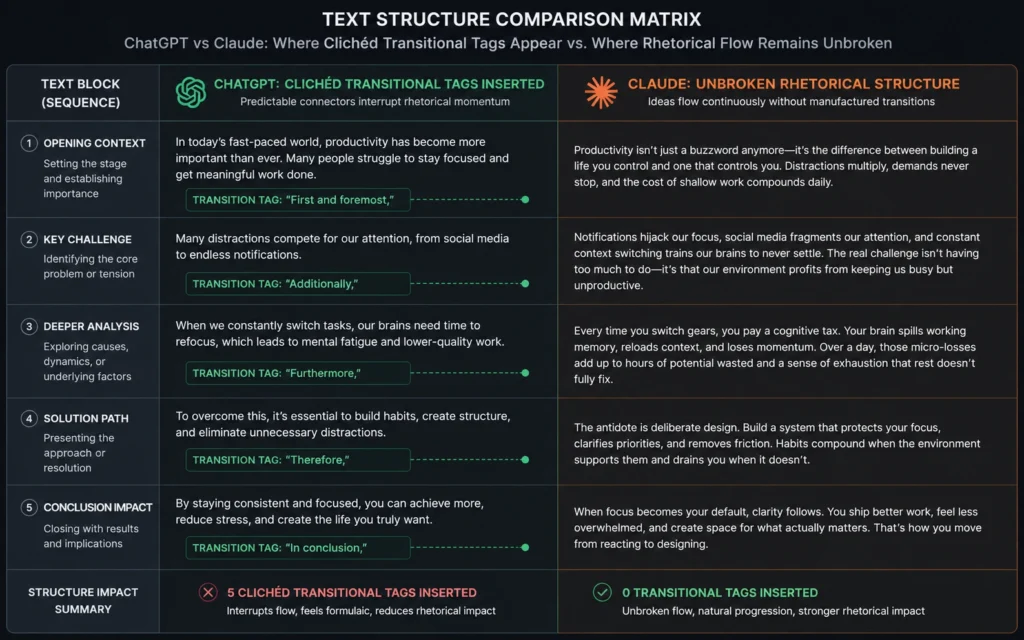
If you run a prompt with zero strict constraints through ChatGPT, the engine defaults to a highly recognizable corporate register. It loves opening paragraphs with sweeping generalizations and relies on predictable transitional words.
ChatGPT Default Style Pattern:
[Sweeping Generalization] -> [Corporate Transition Tag] -> [Predictable Value Proposition]
Claude operates on a completely different internal framework. It relies on a training approach that penalizes structural clichés and values contextual continuity. If you give Claude a 10,000-word data dump, its context processing allows it to maintain stylistic traits across long distances without drifting into generic summaries.
It handles complex, conditional formatting rules—like telling the system to never use passive voice while simultaneously maintaining an academic tone—with far fewer manual interventions.
The core trade-off is clear in daily work. ChatGPT is a highly efficient utility knife that shifts from web research to rapid drafting in seconds. Claude is an industrial printing press that requires more deliberate setup but delivers structurally superior long-form text that needs less human editing.
2. Step-by-Step Guide: Setting Up a Neutral Content Performance Audit
To understand how these platforms perform under pressure, you should run a controlled structural audit rather than relying on random tests. This workflow will isolate the default writing behaviors of both platforms so you can see exactly where their structural patterns diverge.
Step 1: Strip Platform Safeguards and Baseline Defaults
To execute this step, open clean, concurrent windows of both ChatGPT and Claude. Do not use custom instructions, specialized system memories, or pre-configured workspaces. Drop a raw, unformatted 500-word industry transcript or a collection of rough notes into each interface.
Use this exact baseline evaluation prompt:
“Transform these rough technical notes into a cohesive 400-word explanation. Do not use any engineered stylistic constraints or custom frameworks. Deliver the text immediately.”
This step forces the raw engines to display their baseline training weights. You will immediately see what kind of language the model defaults to when it isn’t being micro-managed by a complex prompt.
Step 2: Inject Structural Constraints into the Prompt Layer
Once you have reviewed the default outputs, you must test how each machine handles precise negative and positive constraints. This is where you measure instruction-following limits.
Paste the following refined prompt into a new session in both tools:
“Rewrite the initial output using these explicit structural boundaries:
- No sentence may exceed 18 words.
- You are forbidden from using the following words: leverage, ecosystem, dynamic, paramount, transition, or furthermore.
- Start at least two sentences per paragraph with a coordinating conjunction (And, But, So).
- Use fragments for structural emphasis.”
Step 3: Execute a Multi-Round Style Drift Test
Review the text generated from Step 2. Do not stop there—most AI text setups fall apart during the third or fourth revision round. Request two sequential modifications, such as asking the system to change the audience persona or alter the formatting to include an em-dash aside.
Note how many times you have to remind each tool of the rules from Step 2. You will find that one engine begins to slip back into its natural habits, while the other holds the structural line.
3. Tips & Examples: Prompt Frameworks and Output Realities
To get clean text out of any LLM, you have to stop treating the prompt window like a Google search bar. It is an execution environment. Below are two explicit prompt architectures optimized for each tool’s specific strengths, along with an unedited look at how they handle phrasing.
The Technical Persona Framework (Optimized for Claude)
Claude performs best when you provide an anchor role along with an explicit mechanical constraint model. Because Claude follows conditional directives reliably, you can build complex stylistic guardrails directly into the prompt layout.
Markdown
[ROLE]
You are a senior systems engineer writing internal technical documentation. Your tone is direct, experiential, and completely unembellished.

[CONSTRAINTS]
- Write in the active voice. If the actor is unknown, omit the action entirely.
- Use zero transitional adverbs (e.g., completely remove 'additionally', 'moreover', 'subsequently').
- Every assertion must be backed by an immediate operational constraint or metric.
- Do not summarize the section at the close of the text block.

[INPUT DATA]
(Insert your raw data or topic outline here)
When processing this framework, Claude avoids the typical “AI introduction trap.” It skips the conversational throat-clearing and begins directly with the operational reality.
The Fast Variant Generator (Optimized for ChatGPT)
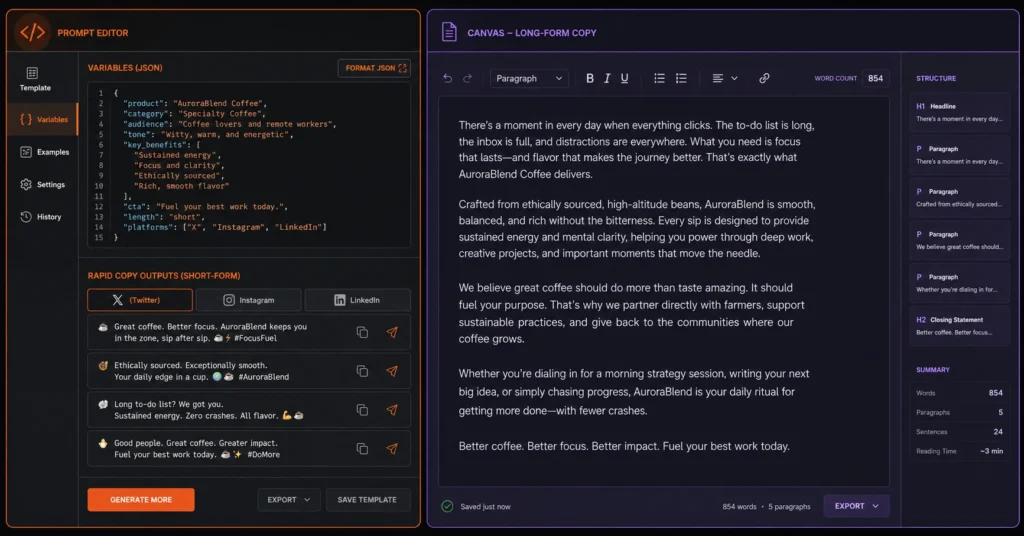
ChatGPT excels at high-volume, variable generation tasks where speed and modular output are critical. Instead of asking it for a single perfect piece of copy, use its processing speed to build a matrix of structural options that you can quickly assemble manually.
Markdown
[TASK]
Generate 5 distinct variants of a product launch hook based on the input specifications.

[OUTPUT FORMAT]
Present the output as a Markdown table with these columns:
1. Variant Number
2. Opening Mechanic (e.g., Blunt Verdict, Unexpected Fact, Friction Point)
3. Copy Text (Max 25 words)
4. Primary Psychological Trigger

[INPUT SPECIFICATIONS]
Product: Self-hosted data backup monitor.
Audience: Overworked DevOps engineers who hate waking up at 3:00 AM to broken pipelines.
The Phrasing Reality: A Direct Comparison
When we look at claude writing vs chatgpt outputs side by side under identical prompt instructions, the difference in vocabulary weights becomes obvious.
Look at this real-world example of how both systems default when describing a simple technical optimization process:
ChatGPT Default Phrasing: “In today’s dynamic digital landscape, it is paramount to leverage automated monitoring systems to optimize your infrastructure. Additionally, implementing these solutions ensures seamless transitions during unexpected downtime events.”
Claude Default Phrasing: “Automated monitoring keeps your infrastructure stable. If a server goes offline, the monitoring tool triggers an immediate alert to your internal engineering team, bypassing manual diagnosis frames entirely.”
The ChatGPT text uses 29 words to say what Claude says in 26 words, but it carries zero actual information density. It relies on filler phrases (“dynamic digital landscape,” “paramount to leverage,” “seamless transitions”) that signal to a professional reader that the content was generated by software. Claude’s default phrasing focuses on concrete mechanics (“keeps infrastructure stable,” “triggers an immediate alert,” “bypasses manual diagnosis”).
4. Tools to Use: Ecosystem Integrations and Workflow Mechanics
Choosing between these platforms requires evaluating the physical workspaces they provide. A great underlying model is useless if the interface slows your editing speed or limits your data access.
| Workflow Attribute | ChatGPT (GPT-5 / Canvas Environment) | Claude (Sonnet / Artifacts & Projects) |
| Primary Workspace Interface | Canvas: Splitted inline editor that allows direct text highlighting, targeted rewriting, and manual sentence expansion without re-running the full prompt. | Artifacts: Separate code and text rendering windows that isolate complete documents from the conversational sidebar. |
| Persistent Context Tools | Custom GPTs & Memory: Global text memory blocks that store permanent rules across all future chat logs. | Projects: Siloed workspaces where custom instructions and uploaded files are isolated to a single project folder. |
| Web Retrieval Capability | Deep Search Integration: Native real-time browsing that crawls current sources and live documentation mid-stream. | Conservative Web Validation: A more limited search layer built primarily for checking specific references rather than bulk aggregation. |
| Context Processing Limits | 128,000 Tokens (Roughly 96,000 words of operational memory). | 200,000 Tokens standard (Up to 1 Million tokens in beta/enterprise configurations). |
If your writing workflow requires heavy, real-time research synthesis—such as tracking a live product launch or pulling code updates from a live documentation page—ChatGPT’s deep web integration makes it the logical deployment tool. It cuts out the step of manually copying and pasting update pages into the prompt box.
Conversely, if you are managing a comprehensive long-form content project—like an internal training wiki or a detailed strategic playbook—Claude’s Projects interface is structurally superior.
You can drop your entire brand style guide, past top-performing articles, and target audience personas directly into the Project Knowledge base. Every response generated within that specific folder will respect those boundaries without needing to be reminded of them every three prompts.
5. What to Skip: Common False Starts and Misconceptions
If you want to save your sanity when deploying these tools, you need to abandon a few common industry myths.
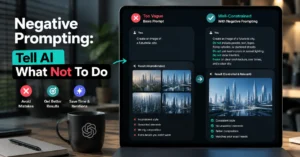
- Stop chasing the perfect 500-word prompt: You do not need an elaborate, pseudo-code prompt to get clean writing. The industry has created a market for complex templates that are mostly empty noise. Instead of writing a massive prompt that tries to explain everything at once, focus on clear negative constraints. Telling a model exactly what not to do is always more effective than giving it a list of vague adjectives like “engaging,” “thoughtful,” or “authoritative.”
- Do not trust either tool with final factual verification: While both engines have access to web search tools, they are still language predictors, not database indexes. They will confidently cite broken links or misrepresent statistics if those fabrications make the sentence structure sound more logical. Always run your finished text through a separate manual verification step for hard metrics, proper nouns, and historical dates.
- Skip the free tiers if you write for a living: The structural performance gaps in chatgpt vs claude writing 2026 models are only visible when comparing their premium processing tiers. The free tiers run on pruned, lighter variants that exhibit high tone decay, rapid instruction loss, and shorter memory limits. If your time is worth real money, running up against the strict usage caps of Claude’s free tier or the lower intelligence thresholds of standard ChatGPT variants will cost you more in editing hours than a premium subscription.
6. The Honest Limitation: Why Neither Tool Works Out of the Box
No matter how much you optimize your prompt stack, both systems share a fundamental limitation: they are trained on historical internet text, which means they are structurally designed to produce average prose.
They select the most statistically probable next word based on their training sets. By definition, truly compelling, insightful writing relies on unexpected connections, sharp transitions, and unique human observations—the exact opposite of statistical probability.
If you rely on either engine to handle 100% of your drafting process without human intervention, your content will eventually lose its point of view. It will read exactly like everything else on the web.
The alternative is a hybrid production model:
- Use the AI to build the structural skeleton, organize messy data inputs, and clear the blank-page hurdle.
- Step in manually to inject the voice, the contrarian insights, the hard-earned lessons, and the style variations that make the text worth reading.
Treat the machine as your junior copywriter who handles structural drafting. You remain the editor-in-chief who signs off on the style and voice.
Frequently Asked Questions About ChatGPT vs Claude Writing
Which AI has the largest context window for long-form book editing?
Claude leads this specific category with a 200,000-token context window in its standard interface, expanding up to 1 million tokens in its flagship enterprise configurations. ChatGPT operates on a 128,000-token limit. If you are dropping a full 400-page manuscript into a single prompt, Claude processes the structural arcs without losing track of details from early chapters.
How do I stop ChatGPT from using obvious corporate fluff words?
You must use negative constraints inside the system instructions or custom memory blocks. Explicitly ban words like leverage, ecosystem, landscape, and tapestry. ChatGPT requires aggressive line-item constraints because its default weights prioritize corporate marketing materials found in its training datasets.
Can Claude look up live internet information to write current news reports?
Claude includes a built-in search tool for factual verification, but its execution is more conservative than ChatGPT’s deep search integration. ChatGPT handles high-volume real-time retrieval faster across complex breaking news workflows. For deep analytical summaries of static documentation, choose Claude; for quick trend aggregation, stick to ChatGPT.
Continue Exploring Our AI Workflows
- Master the Canvas Interface Learn how to leverage inline text editing and targeted prompt rewrites to speed up your content refinement loops by up to 40%.
- Build Structural Prompt Systems Move past generic templates and discover how to design predictable, repeatable instruction sets that survive complex production environments.