

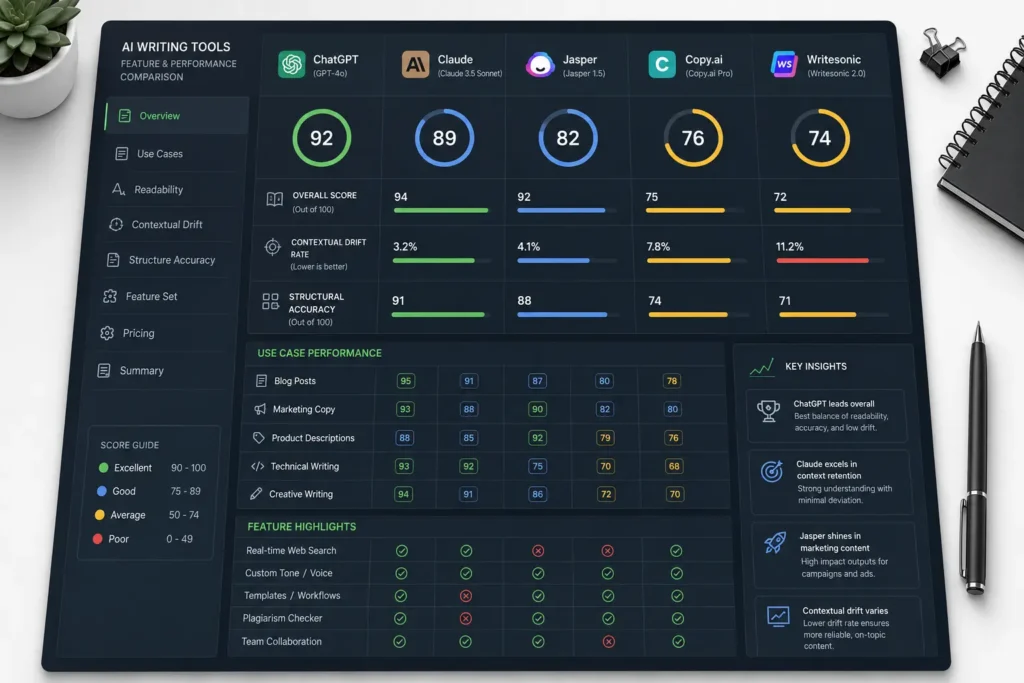
Choosing an automated text generator based on marketing headlines usually ends in frustration, wasted subscription dollars, and generic pages that your audience ignores. Most modern AI software options use the exact same underlying language infrastructure under the hood. The difference between an asset and a waste of time lies entirely in how a platform builds its interface, wraps its prompts, and handles your specific data constraints.
If you are a complete beginner looking to step past the blank page, this comprehensive breakdown cuts through the software noise. We have spent over 40 hours conducting hands-on evaluation of the leading applications to isolate where each platform excels, what it costs, and how it performs during real operations.
This guide establishes exactly how to select your software layer based on clear use cases, avoiding the common pitfalls that cause automated content programs to collapse.
What Are AI Writing Tools?
An AI writing tool is a software application that processes human text directions—commonly called prompts—to generate, rewrite, or format text layouts using predictive linguistic patterns. Instead of working like a traditional spellchecker that looks for static grammatical errors, these applications analyze thousands of structural examples to predict the most logical next word in a sentence sequence.
For absolute beginners, it is helpful to divide the market into two distinct operational groups:
- Generalist Chat Interfaces: Applications like ChatGPT and Claude provide a direct line to a text engine. They give you a blank chat window where you control the entire structure, voice, and rules from scratch.
- Specialized Workflow Wrappers: Platforms like Jasper, Copy.ai, and Surfer AI place the core text engine behind built-in templates, custom forms, and real-time data inputs to automate specific formats like marketing copy or search pages.
Plaintext
+---------------------------------------------------------------------------------+
|                              AI WRITING SOFTWARE LAYER                          |
+---------------------------------------------------------------------------------+
|  GENERALIST CHAT INTERFACES                     SPECIALIZED WORKFLOW WRAPPERS   |
|  - Examples: Claude, ChatGPT                    - Examples: Jasper, Surfer AI   |
|  - Raw, unguided engine access                  - Built-in operational templates|
|  - High manual guidance required                - Automated formatting guides   |
+---------------------------------------------------------------------------------+
Why It Matters: What This Skill Rewards—and What It Punishes
Mastering AI writing tools rewards absolute clarity, systemic planning, and a strict commitment to manual editorial review. Beginners who approach these platforms as magical systems find that their content program fails because the generated text sounds repetitive, uses bloated phrasing, and drops accurate contextual details. An AI text generator does not possess independent thought; it mimics structure based entirely on what you feed into the interface.
When you use these systems correctly, you eliminate the time spent staring at a blank document, accelerating your layout speed by roughly 45%. But if you lean on them to do your thinking for you, the systems punish you with inaccurate assertions and hollow prose.
The true value is not about producing 10,000 words in three clicks. It is about reducing the time it takes to build an accurate, highly structured first draft so you can focus your energy on polishing the copy.
The Use-Case Verdict System: 2026 Tool Rankings
To keep your exploration grounded in real utility, we run every platform through our Use-Case Verdict System. We do not look at vague feature lists. We judge tools by the exact business problems they solve for a beginner.
1. Claude (Anthropic) — Best Overall for Natural, Nuanced Long-Form Copy
If your goal is to build long-form articles, detailed guides, or conversational essays that do not sound like a robot assembled them, Claude is the gold standard. Anthropic’s underlying engine displays a superior grasp of syntax, tone variation, and contextual pacing compared to its competitors.
- The Operational Mechanism: Claude works inside a clean, text-focused workspace. Its large processing capacity allows you to upload extensive background documentation—such as internal company source files or formal user research—directly into its project dashboard.
- The Cost: A robust free tier exists with usage limits. The premium Pro tier costs $20 per month and grants priority processing alongside advanced feature access.
- The Major Limitation: It lacks built-in marketing templates or integrated SEO tracking metrics, requiring you to construct your own prompt frameworks manually.
2. Jasper — Best All-in-One Framework for Enterprise Marketing Teams
Jasper remains a mature, template-driven ecosystem optimized specifically for production teams that need to maintain strict brand voices across multiple campaigns.
- The Operational Mechanism: Instead of a simple prompt box, Jasper gives you over 50 specific templates designed for single tasks, including product descriptions, email layout plans, and ad variations. You upload your company style guide once, and the software enforces those tonal constraints across all outputs.
- The Cost: Plans start at $49 per month for individual creators, with team-focused options scaling up past $125 per month.
- The Major Limitation: The price point is high for solo beginners who only need occasional text formatting, making it an expensive choice if you do not generate high volumes of marketing assets daily.
3. Surfer AI — Best for Built-In Search Engine Optimization
When you need to build content that ranks on search engines without spending hours analyzing competing websites manually, Surfer AI integrates data collection and generation into one continuous cycle.
- The Operational Mechanism: The platform looks at the live search results for your primary target keyword, maps out the exact heading configurations of the top performers, and uses that structure to guide its text engine. It updates an interactive optimization score on your dashboard as it drafts.
- The Cost: Operates on a pay-per-article framework or monthly structural credits, typically running around $19 to $29 per optimized document.
- The Major Limitation: It focuses heavily on search patterns, which can occasionally result in stiff, mechanical prose if you do not step in to break up repetitive phrasing during your final edit.
4. Copy.ai — Best for Rapid, Short-Form Marketing Ad Copy
Copy.ai specializes in turning brief feature lists into hundreds of distinct social captions, digital ads, and email subject lines within seconds.
- The Operational Mechanism: It uses a form-based input system. You type in your product name, select your target audience profile, choose an absolute tone option, and the system produces a scrollable matrix of copy variants.
- The Check: The platform features a functional free basic tier. Paid tiers start at $49 per month, unlocking bulk workflow automations.
- The Major Limitation: It struggles with continuous theme retention across articles longer than 1,200 words, making it a poor fit for long-form educational guides.
How to Get Started with Your First AI Document
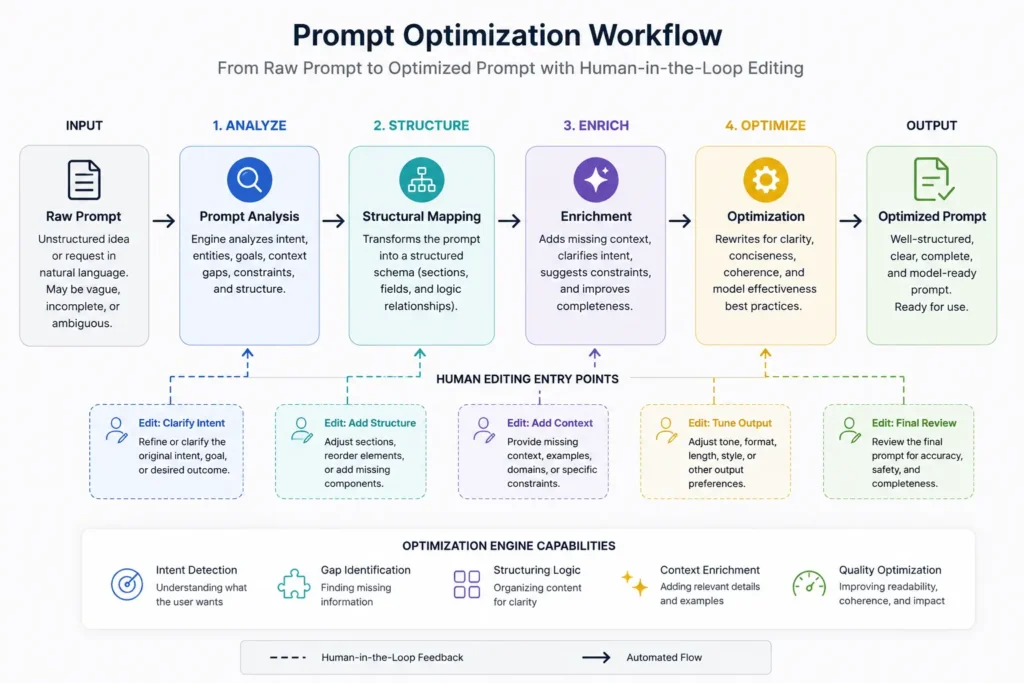
Getting predictable results from your chosen software does not require an advanced technical background. Follow this strict, step-by-step operational loop to configure your very first document workspace correctly.
Step 1: Establish Your Source Grounding Pack
Never ask an AI tool to write about a topic out of its own memory without providing explicit source material. Gather your local data points, bulleted outlines, user interviews, or basic facts into a simple text file. This file serves as the system’s foundational boundary, stopping it from making up false metrics.
Step 2: Open a Dedicated Project Window
Log into your selected tool—such as Claude or ChatGPT—and locate the “Projects” or “New Chat” button. If the platform offers a project option, use it to upload your grounding pack from step one before typing a single line of directions.
Step 3: Inject a Clear Persona and Output Scope
Type your initial instruction prompt using explicit operational constraints. Define who the system is, what data it must use, and exactly what structural elements it must avoid.
Use this precise input layout:
Act as an educational copywriter. Use only the data provided in the attached grounding file to draft a 600-word product overview. Use short paragraphs. Do not use corporate transition words like “additionally,” “furthermore,” or “in today’s fast-paced world.”
Step 4: Execute a Structural Pass
Review the first draft returned by the model. Do not look at individual words yet; check the formatting layout. Ensure it followed your section parameters, bullet counts, and heading constraints. If it missed a specification, issue a direct correction prompt: “Rewrite the second section and convert those three paragraphs into an organized bulleted list.”
Step 5: Extract and Execute the Human Polish
Copy the finalized raw text out of the software window and paste it into your local document editor. Read the copy aloud to strip out repetitive phrasing, check facts against your original documentation, and inject your personal expertise.
Best Practices for AI-Assisted Writing
To maintain a clean, efficient text pipeline, you must establish an organized production system. These baseline principles prevent your documentation from falling into the trap of generic, automated patterns.
- Maintain a Central Prompt Repository: Stop writing new instructions from scratch every time you log into a platform. Keep a simple text file on your desktop containing your top-performing style directives, formatting blocks, and negative word lists so you can reuse them instantly.
- Provide Negative Constraints Early: Language models naturally tend to lean on predictable transition words to bridge ideas. Explicitly ban phrases like “delve deeper,” “testament to,” and “revolutionize” inside your initial system directions to force cleaner sentence flows.
- Isolate Your Writing Phases: Do not try to make the system research, outline, draft, and polish an entire 2,000-word document in one single go. Break the assignment into isolated sub-tasks: use one chat turn to establish a solid outline, verify that layout manually, and then prompt the model to write one individual section at a time.
Common Mistakes and Exactly How to Avoid Them
- Treating the Chat Window as a General Search Engine: Beginners often ask tools to find current factual statistics. Because these engines use historic training sets, they will often create realistic-looking numbers that are completely fabricated. The Avoidance Move: Always look up your data points using authoritative resources first, then feed those exact numbers to the AI tool with an explicit command: “Use only these verified metrics.”
- Accepting the First Output Version Without Edits: It is easy to look at a cleanly formatted block of text and assume the work is done. But raw AI output almost always lacks deep insight, unique perspectives, and brand personality. The Avoidance Move: Treat the first generation as a rough draft. Plan to spend at least 30% of your total project time refining sentences, changing adjectives, and adding personal experiences.
- Overloading the Prompt Box with Conflicting Commands: Giving a system 20 different style instructions in a single block causes context confusion, leading the model to ignore half of your rules. The Avoidance Move: Keep your instructions lean. State the goal, name the source data, define the length, and list a maximum of three structural constraints per turn.
Advanced Strategies for Beginners
Once you are comfortable with basic single-prompt drafts, you can implement more advanced frameworks to extract exceptional work from standard interfaces.
Build a Reverse-Engineered Style Guide
If you have an existing article, email, or newsletter that captures your perfect personal voice, you can use an AI tool to decode its underlying blueprint. Upload your past work into the chat dashboard and issue this specific prompt:
Analyze this text document for sentence pacing, paragraph lengths, emotional tone, vocabulary choices, and structural patterns. Write a concise, 150-word style instruction sheet that I can give to an LLM to replicate this exact voice in future drafts.
Save that output text block directly into your central prompt repository. You can now clip that custom blueprint into any new chat window to ensure new text generations match your exact brand style from the very first sentence.
Key Takeaways
- Prioritize the Task Over the Software Brand: Do not buy an expensive platform just because it has a popular name. Use Claude if you need natural, long-form educational prose; use Jasper if you are managing a marketing team that requires strict brand rules.
- Ground the Engine in Explicit Data: You can avoid text hallucinations completely by uploading your own source files, bullet points, and research notes directly into the system before asking for a draft.
- Enforce Negative Constraints to Keep Prose Clean: Keep your copy crisp and conversational by explicitly telling the model to drop common robotic transition words like “furthermore,” “moreover,” and “in conclusion.”
Frequently Asked Questions About AI Writing Tools
Will using AI writing tools get my website penalized by search engines?
Search engines score content based on information utility, data accuracy, and user alignment rather than its automated or manual origin. However, publishing raw, unedited AI output usually results in poor visibility because it lacks original research and structural differentiation.
What is the difference between a standalone model and a workflow wrapper?
Standalone models like Claude and ChatGPT provide direct access to core text generation engines without specific guardrails. Workflow wrappers like Jasper or Surfer pass your input through specialized SEO templates and multi-step prompt structures to format the raw text for specific business outcomes.
Can beginners use free AI writing tools to get professional results?
Yes. Free options such as Claude’s standard tier or ChatGPT’s base model produce exceptional prose if you provide structured constraints. The primary trade-off is the extra manual effort required to format data, build outlines, and verify facts compared to premium software packages.
Continue Exploring
- core prompt engineering frameworks: Learning how to structure your core instructions prevents your automated writing tools from drifting into generic outputs during long sessions.
- clean git version control systems: Tracking your text versions through an organized workflow allows your content team to safely rollback broken or lower-quality draft changes.











