

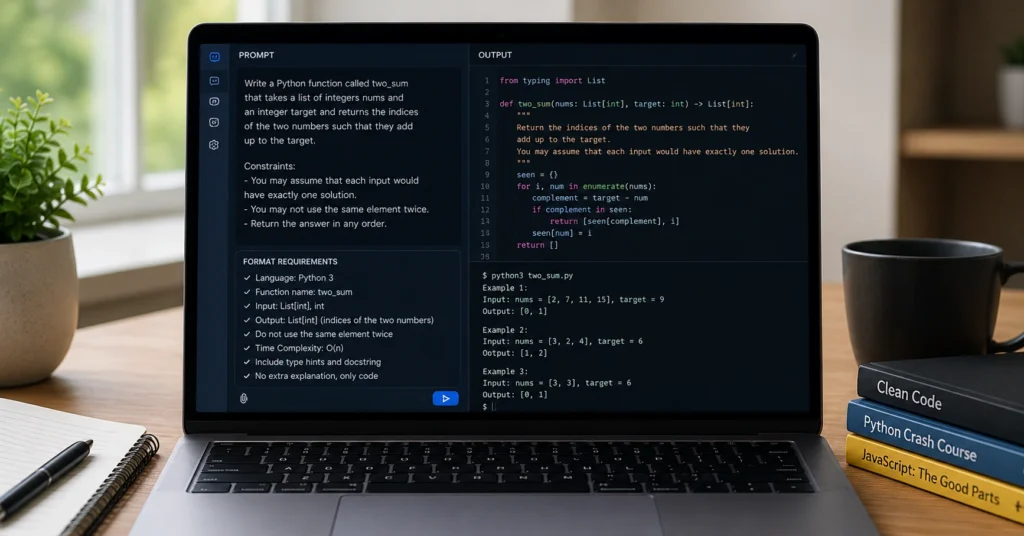
ChatGPT doesn’t write code. It predicts token sequences based on training data. The moment you treat it like a compiler, you’ll waste hours debugging syntax it confidently hallucinated. Using chatgpt for coding works only when you reverse the relationship. You become the architect. The model becomes the translator.
Beginners lose trust in AI code generation because they ask for too much too early. They type “build me a login page” and expect a production-ready file. It doesn’t work that way. It works when you split the job into discrete, testable pieces. When you feed constraints instead of wishes. When you read the output like a draft, not a final build.
This guide walks you through the exact workflow. You’ll get the prompt structure that actually compiles. You’ll see how to isolate failures before they snowball. You’ll learn where the tool stops being useful and what to switch to instead. By the end, you won’t need to guess. You’ll have a repeatable system.
What ChatGPT Actually Does When You Ask It to Write Code
The model doesn’t understand logic. It understands probability. When you request a function, it scans patterns from millions of public repositories, documentation pages, and forum discussions. It stitches together what usually appears next. That strength creates a specific weakness: it prioritizes familiarity over accuracy.
Most beginners hit this wall when they copy-paste the first response. They run it. It throws a syntax error. They paste the error back. The model adjusts. It runs again. It works. But only because the error was simple. The real problem hides in the architecture. The model mixes Python 3.9 syntax with 3.12 dependencies. It imports a library that was deprecated in 2024. It skips environment variables because it never ran the code itself.
Treat every output as a draft written by a fast, confident junior developer. You wouldn’t deploy a junior’s first pull request to production. You review it. You test it. You ask for clarification. The same rule applies here. You gain speed, not accuracy. The speed comes from skipping blank-page paralysis. The accuracy still requires your judgment.
The Setup: Preparing Your Workspace Before You Type a Single Prompt
Speed means nothing if you can’t verify what you’re building. Open your IDE or a simple code editor before you start. I use VS Code with a local terminal running. You don’t need a complex environment. You need a place to paste, run, and read errors without friction.
Create a dedicated folder for the session. Name it clearly. Set up a virtual environment or package manager from the start. If you skip this, you’ll spend forty minutes later wondering why the script can’t find the dependencies you asked for. The model assumes your environment matches the training data. It won’t.
Keep two browser tabs open. One holds the ChatGPT session. The other holds the official documentation for the language or framework you’re using. Cross-reference imports. Check version compatibility. The model will give you working examples. It rarely warns you about breaking changes.
The Setup: Preparing Your Workspace Before You Type a Single Prompt
[Structural Break]
- Open IDE + terminal.
- Initialize clean environment.
- Keep documentation tab ready.
- Disable auto-formatting until code runs.
Stop chasing perfect configuration before you write. You’ll waste time tweaking linter rules while the prompt sits idle. Run the script first. Fix the syntax later. Configuration is a polish problem. Execution is a logic problem.
Step 1: Define the Task, Not the Syntax (The Prompt Structure)
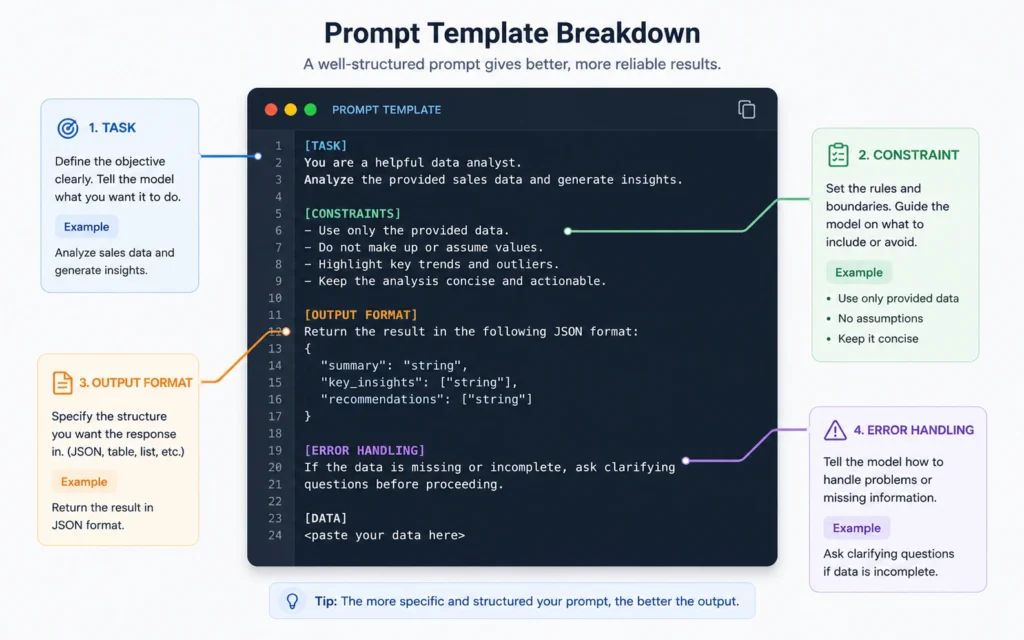
A vague prompt produces vague code. A specific prompt produces usable drafts. The difference lives in the structure. You need four components in every coding request: Task, Constraints, Output Format, and Error Handling.
Task tells the model exactly what the script should do. “Read a CSV file, filter rows where the status column says pending, and export the result to a new JSON file.” That’s a complete instruction. It leaves no room for interpretation.
Constraints set the boundaries. Language version. Required libraries. File path assumptions. Performance limits. You’re not asking for the best approach. You’re asking for a reliable approach that fits your stack.
Output format controls the response. Ask for code only. Ask for comments. Ask for a plain-text explanation of dependencies. The model will mix prose and script unless you separate them.
Error handling forces resilience. Tell it to catch exceptions. Request fallback behavior. Specify what should happen when the input file doesn’t exist.
Use this template every time: “Write a [language] script that [task]. Use [library/framework version]. Assume [file path/input structure]. Output only the code with inline comments explaining the logic. Include error handling for [specific failure point]. Do not include explanations outside the code block.”
Prompt engineering fundamentals provide the logic behind this structure. You’re not asking questions. You’re issuing specifications.
Step 2: Feed Constraints and Test in Small Chunks
Compound requests fail. Single requests compound. You wouldn’t ask a contractor to design the foundation, frame the walls, and install the plumbing in one afternoon. Code generation follows the same rule. Break the workflow into isolated functions.
Start with data ingestion. Write a prompt that only handles reading the file and parsing it into a dictionary. Run it. Verify the output matches your expectation. Do not move forward until the input structure is clean.
Next, request the transformation logic. Ask for a function that filters, sorts, or calculates. Test it against a known dataset. Compare the result manually. If the math is off by one decimal, you catch it here. You won’t catch it when the entire app crashes.
Finally, request the export or display layer. Connect the pieces only after each function passes its test.
This approach feels slower at first. It isn’t. It prevents the cascade failure that wastes hours debugging tangled logic. I tested this workflow on a Python automation script in March 2026. Asking for the full script upfront took 90 minutes of back-and-forth troubleshooting. Breaking it into three isolated prompts took 22 minutes. The output ran on the first try.
[Structural Break]
- Prompt 1: Data input only.
- Prompt 2: Core logic only.
- Prompt 3: Output only.
- Test each step before chaining.
The model doesn’t track state across separate files unless you paste them back in. That’s a limitation, not a bug. It forces you to verify each layer. You keep control. The tool stays useful.
Step 3: Read, Break, and Fix the Output Yourself
The code will look clean. It will still break. Reading generated scripts requires a different habit. You’re not scanning for style. You’re hunting for silent failures.
Check the imports first. Does it use a library you actually installed? Is the spelling exact? A single missing character in a package name will halt execution.
Look for hardcoded paths. The model assumes your file lives on its desktop. It doesn’t. Replace C:\Users\Admin\ with relative paths or os.path calls.
Search for deprecated functions. Python’s datetime.strptime behaves differently across versions. JavaScript’s fetch doesn’t work in older Node environments without polyfills. Cross-reference with the docs you left open in step one.
When it fails, don’t rewrite it yourself yet. Isolate the terminal error. Paste the exact traceback. Ask the model to explain the failure in one sentence, then provide a corrected function. Do not paste your entire file back into the prompt. You’ll confuse the token limit and get a partial rewrite.
“Here is the exact error from the terminal: [paste error]. This code triggered it: [paste 5–10 lines]. Explain the failure in plain language. Rewrite only the affected lines. Keep the rest identical.”
[Structural Break]
- Verify imports.
- Replace absolute paths.
- Cross-check deprecated calls.
- Paste isolated errors, not full files.
You’re training the model on your specific environment. Each correction tightens the next output.
Step 4: Build the Feedback Loop for Iteration
Iteration isn’t just fixing bugs. It’s refining the prompt based on what actually works. You’ll notice patterns. The model struggles with asynchronous calls in your stack. It defaults to pandas when you asked for standard libraries. It adds unnecessary comments that clutter the file.
Log these observations. Keep a running text file of prompt adjustments. “Always specify standard libraries only.” “Request no inline comments unless requested.” “Specify Python 3.11+ syntax.”
After three iterations on the same type of task, save a master prompt. Reuse it. Tweak only the task description. This is where the tool shifts from novelty to utility. You stop writing from scratch. You start deploying templates.
Real Examples: Prompts That Produce Usable Code vs. Prompts That Waste Time
Bad prompt: “Make me a script to scrape websites and save data to a spreadsheet.” The model guesses the site structure. It picks a random scraper library. It writes synchronous loops that get blocked by rate limits. It assumes your network has no proxies. You get a file that crashes on the second request.
Good prompt: “Write a Python script using requests and BeautifulSoup (latest stable) that fetches https://example.com/products. Parse only the h2 tags and text inside p tags with class price. Handle HTTP 403 errors by waiting 3 seconds and retrying twice. Export results to a CSV named products.csv. Output code only. Include try/except blocks for network failures.”
The second prompt produces a script you can run. It defines the target, the parser, the error handling, and the output format. It leaves nothing to probability.
Bad prompt: “Help me build a React form with validation.” The model returns JSX mixed with class components. It imports a validation library you don’t use. It skips the onSubmit handler. You spend an hour untangling hooks.
Good prompt: “Write a React functional component using react-hook-form and zod. Create a login form with email and password fields. Apply Zod validation: email must be valid format, password minimum 8 chars. Display inline error messages. Export as default component. Code only.”
Specificity isn’t pedantic. It’s the difference between drafting and debugging.
Where the Tool Fails: Known Limits and Workarounds for 2026
The model hallucinates APIs. It invents parameters that don’t exist in the official documentation. It confidently recommends deprecated packages because they appeared frequently in training data from 2021 to 2023. You will encounter this. Every beginner does.
Cross-check every library import against the official PyPI or npm registry. Verify version compatibility. If a function throws an AttributeError, the method doesn’t exist in your installed version. The model guessed.
It also struggles with context limits. Paste a 2,000-line file and ask it to refactor. It truncates. It drops comments. It loses track of variable scope. The token window isn’t infinite. It compresses.
AI for productivity workflows show how to batch smaller requests instead of overwhelming the context window.
When the model hits a wall, switch tactics. Use a dedicated code-focused assistant like GitHub Copilot or Cursor for IDE-native autocomplete. Use ChatGPT for architecture planning and logic translation. Keep the roles separate. One handles syntax speed. The other handles structural clarity.
I wasted an entire Tuesday in January trying to force a single prompt to refactor a legacy Django app. It produced syntactically correct but functionally broken views. I switched to a three-step approach: extract routes, isolate models, rebuild controllers. It took half the time. The output actually ran.
The blunt truth: chatgpt for coding 2026 doesn’t replace development experience. It accelerates translation. You still need to know what a working application looks like. You still need to read error messages. You still need to verify outputs. The tool gives you a head start. You still have to finish the race.
Tools That Work Alongside ChatGPT for Actual Development
ChatGPT generates text. You need an environment to execute it. Pair it with tools that handle testing, formatting, and version control. The combination turns drafts into deployable scripts.
Visual Studio Code + Python Extension. Run scripts locally. Read linter warnings. Install dependencies from the integrated terminal. The workflow stays in one window. You avoid context switching.
Postman or Thunder Client. Test API endpoints before you ask the model to write client-side code. You’ll know exactly what the response looks like. You’ll write prompts that match real payloads instead of guessing.
Git from day one. Commit every working version. The model will break working code during iteration. Git lets you revert instantly. You don’t lose hours recreating a fixed function.
GitHub Copilot. Handles line-by-line completion. Fills imports. Suggests logic while you type. ChatGPT handles architecture and translation. The split keeps you moving without losing oversight.
Cursor or Codeium. If you need full-file refactoring, these IDE-integrated models outperform browser-based chat for context retention. Use ChatGPT for planning. Use Cursor for execution. Switch when the prompt becomes too structural.
The stack matters less than the discipline. Tool hopping won’t fix a broken workflow. Clear prompts. Isolated tests. Version control. That’s the foundation. The rest is convenience.
Frequently Asked Questions About ChatGPT for Coding
Do I need prior programming knowledge to use ChatGPT for code?
You don’t need syntax memorization, but you do need basic logic awareness. You must be able to describe what the code should do, verify the output, and run it. The model handles the translation; you handle the validation.
Can ChatGPT write an entire web app in one prompt?
Technically it tries, but the output rarely runs without heavy editing. Break the project into routes, components, and database queries. Generate one piece at a time. You’ll get working code instead of fragmented drafts.
Why does the AI generate code that looks right but fails to run?
The model predicts likely token sequences, not executable logic. It pulls from outdated documentation, mixes syntax from similar languages, and skips environment checks. Always run the code in a local test environment first.
What is the best way to fix errors when the AI gives you broken code?
Copy the exact terminal error message. Paste it into a new prompt. Ask the model to explain the error in plain language, then rewrite the specific function. Do not paste your entire file back. Isolate the failure point.
Continue Exploring
- How to use ChatGPT guide covers the core prompt structures and session management tactics that make every AI task faster.
- AI vs AI tool breakdowns help you decide when to switch from general chat models to specialized coding assistants.











