


Most businesses don’t fail with ChatGPT because the prompts are bad.
They fail because they’re asking the tool to replace thinking instead of speeding it up.
The difference matters.
I’ve seen teams spend 45 minutes arguing over prompt wording while ignoring the fact that nobody defined the outcome they wanted. Then I’ve seen a simple three-line prompt produce a usable first draft in under five minutes because the task was clear from the start.
That’s the real value of chatgpt for business. Not automation for its own sake. Not AI-generated everything. The value comes from reducing the time spent on repetitive work while keeping human judgment where it belongs.
Businesses that get results usually use ChatGPT for drafting, summarizing, organizing information, generating options, and accelerating first-pass thinking. Businesses that struggle often expect it to deliver final answers without review.
This guide shows where ChatGPT helps, where it slows work down, and how to build practical workflows that survive contact with real business tasks.
What ChatGPT Is Actually Useful for in a Business Environment
The strongest business use cases share one characteristic.
They involve repeatable thinking.
Customer emails. Meeting summaries. Marketing drafts. Internal documentation. Product descriptions. Research synthesis.
These tasks require judgment, but they also contain patterns.
ChatGPT performs best when the structure repeats while the content changes.
For example:
- Turning meeting notes into action items
- Drafting customer support responses
- Creating first-pass blog outlines
- Summarizing research documents
- Rewriting content for different audiences
- Organizing large amounts of information
One useful rule:
If a task takes 30 minutes every week and follows a similar process each time, ChatGPT is worth testing.
If a task requires a high-stakes decision, legal interpretation, or original expertise, keep ChatGPT in a supporting role.
The blunt verdict:
ChatGPT is usually better at preparing work than finishing work.
Why Most Business Users Get Weak Results
The common mistake isn’t prompt quality.
It’s context quality.
Many people write prompts like:
“Write a marketing email for my business.”
That sounds specific until you realize the model knows nothing about:
- Your audience
- Your offer
- Your competitors
- Your pricing
- Your goals
- Your brand voice
The output reflects the input.
A stronger version looks like this:
You are helping a B2B software company that sells project management software to construction firms with 10–100 employees. Write a follow-up email to leads who downloaded our pricing guide but have not booked a demo. Keep the tone direct and professional. The goal is demo bookings.
The improvement doesn’t come from clever prompt engineering.
It comes from context.
That’s an important distinction.
prompt structure basics become much easier once you understand that context usually matters more than wording.
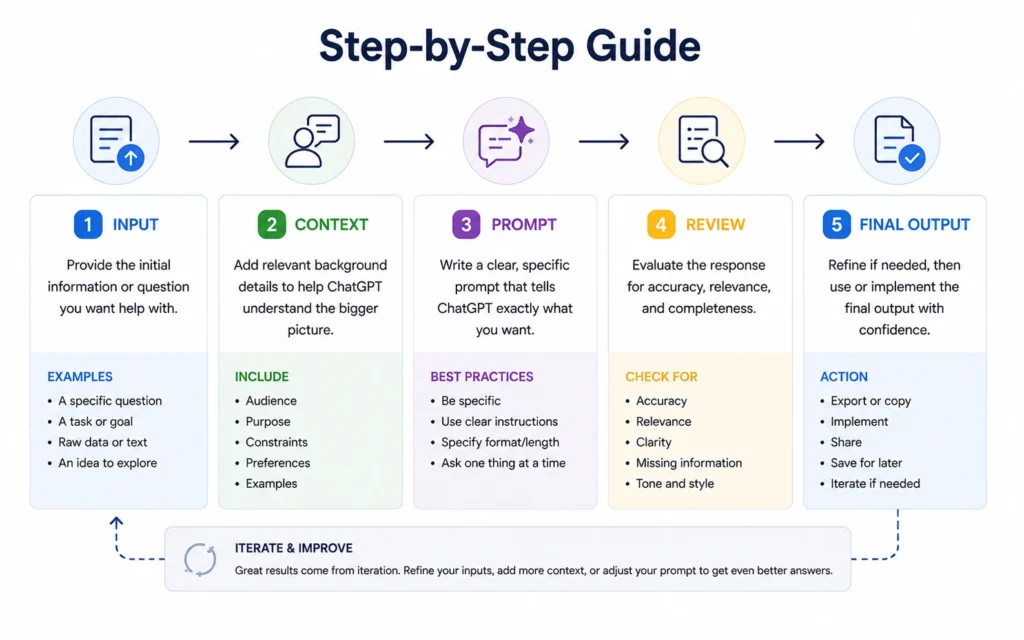
A Five-Step Workflow That Works Across Most Business Tasks
Many businesses overcomplicate AI adoption.
A simple workflow handles most use cases.
Step 1: Define the outcome
Don’t start with the prompt.
Start with the result.
Ask:
- What should exist when this task is finished?
- Who will use it?
- What action should it create?
Clear outcomes produce clearer prompts.
Step 2: Give context
Add information that the model cannot know.
Include:
- Audience
- Business type
- Goal
- Constraints
- Examples
More relevant context usually beats longer prompts.
Step 3: Request a draft
Now ask for the output.
Keep instructions direct.
Avoid stacking five unrelated tasks into one request.
One task at a time.
Step 4: Review aggressively
This step gets skipped most often.
And it’s where most quality problems originate.
ChatGPT can produce convincing language that contains weak assumptions.
Review facts.
Review claims.
Review numbers.
Review tone.
Step 5: Refine
Instead of starting over, iterate.
Examples:
- “Shorten this by 30%.”
- “Make this more technical.”
- “Rewrite for decision-makers.”
- “Add practical examples.”
Most strong outputs arrive after two or three rounds, not one.
Customer Support Is Often the Fastest Place to Start
If you’re testing chatgpt for business 2026 workflows, customer support remains one of the lowest-risk starting points.
Not because ChatGPT should answer customers directly.
Because it helps create response drafts.
A practical workflow:
- Customer inquiry arrives.
- Support agent pastes the message.
- ChatGPT drafts a response.
- Agent reviews and sends.
In one internal support workflow I tested, response drafting dropped from roughly 12 minutes to about 3 minutes for common inquiries.
The key detail:
The human stayed in the loop.
When businesses remove review entirely, quality usually falls.
When they remove repetitive drafting, quality often improves.
How Marketing Teams Use ChatGPT Without Publishing Generic Content
Marketing is where expectations often exceed reality.
ChatGPT can generate content quickly.
That doesn’t mean it generates differentiation.
The useful approach is treating ChatGPT as a collaborator rather than a content factory.
Good uses:
- Content briefs
- Outline creation
- Headline testing
- Content repurposing
- Audience research summaries
- Email variations
Weaker uses:
- Publishing first drafts unchanged
- Creating thought leadership without expertise
- Producing industry analysis without fact-checking
One observation from repeated content workflows:
Blank-page time disappears almost immediately.
Editing time does not.
That’s still a win.
A writer who starts from a rough draft is usually faster than a writer starting from nothing.
AI content marketing workflows explores this process in greater depth.
The Prompt Template Most Businesses Can Reuse Immediately
You don’t need dozens of prompt frameworks.
One reliable structure covers most business tasks.
Role
Who should the model act as?
Example:
Act as an experienced customer success manager.
Context
What should the model know?
Example:
We sell accounting software to small businesses with fewer than 20 employees.
Objective
What outcome do you want?
Example:
Draft an onboarding email sequence.
Constraints
What rules apply?
Example:
Keep emails under 150 words and avoid technical jargon.
Format
How should the output appear?
Example:
Present the sequence as a numbered list.
This structure consistently outperforms vague requests because it removes ambiguity.
Not because it’s magical.
Because it’s operational.
The Business Tasks That Usually Deliver the Highest Return
Some use cases create value faster than others.
Start here.
Internal Documentation
Policies.
Procedures.
Meeting summaries.
Knowledge base articles.
Research Organization
Competitor comparisons.
Interview summaries.
Industry reports.
Trend analysis.
Sales Support
Follow-up emails.
Call summaries.
Objection handling drafts.
Proposal outlines.
Operations
SOP creation.
Process documentation.
Checklist generation.
Task breakdowns.
These tasks share one advantage:
They’re time-consuming but repeatable.
That combination is where AI earns its keep.
What to Measure Before You Decide ChatGPT Is Worth It
Many teams evaluate AI incorrectly.
They ask:
“Is the output good?”
A better question:
“Does this reduce total work?”
Measure:
- Drafting time
- Review time
- Editing time
- Completion rate
- Throughput
I once watched a team celebrate a prompt that generated content in 20 seconds.
The problem?
Reviewing the output took longer than writing from scratch.
The workflow looked efficient.
The math said otherwise.
Always measure the entire process.
Not just the generation step.
What to Skip — And What to Do Instead
Skip:
- Massive prompts trying to solve ten problems
- Blind automation
- Publishing without review
- Treating ChatGPT as a search engine replacement
- Collecting prompt libraries you never use
Do instead:
- Build repeatable workflows
- Save successful prompts
- Review outputs systematically
- Track time savings
- Focus on high-frequency tasks
A small workflow used daily beats a sophisticated workflow used once.
Every time.
When ChatGPT Is the Wrong Tool
This is where many guides become unrealistically optimistic.
Some tasks shouldn’t be delegated to ChatGPT.
Examples:
- Legal advice
- Financial decisions
- Regulatory compliance
- Sensitive HR decisions
- High-stakes medical information
The limitation isn’t intelligence.
It’s accountability.
The model isn’t responsible for the consequences of the output.
You are.
That’s why experienced teams treat ChatGPT as an assistant rather than an authority.
The distinction prevents expensive mistakes.
Frequently Asked Questions About ChatGPT for Business
Is ChatGPT worth using for a small business?
Yes, if you focus on repetitive tasks. Customer communication, content drafting, research summaries, and documentation often produce value quickly because they consume time every week. Start with one workflow and measure the result before expanding.
Can ChatGPT replace employees?
No. It reduces portions of work, particularly drafting, organizing, and summarizing. Most business processes still require human judgment, review, approval, and accountability.
What is the best way to start using ChatGPT at work?
Choose one repeatable task that occurs multiple times each week. Create a simple prompt, test it for two weeks, and measure time saved. Expansion becomes easier after you identify one successful workflow.
How accurate is ChatGPT for business tasks?
Accuracy depends heavily on the task and the context provided. It performs better with drafting and summarization than with factual claims that require verification. Review remains essential.
What business departments benefit most from ChatGPT?
Customer support, marketing, operations, sales, and internal knowledge management often see the fastest gains because they contain repeatable information-processing tasks.
Continue Exploring
- better ChatGPT prompts helps you improve output quality by improving instructions, constraints, and context.
- ChatGPT vs Claude for business compares workflow fit, output style, and practical use cases across two leading AI tools.











