


Most people use ChatGPT for brainstorming the same way they use a search box. They type a short request, get a list of ideas, skim it, and leave disappointed.
The problem usually isn’t the model. It’s the request.
I’ve tested brainstorming workflows for article planning, product positioning, newsletter topics, workshop outlines, and marketing campaigns. The pattern is consistent: a vague prompt produces generic ideas in seconds. A structured prompt produces usable directions that would have taken much longer to generate manually.
That’s the real value of chatgpt brainstorming. Not infinite creativity. Faster exploration of possibilities.
If you learn how to frame the problem, guide the conversation, and evaluate the output, ChatGPT becomes a useful thinking partner rather than a random idea machine.
This article gives you the workflow.
What ChatGPT Is Actually Good At During Brainstorming
ChatGPT works best when the goal is idea expansion rather than idea replacement.
That distinction matters.
Many beginners expect the tool to produce the final answer immediately. In practice, its strongest contribution is helping you generate directions, combinations, angles, and alternatives that you may not have considered.
For example:
Instead of:
“Give me business ideas.”
Try:
“Generate ten business ideas for a solo consultant with a $500 startup budget, strong writing skills, and 10 hours available per week.”
The second prompt gives the model constraints.
Constraints improve brainstorming quality because they force relevance.
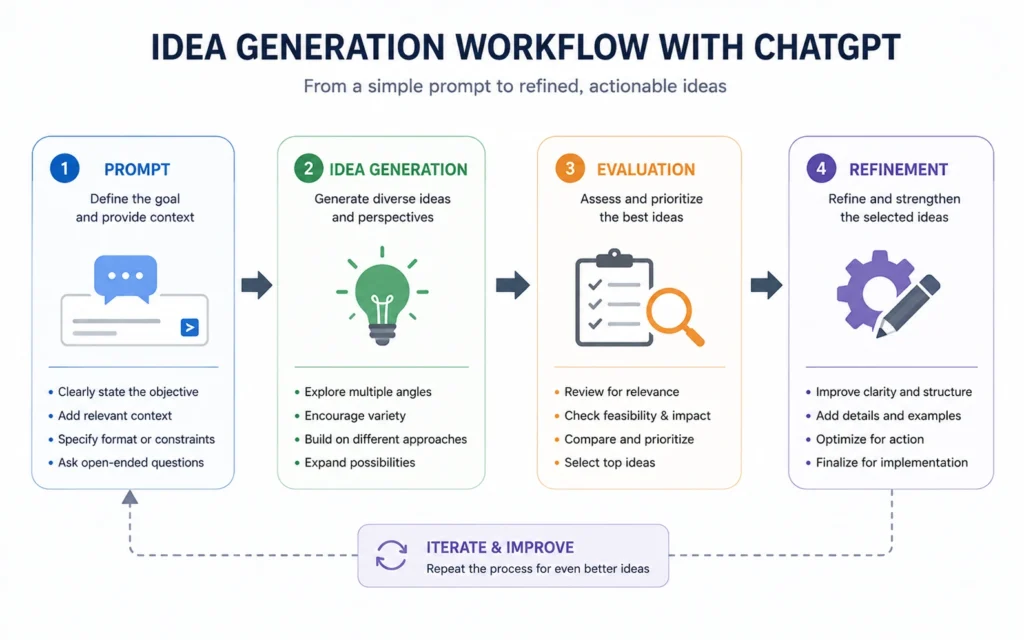
A useful mental model is this:
- You provide context.
- ChatGPT generates options.
- You evaluate.
- ChatGPT expands promising paths.
- You make the decision.
The human remains responsible for judgment.
That’s not a limitation. It’s the workflow.
Why Most ChatGPT Brainstorming Sessions Fail After Three Minutes
The most common mistake is asking for answers before defining the problem.
A surprisingly large number of brainstorming prompts contain fewer than ten words.
Examples:
- Blog ideas
- Marketing ideas
- Startup ideas
- Content ideas
The output usually mirrors the quality of the input.
When I reviewed brainstorming sessions for content planning, the strongest results came from prompts that included three elements:
- Goal
- Audience
- Constraint
Without all three, the model tends to fill gaps with assumptions.
And assumptions often create generic output.
The Better Structure
Use this template:
I want to achieve [goal].
The audience is [audience].
Constraints include [budget, timeframe, skill level, resources].
Generate 20 ideas and group them into categories.
That single change often improves output quality more than switching tools.
Step 1: Define the Problem Before You Ask for Ideas
Good brainstorming starts before the first prompt.
Write a one-sentence problem statement.
Examples:
- Generate newsletter topics for freelance designers.
- Find content angles for beginner investors.
- Create workshop ideas for small business owners.
- Develop lead magnet concepts for a marketing agency.
Notice how each statement identifies a specific audience.
Specific audiences produce better ideas because the model has something concrete to optimize for.
A useful exercise is to finish this sentence:
“The ideas should help this person solve ______.”
Don’t skip this step.
Five minutes spent clarifying the problem often saves thirty minutes sorting through weak suggestions later.
Step 2: Generate Idea Directions Instead of Final Answers
Many people ask ChatGPT for finished concepts immediately.
A better approach is generating categories first.
Example prompt:
Generate 10 different categories of content ideas for a productivity newsletter aimed at remote workers. Do not provide specific topics yet.
This creates structure.
Once categories exist, expand only the strongest ones.
For example:
Expand category #3 into 20 specific newsletter ideas.
This process creates a branching workflow.
Instead of evaluating 100 random ideas, you’re evaluating organized idea families.
That makes decision-making easier.
And it reduces the chance of missing a strong direction hidden inside a weak list.
Step 3: Use Expansion Prompts to Find Better Angles
This is where ChatGPT becomes most useful.
The first list rarely contains the best idea.
The second and third iterations often do.
When an idea looks promising, expand it.
Example:
Take idea #7 and generate:
- 10 variations
- 5 contrarian angles
- 5 beginner-friendly versions
- 5 premium versions
The output becomes richer because you’re exploring a single direction deeply rather than jumping between unrelated concepts.
One observation from repeated testing: strong ideas usually emerge after refinement, not during the first generation pass.
The first list creates options.
The second list creates quality.
Step 4: Ask ChatGPT to Challenge the Ideas
This step is frequently skipped.
It’s also where many weak ideas get eliminated.
Prompt:
Act as a skeptical reviewer. Identify weaknesses, risks, assumptions, and execution challenges for each idea.
The response often exposes issues you missed.
A content concept might be too broad.
A business idea might depend on expertise you don’t have.
A product idea might require a budget that exceeds your resources.
This isn’t negative thinking.
It’s filtration.
Good brainstorming produces options.
Great brainstorming removes bad options early.
How to Use ChatGPT Without Turning It Into a Fancy Suggestion Generator
The strongest brainstorming sessions become conversations.
Not one-shot prompts.
A common pattern looks like this:
Prompt 1:
Define the problem.
Prompt 2:
Generate categories.
Prompt 3:
Expand categories.
Prompt 4:
Challenge assumptions.
Prompt 5:
Refine finalists.
Prompt 6:
Create execution plans.
The workflow is simple.
Each prompt builds on previous context.
That context accumulation improves output quality because the model understands what has already been explored.
The blunt verdict:
Most poor brainstorming results come from ending the conversation too early.
Real ChatGPT Brainstorming Templates You Can Use Today
Content Ideas
Generate 30 content ideas for [audience]. Group them by beginner, intermediate, and advanced knowledge level.
Business Ideas
Generate business ideas for someone with [skills], [budget], and [available hours]. Exclude ideas requiring employees.
Product Ideas
Generate product concepts for people struggling with [problem]. Include pricing, audience, and key benefit.
Newsletter Ideas
Create 50 newsletter topic ideas focused on [subject]. Separate educational, analytical, and opinion-driven content.
YouTube Ideas
Generate video concepts for a channel about [topic]. Include title angle, target viewer, and hook.
These templates work because they provide context, audience, and constraints.
They aren’t magic prompts.
They’re structured requests.
The Limitation Most ChatGPT Brainstorming Guides Ignore
ChatGPT is better at combining existing patterns than discovering entirely new ones.
That’s important.
If you’re looking for incremental improvements, positioning ideas, content concepts, campaign directions, or workflow variations, the tool performs well.
If you’re trying to discover a category-defining breakthrough, you’ll still need real-world observation.
Many original ideas come from:
- Customer conversations
- Market experience
- Failed experiments
- Operational problems
Not language models.
One of my own mistakes was using ChatGPT to generate content topics before reviewing audience questions. The output looked polished but missed the actual concerns readers had.
The workflow improved immediately after feeding real customer questions into the prompt.
The lesson:
Use ChatGPT to expand reality.
Don’t use it to replace reality.
Tools and Resources That Improve ChatGPT Brainstorming
ChatGPT works better when paired with systems that capture and organize ideas.
Useful combinations include:
ChatGPT + Notes App
Generate ideas in ChatGPT.
Store promising concepts in your note system.
Review later.
Simple. Effective.
ChatGPT + Digital Whiteboards
Visual organization helps when exploring multiple directions.
Mind maps often reveal connections hidden in lists.
ChatGPT + Spreadsheets
Useful for ranking ideas.
Create columns for:
- Effort
- Potential impact
- Cost
- Speed to launch
Then score options objectively.
The best idea is not always the most creative one.
Sometimes it’s the easiest useful idea to execute.
What ChatGPT Brainstorming 2026 Looks Like in Practice
The trend isn’t better idea generation.
It’s better idea management.
Most users already have access to capable models.
The difference increasingly comes from workflow design.
People who get strong results tend to:
- Provide context
- Use iterative prompts
- Expand selectively
- Challenge assumptions
- Organize outputs
People who get weak results usually stop after one prompt.
The tool matters.
The process matters more.
Common Mistakes and Exactly How to Avoid Them
Asking for Too Many Ideas
A list of 200 ideas sounds productive.
It usually creates evaluation fatigue.
Generate fewer ideas and expand the strongest ones.
Skipping Constraints
Constraints improve relevance.
Always include audience, resources, timeline, and objective.
Accepting the First Output
The first response is a starting point.
Not the finish line.
Ignoring Evaluation
Idea generation without filtering creates noise.
Add a review step every time.
Using Generic Prompts
Generic prompts create generic answers.
Specific prompts create useful answers.
Frequently Asked Questions About ChatGPT Brainstorming
Is ChatGPT good for brainstorming?
Yes. It performs well when generating directions, variations, and alternative approaches. The quality depends heavily on the context and constraints provided in the prompt.
Can ChatGPT generate original ideas?
It can combine existing concepts in useful ways. Completely novel ideas usually emerge from real-world experience, observation, and domain knowledge rather than AI output alone.
What is the best prompt for brainstorming?
The strongest prompts include a goal, audience, constraints, and desired output format. Those four elements consistently improve idea quality.
Why are my ChatGPT brainstorming results generic?
Generic outputs usually come from vague prompts. Add audience details, constraints, examples, and a specific objective to improve relevance.
How many brainstorming rounds should I run?
Three to five iterations are often enough. Generate ideas, expand promising options, challenge assumptions, and then refine finalists.
Continue Exploring
- How to Use ChatGPT — Build stronger foundations before moving into advanced workflows and automation.
- prompt engineering fundamentals — Learn why prompt structure changes output quality more than most beginners expect.











