Using chatgpt for email marketing is a liability if you treat the interface like an automated content vending machine. If your prompt workflow looks like “write a sales email for a new running shoe,” the system will reliably generate sentences packed with corporate filler, empty excitement, and predictability. Your subscribers will spot the robotic structure within two sentences, and your open rates will drop over time.
I watched a campaign list of 45,000 subscribers lose half its click-through performance over three months because the marketing team automated their entire weekly broadcast using default ChatGPT output. The copy was grammatically perfect, but it lacked specificity. It didn’t solve a real problem.
To win with chatgpt for email marketing 2026 systems, you must change your role from a passive prompter to an active structural engineer. You use the large language model to organize raw concepts, build sequence frameworks, and test specific structural variations. You do not let it decide the strategy.
What Email Marketing Rewards — And What ChatGPT Punishes
Effective email marketing rewards relevance, precise formatting, and clear behavioral loops. Every message land in an inbox needs to answer exactly three questions instantly: why are you writing to me, what am I supposed to do, and why should I care right now?
If you use default prompts, ChatGPT punishes your deliverability by generating long, repetitive text blocks. It relies on standard tropes—like starting every email with a generic greeting, or overusing exclamation points and emojis—that trigger modern spam filters.
The tool should only build the foundational scaffolding. Your job is to input the data, the observed human pain points, and the precise boundaries.
The Step-by-Step Prompt Layering Workflow
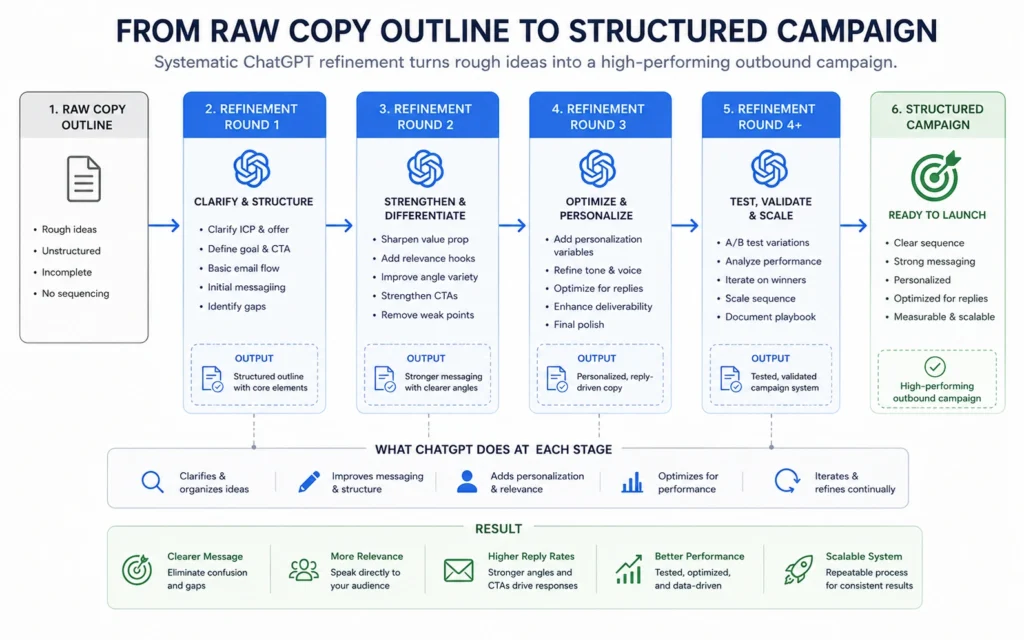
To get predictable copy, do not try to build an entire campaign in one prompt run. You need to segment the workflow into iterative layers. This method splits strategy, drafting, and style optimization into separate actions.
Plaintext
[SYSTEM ARCHITECTURE]
Round 1: Context & Strategy Ingestion
       ↓
Round 2: Structural Outline Execution
       ↓
Round 3: Behavioral Proof Injection
       ↓
Round 4: Style Extraction & Pruning
Round 1: Context and Strategy Ingestion
Before asking for a single word of copy, feed the large language model your operational constraints. Do not allow the system to guess who your reader is. Give it data about your target user base.
Plaintext
Act as an email marketing strategist. I am going to feed you context about our software product, our target audience, and our launch goal. Do not write an email yet. Acknowledge that you understand these constraints by summarizing the core challenge my customer faces.

PRODUCT: CoreTask SaaS (Project tracking tool for freelance designers)
TARGET AUDIENCE: Freelance UX/UI designers managing 3 to 5 concurrent clients. Their main issue is scope creep and unpaid tracking hours.
GOAL: Get them to click a registration link for a live 10-minute workflow optimization video.
TONE CONSTRAINT: Direct, casual, completely devoid of corporate sales language.
Round 2: Structural Outline Execution
Once the model has ingested your background parameters, instruct it to create a functional content flow block. Focus on the progression of arguments rather than final phrasing choices.
Plaintext
Using the approved context, write a structural outline for a 3-part email sequence.
Each outline step must map out:
1. The singular psychological hook of that specific email
2. The exact transition logic to the link click
3. The structural format (e.g., short story, direct observation, bulleted mistake list)

Do not generate full draft text. Give me the skeletal architecture only.
Round 3: Injecting Behavioral Proof
Now, feed raw, unorganized case notes or customer quotes into the session. This step ensures the final output contains precise details that generic AI text cannot replicate.
Plaintext
Here is a real piece of raw feedback from a current user: "Before using this, I was losing roughly 8 hours every single week just adjusting Figma files because clients kept changing requirements without a formal change order. It cost me close to $600 a month in unbilled time."

Draft Email 1 using the outline structure we built. Integrate this specific anecdote naturally.
Rules:
- Keep the entire draft under 150 words.
- Do not use more than one exclamation point.
- Zero introductory fluff sentences like "I hope this email finds you well."
Round 4: Style Extraction and Pruning
The raw draft will likely still contain a few predictable AI phrasing patterns. Run a final pruning sweep to remove filler verbs and enforce your layout boundaries.
Plaintext
Review the draft you just generated. Strip out any of the following terms if they appear: "unlock," "revolutionize," "moreover," "look no further," or "ensure."
Make the first sentence a direct observation about unbilled Figma changes. Move the registration link to its own separate line with clear spacing.
Tips and Real Campaign Reference Templates
The following templates demonstrate how to apply these rules to standard marketing events. Use these examples inside ChatGPT to lock in your formatting styles.
The Problem-Agitation Sequence Template
This blueprint leverages a specific customer headache to drive registration metrics.
Plaintext
Subject: The $600 Figma loophole

Hey [First Name],

Most independent designers lose roughly 8 hours every single week to unbilled client edits.

It starts with a minor adjustment to a design component. Then a color modification. Then an entirely new user flow. By Friday, you have worked a full day for free because there was no tracking mechanism to show the client they exceeded their scope boundaries.

We built a simple 3-step tracking template that prevents this exact leak without causing awkward client friction.

I broke down the exact framework in a short video clip below:

[Link: Watch the 10-minute teardown]

Talk soon,
[Your Name]
The Plain-Text Feedback Pattern
Plain-text presentations often achieve higher click-through performance than complex, image-heavy HTML layouts. They feel like a personal note from a colleague.
| Structural Component | Operational Goal | Formatting Rule |
| The Opening Line | State the problem immediately. | No casual small talk or greeting filler. |
| The Case Pivot | Introduce granular numbers. | Use real financial or time metrics. |
| The Call to Action | Present a single link. | Place on an isolated line with clear margins. |
Essential Production Tools and Setup Rules
To run this process smoothly, combine ChatGPT with your existing delivery framework.
- ChatGPT System Instructions: Save your baseline tone profile, list parameters, and banned phrase criteria within your account settings. This prevents you from needing to retype your foundational brand rules every time you open a new session window.
- Markdown Editors: Copy your generated drafts out of ChatGPT and paste them into a clean markdown interface before moving them to Mailchimp, ConvertKit, or Klaviyo. This step strips away erratic rich-text styling tags that can cause rendering issues across popular email platforms like Apple Mail and Gmail.
- Anonymization Tools: If you analyze subscriber behavior lists inside the chat window, run your spreadsheet data through an Excel filter first. Strip out all explicit personal details to preserve privacy while looking for trends.
Common Failures That Slow Your Campaigns Down
The fastest way to destroy your inbox authority is to allow ChatGPT to write your subject lines without strict constraints. Left to its own devices, the model will generate clickbait style lines loaded with all-caps words or emojis. These structures trigger automated email filters, landing your broadcast straight in the promotions or spam tabs.
Another major issue is the editing burden. If a prompt saves you ten minutes of writing but requires fifteen minutes of editing to remove generic language, your workflow is broken.
You must focus your prompts on creating structural drafts rather than polished final copy. Treat the system’s output as an organized draft that requires your personal insights and real customer data before it ever goes live.
Frequently Asked Questions About ChatGPT for Email Marketing
How do I make ChatGPT email copy stop sounding so robotic?
Provide ChatGPT with a real snippet of your own past writing. Explicitly command it to ban structural indicators like introductory throat-clearing sentences, emojis, and overly formal transition words.
Is it safe to paste customer lists or emails into ChatGPT?
No, never upload raw csv files containing names, emails, or personal data. Strip out all personally identifiable information before feeding context into your model to protect data security.
Can ChatGPT handle deep campaign data analysis?
Yes, if you upload anonymized spreadsheet data, it can calculate trends. It can isolate segments with open rates under fifteen percent and flag patterns in subject lines that drop click-through metrics.
Continue Exploring
- Read our deep dive on building structured framework environments to improve how you manage complex workflows across business pipelines.
- Learn how to tie your prompt strategies directly into background logic scripts by checking out our step-by-step systems manual.