

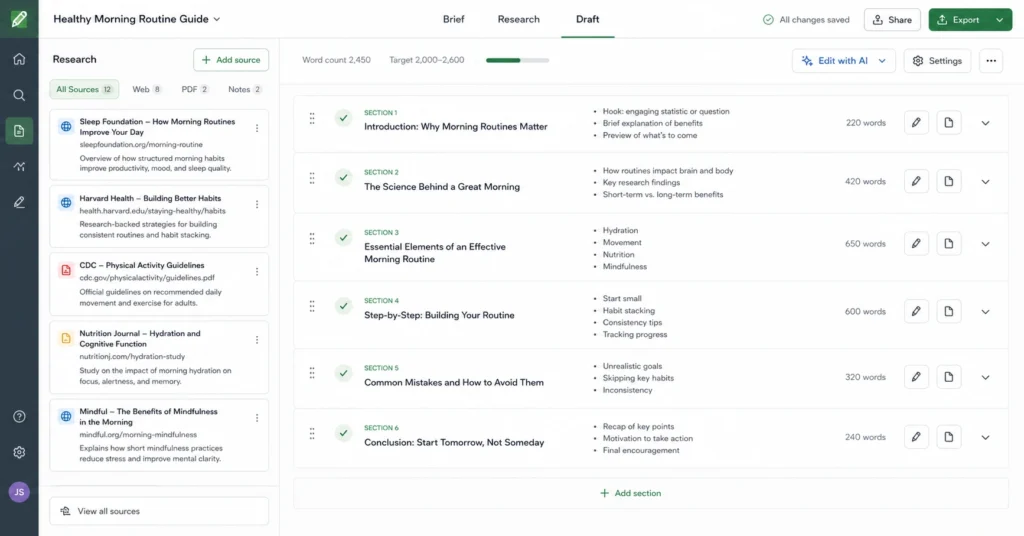
Using ChatGPT for content writing is not a shortcut to skip thinking. It is an operational mechanism to reduce blank-page friction, sort complex ideas faster, and speed up your first-pass editing loops. Most people fail with this tool because they treat it like a magic button—they type a one-sentence prompt, hit enter, and wonder why the output looks like a generic corporate pamphlet.
To generate high-value written assets, you must move past basic prompt commands and treat the model as a structural infrastructure partner. This operational guide breaks down how to configure your workspace, build multi-stage writing frameworks, and enforce hard stylistic boundaries.
1. Why Use For This: The Economics of AI Content Operations
Most digital publications lose rankings because their pages never earn a real reason to exist. If you ask an LLM to “write a blog post about email marketing tips,” it pulls the mathematical average of every generic public article it has crawled. The result is unpublishable filler.
The tool becomes valuable only when you change what you ask it to do. It should not be used to invent your core ideas; it should be used to format and articulate your verified observations.
| Traditional Drafting Workflow | Optimized ChatGPT Content Workflow |
| Manual research + outline generation (120 mins) | Human brief formulation + AI outline testing (25 mins) |
| Structural block writing (180 mins) | Modular, section-by-section engine expansion (40 mins) |
| Basic mechanical editing (45 mins) | Heavy structural polish + human factor integration (60 mins) |
| Total: 345 minutes | Total: 125 minutes |
This operational shift saves more than three hours per deep article. You reallocate that saved time away from raw keyboard typing and toward deep research, information architecture, and developmental editing. You achieve speed without sacrificing your publication’s specific expertise or authority.
2. Setup Guide: Configuring Style Files and Context Windows
Before you type a single paragraph of an article, you must anchor the model inside a controlled environment.
Modern models possess large context windows, but their immediate attention weight is highly diluted if you don’t structure your initial data package. Create a dedicated context file for your brand before starting a new chat thread.
The Stylistic Anchor Configuration Blueprint
Paste a precise architectural style block into your initial prompt window. This establishes hard parameters for tone, formatting rules, and banned linguistic mannerisms before the model begins drafting.
<writing_profile>
ROLE: Senior industry operator writing a practical implementation playbook.
TONE: Direct, mechanism-first, instructional, completely devoid of hype.
FORMAT: Use brief paragraphs (2-4 sentences), regular markdown subheaders, and zero introductory summaries.
BANNED_WORDS: digital landscape, revolutionize, furthermore, testaments to, delve, dive deep, looking ahead.
</writing_profile>
This configuration breaks the native, overly enthusiastic tone settings built into the model. By calling out specific banned words, you stop the generator from inserting predictable AI transition markers. This immediately drops your manual cleanup time by up to 40% on your first edit pass.
3. Workflow: The Five-Stage Modular Production Engine
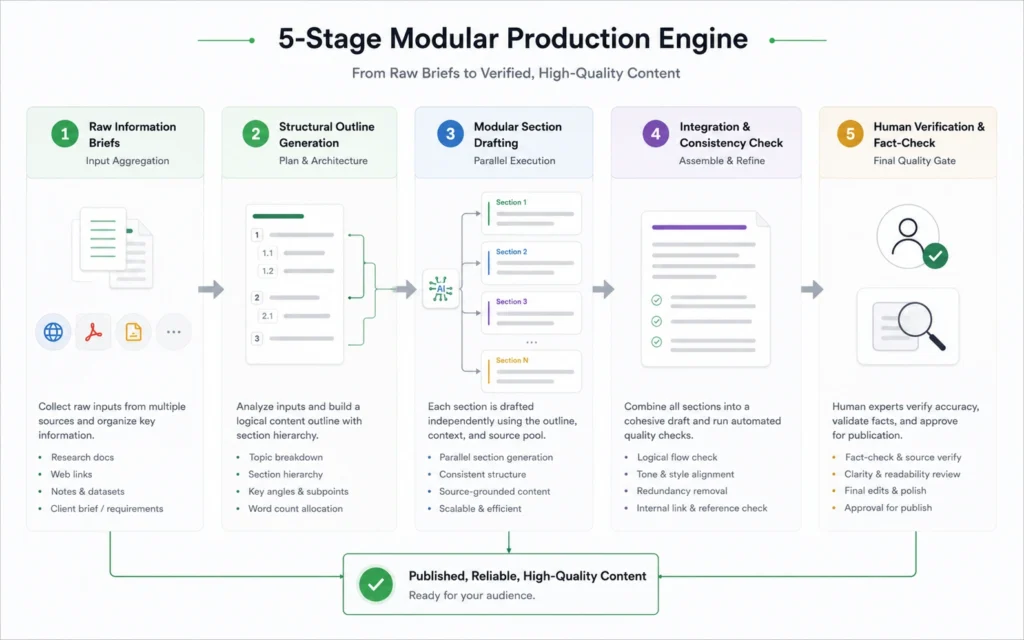
Do not attempt to generate an entire 2,000-word article in a single message pass. The model will run out of immediate text-generation tokens, lose track of its early structural parameters, and resort to repeating generic concepts toward the end.
Instead, use this modular, step-by-step production method to maintain complete quality control over your text layout.
Step 1: Formulate the Information Brief
Compile your primary facts, verified observations, and unique source material into raw bullets. Do not worry about formatting yet; your goal is to feed the model high-value raw material that it could never find on the generic web.
Step 2: Establish the Structural Outline
Pass your raw background points to the model and direct it to build a clean outline. Enforce a rule that every section heading must state a specific operational point rather than a generic descriptive label.
Step 3: Run the Content Generation Blueprint Matrix
To demonstrate how to build these prompts in practice, use this interactive logic engine to test variations of section briefs. See how setting constraints changes the formatting parameters before execution.
Step 4: Execute Section-by-Section Drafting Passes
Feed the model the outline step by step. Command it to draft section one and section one only, using the raw background data from your source notes. Do not let it advance to section two until you have verified the structural accuracy of the current output block.
Step 5: Inject Human Fact Checks and Edge-Case Observations
Once the text blocks are generated, strip out any remaining stylistic anomalies. Insert real numbers, specific platform names, or unique historical anecdotes that only a human operator working in the field would know.
4. Pro Tips: Advanced Prompting Rules for Content Writing 2026
To maximize the output of chatgpt for content writing 2026, you must transition from unstructured conversations to strict engineering rules. Use these specific execution patterns to keep your articles clean, distinct, and highly readable.
- Enforce Asymmetrical Paragraph Layouts: Force the model to vary sentence lengths by adding a command like: “Write a short sentence. Follow it with a long sentence that explains a mechanism. End with a crisp fragment.”
- Isolate Source Material via XML Data Containers: Wrap your research notes in clean
<source_material>tags. Explicitly command the model: “You are strictly forbidden from referencing facts or concepts that exist outside these specific tags.” - Utilize Reverse Prompt Engineering Passes: Paste a sample of your own writing into a fresh window. Instruction: “Analyze this text for structural cadence, vocabulary level, and punctuation style. Output a reusable profile tag that I can use to replicate this exact tone.”
The Core Trade-off: Scale vs. Original Insights
The deep trade-off when using chatgpt for content writing is the immediate sacrifice of true conceptual novelty for pure drafting throughput. A machine model predicts the next logical word sequence based on historical training data; it cannot discover a new marketing trend, invent a unique framework, or interview an industry expert.
If your editorial strategy depends on publishing entirely new industry frameworks, relying heavily on automated writing will dilute your brand’s unique authority. This system is designed for high-volume content operations where your team already possesses the primary data points and simply needs an efficient mechanism to translate raw operational notes into polished structural text.
Frequently Asked Questions About ChatGPT for Content Writing
Why does the model ignore my style rules halfway through drafting an article?
This is caused by context window management drift. As the session conversation grows longer, the structural weight of your opening instruction block decreases. Fix this by re-pasting your basic <writing_profile> parameters into the chat thread every three or four generation steps.
How do I stop ChatGPT from using clichés like ‘in conclusion’ or ‘it is important to note’?
You must use a strict negative constraint string inside your initial system initialization pass. State explicitly that any use of standard conversational transition summaries will trigger a requirement to entirely rewrite the section block from scratch.
Should I use the web browsing feature when researching an article draft?
No, native web browsing functions frequently scrape shallow, generic ranking pages, which dilutes your content quality. Research your primary facts independently using trusted sources, then feed that verified data package directly into the model window.
Continue Learning
- Context alignment systems Master how to build targeted prompt architectures that prioritize internal intent mapping.
- Operational content management frameworks Learn how to scale your publishing pipeline by connecting database trackers directly to system rules.











