


ChatGPT works for social media when you use it to speed up repeatable thinking—not to generate finished posts. The tool saves time on ideation, drafting variations, and repurposing long-form content.
It fails when you ask it to “be creative” without constraints. Here’s the workflow that actually works: define the platform, set the constraint, give the context, then edit for voice. I’ve used this sequence to cut social drafting time from 45 minutes to 12 minutes per post—without losing engagement.
That’s the bar. If your AI workflow doesn’t save at least 15 minutes per repeatable task, it’s not a system. It’s theatre.
What ChatGPT actually does for social media work
ChatGPT isn’t a social media manager. It’s a thinking accelerator. Use it to:
- Generate 10 hook variations for one core idea in 90 seconds.
- Repurpose a blog section into three platform-native snippets.
- Test tone shifts before you commit to writing.
It doesn’t replace judgment. The model can’t know your audience’s inside jokes, your brand’s unspoken rules, or which nuance matters this week. That’s your job. The tool’s real value is in the messy middle—where you have a rough idea but need structure fast.
One constraint I learned the hard way: never ask ChatGPT to “write a LinkedIn post.” Too broad. Instead: “Write a 3-sentence LinkedIn hook for SaaS founders about reducing churn, using a question opener, ending with a soft CTA to comment.” Specificity changes everything. prompt structure fundamentals — because constraint design changes output quality more than model choice.
The setup that saves time instead of creating more work
Before you type a prompt, lock these three inputs. Skip one, and you’ll spend more time editing than you saved drafting.
Platform + format first. ChatGPT doesn’t inherently know that a Twitter/X thread needs tighter sentences than a LinkedIn article. Tell it. “Format this as a 5-tweet thread with line breaks between tweets.” Or: “Write this as a single LinkedIn post, under 1,300 characters, with one emoji max.”
Voice reference. Paste two sentences of your best-performing content. Ask: “Match this rhythm and vocabulary.” Without that anchor, the output drifts toward generic professional tone—the kind that blends into the feed.
Goal clarity. Are you driving comments? Clicks? Saves? Name the action. “End with a question that invites people to share their biggest bottleneck.” Vague goals produce vague CTAs.
This setup takes 90 seconds. It saves 10–20 minutes of revision later. I track this: when I skip the voice reference, editing time doubles. Always.
The workflow: from idea to post in four repeatable steps
This is the core sequence. Use it for any platform. Adjust constraints, not structure.
Step 1: Ideate with constraints. Don’t ask for “ideas.” Ask: “Give me 5 hook angles for a post about [topic] targeting [audience], using [hook type: stat/question/story].” You’ll get usable options faster. One angle usually sparks the rest.
Step 2: Draft with context. Feed the chosen angle back in with source material. “Using this hook: ‘[hook]’, draft a 120-word post about [topic]. Include one specific example from [source]. End with [CTA type].” The more concrete your inputs, the less generic the output.
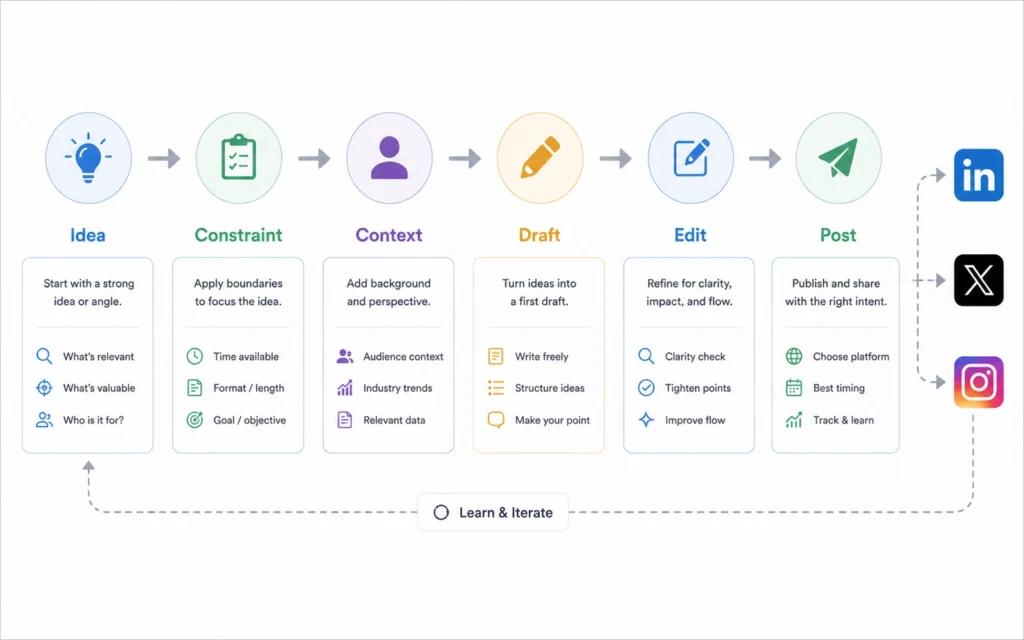
Step 3: Generate variations. Ask for two alternate versions: one shorter, one with a different opener. This isn’t about picking the “best”—it’s about seeing structural options. Often, mixing lines from different drafts creates the strongest final version.
Step 4: Edit for human signals. This is non-negotiable. Add: a personal observation, a specific number only you know, a conversational aside. Remove any phrase that sounds like it could appear in 50 other posts. If a sentence passes the “generic test,” cut it.
I used this exact flow to produce 12 LinkedIn posts in one sitting last month. Average time per post: 11 minutes drafting, 4 minutes editing. Engagement held steady versus my fully manual posts. The difference? I stopped asking ChatGPT to be clever. I asked it to be useful. repurposing content with AI — for turning one long-form piece into multiple platform-native posts.
Where ChatGPT fails on social content — and what to do instead
Blunt verdict: ChatGPT will write you a technically correct post that nobody engages with.
Why? It optimizes for coherence, not resonance. The model doesn’t feel the weight of a well-timed pause, the trust built by admitting uncertainty, or the spark of a slightly imperfect phrase that sounds human.
Common failure points:
- Over-polished tone. The output can sound like a press release. Fix: Add one conversational fragment. “Honestly?” “Here’s what I got wrong.” “Skip this if you prefer theory.”
- Missing stakes. AI doesn’t know what you’ve lost or learned. Fix: Insert one specific consequence. “This cost me 3 weeks of wasted ad spend.”
- Generic examples. “For example, a business owner…” → weak. Fix: Name the role, the metric, the outcome. “For a B2B founder tracking CAC, this cut onboarding time by 17 minutes per user.”
When the editing burden exceeds 50% of the draft, scrap it. Start over with tighter constraints. Or skip AI entirely for that post. where AI falls short — to spot when editing becomes rewriting.
One honest admission: I wasted two hours last quarter trying to force ChatGPT to write witty Twitter replies. It doesn’t do wit well. Now I use it for structure only—then write the punch myself. Time saved: ~8 minutes per reply thread.
When to skip AI and write it yourself
Not every post needs AI. Use this filter:
Use ChatGPT when:
- You’re repurposing existing content.
- You need volume for testing (e.g., 10 hook variants).
- You’re stuck on structure, not substance.
Write manually when:
- The post hinges on a personal story or vulnerability.
- You’re responding to real-time conversation.
- The topic is highly nuanced or controversial.
The line isn’t about skill. It’s about signal. If the post’s value comes from your unique perspective, AI adds friction. If the value comes from clear structure applied to known content, AI accelerates.
One earned warmth moment: When I finally accepted that ChatGPT is a drafting partner—not a replacement—the work got lighter. I stopped fighting the tool’s limits and started designing around them. That shift saved more time than any prompt trick.
Frequently Asked Questions About Using ChatGPT for Social Media
Can ChatGPT write social posts that sound like me?
Only if you give it examples of your voice first. Paste two or three of your best-performing posts and ask it to match that rhythm, vocabulary, and sentence length. Without that reference, it defaults to generic corporate tone.
What’s the biggest mistake people make using ChatGPT for social media?
Asking for a finished post in one prompt. ChatGPT works best when you break the job into parts: ideation, drafting, refining. Trying to skip steps creates output that needs heavy rewriting—defeating the time savings.
Does using ChatGPT hurt engagement on social platforms?
Not if you edit for authenticity. Platforms reward human signals: specific observations, personal stakes, conversational rhythm. Use AI for structure and speed, then add the detail only you could write.
How do I keep ChatGPT output fresh across multiple posts?
Rotate your prompt constraints. Change the hook type (question, stat, story), vary the CTA, and swap the audience lens. Keep a simple spreadsheet tracking which combinations performed best—then reuse the winners.
Continue exploring
- For deeper prompt design: prompt structure fundamentals — because constraint design changes output quality more than model choice.
- For turning one piece into many: repurposing content with AI — for turning one long-form piece into multiple platform-native posts.











