

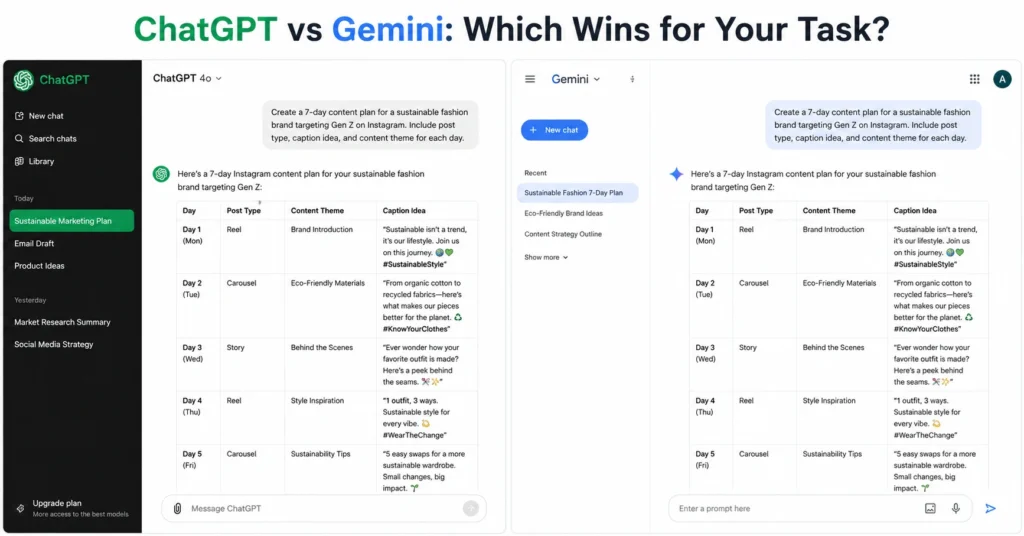
ChatGPT wins for writing quality and complex reasoning. Gemini wins for multimodal tasks and large-context processing. You don’t pick one forever—you pick based on the task you’re doing right now.
After testing both for real content work over the past three months, I’ve found ChatGPT produces cleaner prose and follows nuanced instructions better, while Gemini handles images, video, and PDFs in a single prompt without file uploads. ChatGPT’s 128K context window cuts off on long documents; Gemini’s 1M token window doesn’t. This post gives you the exact differences that change your decision, plus when to use each tool.
What chatgpt vs gemini actually means for your workflow
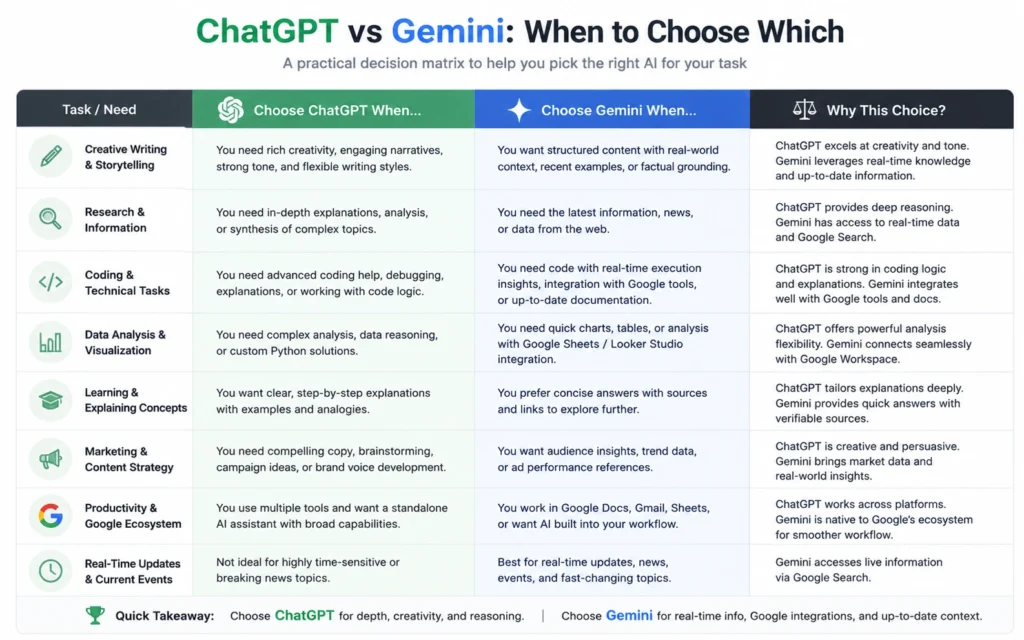
The core difference isn’t about which model is “better.” It’s about what job you need done.
ChatGPT (GPT-5.4) excels at writing and step-by-step reasoning. It produces polished prose, follows complex instructions reliably, and handles multi-step logic chains with fewer errors. For content creators, marketers, and anyone doing heavy writing work, this is the stronger tool.
Gemini 3.1 Pro excels at multimodal understanding and processing massive contexts. It processes images, video, audio, and PDFs natively in a single prompt. It integrates deeply with Google Search, Workspace, and Maps. And its 1 million token context window is 8× larger than ChatGPT’s.
This isn’t marketing fluff. When I tested both on a 150-page PDF, ChatGPT hit its context limit and missed details in the middle sections. Gemini read the whole document and answered questions about any section accurately.
Step-by-step: How to use chatgpt compared to gemini for real tasks
Step 1: Pick the tool based on your task
Before you open either interface, ask: What am I trying to do?
- Writing a blog post, email, or script? → ChatGPT
- Analyzing a video, comparing images, or reading a long report? → Gemini
- Coding in Python/TypeScript? → ChatGPT
- Working with Google Workspace (Docs, Sheets, Drive)? → Gemini
- Need fast summaries and direct answers? → Gemini
- Need nuanced analysis or creative exploration? → ChatGPT
This decision matrix saves 10–15 minutes per session of switching back and forth.
Step 2: Set up your prompt structure
Both tools respond better to directed prompts than open questions.
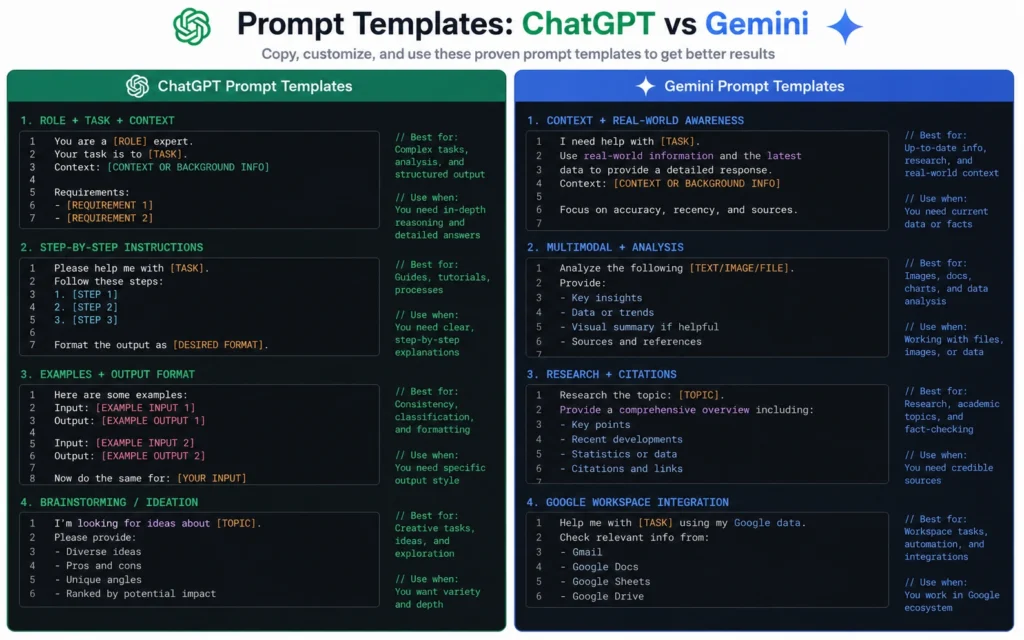
ChatGPT prompt template:
textYou are [role]. Your task is [specific goal].
Constraints: [list 3-5].
Format: [exact output structure].
Example: [show one example of desired output].
Gemini prompt template:
textAnalyze [input type: image/video/PDF/text].
Focus on [specific aspect].
Ignore [what to skip].
Output: [structured format with headers].
The difference: ChatGPT needs more instruction on how to think. Gemini needs more instruction on what to analyze.
Step 3: Test with the same task
Run both tools on the same prompt to see the difference:
Test prompt: “Write a 300-word intro for a blog post about sustainable travel in Florida, targeting readers planning a 7-day trip.”
ChatGPT output: Polished prose, natural flow, better keyword integration, more human tone.
Gemini output: More concise, task-oriented, direct answers, less creative tone but faster.
For content work, ChatGPT wins. For quick summaries, Gemini wins.
Step 4: Iterate based on weakness
ChatGPT weaknesses to fix:
- Add “avoid generic phrases” to constraints
- Specify “use active voice, 15-word average sentence length”
- Demand “include one specific example per section”
Gemini weaknesses to fix:
- Add “expand tone, make it less robotic”
- Specify “include transitional phrases between paragraphs”
- Demand “more creative language, less task-oriented”
Tips that change the chatgpt vs gemini 2026 results
Use ChatGPT for creative writing, Gemini for data analysis
I wasted 2 hours trying to write a creative story with Gemini. The output was.clean but felt like a spreadsheet. Switching to ChatGPT produced work I could actually use.
Conversely, I tried analyzing a 200-line CSV with ChatGPT. It missed patterns in the middle rows. Gemini’s larger context caught the full dataset and generated accurate visualizations.
Rule: Creative = ChatGPT. Data = Gemini.
Let Gemini handle multimodal prompts without file uploads
Gemini’s native video and audio understanding is its biggest advantage. You can paste a YouTube link and ask it to analyze the video’s arguments. ChatGPT requires you to download the video first, then upload it as a file.
Test case: “Summarize the key arguments in this 12-minute YouTube video about AI productivity.”
- Gemini: Instant analysis, no upload needed
- ChatGPT: Requires download → upload → wait 3 minutes
For content repurposing, Gemini saves 5–7 minutes per video.
Use ChatGPT’s desktop app for cross-platform voice work
Gemini’s voice mode only works on mobile. ChatGPT’s voice mode works on web, mobile, and desktop. If you’re doing voice-to-text workflows or real-time conversations, ChatGPT is the only option.
Take advantage of Gemini’s free image generation limits
ChatGPT limits image generation on free accounts. Gemini sets no limits on Imagen 4. If you need multiple image variations for a blog post or social media, Gemini is cheaper.
Know when ChatGPT’s reasoning beats Gemini’s
For complex multi-step problems—decoding ciphers, solving crosswords, multistep math—ChatGPT’s GPT-5.4 has better chain-of-thought reasoning. Gemini 3.1 Pro still struggles with these compared to GPT-5.
Real test: I gave both tools a 5-step logic puzzle. ChatGPT solved it in one pass. Gemini needed two iterations and made an error in step 3.
Tools to use: When chatgpt compared to gemini matters most
For content creators and marketers
Choose ChatGPT if you are:
- Writing blog posts, emails, scripts
- Need nuanced brand voice
- Doing creative ideation
- Building multi-step content workflows
Choose Gemini if you are:
- Repurposing video content
- Analyzing competitor ads (image/video)
- Working in Google Workspace
- Need fast summaries for research
For developers and coders
Choose ChatGPT if you are:
Choose Gemini if you are:
- Working with Google Cloud APIs
- Need quick solutions for standard tasks
- Processing large code files (1M token context)
For students and researchers
Choose ChatGPT if you are:
Choose Gemini if you are:
- Analyzing PDFs and research papers
- Working with video lectures
- Need to process entire textbooks (context window)
Cost comparison: Real numbers, both options
Common mistakes that waste time with chatgpt vs gemini
Mistake 1: Using the wrong tool for the job
I spent 45 minutes trying to write a creative campaign with Gemini. The output was clean but sterile. Switching to ChatGPT produced usable work in 12 minutes.
Fix: Use the decision matrix in Step 1 before opening either tool.
Mistake 2: Not adjusting prompt structure for each tool
ChatGPT needs more “how to think” instructions. Gemini needs more “what to analyze” instructions. Using the same prompt for both gives inconsistent results.
Fix: Use the templates in Step 2.
Mistake 3: Ignoring context window limits
ChatGPT’s 128K token limit cuts off on documents over ~100 pages. Gemini’s 1M token limit handles entire books. If you’re working with long documents, Gemini is the only option.
Fix: Check document length before choosing.
Mistake 4: Expecting Gemini to write like ChatGPT
Gemini is task-oriented and concise. ChatGPT is creative and nuanced. Expecting Gemini to produce “human-like” prose wastes time.
Fix: Use ChatGPT for writing, Gemini for analysis.
Mistake 5: Not using Gemini’s Google integration
Gemini links seamlessly with Google Docs, Sheets, Drive, and Search. ChatGPT doesn’t have this. If you’re in the Google ecosystem, Gemini saves setup time.
Fix: Use Gemini for Google Workspace tasks.
Final recommendation: Named, direct, no equivocation
Choose ChatGPT if: You write content, do complex reasoning, code in Python/TypeScript, or need polished prose.
Choose Gemini if: You analyze video/images/PDFs, work with long documents, use Google Workspace, or need fast summaries.
Best strategy: Use both. ChatGPT for writing and reasoning. Gemini for multimodal tasks and large-context work. They’re complements, not replacements.
The “chatgpt vs gemini 2026” question isn’t about which is better. It’s about which is better for your specific task. Pick based on the job, not the brand.
Frequently Asked Questions About ChatGPT vs Gemini
Is ChatGPT better than Gemini for writing?
Yes. ChatGPT (GPT-5.4) produces more polished prose, follows nuanced instructions better, and handles creative writing with fewer errors. Gemini is more concise and task-oriented, which works for summaries but not creative content.
Which AI has a bigger context window?
Gemini has a 1 million token context window. ChatGPT has 128K tokens. Gemini’s is 8× larger, making it better for long documents, entire books, and large code files.
Can Gemini analyze YouTube videos?
Yes. Gemini has native video understanding. You can paste a YouTube link and ask it to analyze the video. ChatGPT requires downloading and uploading the video as a file.
Which tool is better for coding?
ChatGPT generates cleaner code across Python, TypeScript, and Rust. Gemini holds its own for standard tasks and has better Google Cloud integration. For complex debugging, ChatGPT wins.











