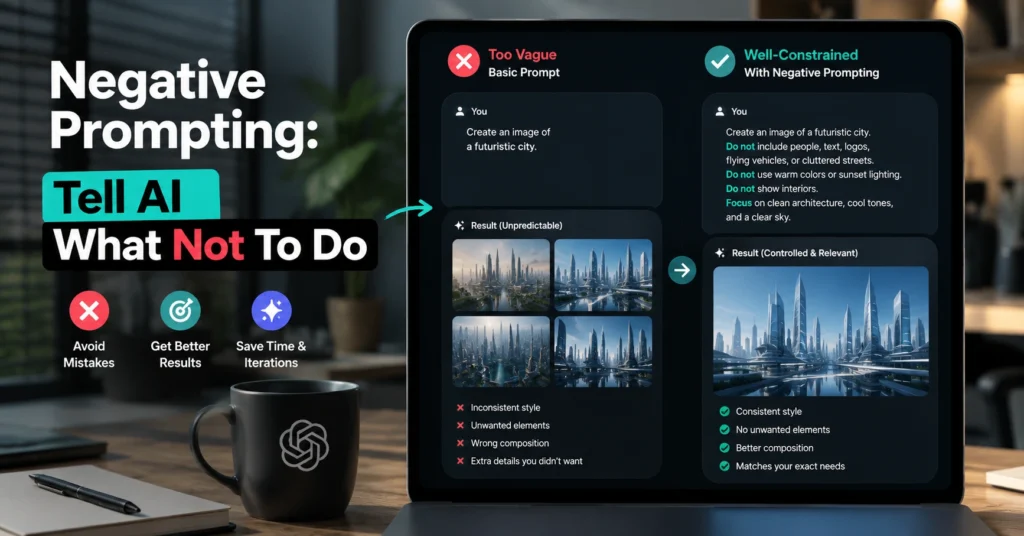
Negative prompting AI is one of the simplest prompt engineering techniques available, yet it’s routinely overlooked. After testing hundreds of prompts across writing, research, summarization, and content workflows, a pattern appears quickly: many weak AI outputs are not caused by missing instructions. They’re caused by missing constraints.
A model can follow your request and still produce something unusable because it fills gaps with assumptions. Negative prompting reduces those assumptions. It narrows the solution space and gives the model fewer ways to go wrong.
If you’ve ever received a response that felt too generic, too long, too formal, too repetitive, or too promotional, negative prompting is often the fix.
This article shows how negative prompting works, when it helps, where it fails, and how to build practical prompts that produce cleaner results with less editing.
Negative Prompting AI Works Because Models Fill Empty Spaces
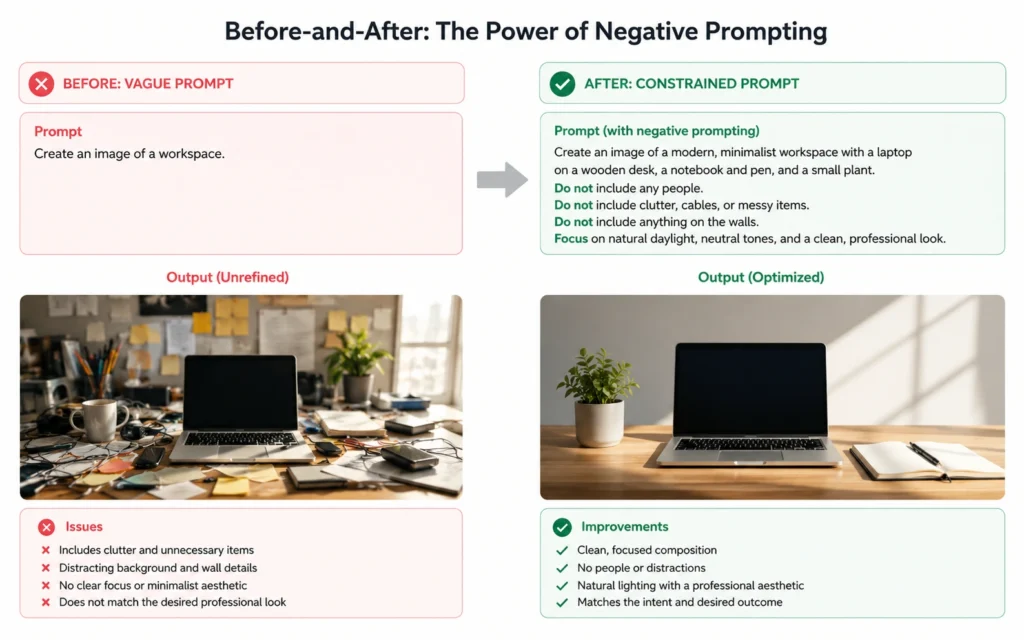
AI models are prediction systems.
When your prompt leaves room for interpretation, the model fills that space using patterns from its training data. Sometimes that’s useful. Often it creates output you never wanted.
Consider this prompt:
Write a LinkedIn post about remote work.
The request is clear, but the possible responses are enormous.
Now compare it to:
Write a LinkedIn post about remote work. Do not use motivational language. Do not include emojis. Do not use phrases like “the future of work.” Avoid generic productivity advice.
The second prompt removes several common failure paths.
The output becomes more focused because you’ve reduced ambiguity.
A useful mental model is this:
Positive prompts define the destination. Negative prompts remove the wrong roads.
Most prompt engineering advice focuses heavily on the destination. Experienced users spend just as much time blocking undesirable outcomes.
Step 1: Identify the Specific Output Problem Before Adding Constraints
Negative prompting fails when constraints are vague.
One mistake I made early on was adding instructions like:
- Don’t be bad
- Don’t be generic
- Don’t sound robotic
The model has no reliable definition for those phrases.
Instead, identify observable problems.
Bad constraint:
Don’t sound generic.
Better constraint:
Do not use phrases such as “unlock your potential,” “game-changing,” or “revolutionary solution.”
Bad constraint:
Don’t write too much.
Better constraint:
Keep each paragraph under three sentences.
The difference matters because AI responds more consistently to measurable instructions.
Before adding negative prompts, ask:
- What specifically annoyed me in the last output?
- What wording should disappear?
- What structure should be avoided?
- What assumptions should the model stop making?
The answer becomes the constraint.
Step 2: Add Constraints One Category at a Time
Most beginners create giant blocks of restrictions.
That usually makes prompts harder to manage.
A cleaner approach is grouping constraints by category.
Style Constraints
Examples:
- Do not use marketing language.
- Do not use emojis.
- Avoid corporate jargon.
- Do not write in a promotional tone.
Structure Constraints
Examples:
- Do not use bullet points.
- Avoid tables.
- Do not exceed 500 words.
- Do not start paragraphs with questions.
Content Constraints
Examples:
- Do not discuss pricing.
- Avoid legal advice.
- Do not mention competitors.
- Do not include statistics unless provided.
Audience Constraints
Examples:
- Do not assume prior technical knowledge.
- Avoid industry jargon.
- Do not use acronyms without explanation.
This structure makes troubleshooting easier.
When an output fails, you know exactly which category needs adjustment.
Step 3: Combine Positive and Negative Instructions
Negative prompting alone is rarely enough.
A prompt with only restrictions can produce weak results because the model knows what to avoid but not what to build.
Compare these examples.
Weak:
Do not use jargon. Do not be promotional. Do not write long paragraphs.
Better:
Explain cloud storage to first-time business owners. Use simple language. Keep paragraphs under three sentences. Do not use technical jargon. Do not use promotional language.
The second version creates boundaries and direction.
That’s where negative prompting AI becomes useful in real work.
The best prompts usually follow this sequence:
- Define the task.
- Define the audience.
- Define the desired outcome.
- Define what to avoid.
In that order.
The Prompt Pattern That Fixes Most Beginner Mistakes
One reusable framework works surprisingly well across writing, analysis, and research tasks.
Template:
Task: [What should be created?]
Audience: [Who is it for?]
Goal: [What outcome should it produce?]
Include: [Required elements]
Do Not:
- [Constraint 1]
- [Constraint 2]
- [Constraint 3]
Format: [Output structure]
I use some variation of this framework whenever output quality matters.
The improvement isn’t dramatic because of a secret phrase.
It’s better because the instructions remove ambiguity before the model starts generating.
That’s prompt engineering in practice: reducing guesswork.
Where Negative Prompting Saves the Most Time
Negative prompting produces the biggest gains when review time is expensive.
Three workflows stand out.
Content Creation
Without constraints, AI often falls back on common internet writing patterns.
Typical problems:
- Repetitive openings
- Generic conclusions
- Marketing clichés
- Inflated language
Adding specific exclusions removes a large percentage of editing work.
Research Summaries
Research prompts frequently produce filler.
Useful constraint:
Do not repeat information across sections. Do not include background definitions unless directly relevant.
This single instruction can cut summary length significantly.
Business Documentation
AI often adds assumptions.
Useful constraint:
Do not invent policies, numbers, dates, or company procedures.
That one line prevents many review headaches.
In one internal workflow test, adding factual constraints reduced correction passes from four rounds to two. The drafting time stayed roughly the same, but review time dropped by about 15 minutes per document.
The Most Common Negative Prompting Mistake Is Over-Constraining the Model
More constraints do not automatically create better outputs.
Sometimes they create worse ones.
I’ve seen prompts containing twenty or thirty restrictions that produced stiff, unnatural responses.
The model spent more effort avoiding mistakes than completing the task.
Here’s the trade-off.
Too few constraints:
- Output drifts.
- Generic responses increase.
Too many constraints:
- Creativity drops.
- Responses become rigid.
- Useful ideas disappear.
The goal is not maximum control.
The goal is useful control.
A practical rule:
If a restriction doesn’t solve a recurring problem, remove it.
Prompts should earn their complexity.
Tools That Respond Well to Negative Prompting
Most modern AI systems support negative prompting in some form.
ChatGPT
Strong for writing, brainstorming, analysis, and structured content.
Negative prompts work best when attached directly to the task rather than separated into a long list at the end.
Claude
Often responds well to style and reasoning constraints.
Particularly useful when you want detailed output without excessive verbosity.
Gemini
Works well for research-oriented workflows and document analysis.
Negative prompting helps reduce repetition and unnecessary explanation.
AI Image Generators
Negative prompting became popular in image generation long before many text users adopted it.
Examples:
Do not include extra fingers.
Avoid blurry backgrounds.
No text overlays.
No watermark.
Image generation users learned early that specifying unwanted elements often improves results faster than describing desired elements alone.
The same principle applies to text.
How to Evaluate Whether Your Negative Prompt Is Working
Most people judge prompts emotionally.
A better approach is operational.
Ask:
- Did editing time decrease?
- Did unwanted patterns disappear?
- Did output consistency improve?
- Did revision cycles decrease?
Those measurements matter more than whether a prompt feels sophisticated.
A prompt that looks simple but saves ten minutes every time wins.
A prompt that looks advanced but requires heavy cleanup loses.
The blunt verdict:
Prompt engineering is less about writing clever instructions and more about removing predictable mistakes.
Negative prompting is one of the fastest ways to do that.
Frequently Asked Questions About Negative Prompting AI
What is negative prompting AI?
Negative prompting AI is the practice of telling an AI system what to avoid in addition to telling it what to create. These constraints help reduce unwanted patterns, assumptions, formatting choices, or stylistic issues.
Does negative prompting improve AI output quality?
Often, yes. It works best when you are fixing recurring problems such as excessive length, repetitive language, marketing clichés, or incorrect assumptions. The improvement comes from reducing ambiguity.
How many negative prompts should I use?
Start with three to five meaningful constraints. Add more only when a recurring problem appears. Large lists of restrictions often create rigid or unnatural outputs.
Does negative prompting work for image generation?
Yes. Image-generation users have used negative prompting for years to remove unwanted visual elements such as watermarks, text overlays, blur, distortion, or incorrect anatomy.
Is negative prompting AI still useful in 2026?
Yes. As models improve, they make fewer obvious mistakes, but they still interpret open-ended requests differently. Negative prompting remains useful because it helps align outputs with specific goals and workflow requirements.
Continue Exploring
- prompt engineering fundamentals: If negative prompting feels useful, the next step is learning how prompt structure, examples, and constraints work together inside a complete prompt system.
- practical ChatGPT workflows: Understanding when to use AI is just as important as knowing how to prompt it. This guide focuses on repeatable work tasks that benefit from AI assistance.