I’ve seen simple prompts outperform complicated prompt templates because the task was straightforward and the model already understood it well. I’ve also seen a carefully written instruction fail repeatedly until two examples were added. The difference was less than 80 words, but the output quality changed immediately.
That’s the practical question behind zero shot prompting and few-shot prompting.
One removes examples entirely. The other uses examples to teach the model the pattern you want.
If you’re learning prompt engineering, understanding when to use each approach will save more time than memorizing prompt formulas. You’ll know when to keep prompts short, when to add examples, and when adding more context is just creating extra work.
Zero shot prompting works because modern models already know a lot
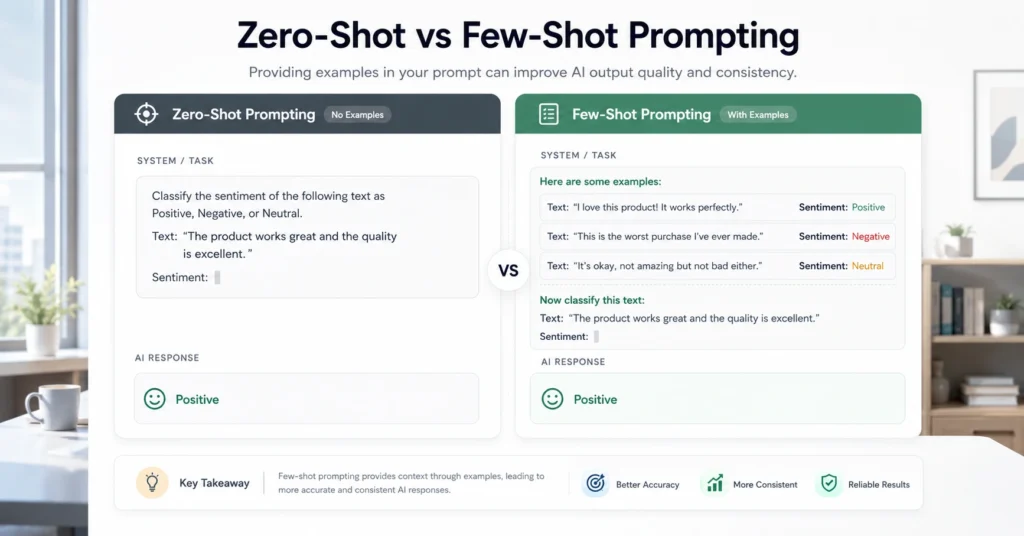
Zero shot prompting means asking the AI to perform a task without providing examples.
You give the instruction. The model produces the result.
Example:
Prompt
Summarize this article in five bullet points for a business audience.
That’s it.
No demonstrations. No sample outputs. No formatting examples.
The model relies on knowledge learned during training and tries to infer your intent from the instruction alone.
For many tasks, this is enough.
Tasks where zero-shot prompting often performs well:
- Summaries
- Brainstorming
- Explanations
- Rewriting
- Classification
- Simple analysis
- Content outlines
The biggest advantage is speed.
You can move from idea to output in seconds because there is no setup cost.
The limitation is consistency.
If your task requires a very specific format, tone, decision rule, or structure, the model has to guess what “good” looks like.
And models are often confident guessers.
Few-shot prompting teaches the pattern before asking for the answer
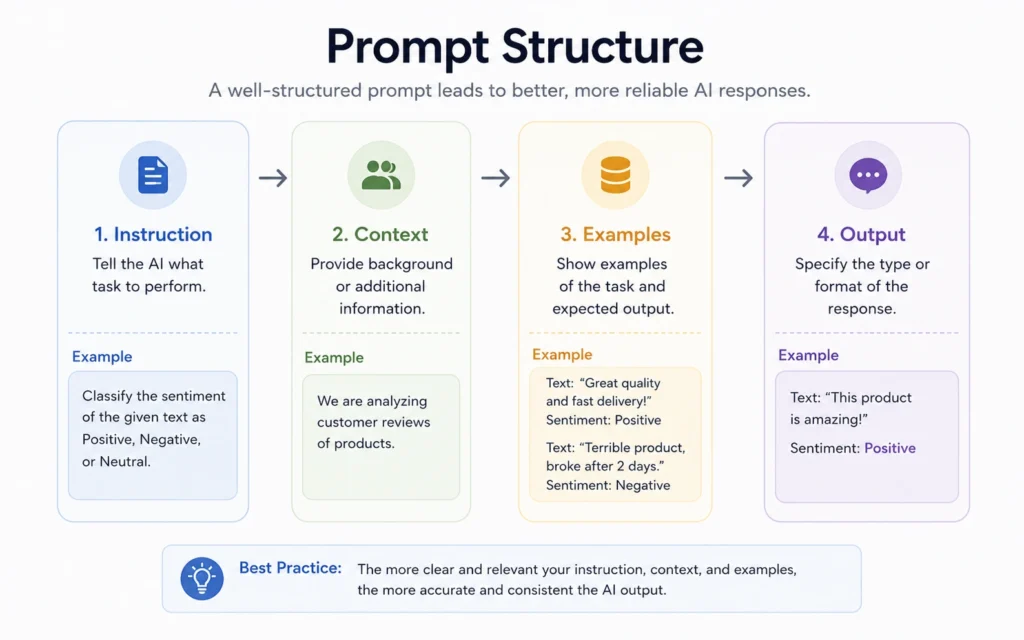
Few-shot prompting adds examples before the actual task.
Instead of describing the desired result, you demonstrate it.
Example:
Prompt
Input: Customer says shipping took too long.
Output: Delivery complaint.Input: Customer says package arrived damaged.
Output: Product damage complaint.Input: Customer says support never replied.
Output:
The model continues the pattern.
This approach works because examples reduce ambiguity.
You’re not explaining the format.
You’re showing it.
That distinction matters.
Many beginners write long instructions trying to describe what they want. Often, two examples communicate the requirement more clearly than 200 words of explanation.
The strongest use cases include:
- Classification tasks
- Structured extraction
- Consistent formatting
- Content labeling
- Tone replication
- Data transformation
The trade-off is preparation time.
You must create examples before running the task.
For one-off requests, that effort may not be worth it.
Why examples change AI output more than most beginners expect
Language models learn patterns.
That’s the important mechanism.
When you provide examples, the model doesn’t just read them. It uses them as clues for how the next output should look.
Consider these two prompts.
Zero-shot
Write a product description for a wireless keyboard.
The model might produce several paragraphs.
It might use marketing language.
It might focus on features.
Now compare that with:
Few-shot
Example:
Product: Noise-cancelling headphones
Description: Lightweight headphones designed for daily commuting. Battery life up to 40 hours.Example:
Product: Portable monitor
Description: Compact display for remote work. Fits easily into a backpack.Product: Wireless keyboard
Description:
The structure becomes predictable.
That’s often the real goal.
Not intelligence.
Consistency.
A common mistake in prompt engineering is assuming better results come from longer instructions. In practice, many workflows improve because examples eliminate interpretation errors.
A simple workflow for choosing between zero-shot and few-shot prompting
Use this decision process.
Step 1: Run the task with zero-shot prompting
Start simple.
Many users skip this step and immediately build complex prompts.
Don’t.
Test the shortest instruction that could reasonably work.
Example:
Extract the three main customer complaints from this review dataset.
Review the result.
If it meets the standard, stop there.
Use fewer tools.
Step 2: Identify what failed
Look for specific failures.
Not general dissatisfaction.
Ask:
- Was formatting inconsistent?
- Did categories change?
- Was tone incorrect?
- Did outputs vary between runs?
Define the problem precisely.
The better you identify the failure, the easier it becomes to fix.
Step 3: Add one or two examples
Now introduce examples that demonstrate the desired pattern.
Keep them short.
A mistake I made repeatedly when testing prompts in content workflows was adding five or six examples immediately. Review time increased and results barely improved.
Two strong examples often outperform six average ones.
Step 4: Compare output quality
Run the same task again.
Measure:
- Accuracy
- Consistency
- Formatting compliance
- Editing effort
If review time drops, the few-shot version is helping.
If review time stays the same, remove complexity.
The prompt template beginners can reuse immediately
For zero-shot prompting:
Task:
[What needs to be done]

Context:
[Relevant information]

Constraints:
[Length, tone, format]

Output:
[Expected result]
Example:
Task:
Summarize this report.

Context:
Audience is sales managers.

Constraints:
Five bullet points maximum.

Output:
Actionable summary.
For few-shot prompting:
Example 1:
Input:
[...]

Output:
[...]

Example 2:
Input:
[...]

Output:
[...]

New Input:
[...]

Output:
This structure works because it separates demonstration from execution.
The model can see the pattern before producing the final answer.
Where zero-shot prompting wins despite all the attention on examples
Prompt engineering discussions often make few-shot prompting sound superior.
That’s incomplete.
Zero-shot prompting wins when setup time matters more than precision.
Examples include:
- Brainstorming article ideas
- Generating rough outlines
- Summarizing meeting notes
- Creating draft questions
- Exploring options
The benefit isn’t necessarily better output.
It’s faster iteration.
When I’m testing ideas, I don’t want to spend 12 minutes building examples before discovering the idea isn’t useful.
The fastest prompt is often the right prompt.
Especially during exploration.
Where few-shot prompting earns the extra effort
Few-shot prompting becomes valuable when consistency matters.
Think about repeated workflows.
Examples:
- Customer support tagging
- Lead qualification
- Content categorization
- Product attribute extraction
- Research classification
These tasks are less about creativity and more about reliable execution.
One useful observation from production workflows: editing burden often matters more than generation speed.
If a few-shot prompt takes three extra minutes to build but saves fifteen minutes of corrections later, it pays for itself quickly.
That’s the calculation experienced operators make.
Not prompt length.
Total workflow time.
The biggest mistake beginners make in zero shot prompting 2026
They try to solve unclear thinking with more instructions.
The model cannot compensate for an undefined objective.
Consider these prompts.
Weak:
Write a better article.
Better:
Rewrite this article for SaaS founders. Reduce length by 30%. Preserve examples. Remove repeated ideas.
The improvement didn’t come from advanced prompting.
It came from clarity.
This pattern appears constantly in AI work.
People assume output quality problems are prompt engineering problems.
Many are decision-making problems.
The model doesn’t know what success looks like unless you define it.
Few-shot prompting helps.
Clear objectives help more.
Tools that make prompt testing easier
Most major AI systems support both approaches.
Useful options include:
- OpenAI ChatGPT
- Anthropic Claude
- Google Gemini
For documentation and prompting guidance, review:
The tool matters less than the workflow.
A clear prompt structure usually produces larger gains than switching models.
That’s not exciting advice.
It’s useful advice.
When you should ignore both approaches and redesign the task
Sometimes the prompt isn’t the problem.
The task is.
If outputs remain inconsistent after multiple iterations, check whether the request contains hidden ambiguity.
Example:
Identify high-quality leads.
What counts as high-quality?
Revenue?
Industry?
Employee count?
Decision-maker title?
Without criteria, neither zero-shot nor few-shot prompting can reliably solve the problem.
The fix isn’t another prompt revision.
The fix is defining the decision framework first.
Prompting starts after the objective is clear.
Not before.
Frequently Asked Questions About Zero-Shot Prompting
What is zero-shot prompting?
Zero-shot prompting is a prompting method where you ask an AI model to complete a task without providing examples. The model relies on the instruction and its existing knowledge to generate the result.
What is the difference between zero-shot and few-shot prompting?
Zero-shot prompting uses instructions only. Few-shot prompting includes examples before the task. The examples help the model understand the desired pattern, structure, or output format.
Is few-shot prompting always better?
No. Few-shot prompting often improves consistency, but it also increases setup time. For brainstorming, summarization, and quick exploration, zero-shot prompting is often faster and sufficient.
How many examples should a few-shot prompt contain?
Start with one to three strong examples. Adding more examples does not automatically improve results. In many workflows, two clear examples outperform a larger collection of average ones.
Which AI models support zero-shot prompting?
Most modern language models support zero-shot prompting, including ChatGPT, Claude, and Gemini. The technique depends more on prompt design than on a specific platform
Continue Exploring
- Prompt Engineering Hub goes deeper into the frameworks that improve AI output without relying on prompt hacks.
- how to write better ChatGPT prompts shows how to structure instructions, constraints, and context so the model spends less time guessing.