You don’t need AI because recording a podcast is hard. You need it because post-production eats 3–5 hours per episode, and that time compounds fast. If you’re publishing weekly, that’s 150–260 hours a year spent on editing, transcription, and show notes instead of writing better questions or finding better guests.
AI tools for podcasters in 2026 reduce that burden by handling three repeatable tasks: transcribing audio, removing filler words and noise, and generating show notes or clips. The real value isn’t automation for its own sake—it’s cutting editing time from 4 hours to 45 minutes without dropping audio quality below listener expectations.
But AI won’t fix a poorly recorded episode. If your audio has heavy background noise, clipping, or inconsistent mic levels, the transcription accuracy drops and the editing tools struggle. The best results come when you record cleanly first, then use AI to handle the repetitive cleanup.
This post covers the specific AI tools that work for podcast transcription, editing, and repurposing, plus the exact workflow that saves time without sacrificing quality. You’ll get a setup guide, a step-by-step process, and pro tips that come from actual use—not marketing copy.
What AI Actually Does for Podcast Work
AI tools for podcasters handle three core jobs:
| Job | What AI Does | What It Doesn’t Do |
|---|---|---|
| Transcription | Converts speech to text with 90–95% accuracy on clean audio | Fix muffled audio or overlapping speakers perfectly |
| Editing | Removes filler words, silence, and background noise automatically | Replace creative editorial decisions or pacing choices |
| Repurposing | Generates show notes, blog posts, captions, and short clips | Write compelling interview questions or guarantee viral content |
The mechanism is straightforward: AI listens to your audio, identifies patterns (words, pauses, noise), and applies rules you set or learns from examples. For transcription, it uses speech-to-text models. For editing, it detects filler words like “um” and “uh,” removes long silences, and normalizes volume levels.
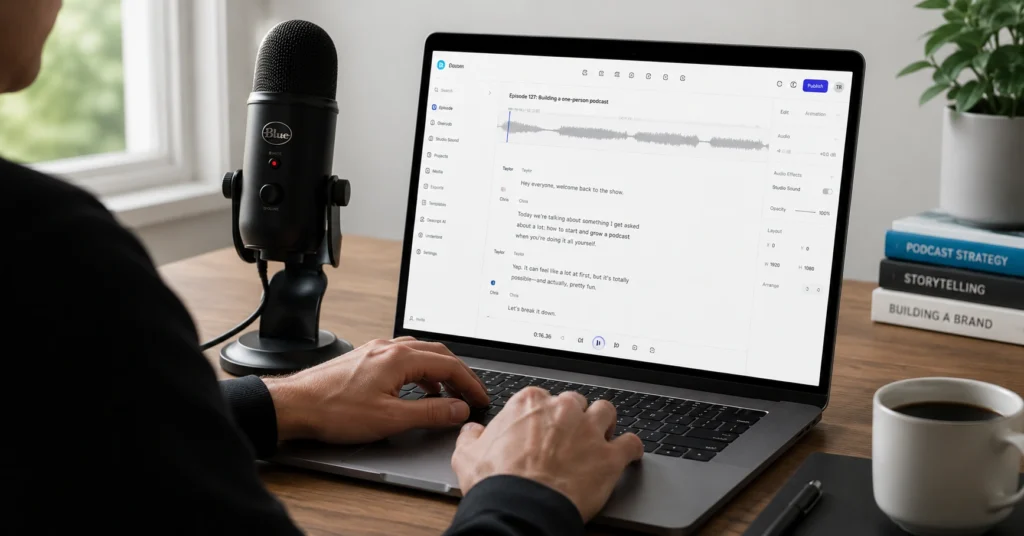
In practice, Descript’s text-based editing cuts my rough edit time from 90 minutes to 25 minutes for a 45-minute episode. The trade-off? You still need to review the transcript for accuracy, especially with technical terms or names the AI doesn’t recognize.
Most podcasters waste time trying to use AI for everything. The tools that deliver real value focus on one job and do it well. Descript excels at text-based editing. Cleanvoice AI handles cleanup. Auphonic masters the final audio. Sonix or Castmagic transcribe. Using one tool for all jobs usually means worse results and more manual work.
Why This Matters in 2026
AI podcast editing tools have matured past the “novelty” phase. In 2024, transcription was often inaccurate and editing features felt experimental. By 2026, the workflow is stable enough that intermediate podcasters can rely on it for weekly episodes without constant manual fixes.
The shift isn’t just about better accuracy—it’s about workflow integration. Tools now connect directly to hosting platforms, automatically generate social clips, and export in formats ready for YouTube Shorts or Instagram Reels. That’s where the real time savings happen: you’re not just editing faster, you’re also publishing more content from the same recording.
Core Tool Stack for Most Podcasters
1. Descript (Primary Editor)
- What it does: Text-based audio/video editing, transcription, filler word removal
- Pricing: Free tier / ₹1,000–₹2,000/month
- Best for: Full control over editing without learning traditional DAWs
- Setup: Upload audio → let it transcribe → edit by deleting text → export
2. Cleanvoice AI (Cleanup Layer)
- What it does: Auto-removes filler words, mouth noises, long silences
- Pricing: Usage-based pricing
- Best for: Speakers who use lots of “um,” “uh,” “like”
- Setup: Upload before Descript → download cleaned audio → import to editor
3. Auphonic (Mastering)
- What it does: Automatic leveling, noise reduction, loudness normalization
- Pricing: Free + paid tiers
- Best for: Final polish before publishing
- Setup: Upload final edit → set target loudness (-16 LUFS for podcast) → export
4. Castmagic or Sonix (Transcription + Repurposing)
- What it does: Transcription, show notes, timestamps, blog posts
- Pricing: Castmagic (subscription) / Sonix (pay-as-you-go)
- Best for: Generating show notes and content from transcripts
- Setup: Upload audio → select output templates → copy/paste results
Alternative Stack for Video Podcasters
If you’re recording video (which most podcasters should for YouTube repurposing):
- Riverside for recording remote interviews with separate audio/video tracks
- Gling.ai for video + audio editing, automatic bad-take removal
- Opus Clip for extracting short clips from long-form video
I switched from Riverside to Descript for editing remote interviews after wasting 6 hours trying to sync separated audio/video tracks manually. The trade-off: Riverside’s recording quality is slightly better, but Descript’s timeline sync saves 30–40 minutes per episode.
Configuration Checklist
Before your first episode, set these up:
- Transcription language: Confirm the tool matches your accent and dialect (e.g., Indian English vs. US English)
- Filler word list: Add custom filler words beyond “um” and “uh” (e.g., “basically,” “you know”)
- Loudness target: Set -16 LUFS for podcasts, -14 LUFS for YouTube
- Export format: MP3 128kbps for audio, MP4 1080p for video
- Speaker labels: Train the tool to recognize your voice vs. guests (most tools require 2–3 episodes to learn)
What to Skip
Don’t start with AI-generated voice cloning or fully automated podcast creation. These tools (like Podcast.ai) produce generic-sounding content that lacks the nuance of real conversation. Save voice cloning for specific use cases like multilingual dubbing, not your main show.
Also skip tools that promise “one-click perfect episodes.” FireCut and similar all-in-one tools claim to do everything, but they often over-edit or remove content that should stay. Use them only for drafts, not final exports.
Workflow: From Recording to Published Episode
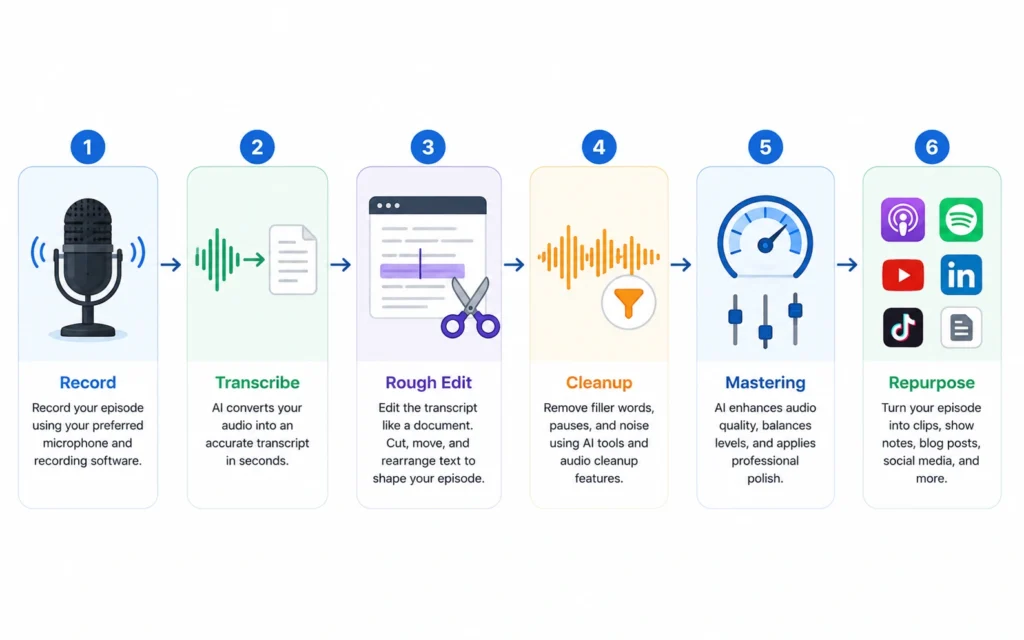
Here’s the exact workflow that balances speed and quality. This is what I use for a 45-minute episode published weekly.
Step 1: Record with Clean Audio
- Use a decent USB mic (Blue Yeti, Rode NT-USB) or XLR setup
- Record in a quiet room with minimal echo
- For remote interviews, use Riverside to capture local audio/video tracks
- Target recording level: -12dB to -6dB (avoid clipping)
Decision point: If your audio has heavy background noise, run it through Adobe Podcast Enhance first before editing. Otherwise, skip this step.
Step 2: Transcribe and Import
- Upload to Descript or Castmagic
- Wait for transcription (45-minute episode takes ~10–15 minutes)
- Review transcript for major errors (names, technical terms)
- Fix speaker labels if the tool misidentified voices
Descript’s transcription is 90–95% accurate on clean audio, but it consistently misspells Indian names and technical terms. I now keep a glossary of 20–30 terms to manually correct after every episode. That’s 5–7 minutes of extra work, but it prevents embarrassing errors in show notes.
Step 3: Rough Edit (Text-Based)
- Read through the transcript, not the audio
- Delete sentences, tangents, or repeated points by deleting text
- Remove filler words using Descript’s “Remove Filler Words” feature
- Cut long silences (>2 seconds) automatically
This step takes 20–30 minutes for a 45-minute episode—down from 60–90 minutes with traditional editing.
Step 4: Cleanup Layer
- Export the rough edit as WAV
- Upload to Cleanvoice AI
- Enable: filler word removal, mouth noise removal, silence trimming
- Download cleaned audio
This step is optional if you already removed filler words in Descript. Use it when your guest talks fast and uses lots of verbal tics.
Step 5: Mastering
- Upload final edit to Auphonic
- Set target loudness: -16 LUFS (podcast standard)
- Enable: noise reduction, leveler, compressor
- Export MP3 128kbps
Auphonic takes 5–10 minutes for a 45-minute episode. The result is consistent volume across episodes, which listeners notice even if they can’t name it.
Step 6: Repurposing
- Upload final audio to Castmagic or Sonix
- Generate: show notes, timestamps, blog post, social captions
- For video: use Opus Clip to extract 3–5 short clips (30–60 seconds each)
- Edit clips manually if needed (add captions, logo, branding)
This step generates 5–10 pieces of content from one episode. That’s where the real ROI comes from: you’re not just publishing a podcast, you’re building a content pipeline.
Total Time Breakdown
| Task | Manual Time | AI-Assisted Time |
|---|---|---|
| Transcription | 0 (manual) | 15 minutes |
| Rough Edit | 90 minutes | 25 minutes |
| Cleanup | 30 minutes | 10 minutes |
| Mastering | 20 minutes | 10 minutes |
| Show Notes | 45 minutes | 10 minutes |
| Total | 3+ hours | 70 minutes |
The workflow saves 2+ hours per episode. At weekly publishing, that’s 100+ hours saved annually.
Pro Tips: Where Most People Waste Time
Tip 1: Don’t Edit During Recording
Resist the urge to stop and re-record when you stumble. Most stumbles get removed in post-production anyway. Recording flow matters more than perfection. You can fix mistakes later—broken momentum hurts the entire episode.
Tip 2: Use Speaker Labels Aggressively
If your tool supports it, label every speaker clearly. This helps with transcription accuracy and makes repurposing easier (e.g., “Guest says X” becomes a quote for social media). Most tools learn after 2–3 episodes, but manual labeling from episode 1 speeds things up.
Tip 3: Batch Your Repurposing
Don’t generate show notes, clips, and blog posts one at a time. Upload the final audio to Castmagic, then let it generate everything at once. Export all outputs, then spend 15 minutes editing what matters. This cuts context-switching and keeps momentum.
Tip 4: Test AI Clips Before Publishing
Opus Clip and similar tools extract “viral” clips, but they often miss context. Always watch the full clip before posting. I’ve seen AI cut off the punchline of a joke or remove the setup for a key insight. The algorithm prioritizes engagement, not accuracy.
Tip 5: Keep a Human Review Step
AI won’t catch everything. Before publishing, listen to 2–3 minutes of the final edit at 1.5x speed. Look for:
- Awkward cuts where audio jumps
- Missing words that change meaning
- Background noise that slipped through
This takes 5 minutes and prevents embarrassing mistakes.
Tip 6: Don’t Over-Clean
Removing every filler word and silence makes conversation feel robotic. Keep 1–2-second pauses between major points. They give listeners time to process. Aggressive cleanup (removing all pauses) is a common mistake that makes podcasts sound like audiobooks.
Strong Take: Most podcasters over-edit. They remove so much “imperfection” that the conversation loses its humanity. AI makes it easy to go too far. Use it to clean, not sterilize.
Tip 7: Build a Template Library
Create templates in Castmagic for:
- Show notes structure
- Blog post format
- Social captions (Twitter, LinkedIn, Instagram)
- Email newsletter version
Once templates are set, repurposing takes 10 minutes instead of 45.
When AI Tools Don’t Help
AI tools for podcasters aren’t universal solutions. They fail in these scenarios:
| Scenario | Why AI Struggles | Better Approach |
|---|---|---|
| Heavy background noise | Transcription accuracy drops below 70% | Record again or use manual editing |
| Multiple overlapping speakers | AI can’t separate voices cleanly | Use multitrack recording with separate mics |
| Technical jargon / names | AI misspells consistently | Manual review + glossary |
| Creative editorial decisions | AI doesn’t understand context | Human editing for pacing and flow |
| Very short episodes (<10 min) | Setup time > editing time | Manual edit or skip AI |
If your recording setup is poor, AI will magnify the problems instead of fixing them. Invest in a decent mic and quiet room before investing in AI tools.
Cost Breakdown: What AI Tools for Podcasters Actually Cost
Total for full stack: ₹4,000–₹8,000/month for intermediate podcasters publishing weekly.
Money-saving move: Start with Descript (editing + transcription) and Auphonic (mastering). Add Cleanvoice and Castmagic only if you’re spending more than 2 hours/episode on cleanup and show notes. Many podcasters don’t need the full stack until they hit 10+ episodes/month.
Frequently Asked Questions About AI Tools for Podcasters
What are the best AI tools for podcasters in 2026?
The best AI tools for podcasters in 2026 are Descript (editing), Cleanvoice AI (cleanup), Auphonic (mastering), and Castmagic (transcription + repurposing). For video podcasts, add Riverside (recording) and Opus Clip (clips).
Do AI tools save time for podcast editing?
Yes. AI tools reduce editing time from 3–4 hours to 45–70 minutes per 45-minute episode. The biggest savings come from text-based editing and automatic filler word removal.
Are AI transcripts accurate enough for show notes?
AI transcripts are 90–95% accurate on clean audio. They work well for show notes but require manual review for names, technical terms, and tricky accents. Keep a glossary of recurring terms to speed up corrections.
Can AI replace a human podcast editor?
No. AI handles repetitive tasks (cleanup, transcription, leveling), but it can’t make creative editorial decisions. You still need human review for pacing, context, and quality control.