


A Custom GPT works best when it handles a repeatable job. If you ask it to do something different every time, the advantage disappears. A GPT configured for SEO briefs, sales emails, or customer support can save time because it starts with instructions that don’t need to be rewritten in every conversation.
I learned this the hard way after spending nearly an hour building a detailed Custom GPT for general brainstorming. It looked useful. It wasn’t. The instructions were too broad, and the results felt almost identical to a normal ChatGPT conversation. The improvement came only after narrowing the GPT to one repeatable workflow.
That’s the real value of chatgpt custom gpts. They reduce setup time, preserve context, and make recurring work easier to repeat consistently.
By the end of this guide, you’ll know how Custom GPTs work, when they’re useful, how to create one, and how to avoid the mistakes that make them feel pointless.
What ChatGPT Custom GPTs Actually Do
A Custom GPT is a version of ChatGPT configured for a specific purpose.
Instead of explaining your requirements every time you start a conversation, you define them once. The GPT remembers those instructions and applies them automatically.
A Custom GPT can include:
- Permanent instructions
- Uploaded reference files
- Preferred writing styles
- Workflow rules
- Tool access
- External actions when supported
Think of it as the difference between hiring a new assistant every morning and working with the same assistant who already knows the process.
The strongest use cases are narrow.
Good examples:
- SEO content brief creator
- Podcast outline assistant
- Meeting note organizer
- Product comparison assistant
- Customer support response helper
Weak examples:
- “Do everything” GPTs
- Generic productivity assistants
- Broad life coaching GPTs
The narrower the job, the easier it becomes to improve the output.
Step 1: Start With One Repeatable Task
Before opening the GPT Builder, identify a task you perform at least once a week.
This matters more than the technology itself.
Many beginners start by asking, “What GPT should I build?” The better question is, “What work do I repeat?”
Examples include:
- Creating article outlines
- Summarizing interview transcripts
- Writing social media drafts
- Reviewing customer feedback
- Converting meeting notes into action items
A task that repeats frequently creates enough volume for the GPT to save time.
If the task happens once every few months, creating a Custom GPT usually isn’t worth the effort.
A useful rule:
If you find yourself copying the same prompt three or more times per week, a Custom GPT is probably justified.
Step 2: Build the GPT Before You Worry About Perfection
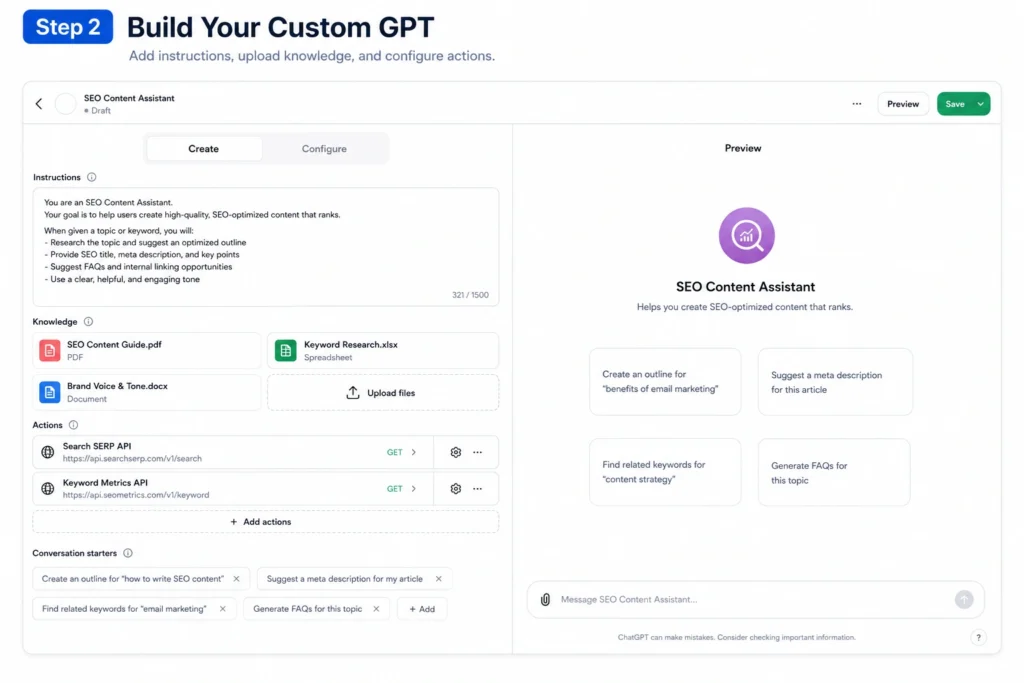
Most first-time users spend too much time polishing instructions.
Don’t.
Create a working version first.
Inside the GPT Builder, define:
Purpose
State exactly what the GPT does.
Bad:
“Help with content.”
Better:
“Create SEO-focused blog outlines for beginner audiences using search intent and content structure best practices.”
Audience
Specify who receives the output.
Examples:
- Small business owners
- Marketing teams
- SaaS founders
- Students
- Freelancers
Rules
Add constraints.
Examples:
- Use plain English.
- Avoid jargon.
- Limit introductions to 120 words.
- Include practical examples.
Reference Material
Upload files that improve consistency.
Examples:
- Brand guidelines
- Style guides
- Product documentation
- Templates
- Previous content
The first version doesn’t need to be perfect.
It needs to be usable.
Step 3: Test With Real Inputs Instead of Sample Prompts
This is where most Custom GPTs fail.
People test with easy prompts.
Real work is messy.
Use actual tasks from your workflow.
If you’re creating a content planning GPT, don’t ask:
“Give me content ideas.”
Instead, provide:
- Target audience
- Existing content
- Business goals
- Competitor observations
- Constraints
The quality difference becomes obvious quickly.
One of the most useful observations from building Custom GPTs is that weak inputs still produce weak outputs. The GPT improves consistency. It doesn’t remove the need for context.
That’s an important distinction.
Step 4: Improve One Instruction at a Time
When a GPT performs poorly, many users rewrite everything.
That creates confusion.
Change one variable at a time.
For example:
- Adjust tone
- Add examples
- Add formatting rules
- Upload supporting documents
- Tighten audience definitions
Then test again.
This approach reveals what actually changed the result.
Prompt engineering becomes easier when you treat it like troubleshooting rather than creativity.
prompt engineering fundamentals
Understanding prompt structure helps you improve Custom GPT performance without endlessly rewriting instructions.
Step 5: Turn the GPT Into a Workflow, Not a Conversation
The biggest improvement comes from workflow design.
Most people use Custom GPTs exactly like standard ChatGPT.
That’s leaving value on the table.
A workflow looks like this:
Input → Processing → Output → Review
Example:
Input: Customer feedback spreadsheet
Processing: Categorize complaints
Output: Top five recurring issues
Review: Human checks conclusions
This structure reduces randomness.
It also makes performance easier to evaluate.
The strongest Custom GPTs don’t feel like chatbots. They feel like systems.
How to Use ChatGPT Custom GPTs Without Turning Them Into Fancy Shortcuts
Many Custom GPTs save almost no time.
Why?
Because they automate the wrong part of the process.
A common example is article writing.
Users build a GPT that generates full articles instantly. Then they spend 45 minutes fixing the output.
The GPT created words. It didn’t reduce work.
A better approach:
- Generate outlines
- Create research summaries
- Organize source material
- Produce first-pass drafts
These tasks reduce repetitive effort while keeping human review manageable.
The blunt verdict: if review time exceeds creation time, the workflow needs redesign.
That’s true for nearly every AI system.
Examples of Useful Custom GPT Workflows
Content Marketing GPT
Purpose:
Generate content briefs, outlines, and topic clusters.
Why it works:
Planning is repetitive. The structure stays similar across projects.
Meeting Summary GPT
Purpose:
Convert transcripts into decisions and action items.
Why it works:
Meetings generate large amounts of unstructured information.
Customer Research GPT
Purpose:
Analyze reviews and categorize patterns.
Why it works:
Humans spot nuance. AI speeds up sorting.
Sales Preparation GPT
Purpose:
Create account research summaries before calls.
Why it works:
Gathering background information often takes longer than using it.
These examples succeed because they target recurring work rather than general intelligence.
The Tools Inside Custom GPTs That Matter Most
Beginners often focus on advanced features before mastering basics.
Start with these:
Instructions
The foundation of every GPT.
Poor instructions create poor results.
Knowledge Files
Uploaded documents provide reference material.
This often improves consistency more than additional prompting.
Web Access
Useful for current information and research tasks.
Data Analysis
Helpful for spreadsheets, reports, and structured datasets.
Most users get more value from better instructions and knowledge files than from advanced configurations.
That’s where the highest return usually sits.
What Custom GPTs Cost in Time, Effort, and Attention
Creating a useful GPT is usually faster than people expect.
Simple GPT:
10–20 minutes
Workflow-focused GPT:
30–60 minutes
Business workflow GPT:
Several hours of testing and refinement
The hidden cost isn’t setup.
It’s maintenance.
Processes change.
Documentation changes.
Templates change.
A GPT that worked perfectly six months ago can become outdated if nobody updates the underlying instructions.
This is one reason large collections of Custom GPTs often become neglected.
Use fewer tools.
Maintain them well.
When You Should Use a Custom GPT — And When Standard ChatGPT Is Better
Use a Custom GPT when:
- The task repeats
- The process is consistent
- The instructions rarely change
- Multiple people need the same workflow
Use standard ChatGPT when:
- The task is one-off
- You are exploring ideas
- Requirements change constantly
- You don’t yet understand the workflow
An honest limitation worth knowing:
Many beginners create a Custom GPT before understanding the process they’re trying to automate.
That usually fails.
Map the workflow first.
Then automate parts of it.
Not the other way around.
Common Mistakes That Make Custom GPTs Feel Disappointing
Making the Scope Too Broad
A GPT that does everything usually does nothing particularly well.
Uploading No Reference Material
Instructions help.
Examples help more.
Testing With Easy Prompts
Real workflows reveal real problems.
Constantly Rewriting Instructions
Change one thing at a time.
Expecting Full Automation
The best GPTs reduce work.
They rarely eliminate it.
Most successful AI workflows combine machine speed with human judgment.
Frequently Asked Questions About ChatGPT Custom GPTs
What are ChatGPT Custom GPTs?
ChatGPT Custom GPTs are personalized versions of ChatGPT configured with instructions, files, workflows, and tools for specific tasks. They help reduce repeated setup work and improve consistency across recurring jobs.
Do I need coding skills to create a Custom GPT?
No. Most Custom GPTs can be built using the visual GPT Builder. You define instructions, upload files, test outputs, and refine behavior without writing code.
Are Custom GPTs better than normal ChatGPT conversations?
For repeatable workflows, often yes. For one-time questions or exploration, standard ChatGPT is usually faster and simpler.
How long does it take to build a useful Custom GPT?
A basic version often takes 10 to 20 minutes. A workflow-focused GPT generally requires additional testing, iteration, and refinement before it becomes reliable.
What is the best use case for Custom GPTs?
The strongest use cases involve repeated work. Content planning, meeting summaries, research organization, customer feedback analysis, and structured drafting are common examples.
Continue Exploring
- writing better ChatGPT prompts If your GPT outputs are inconsistent, prompt structure is usually the first place to improve.
- AI productivity workflows Understanding workflow design helps you decide which tasks should be automated and which should stay human-led.











