Learning how to start a YouTube channel is easier than most beginners expect. Growing one is harder than YouTube tutorials make it sound.
Most new creators do not fail because they picked the wrong camera. They fail because they build a channel without understanding what viewers are actually clicking for. The first mistake usually appears before the first upload: random topics, inconsistent packaging, and videos designed around what the creator wants to say instead of what the viewer wants solved.
A beginner creator I worked with spent three weeks choosing microphones before publishing a single video. Another creator used a mid-range Android phone, free editing software, and a white desk lamp — and reached 1,000 subscribers in under four months because every video solved one specific beginner problem clearly.
That pattern shows up constantly on YouTube.
The platform rewards useful packaging first. Production quality matters later.
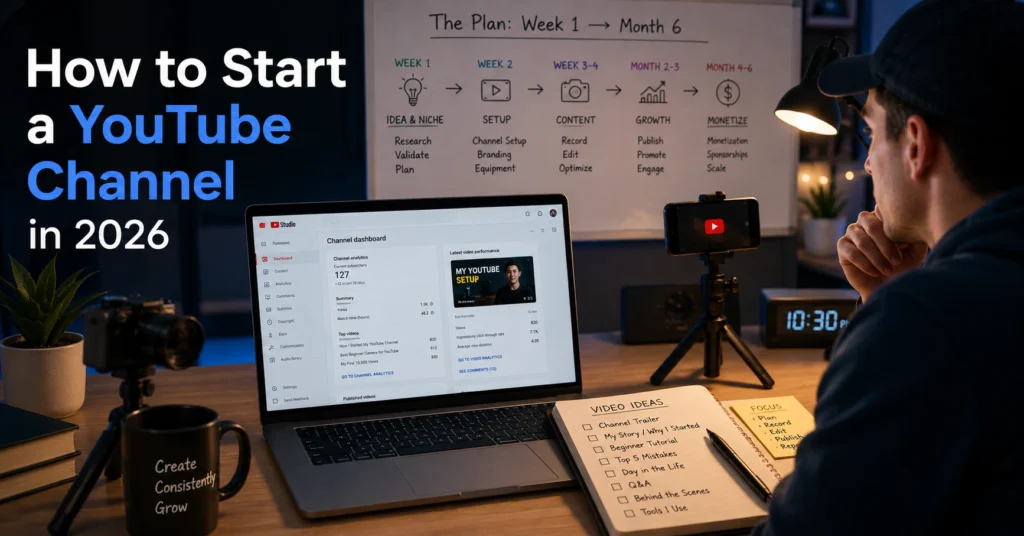
This guide breaks down how to start a YouTube channel for beginners in 2026 using a practical Month 1 to Month 6 workflow. You’ll learn how to choose a channel direction, set up your account, plan videos, write titles, film without expensive gear, edit efficiently, and publish consistently without turning YouTube into a second full-time job.
What Is Start A Youtube Channel?
Starting a YouTube channel is not the same thing as uploading videos.
Uploading is technical. Building a channel is structural.
A real YouTube channel has:
- A clear topic direction
- Repeatable video formats
- Consistent viewer expectations
- Packaging that earns clicks
- Content that holds attention long enough to matter
That difference becomes obvious fast. Many beginners upload five unrelated videos and assume the algorithm ignored them. Usually the problem is simpler: the channel never gave viewers a reason to return.
YouTube works more like a recommendation engine than a social feed. The platform studies:
- What people click
- How long they stay
- Whether they watch more afterward
- Which audiences consistently respond to your topics
So when you start a YouTube channel, you are really building three systems at once:
- A publishing system
- A topic-selection system
- A viewer-retention system
Most beginner guides explain the upload button. They skip the systems.
That creates a frustrating cycle where creators:
- publish inconsistently,
- chase trends randomly,
- change niches every month,
- and confuse low views with bad luck.
The stronger approach is narrower and less exciting at first.
Choose one audience.
Solve one type of problem.
Repeat the format long enough to learn what works.
And yes — that sounds boring compared to “grow fast on YouTube.” But channels usually grow through pattern recognition, not creative chaos.
Why It Matters
YouTube is one of the few creator platforms where old work keeps generating attention months later.
A short-form post on most platforms disappears within days. A useful YouTube video can continue pulling search traffic and recommendations for years if the topic stays relevant.
That changes the economics of content creation completely.
A beginner blog post with weak SEO often dies quietly. A weak YouTube video can still recover if viewers respond well later through browse recommendations. The platform continuously retests videos with new audiences.
That does not mean YouTube is easy. It means the upside compounds.
A single useful tutorial can:
- generate affiliate revenue,
- build email subscribers,
- drive product sales,
- attract freelance work,
- or become the foundation for a searchable content library.
One creator in the productivity space uploaded 32 videos before one crossed 50,000 views. The breakout video was not more cinematic. The title simply matched a clearer beginner problem: “How I Plan My Week in 20 Minutes.”
Packaging changed first. Then performance followed.
That is an important lesson for beginners.
Good creators do not only improve filming. They improve framing.
And YouTube rewards that skill heavily.
The real value is leverage, not fame
Most people begin YouTube thinking about subscribers. Useful channels are usually built around leverage instead:
- searchable expertise,
- repeatable audience trust,
- and monetisable attention.
A small channel with 4,000 focused subscribers can outperform a larger entertainment channel financially if the audience has clear intent.
Examples:
- Software tutorials
- Career education
- Finance explainers
- Fitness systems
- B2B walkthroughs
- Editing tutorials
- Study systems
Views matter. But viewer intent matters more.
A creator helping people choose accounting software may earn more per 10,000 views than a broad comedy channel earning ten times the traffic.
That changes how you should think about niche selection from the start.
How to Get Started
The fastest ways to start a YouTube channel are usually the least glamorous.
Use the equipment you already own.
Choose a narrow topic.
Publish before your setup feels finished.
Beginners often reverse that order.
Week 1: Choose one repeatable channel direction
Your first decision is not camera gear. It is channel positioning.
Good beginner channel directions usually sit inside one of these:
- Teaching
- Reviewing
- Explaining
- Documenting
- Comparing
- Demonstrating
The mistake is choosing a niche that is too broad.
“Lifestyle” is broad.
“Budget meal prep for college students” is usable.
“Tech” is broad.
“AI tools for freelance designers” is usable.
Specific channels create clearer viewer expectations.
And viewer expectations drive return visits.
A practical test:
Can you list 20 video ideas for this topic in under 15 minutes?
If not, the niche is probably too vague or too dependent on trends.
beginner-friendly YouTube video ideas helps solve this early because most new creators underestimate how quickly topic fatigue appears.
Week 1: Set up the channel properly
Create:
- Channel name
- Profile image
- Banner
- About section
- Channel handle
Do not spend two weeks designing branding.
Most beginner branding work gets replaced within a year anyway.
Your About section should explain:
- who the channel helps,
- what the videos cover,
- and what viewers gain.
Example:
“Weekly tutorials for beginner video editors using free and low-cost tools.”
Clear beats clever.
Week 2: Build your first content system before filming
This is where many beginners waste time.
They film first.
Then struggle with titles.
Then create random thumbnails.
Then wonder why nobody clicks.
The better workflow starts with packaging.
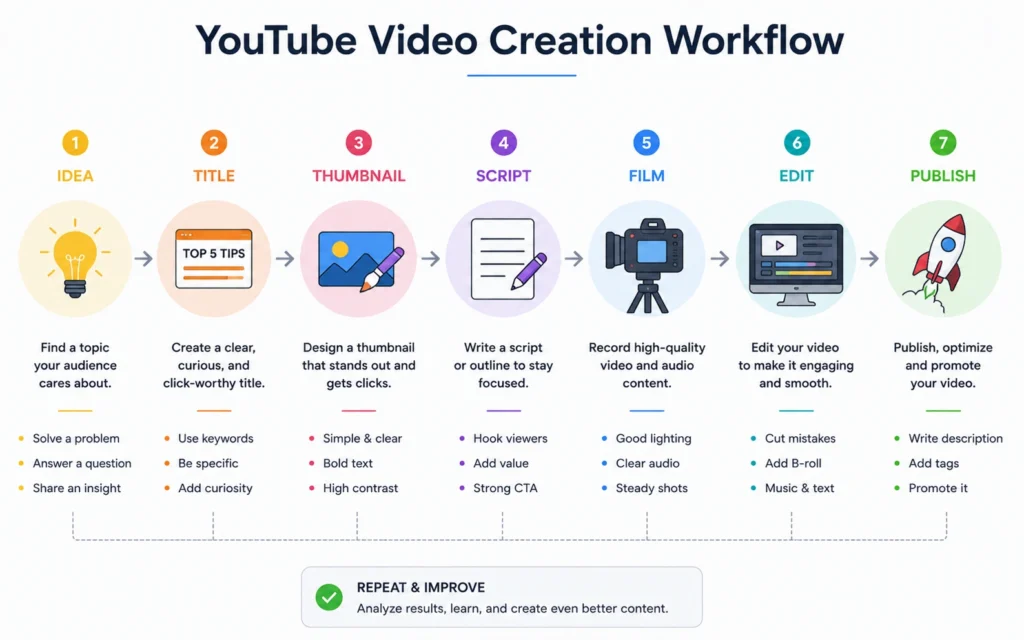
Use this sequence:
- Video idea
- Working title
- Thumbnail concept
- Outline
- Script or bullet structure
- Filming
- Editing
- Upload
Packaging before production changes the quality of the entire video.
Because a weak title usually points to a weak idea.
A creator once told me they spent six hours editing a vlog that never crossed 80 views. The problem appeared before filming: the title described the creator’s day instead of giving the audience a reason to care.
That happens constantly.
Week 2–4: Publish your first five videos fast
Your first uploads are training reps.
Treat them that way.
Do not expect:
- viral performance,
- polished editing,
- perfect thumbnails,
- or strong camera confidence.
Most beginners speak unnaturally on camera for the first 10–15 recordings. The improvement comes through repetition, not theory.
Aim for:
- one video per week minimum,
- clear audio,
- one useful point per video,
- shorter editing timelines,
- and consistent structure.
A sustainable workflow beats ambitious inconsistency every time.
Month 2: Learn packaging before upgrading gear
This is one of the biggest beginner misconceptions on YouTube.
Better cameras rarely fix weak content.
Better packaging often does.
Packaging includes:
- Titles
- Thumbnails
- Topic framing
- Opening hooks
The first 10 seconds matter heavily because viewers decide quickly whether the video matches their expectations.
That does not mean using fake urgency or exaggerated reactions. It means reducing confusion.
Strong opening:
“This video shows exactly how I edit YouTube Shorts in under 30 minutes using CapCut.”
Weak opening:
“Hey guys, welcome back to another video…”
Most viewers leave before the point arrives.
writing stronger YouTube titles becomes important here because many channels fail at the click stage before retention even matters.
Month 3–6: Build repeatable formats
Beginners often chase originality too early.
Repeatability matters more.
If one video format works:
- repeat the structure,
- refine the pacing,
- improve the hook,
- strengthen the thumbnail system.
Many successful channels repeat the same core format for years.
Because viewers return for familiarity.
Not randomness.
Examples:
- “I tested X for 30 days”
- “Beginner’s guide to X”
- “Best tools for X”
- “What nobody tells you about X”
- “Step-by-step setup for X”
Repetition is not laziness when the audience still benefits.
It is positioning.
Best Practices
The best YouTube practices in 2026 are less about tricks and more about reducing friction for the viewer.
Clear idea.
Clear packaging.
Clear payoff.
Everything else supports those three things.
Strong thumbnails matter more than beginner creators want to admit
A weak thumbnail can bury a useful video.
This frustrates beginners because the work feels invisible. But YouTube is a click-driven platform. If viewers never enter the video, retention quality does not matter.
The strongest beginner thumbnails usually:
- focus on one idea,
- use fewer words,
- create visual contrast,
- and avoid clutter.
Tiny text fails constantly on mobile.
So do thumbnails trying to explain the entire video at once.
thumbnail design guide matters because thumbnail design is communication, not decoration.
Audio quality matters before camera quality
Bad audio feels amateur faster than average video quality.
A creator recording with a phone and a $25 lavalier microphone often sounds more trustworthy than someone using a DSLR with echo-heavy room audio.
Beginners frequently overspend on cameras before solving:
- echo,
- background noise,
- inconsistent volume,
- or poor mic placement.
Fix audio first.
The improvement per dollar is much higher.
Edit for pacing, not complexity
Many beginner creators over-edit because they think fast cuts automatically create retention.
Usually they create noise.
Good editing removes friction:
- dead pauses,
- repeated phrases,
- unnecessary tangents,
- and slow transitions.
That is different from adding constant motion graphics.
Some of the strongest tutorial channels on YouTube use very simple edits. The pacing works because the information density stays high.
One practical rule:
If a section does not move the viewer closer to the promise in the title, cut it.
Use search-based topics early
Search content helps beginners because demand already exists.
Instead of inventing entertainment concepts from scratch, beginners can answer existing questions:
- “How to use Notion for students”
- “Best free video editor for beginners”
- “How to start a faceless YouTube channel”
This creates a feedback loop:
- viewers search,
- videos appear,
- click data accumulates,
- channel understanding improves.
Search-driven channels also teach beginner creators how audiences phrase problems.
That becomes valuable later when moving into broader recommendation-based content.
Publish consistently enough to learn
Consistency is useful for one reason: feedback volume.
Not discipline theatre.
A creator publishing one video every three months learns very slowly because there are too few data points:
- too few thumbnails tested,
- too few titles tested,
- too little audience behavior visible.
One solid video weekly is enough for most beginners.
Daily uploads are usually a trap unless the workflow is extremely lightweight.
Common Mistakes
Most beginner YouTube mistakes happen before analytics even matter.
The channel structure is weak from the beginning.
Trying to make every video for everyone
Broad channels confuse viewers.
A channel uploading:
- gaming clips,
- productivity advice,
- reaction videos,
- and fitness content
usually struggles because returning viewers do not know what to expect.
YouTube also struggles to categorize the audience.
Early clarity helps more than early variety.
That does not mean staying trapped forever. It means earning audience trust in one area first.
Copying large creators too literally
Big creators operate with:
- teams,
- budgets,
- editors,
- existing audiences,
- and years of experience.
Beginners copying high-production formats often burn out quickly.
A creator once spent 17 hours editing a cinematic desk setup video that gained fewer than 200 views. The same creator later switched to screen-recorded tutorials with tighter titles and crossed 10,000 subscribers within eight months.
The audience cared about the solution more than the cinematic b-roll.
That realization saves beginners enormous time.
Upgrading gear before proving the workflow
New creators often treat purchases as progress.
But expensive gear can hide weak fundamentals.
Do not buy:
- premium cameras,
- advanced lighting kits,
- expensive lenses,
- or subscription-heavy editing stacks
before proving you can publish consistently.
A repeatable workflow matters more than equipment ownership.
Ignoring titles until upload day
This is one of the most expensive beginner mistakes.
Good YouTube titles shape:
- scripting,
- viewer expectations,
- retention,
- and thumbnail direction.
Weak titles usually create weak videos because the creator never clarified the promise properly.
Write titles first.
Then build the video around delivering that promise.
Treating YouTube as motivation instead of operations
This is the blunt verdict.
Most channels fail because the creator builds around emotional momentum instead of operational repeatability.
They wait to “feel creative.”
They redesign branding repeatedly.
They switch niches every month.
They disappear after weak performance.
The channels that survive usually look less exciting behind the scenes:
- content calendar,
- repeatable structure,
- manageable upload pace,
- reusable editing workflow.
That operational stability matters more than inspiration.
Advanced Strategies
Advanced YouTube growth is mostly about compounding systems the beginner phase already introduced.
The fundamentals do not disappear. They become more intentional.
Build content around viewer journeys instead of isolated videos
Strong channels create sequences.
A beginner watches one video.
Then another.
Then another.
That chain matters.
A finance creator explaining budgeting might structure content like:
- Beginner budgeting setup
- Debt tracking system
- Emergency fund strategy
- Investing basics
- Long-term portfolio walkthrough
Each video naturally leads into the next.
This increases:
- watch time,
- session duration,
- subscriber conversion,
- and audience trust.
Disconnected uploads break that momentum.
Learn the difference between search content and browse content
This distinction changes channel strategy completely.
Search content answers active questions.
Browse content interrupts attention.
Examples of search:
- “How to edit YouTube videos”
- “Best camera for YouTube beginners”
Examples of browse:
- “I Tried Editing Like MrBeast for 7 Days”
Beginners should usually start with search because intent already exists.
Browse content becomes more effective later when:
- packaging improves,
- audience familiarity grows,
- and storytelling skills strengthen.
Channels that understand both usually scale faster.
Use YouTube Shorts carefully
Shorts can grow exposure quickly. They can also build shallow audiences that never watch long-form videos.
That trade-off matters.
Shorts work best when they:
- support the long-form topic,
- attract the same audience,
- and reinforce the same niche.
A long-form educational creator posting unrelated meme clips often damages channel clarity.
YouTube Shorts strategy matters because Shorts and long-form content reward different viewer behaviors.
Build a lightweight production system
The creators who last are usually the creators who reduce friction.
Simple systems outperform heroic effort.
Useful beginner systems:
- batch scripting,
- reusable thumbnail templates,
- filming multiple videos together,
- standard intro structure,
- fixed editing workflow,
- organized asset folders.
One creator reduced editing time from seven hours to under three simply by standardizing:
- music folders,
- intro graphics,
- subtitle presets,
- and export settings.
Small operational improvements compound heavily over months.
Learn analytics without obsessing over them
Analytics are useful diagnostics. Not emotional scoreboards.
Beginners should watch:
- click-through rate,
- average view duration,
- retention drop points,
- returning viewers,
- and traffic sources.
But early analytics are noisy.
A video failing at 300 views does not always mean the idea is bad. Sometimes the packaging failed before enough viewers entered the video.
The wrong response is panic.
The useful response is pattern analysis.
Monetise later than you want to
Many beginners start YouTube focused entirely on income.
That pressure creates weak decisions:
- excessive sponsorship focus,
- low-quality affiliate promotions,
- chasing trends outside the niche.
Audience trust compounds slower than beginners expect — but it compounds strongly once established.
The better approach:
- Build useful content
- Understand viewer problems
- Identify repeated audience needs
- Monetise naturally around those needs
The strongest monetisation usually feels like workflow extension, not interruption.
Key Takeaways
Starting a YouTube channel in 2026 does not require expensive gear, advanced editing, or perfect confidence.
It requires:
- a clear topic,
- repeatable formats,
- useful packaging,
- and enough consistency to learn from real viewer behavior.
Most beginners overestimate equipment and underestimate clarity.
The channels that improve fastest usually:
- solve one specific problem,
- publish consistently,
- write titles before scripting,
- and refine packaging continuously.
And the biggest shift happens when you stop thinking like someone uploading videos and start thinking like someone building systems:
- topic systems,
- publishing systems,
- editing systems,
- audience systems.
That is the real work behind sustainable YouTube growth.
Not motivation.
Not hacks.
Not waiting until everything feels ready.
Use fewer tools.
Publish earlier.
Study viewer behavior honestly.
Repeat what works long enough to understand why it works.
That is how most useful channels are actually built.
Frequently Asked Questions About Starting a YouTube Channel
How much does it cost to start a YouTube channel?
You can start with a smartphone, free editing software, and basic lighting from a window or desk lamp. Most beginners spend between $0 and $300 during the first few months depending on audio upgrades and editing needs.
Do I need to show my face on YouTube?
No. Many channels use screen recordings, tutorials, voiceovers, animations, or product demonstrations successfully. The important part is clarity and viewer value, not face visibility.
What is the best niche for beginner YouTubers?
The best beginner niche is usually one you can explain consistently for at least 20 video ideas. Useful educational topics often perform better for beginners than broad entertainment formats because audience intent is clearer.
How long does it take to grow a YouTube channel?
Most channels take longer than beginners expect. Many creators publish for several months before seeing meaningful traction. The learning curve includes packaging, scripting, editing, retention, and topic selection.
Should beginners upload YouTube Shorts or long-form videos?
Long-form videos usually build stronger audience depth and monetisation opportunities. Shorts can help exposure, but they work best when they support the same audience and topic direction as your main videos.
Continue Exploring
- video editing software for beginners helps you choose tools that reduce editing friction instead of increasing complexity during the first few months.
- creator workflow system breaks down how small creators organize scripting, filming, editing, and publishing without turning content production into chaos.