Learning keyword research is not hard because the concepts are complex. It’s hard because most advice collapses the process into slogans like “find high-volume keywords” or “target long-tail terms.” Those phrases sound useful until you open a keyword tool and see 17,000 ideas with no clear way to choose.
Keyword research for beginners works when you connect three things: what people are searching for, why they’re searching, and whether your page can realistically rank. In 2026, search volume alone is meaningless without intent and difficulty filtered through your site’s actual authority [web:1][web:10].
This post shows you how to do keyword research from scratch. You’ll learn what keyword research is, which tools to use, how to read keyword metrics, and exactly how to choose between competing keywords using the Keyword Decision Framework. By the end, you’ll have a repeatable process for finding keywords that deserve a page.
What keyword research for beginners actually decides before you write
Keyword research is the process of identifying the words and phrases your target audience types into search engines [web:1]. It’s not about guessing what sounds clever. It’s about discovering what people are already searching for and matching your content to those queries.
For beginners, keyword research decides three things before you write a single word:
1. What topic your page is about — not in your head, but in search engines’ understanding.
2. What question the page is supposed to answer — informational, commercial, transactional, or navigational.
3. Whether the page has a realistic chance to rank — based on keyword difficulty and your site’s authority.
Most rankings are lost because the page never earned a reason to exist. You publish something you think is useful, but it doesn’t match what searchers actually want. Keyword research prevents that by forcing you to start with the searcher, not your idea.
I spent 6 weeks writing content around “best SEO tools” without checking intent. The page got 12,000 impressions and 3 clicks. When I finally looked at the SERP, I saw that Google was showing comparison tables and buyer guides — not a generic list. The intent was commercial investigation, not informational. That mismatch cost me 3 months of work. Keyword research would have caught that in 17 minutes.
What to know before you start keyword research
Before you open a keyword tool, you need a clear mental model of how search works. Otherwise, you’ll chase volume and miss the real signal.
Search intent is the foundation, not an afterthought
Search intent is the reason behind a search. Google classifies intent into four main types:
– **Informational:** The user wants to learn something (e.g., “what is keyword research”).
– **Navigational:** The user wants to go to a specific site (e.g., “Ahrefs login”).
– **Commercial:** The user is comparing options before buying (e.g., “best SEO tools 2026”).
– **Transactional:** The user is ready to buy or take action (e.g., “buy SEO course”).
A page that matches intent ranks. A page that doesn’t, doesn’t — even if your on-page SEO is perfect [web:1].
Keyword difficulty tells you whether you can realistically rank
Keyword difficulty (KD) is a score that estimates how hard it is to rank for a keyword. Most tools use a 0–100 scale. Higher KD means stronger competitors already occupy the top results.
For beginners, aim for KD under 30–40. That range is where new sites can build momentum without fighting against established authority [web:1].
Search volume is useful only when filtered by intent and difficulty
Search volume tells you how many people search for a keyword per month. But volume without context is dangerous. A keyword with 10,000 searches and KD 75 is worse for a new site than a keyword with 800 searches and KD 25.
In 2026, intent-based segmentation matters more than ever. Volume tells you how big the opportunity is. Intent and difficulty tell you whether you can actually take it [web:1].
I once targeted a keyword with 22,000 monthly searches and KD 38. It looked perfect on paper. But when I checked the SERP, the top 10 results were all from domains with 50+ years of combined age and hundreds of thousands of backlinks. I ranked on page 2 in 3 months and never moved. The keyword was too competitive for my site’s authority. I should have picked 3 lower-volume keywords instead and built topical coverage first.
The concepts that matter most in keyword research for beginners
These are the concepts you need to understand before you start building your keyword list.
Seed keywords
A seed keyword is the starting point for keyword research. It’s a short, broad term that describes your topic (e.g., “keyword research,” “SEO tools,” “weight loss”). Keyword tools use seed keywords to generate hundreds or thousands of related ideas [web:5].
For beginners, start with 3–5 seed keywords. Don’t overthink this. Just write down the main topics your site covers.
Long-tail keywords
Long-tail keywords are longer, more specific phrases (e.g., “keyword research for beginners 2026” instead of “keyword research”). They usually have lower search volume but higher intent and lower difficulty [web:2].
For new sites, long-tail keywords are where you build early traction. They’re easier to rank for and convert better because they’re more specific.
Keyword clusters and topical coverage
Keyword clusters group similar keywords into topics. For example:
Cluster: “keyword research”
– keyword research for beginners
– how to do keyword research
– keyword research tools
– keyword research framework
This helps with semantic SEO and improves internal linking. Instead of writing one page for every keyword, you write one strong page per cluster and link related content together [web:1].
Exact match vs. partial match vs. semantic keywords
– Exact match: The keyword appears exactly as typed (e.g., “keyword research for beginners”).
– Partial match: The keyword appears with other words around it (e.g., “beginner’s guide to keyword research”).
– Semantic keywords: Related terms that help search engines understand the topic (e.g., “search intent,” “keyword difficulty,” “SEO tools”).
In 2026, Google understands context better than exact matches. You should include your primary keyword naturally, but also cover related terms and questions [web:1].
Where people get stuck: errors, myths, and false starts in keyword research
Most beginners don’t fail because they don’t know the tools. They fail because they repeat predictable mistakes.
Mistake 1: Focusing only on high-volume keywords
High-volume keywords look attractive. But they’re usually the most competitive. A new site targeting “SEO tools” will lose to established players every time.
Fix: Start with lower-volume, lower-difficulty keywords. Build authority first, then expand.
Mistake 2: Ignoring search intent
You find a keyword with 5,000 searches and KD 25. You write a detailed guide. But the SERP shows product pages and comparison tables. Your intent is informational; the SERP is commercial.
Fix: Always check the SERP before writing. If the top results don’t match your content type, skip the keyword or adjust your page.
Mistake 3: Not updating keyword lists regularly
Keywords change over time. Search behavior shifts. New competitors emerge. A keyword list from 2024 might not work in 2026.
Fix: Review your keyword list every 3–4 months. Add new opportunities, remove stale keywords, and adjust based on performance [web:1].
Mistake 4: Overusing exact-match keywords
Keyword stuffing (repeating the exact keyword too often) hurts readability and can trigger spam filters. Google prefers natural language.
Fix: Use your primary keyword in key places (title, H1, first 100 words, meta description), but write naturally for humans elsewhere [web:1][web:2].
Mistake 5: Treating keyword research as a one-time task
Keyword research is not something you do once and forget. It’s part of an ongoing process: research → publish → measure → refine.
Fix: Build keyword research into your regular content workflow. Revisit old posts and update them with new keywords where relevant.
Tools, workflows, and examples that actually help for keyword research for beginners
You don’t need every tool. You need the right tools for your stage and budget.
Google Keyword Planner (free)
Google Keyword Planner is the classic starting point for beginners. It’s free and provides search volume, competition levels, and CPC estimates directly from Google [web:2].
What it’s good at:
– Free access to Google’s search volume data
– Basic keyword ideas from seed keywords
– Competitor domain analysis
What it’s bad at:
– Limited keyword difficulty data
– Less detailed competitor analysis than paid tools
– Interface designed for advertisers, not SEOs
Best for: Beginners on a budget who want reliable volume data.
Semrush (paid)
Semrush is an all-in-one SEO platform with strong keyword research features [web:1][web:10].
What it’s good at:
– Competitive analysis and keyword gap tools
– Detailed keyword difficulty scores
– SERP analysis and trend data
– Topic research and content ideas
What it’s bad at:
– Expensive for solo beginners
– Steeper learning curve
Best for: Marketers and small teams who need competitive insights.
Ahrefs (paid)
Ahrefs is known for its backlink database and keyword research capabilities [web:1][web:2].
What it’s good at:
– SERP analysis and keyword difficulty
– Long-tail keyword insights
– Content exploration and keyword gaps
– Accurate search volume data
What it’s bad at:
– Higher price point
– Some features overkill for beginners
Best for: SEOs who want deep competitor and backlink analysis.
Ubersuggest (freemium)
Ubersuggest is a beginner-friendly tool with a free tier [web:1].
What it’s good at:
– Affordable entry point
– Simple interface
– Basic keyword ideas and difficulty scores
What it’s bad at:
– Less accurate data than Google or paid tools
– Limited advanced features
Best for: Beginners who want a cheap paid upgrade from free tools.
AnswerThePublic (freemium)
AnswerThePublic focuses on question-based and voice search queries [web:1].
What it’s good at:
– Finding question-based keywords
– Visualizing search queries
– Good for content ideas
What it’s bad at:
– Limited volume data
– Niche use case
Best for: Content creators who want question-based keywords.
I switched from Ubersuggest to Semrush after 4 months. The difference was immediate. Ubersuggest gave me 200 keyword ideas. Semrush gave me 2,400, plus competitor gaps I didn’t know existed. But the real value was the intent filter. I stopped wasting time on keywords that looked good but matched the wrong intent. The tool paid for itself in 6 weeks by preventing 3 bad content decisions.
The Keyword Decision Framework – how to choose between competing keywords
You’ll often find multiple keywords that look promising. The Keyword Decision Framework helps you choose between them without guessing.
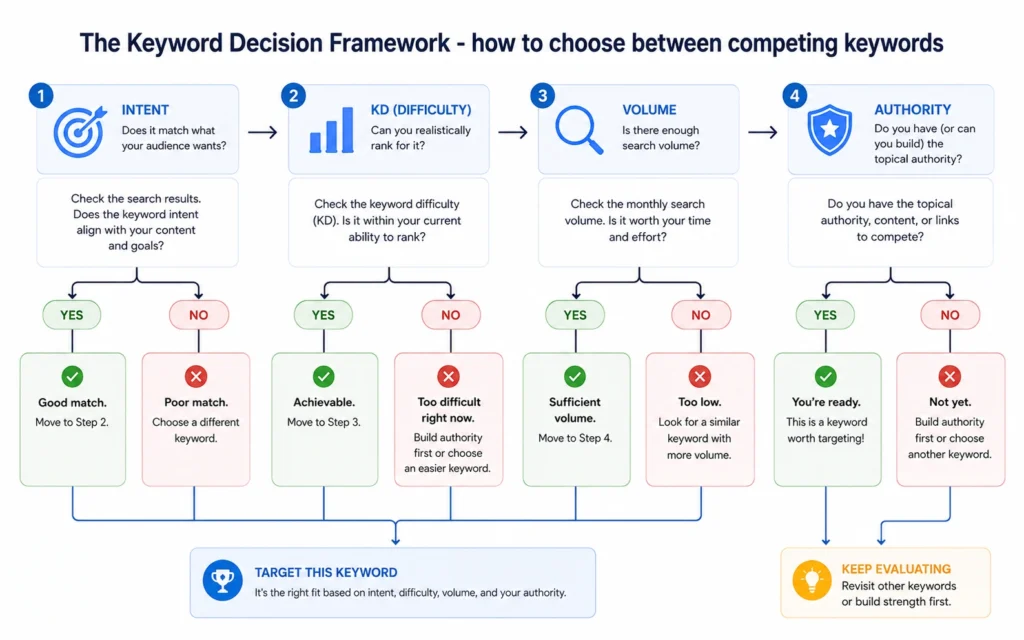
Step 1: Check search intent
Ask: What does the SERP show?
– Blog posts → informational
– Product pages → transactional
– Comparison tables → commercial
– Brand homepages → navigational
If your content type doesn’t match the SERP, skip the keyword. Intent mismatch is the fastest way to waste months of work.
Step 2: Check keyword difficulty
Ask: Can my site realistically rank here?
– KD 0–30: Good for new sites
– KD 30–50: Possible with strong content and some authority
– KD 50+: Strong sites only
For beginners, stick to KD under 30–40 until you’ve built momentum [web:1].
Step 3: Check search volume
Ask: Is the volume worth the effort?
– Under 100: Usually not worth a dedicated page
– 100–500: Good for long-tail supporting content
– 500–2,000: Sweet spot for new sites
– 2,000+: Only if KD is low and intent matches
Volume matters, but only after intent and difficulty are settled.
Step 4: Check your site’s authority
Ask: Does my site have enough authority to compete?
Check the top 10 results:
– Are they from major brands?
– Do they have hundreds of backlinks?
– Are they from domains 5+ years old?
If yes, skip the keyword unless you have a unique angle or stronger content.
FAQ: Frequently Asked Questions About keyword research for beginners
What is keyword research for beginners?
Keyword research for beginners is the process of finding the words and phrases your audience types into search engines. It helps you choose topics that people actually search for, match search intent, and build content that can rank.
What is the best keyword research tool for beginners in 2026?
Google Keyword Planner is the best free tool for beginners. It gives search volume and competition data directly from Google. For more advanced features, Semrush and Ahrefs are strong paid options [web:1][web:2].
How do I choose between competing keywords?
Use the Keyword Decision Framework: compare search intent, keyword difficulty, search volume, and your site’s authority. Choose keywords where you can realistically rank and that match what your page is supposed to do.
What is keyword difficulty and why does it matter?
Keyword difficulty (KD) estimates how hard it is to rank for a keyword. Higher KD means stronger competitors. Beginners should start with lower KD keywords (under 30–40) to build momentum [web:1].
What is search intent and why is it important?
Search intent is the reason behind a search. It can be informational, navigational, commercial, or transactional. Matching intent is more important than search volume. A page that doesn’t match intent won’t rank well, even with perfect on-page SEO [web:1].
Continue exploring
- SEO basics for beginners — Understand how search works before you dive deeper into keywords.
- keyword clustering — Learn how to group keywords into topics for better content planning.