Most local keyword research fails because people treat it like regular keyword research with a city name tacked on. That’s not how local search works.
I spent three months last year helping a plumbing client in Austin fix their visibility problem. They had 47 location pages—one for every suburb within 30 miles. Traffic was flat. Rankings were terrible. The issue wasn’t effort; it was that 38 of those pages targeted locations with fewer than 10 searches per month. We consolidated down to 12 pages based on actual search volume and intent signals. Within 90 days, organic calls increased 34%.
Local keyword research isn’t about finding more keywords. It’s about finding the right locations that deserve their own page, understanding what people actually search for in those areas, and recognizing when you’re creating content nobody will ever find.
This post shows you the free workflow I use now. No paid tools required. No theory. Just the specific steps that separate useful location pages from SEO theater.
What Makes Local Keyword Research Different
Local keyword research adds three constraints that regular keyword research ignores: geographic search volume, proximity signals, and location-specific intent.
A keyword like “emergency plumber” might have 8,000 searches per month nationally. But “emergency plumber Austin” drops to 320. “Emergency plumber Round Rock” (a suburb 20 miles north) might be 40. That difference determines whether you create a dedicated page, mention the location in existing content, or skip it entirely.
The second constraint is proximity. Google doesn’t rank local pages the same way it ranks national content. Your physical address, service area boundaries, and Google Business Profile categories matter as much as your on-page optimization. You can’t keyword-research your way out of a bad location signal.
Third, local intent is specific. Someone searching “best coffee shop” wants different information than someone searching “best coffee shop downtown Portland.” The first query might be exploratory. The second has location intent baked in. Your keyword research needs to surface these intent differences before you write a single word.
Most guides skip this part. They jump straight to tools. But if you don’t understand these constraints, you’ll waste hours finding keywords you can’t rank for.
The Free Stack That Actually Works
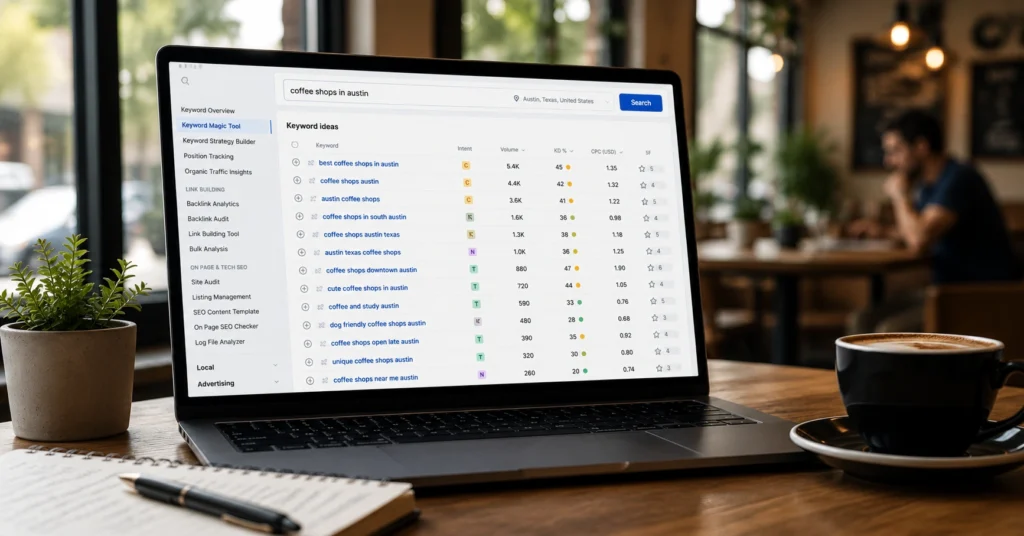
You don’t need Ahrefs or SEMrush to do competent local keyword research. You need four free tools used in the right sequence.
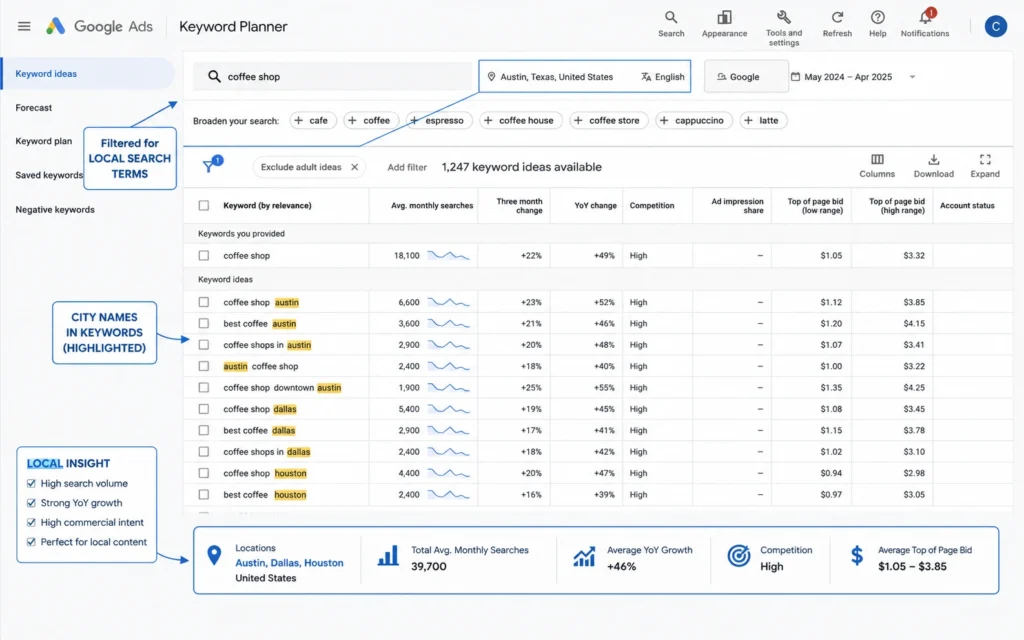
Google Keyword Planner remains the only free tool that shows actual search volume ranges. Yes, it aggregates data into ranges (100-1K, 1K-10K) unless you’re running active ad campaigns. But for local work, that’s usually enough. You’re trying to distinguish between “worth creating a page” and “not worth the effort,” not optimizing for exact volume.
Set your location filter to the specific city or metro area you’re researching. Don’t leave it at “United States.” The difference matters. I’ve seen “dentist Denver” show 2,400 searches nationally but only 590 when filtered to the Denver metro area. That changes the content strategy completely.
Google Trends tells you whether a location keyword is growing, stable, or declining. It doesn’t show volume, but it shows direction. If “solar installer Boise” has declined 40% over 24 months, you need to know that before investing in a location page. Conversely, a rising trend might justify creating content for a lower-volume keyword.
Use the geographic filter to compare interest across nearby cities. This helps you prioritize which locations deserve pages when you serve multiple areas.
Google Business Profile insights (if you have access to the client’s profile) shows actual search queries that led to profile views, calls, and direction requests. This is gold. It’s real user behavior, not modeled data. You’ll see variations you’d never think to research—”plumber near me open now” versus “24 hour plumber,” for example.
Manual SERP analysis is the final tool. Type your location keyword into Google and look at what ranks. Are the results mostly local pack listings? Directory sites? Actual business websites? The SERP tells you what Google thinks users want. If directories dominate page one, ranking will be harder. If individual business sites rank, you have a clearer path.
I use these four tools in sequence, not in isolation. Keyword Planner gives me volume. Trends shows me trajectory. GBP insights reveals real queries. SERP analysis confirms opportunity. Together, they’re enough.
The 5-Step Workflow
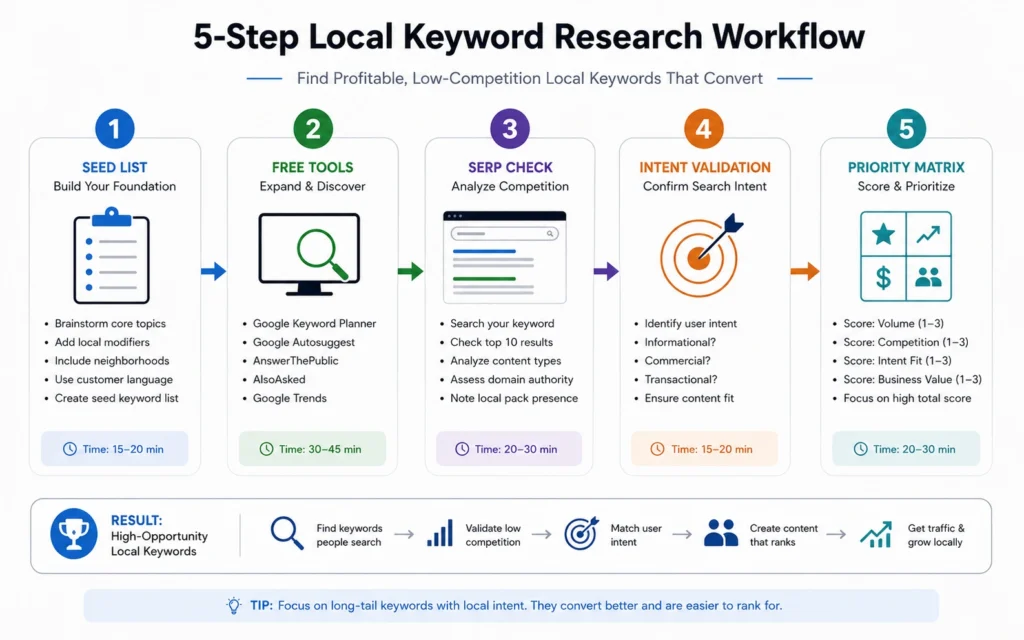
Here’s the exact process I follow for every local keyword research project. It takes 2-3 hours per location cluster.
Step 1: Build your seed list
Start with your core services and multiply by location modifiers. If you’re a roofer in Dallas serving five suburbs, your seed list looks like:
- roof repair Dallas
- roof repair Plano
- roof repair Frisco
- roof repair McKinney
- roof replacement Dallas
- roof replacement Plano
- [Continue for each service × location combination]
Don’t get clever yet. Just create the obvious combinations. You’ll prune and expand in later steps.
Step 2: Validate search volume
Run each seed keyword through Google Keyword Planner with the location filter set to the specific metro area. Flag anything with fewer than 50 searches per month as “low priority.” These keywords rarely justify dedicated pages unless they’re high-value transactions.
Group keywords by location. You might discover that “roof repair McKinney” has 210 searches but “roof replacement McKinney” has only 30. That tells you McKinney deserves a page focused on repair, not replacement.
Step 3: Check SERP competition
For each keyword with sufficient volume, search it in an incognito window. Look at the top 10 results. Note:
- How many are local pack listings versus organic results
- Whether directories (Yelp, Angi, HomeAdvisor) dominate
- The domain authority of ranking sites (use free tools like MozBar)
- Whether the results match your service area
If page one is all national directories and you’re a local business, ranking will require significant effort. That doesn’t mean skip the keyword—it means adjust your timeline and resource allocation.
Step 4: Identify intent variations
Look at the “Related searches” section at the bottom of the SERP. These are goldmines for local intent. You’ll see patterns like:
- “emergency roof repair Dallas”
- “affordable roof repair Dallas”
- “roof repair Dallas cost”
Each variation represents a different user need. Your location page should address the primary intent, but you can capture secondary intents with targeted sections.
Step 5: Prioritize using a simple matrix
Create a 2×2 grid: search volume (high/low) on one axis, competition difficulty (easy/hard) on the other.
High volume + easy competition = immediate priority. Create these pages first.
High volume + hard competition = strategic priority. These pages require more effort but have the highest ceiling.
Low volume + easy competition = quick wins. Create these if you have bandwidth, but don’t prioritize them.
Low volume + hard competition = skip. Unless there’s a strategic reason, these aren’t worth your time.
This workflow takes discipline. It’s tempting to skip the SERP analysis or guess at intent. Don’t. The extra 20 minutes per keyword saves hours of wasted content creation.
Common Mistakes That Waste Months
I’ve made every mistake on this list. You don’t have to.
Creating location pages for towns with no search volume. This is the most common error. Just because you serve a location doesn’t mean people search for it. I once audited a law firm with 23 location pages. Seventeen of them targeted keywords with fewer than 20 searches per month. We deleted those pages and redirected the URLs to the main service page. Rankings improved because we stopped diluting our topical authority.
Optimizing for “near me” keywords. Stop doing this. Google adds “near me” automatically based on user location. You optimize for “service + city,” and Google handles the rest. I still see agencies charging clients to optimize pages for “plumber near me.” It’s a waste of time.
Ignoring neighborhood-level keywords in dense cities. If you’re in a major metro, neighborhood keywords often outperform city-level keywords. “Coffee shop Capitol Hill Seattle” might have more commercial intent than “coffee shop Seattle.” The competition is lower, and the user is closer to conversion. Free tools like Google Trends can help you identify which neighborhoods have search volume.
Treating every location the same. Your Dallas page shouldn’t be your Austin page with find-and-replace. Each location needs unique content that reflects local landmarks, common problems in that area, neighborhood names, and service-specific details. Yes, this takes more time. It’s also the difference between ranking and not ranking.
Forgetting mobile intent. Local searches are overwhelmingly mobile. If your location pages aren’t optimized for mobile—fast load times, click-to-call buttons, clear address display—you’re losing conversions even if you rank. Check your pages on an actual phone, not just in desktop view.
What to Do When Volume Is Too Low
Sometimes the data is clear: nobody searches for your service in your target location. You have three options.
Option 1: Expand your service area definition. Instead of “roof repair Round Rock,” target “roof repair North Austin suburbs” and mention Round Rock, Pflugerville, and Cedar Park within the content. This works when nearby locations individually have low volume but collectively add up.
Option 2: Focus on adjacent services. Maybe “emergency plumber Round Rock” has 15 searches, but “water heater repair Round Rock” has 140. Adjust your service mix or content focus to match actual demand.
Option 3: Build authority through local content, not location pages. Create content about local events, community issues, or area-specific problems that relate to your service. A HVAC company in Boise might write about “how Boise’s dry climate affects your furnace” instead of creating 15 thin location pages. This builds topical authority and earns local links without requiring search volume for every keyword.
The key is matching your effort to actual opportunity. Local keyword research 2026 isn’t about gaming the system with hundreds of location pages. It’s about identifying the few locations that matter and executing well on those.
When to Stop Researching and Start Writing
You’ll know you’re done with keyword research when:
- You’ve identified 3-5 primary location keywords with sufficient volume
- You understand the intent behind each keyword
- You’ve analyzed the competition and have a realistic timeline
- You have a list of 10-15 secondary keywords to incorporate naturally
Anything beyond that is procrastination. The SERP will teach you more than additional keyword research. Publish the page, monitor performance for 60 days, then adjust based on real data.
I used to spend weeks researching before writing a single word. Now I spend 2-3 hours, write the page, and let actual performance guide iteration. The difference isn’t laziness—it’s recognizing that keyword research is a starting point, not the work itself.
FAQ: Frequently Asked Questions About Local Keyword Research
What is the difference between local and regular keyword research?
Local keyword research focuses on location-specific intent—queries that include city names, neighborhoods, “near me” phrases, or service-area modifiers. Regular keyword research targets broader, non-geographic intent. The tools overlap, but local research requires you to validate geographic search volume and understand proximity-based ranking factors.
Can I do local keyword research without paid tools?
Yes. Google Keyword Planner, Google Trends, Google Business Profile insights, and manual SERP analysis provide enough data for most local businesses. The limitation isn’t access to data—it’s knowing which signals matter. Free tools show you search volume and trends; you still need to interpret intent and competition manually.
How many location keywords should I target per page?
One primary location per page, with 2-3 related neighborhood or service-area variations used naturally in the content. Creating separate pages for every nearby town only works if each location has genuine search volume and distinct intent. Otherwise, you’re diluting your topical authority across thin pages.
Do “near me” keywords still matter in 2026?
Yes, but not in the way most people think. You don’t optimize pages for “near me” phrases—Google adds those modifiers automatically based on user location. Instead, you optimize for the service + location combination (e.g., “plumber Austin”) and ensure your Google Business Profile and NAP consistency signal proximity clearly.
Continue Exploring
Ready to apply this to your specific situation?
- Start with keyword research fundamentals to master the core concepts before diving into local applications.
- Move into local SEO strategy to understand how location keywords fit into the broader local ranking system.
- Optimize your Google Business Profile to ensure your keyword research translates into profile visibility.