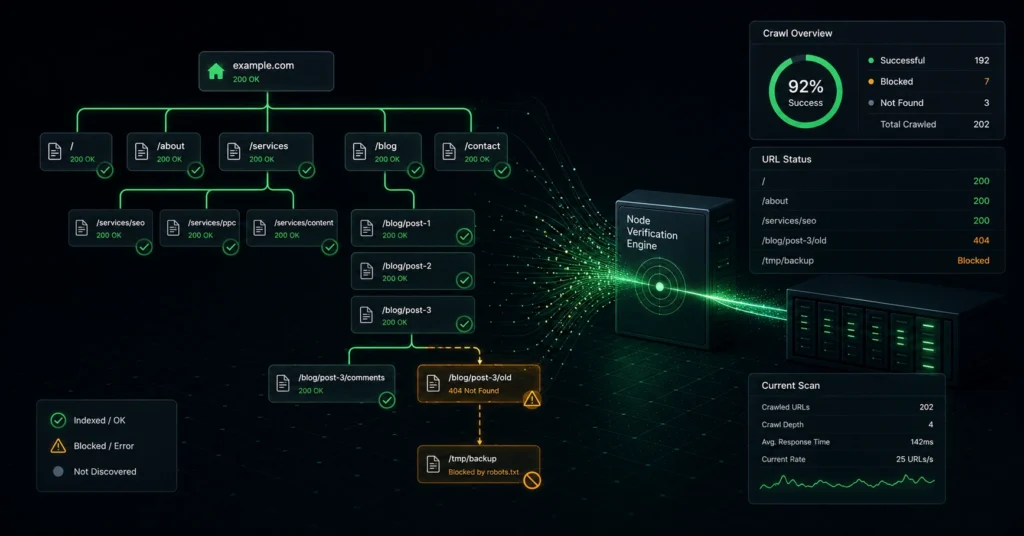
If search engines cannot smoothly navigate your site architecture, your content strategy does not matter. Masterful copywriting, pixel-perfect design, and aggressive backlink acquisition fail instantly when structural roadblocks prevent search spiders from downloading your source code.
To systematically optimize your organic visibility, you must first master crawlability SEO—the technical practice of removing access friction so that search engines can easily find, process, and list your content in their databases.
This guide skips the high-level definitions and focuses on the concrete diagnostic frameworks you need to unblock stuck pages. If you have hundreds of URLs languishing in the “Crawled – currently not indexed” graveyard inside your search console dashboard, this is the exact system required to force search spiders to take action.
The Practical Distinctions That Keep Your Pages Out of Search
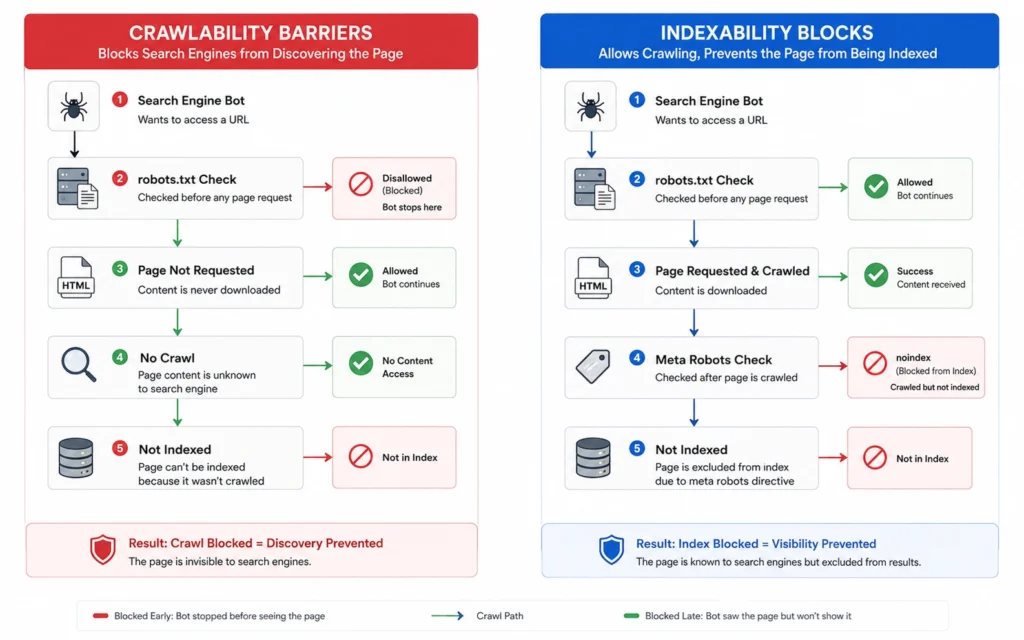
Crawlability and indexability are frequently treated as synonyms in generic marketing advice, but conflating them will cause you to waste weeks implementing the wrong technical fixes. They are two distinct sequential check gates in a search engine’s indexing pipeline.
- Crawlability defines whether a search engine spider can physically request, download, and read the raw HTML code of a URL. If your web server blocks the bot, or if your internal linking structure strands a page in complete isolation, the page suffers from a crawlability failure.
- Indexability determines whether a search engine is willing to store that downloaded page inside its active search index. A page can be perfectly crawlable, but if it contains a structural directive telling the bot to discard it, it remains hidden from users.
Think of crawlability as the physical road system leading to a locked office building, while indexability is the access badge required to pass the security desk inside. If the road is washed out, the badge is irrelevant.
We recently audited an e-commerce platform that spent $45,000 on content updates to fix declining organic traffic. The actual issue had nothing to do with their content quality; a junior developer had inadvertently introduced a loops error in their faceted navigation. The search spiders were getting trapped in infinite URL variations, burning through the site’s processing allocation before ever reaching the revenue-generating product landing pages.
The Core Pillars of Crawlability SEO
To maintain a healthy technical setup, you must actively manage the entry pathways, direct rules, and physical constraints that govern bot behavior on your server. When these systems are uncoordinated, search engines default to a conservative stance—they simply stop exploring your site.
1. Server Performance and Infrastructure Response
Before a bot can read a single line of text, your server must acknowledge its request. If your hosting environment frequently drops connections or drops under minor load, your visibility will decay.
Search engines do not possess infinite computing power. When a crawler hits your site, it measures your server’s server response times using programmatic metrics. If your pages consistently take longer than two seconds to respond, or if they throw 503 service unavailable codes during peak hours, the crawler will proactively throttle its speed to protect your server from crashing. This reaction limits your visibility, leaving newer pages completely undiscovered for weeks.
2. Information Architecture and Link Distribution
Search spiders navigate the web primarily by following hyperlinks. A page that lacks pointing internal links is technically known as an orphan page, rendering it virtually invisible to natural discovery pipelines.
[ Homepage ] ──► [ Category Page ] ──► [ Sub-Category Page ] ──► [ Deep Product Page ]
      │                                                                 ▲
      └─────────────────────────── (Orphan Page: No Links) ─────────────┘
Your directory structure should follow a clean, hierarchical tree pattern. Every deep contextual page must reside no further than three clicks away from your root domain homepage. When your internal link structure relies entirely on loose script-based menus or dynamic form fields instead of raw HTML anchor tags, search bots fail to trace the pathways, stranding valuable URLs in total isolation.
3. The Explicit Rules Matrix
You must maintain clear, unambiguous instructions that explicitly tell search engines which sections of your asset are open for evaluation and which are completely off-limits.
This is controlled through your root directory’s configuration assets. A misconfigured system here can entirely wipe your platform from search results overnight. You must balance programmatic constraints with manual exclusion tools to ensure your processing resource is allocated solely to pages designed to generate organic business value.
Step-by-Step Diagnostic Workflow to Restore Indexation
When your core pages fail to show up in search results, do not guess at the solution. Use this rigorous, systematic troubleshooting process to locate the exact technical breakdown in your indexing loop.
Step 1: Analyze the Host-Level Request Health
Your first task is confirming whether search bots are experiencing structural connection failures when trying to talk to your web host.
Open your search dashboard and navigate directly to the settings panel to review the active Crawl Stats report. This section displays a detailed breakdown of your host’s technical response patterns over a rolling 90-day window.
┌────────────────────────────────────────────────────────┐
│             Crawl Stats Status Breakdown               │
├───────────────────────────────┬────────────────────────┤
│ Response Type                 │ Target Safety Threshold│
├───────────────────────────────┼────────────────────────┤
│ 200 OK (Success)              │ > 95% of total requests│
│ 301/302 (Redirection)         │ < 5% of total requests │
│ 404 (Not Found)               │ < 1% of total requests │
│ 5xx (Server Failures)         │ 0% Allowable           │
└───────────────────────────────┴────────────────────────┘
If your server errors show unexpected spikes, you must consult your hosting team immediately to check your firewalls. Aggressive security configurations often mistake rapid search spider activity for a malicious DDoS attack, inadvertently blacklisting official search bots at the root infrastructure level.
Step 2: Validate the Robots.txt File Directives
Once you verify that the server is accepting connections, you must review the explicit parsing rules stored in your root directory.
Access your live ruleset by typing your domain into a browser followed exactly by /robots.txt. Examine the file for broad exclusion commands that might be trapping your primary assets.
# CRITICAL BLOCKER EXPOSED
User-agent: *
Disallow: /wp-admin/
Disallow: /products/       <-- This line will block your entire store catalog
Ensure your asset directories are completely free of over-generalized exclusion statements. If you discover a catastrophic line blocking an active cluster, remove it immediately. Use the official validation tools inside Google Search Central to test your revised syntax before pushing the live changes to your production server.
Step 3: Audit Content Isolation and Orphan Pages
Next, you must locate any published URLs that are completely cut off from your site’s natural internal link distribution system.
Run a comprehensive technical crawl of your site using a dedicated testing platform like Screaming Frog or Sitebulb. Configure the software to scrape your XML sitemaps simultaneously, then run a post-crawl architecture analysis.
Compare the total URLs discovered via regular link crawling against the records listed inside your sitemap files. If the crawl engine surfaces pages that are present in the sitemap but show an internal inlink count of zero, those pages are orphaned. Correct this issue immediately by embedding contextual text links pointing to those pages from highly authoritative category hubs or relevant parent articles.
Step 4: Eradicate Canonicalization and Duplicate Redundancy
Search engines will intentionally refuse to index pages if they determine the content is a duplicate copy of an asset they have already cataloged elsewhere. This aspect is vital for managing crawlability SEO 2026 landscapes, where crawlers prioritize unique value over mass-produced layouts.
Inspect your URL parameters closely, particularly if you run an e-commerce store with extensive product filtration rules. Ensure every single page features a self-referencing canonical tag within the page header code.
HTML
<link rel="canonical" href="https://theskilljourney.com/target-page-url/" />
If your content publishing platform generates unique, disparate tracking links for the exact same article asset, explicit canonicalization forces the crawler to merge the ranking metrics into one single destination URL. This practice completely prevents internal duplicate visibility penalties from suppressing your main pages.
Step 5: Verify the Meta Robots Header Status
The final step is checking for hidden, code-level execution instructions that command search engines to drop your pages from memory after downloading them.
Open a live problem page in your browser, view the raw page source code, and perform a fast text search for the specific phrase robots.
HTML
<meta name="robots" content="noindex, follow">
If that specific directive exists within your header block, the page will never appear in standard search results, regardless of how many quality external links you build. Switch that command to index, follow inside your content management system settings to permanently unblock the page for general search visibility.
Where People Get Stuck: Critical Indexing Myths
The technical nature of crawlability creates a breeding ground for outdated beliefs that cause operators to chase down fictional problems while ignoring severe architecture flaws.
A pervasive, harmful myth is that submitting your XML sitemap multiple times a week forces search engines to rank your pages faster. An XML sitemap is merely a discovery list, not an optimization tool. If your site code contains systemic loops, messy internal links, or severe server delays, continuously uploading your sitemap achieves absolutely nothing. The spider will read the list, hit the technical barrier on your server, and abandon the session.
Another common error is relying on cheap, automated link blasting tools to force indexation on low-quality pages. If a search engine crawls your page and consciously chooses not to index it, the primary cause is almost always an issue of uniqueness or depth. Flooding that unindexed URL with spammy forum links will not override the algorithm’s quality filters—it simply signals that your entire domain engages in artificial authority manipulation.
Tooling Infrastructure and Execution Efficiency
Managing technical health manually across thousands of pages is impossible. You need a dedicated, reliable technical stack to monitor site access and catch structural failures before they damage your organic performance.
| Tool Name | Core Technical Purpose | Operational Cost | Genuine Strategic Alternative |
| Google Search Console | Core indexing diagnostics & coverage tracking | Free | Manual server log file inspection |
| Screaming Frog SEO Spider | Deep architecture analysis & orphan page discovery | Free up to 500 URLs; ~$250/yr for unlimited | Cloud crawlers (JetOctopus / Lumar) |
| WebPageTest | Comprehensive server response & performance mapping | Free basic tier | Google PageSpeed Insights dashboard |
While desktop audit tools work beautifully for standard marketing footprints, they possess a distinct operational limitation: they simulate a single, isolated crawl from your local computer. If your platform spans more than 50,000 deep dynamic pages, running regular desktop audits will quickly overwhelm your system’s local memory. For enterprise scales, you must transition to cloud-based technical crawl engines like Lumar or automated log file analysis scripts to continuously track real bot behaviors without degrading your machine’s local performance.
Technical Maintenance Rules to Protect Server Resources
If your web platform features extensive legacy setups or highly complex navigation rules, you must establish strict programmatic guardrails to prevent bots from consuming valuable server bandwidth on non-indexable content paths.
When to Restrict Access and When to Block Indexation
Use your root robots.txt file exclusively to manage server resources, not to hide low-quality content. When you disallow a path via robots.txt, you stop the bot from looking at the page code entirely. However, if that blocked URL already has external links pointing to it from other sites across the web, Google can still index the blank URL based purely on that external anchor text metadata.
To cleanly remove an accessible page from search indexes while maintaining link flow, you must leave the path open in your robots.txt file, but embed a explicit noindex rule directly within the page’s HTML header. This layout allows the search spider to crawl the page, process the explicit removal command, and smoothly drop the asset from its index without wasting processing resources on future visits.
Managing Large-Scale Internal Script Footprints
Modern web assets often rely heavily on complex background processes, customer account dashboards, and internal database search functions. These areas generate millions of duplicate, thin URL parameters that have no purpose existing in public search environments.
Add explicit path restrictions within your master configuration file to cordon off these internal operational zones entirely.
# Protect Server Resources From Redundant Crawling
User-agent: *
Disallow: /search/
Disallow: /api/
Disallow: /checkout/
Disallow: /*?sort=
This strict segregation ensures that when search bots allocate a processing window to your domain, 100% of that computational energy is directed toward crawling your core editorial hubs, product pages, and service frameworks instead of spinning endlessly in non-indexable utility loops.
To maintain structural health across your entire platform, you can seamlessly review your primary index settings alongside our deeper operational resources by returning to our main technical seo hub.
Frequently Asked Questions About Crawlability SEO
Why is Google crawling my pages but refusing to index them?
This usually indicates a quality or redundancy issue. If the content is highly similar to existing pages on your site, or lacks sufficient unique value compared to what is already on the web, Google will intentionally conserve database space by withholding indexation.
How long does it take for a fixed robots.txt file to apply?
Google typically refreshes its cached copy of your robots.txt file within 24 hours. You can accelerate this timeline by using the robots.txt Tester tool inside Google Search Central to submit an immediate update request.
Can a slow web server cause indexation failures?
Yes. If your server frequently responds with 503 errors or takes longer than a few seconds to serve a page, search spiders will throttle their crawl velocity to avoid crashing your site, leading to unindexed content.