Most technical SEO advice assumes you can code. You can’t. That’s fine.
I spent three months trying to learn technical SEO by reading developer forums and documentation written for engineers. I wasted 17 hours on problems that didn’t matter and ignored three simple fixes that would have moved the needle immediately. Technical SEO for beginners isn’t about becoming a developer. It’s about knowing what to check, what to fix, and what to leave alone.
This guide covers the technical SEO basics you can actually implement without writing code. You’ll learn what search engines need from your site, which tools show you the problems, and which fixes deserve your time first. No jargon without explanation. No assumptions about prior knowledge. Just the work that matters.
What Technical SEO Rewards — and What It Punishes
Technical SEO rewards clarity and punishes confusion. Search engines crawl your site like a librarian walking through a disorganized warehouse. If they can’t find what’s on the shelves, they can’t recommend it to anyone.
The reward structure is straightforward: pages that load fast, have clear structure, and use standard web conventions get crawled more often and indexed more reliably. Pages that break basic web standards, load slowly, or hide content behind confusing navigation get deprioritized or skipped entirely.
Here’s what I learned the hard way: a single misconfigured robots.txt file blocked Google from crawling 40% of my site’s pages for six weeks. I didn’t notice until traffic dropped 30%. The fix took 4 minutes. The damage took two months to recover.
Technical SEO punishes assumptions. It doesn’t care that your site “looks fine” in a browser. It cares whether search engines can access, understand, and trust your content.
What to Know Before You Start
You need three things before diving into technical SEO for beginners 2026:
Access to Google Search Console. This is free. It’s non-negotiable. It shows you exactly how Google sees your site. If you haven’t verified your site yet, do that first. Everything else depends on it.
A basic understanding of how search works. Search engines do three things: crawl (discover pages), index (store pages), and rank (order pages for queries). Technical SEO removes friction from the first two steps so the third step can happen.
Realistic expectations about impact. Technical SEO rarely produces overnight ranking jumps. It prevents problems and creates conditions where good content can perform. If your content is weak, fixing technical issues won’t save it. If your content is strong, technical problems might be holding it back.
One thing you don’t need: coding skills. You need to know where to click, what to look for, and when to ask for help. That’s different.
The 5 Technical SEO Concepts That Actually Matter
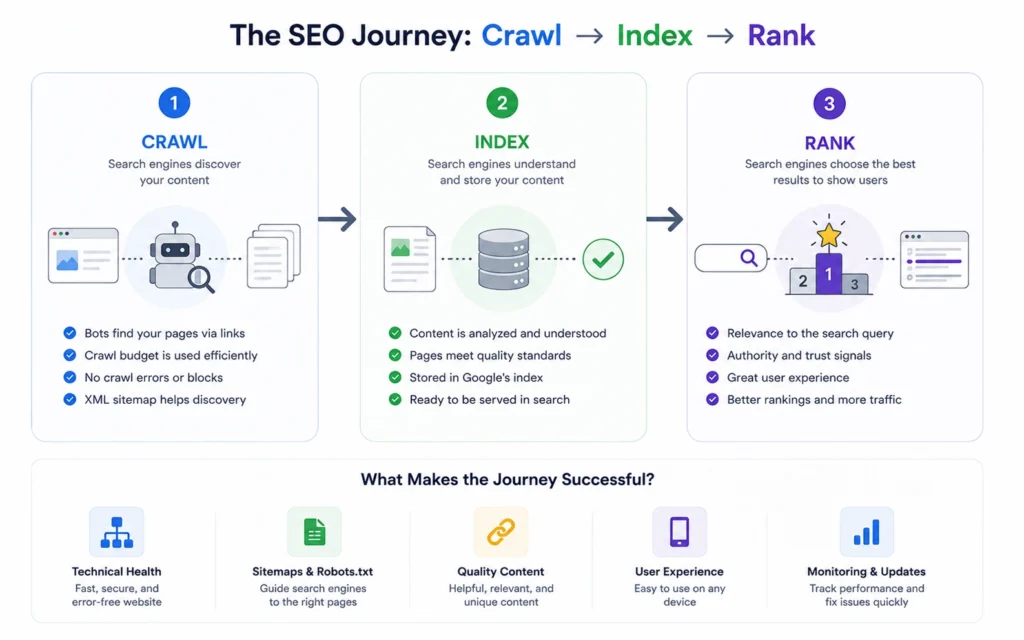
Forget the 50-point checklists. Most technical SEO work clusters around five core concepts. Master these, and you’ve covered 80% of what matters.
Crawlability: Can search engines reach your pages?
This is the foundation. If Google can’t crawl a page, it can’t index it. If it can’t index it, it can’t rank it. Crawlability problems usually come from three places: robots.txt blocking access, broken internal links, or pages hidden behind login walls.
Check this in Google Search Console under “Settings” → “Crawl stats.” If the graph shows zero crawls for days at a time, you have a problem. If you see thousands of 404 errors, you have a different problem.
Indexation: Are your pages stored in Google’s database?
Crawlability gets Google to the door. Indexation gets them to remember what’s inside. Not all crawled pages get indexed. Google might skip pages it considers low-value, duplicate, or thin.
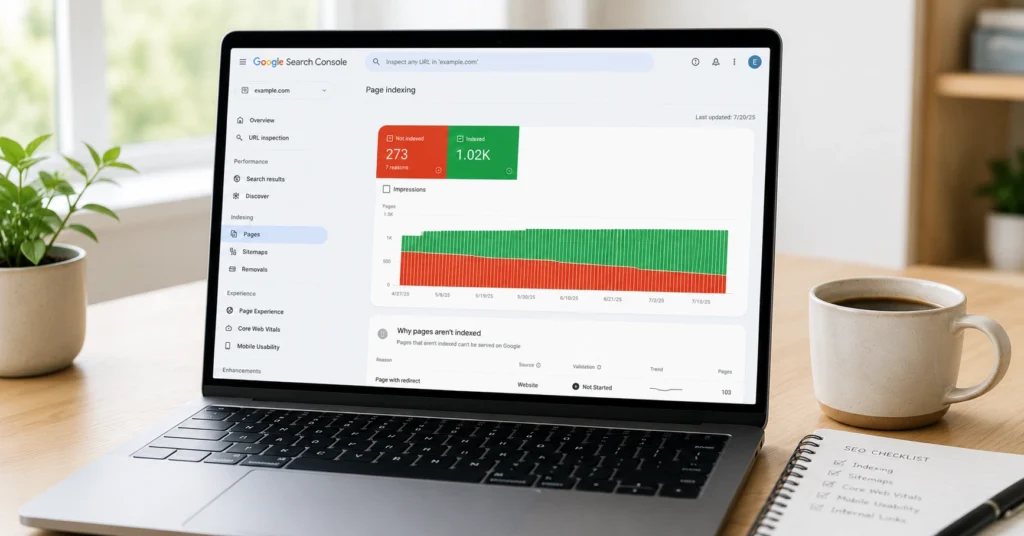
The “Pages” report in Search Console shows you exactly which pages are indexed and which aren’t. The “Why pages aren’t indexed” section tells you the reason. Common issues: “Crawled – currently not indexed” (Google saw it but didn’t think it was worth storing) or “Discovered – currently not indexed” (Google knows it exists but hasn’t crawled it yet).
Site structure: Can users and search engines navigate logically?
This isn’t about fancy navigation menus. It’s about whether every page is reachable within 3-4 clicks from the homepage and whether your URL structure reflects your content hierarchy.
A flat site structure (everything one click from home) confuses search engines about what matters. A deep site structure (7+ clicks to reach content) buries pages so deep they rarely get crawled. The sweet spot: 3-4 clicks maximum to any important page.
Page speed: Do pages load fast enough to keep users?
Google uses page speed as a ranking factor, but more importantly, slow pages kill user engagement. If your page takes 5 seconds to load, 30% of visitors leave before it finishes.
You don’t need to hit perfect scores. You need to avoid catastrophic slowness. Check your pages in PageSpeed Insights. Anything under 50/100 on mobile needs attention. Anything under 75 is acceptable but improvable.
Mobile-friendliness: Does your site work on phones?
Google uses mobile-first indexing, which means it evaluates your site based on the mobile version. If your site breaks on mobile, it hurts your rankings everywhere.
Test your site with Google’s Mobile-Friendly Test tool. If it fails, you need to fix it. There’s no workaround.
Where Beginners Get Stuck: Errors, Myths, and False Starts
Most technical SEO mistakes fall into three categories: over-optimization, wrong priorities, and misunderstanding what matters.
Myth 1: You need perfect technical scores to rank.
False. I’ve seen pages with 60/100 PageSpeed scores outrank pages with 95/100 scores because the content was better and the backlinks were stronger. Technical SEO is a threshold, not a competition. Get above the threshold, then focus on content and authority.
Myth 2: Every error in Search Console needs fixing immediately.
Also false. Search Console reports everything it notices, not everything that matters. A few 404 errors on old blog posts? Ignore them. Hundreds of 404 errors on important pages? Fix them. Context determines priority.
Myth 3: Technical SEO is a one-time project.
This is where most beginners fail. Technical SEO is maintenance, not a launch checklist. Sites change. Plugins update. Content gets deleted. Links break. You need to check your technical health monthly, not once and forget it.
The false start I see most often: beginners try to fix everything at once. They get overwhelmed, make changes without testing, break something important, and give up. Don’t do this.
Fix one category at a time. Start with crawlability and indexation. Then move to site structure. Then page speed. Then mobile. One category per week. Test after each change.
Tools and Workflows That Actually Help
You don’t need expensive software. You need the right free tools and a simple workflow.
Google Search Console (free, mandatory): This is your primary diagnostic tool. Check it weekly. Look at three reports:
- “Pages” → See what’s indexed and what isn’t
- “Sitemaps” → Confirm Google is reading your sitemap
- “Core Web Vitals” → Identify pages with speed problems
Google PageSpeed Insights (free): Test your 5-10 most important pages. Don’t obsess over the score. Look at the specific recommendations. “Reduce image sizes” is actionable. “Eliminate render-blocking resources” might require a developer.
Screaming Frog SEO Spider (free up to 500 URLs): This crawls your site like Google does. The free version handles most small sites. Use it to find:
- Broken links (404 errors)
- Missing title tags and meta descriptions
- Duplicate content
- Redirect chains
The workflow I use:
Week 1: Verify Search Console, submit sitemap, check indexation status. Week 2: Run Screaming Frog crawl, fix broken links, add missing titles. Week 3: Test top 10 pages in PageSpeed Insights, compress oversized images. Week 4: Check mobile-friendliness, fix navigation issues. Ongoing: Monthly Search Console review, quarterly full crawl.
This isn’t glamorous. It won’t produce viral content. It prevents problems and creates stability.
What It Costs: Time, Money, and Attention
Technical SEO for beginners costs more time than money, but the time investment is front-loaded.
Time costs:
- Initial setup and audit: 8-12 hours
- Monthly maintenance: 2-3 hours
- Major fixes (if needed): 4-8 hours per issue
Most of the initial time goes into learning the tools and understanding your site’s structure. Once you’ve done one audit, the next one takes half as long.
Money costs:
- Google Search Console: Free
- PageSpeed Insights: Free
- Screaming Frog: Free (up to 500 URLs) or £149/year for unlimited
- Hosting upgrades (if speed is a problem): $10-50/month
You can do 90% of technical SEO with free tools. The paid upgrades save time, not capability.
Attention costs: This is the hidden cost. Technical SEO requires discipline. You have to check reports even when nothing’s broken. You have to resist the urge to tweak things that don’t need fixing. You have to accept that some problems require developer help and you can’t solve them yourself.
The attention cost is real. Budget for it.
When to Use This Approach and When Not To
Technical SEO matters most when:
- You’re launching a new site (build it right from the start)
- You’ve published great content that isn’t ranking (technical problems might be blocking it)
- You’ve recently migrated or redesigned your site (things break during changes)
- Your traffic dropped suddenly (technical issues are a common culprit)
Technical SEO matters less when:
- You have 10 pages and no content strategy yet (write more content first)
- Your pages aren’t indexed because they’re thin or duplicate (fix the content first)
- You’re ranking on page 5 with no backlinks (authority is your problem, not technical SEO)
The sequence matters. Content first. Technical foundation second. Link building third. Don’t invert this.
What to Skip — and What to Do Instead
Skip: Schema markup (for now)
Structured data helps with rich results, but it’s not a ranking factor. If you’re struggling with basic indexation, skip schema. Come back to it later.
Do instead: Ensure every page has a unique, descriptive title tag and meta description. This matters more than schema for beginners.
Skip: Complex canonicalization strategies
Canonical tags prevent duplicate content issues, but most beginners don’t have duplicate content at scale. If you’re running a standard blog or business site, your CMS handles this.
Do instead: Check that you don’t have both http:// and https:// versions of your site indexed. Pick one (https), redirect the other, and move on.
Skip: JavaScript SEO deep-dives
If your site uses heavy JavaScript frameworks (React, Vue, Angular), SEO gets complicated. But most beginners use WordPress, Squarespace, or Webflow. These platforms handle JavaScript SEO reasonably well out of the box.
Do instead: Test your pages with the “URL Inspection” tool in Search Console. If Google can see your content in the screenshot, you’re fine. If not, you might need developer help.
Skip: Optimizing for every Core Web Vital metric
Core Web Vitals include LCP, FID, CLS, and other acronyms. You don’t need to master all of them. Focus on one: Largest Contentful Paint (LCP). This measures load speed. Fix this first.
Do instead: Compress images, use a caching plugin, and upgrade hosting if needed. These three actions fix 80% of LCP problems.
Frequently Asked Questions About Technical SEO for Beginners
How long does it take to see results from technical SEO?
Technical SEO fixes typically show results in 2-8 weeks. Indexation issues resolve fastest—sometimes within days. Speed improvements take 2-4 weeks to reflect in rankings. Site structure changes can take 6-8 weeks because Google needs to recrawl and re-evaluate your pages. The key is that technical SEO prevents problems more than it creates dramatic improvements.
Do I need to learn HTML to do technical SEO?
No. You need to understand what HTML elements do (title tags, headings, meta descriptions), but you don’t need to write code. Most CMS platforms let you edit these elements through visual interfaces. If you need to add tracking codes or fix complex issues, you can hire a developer for specific tasks without learning to code yourself.
What’s the single most important technical SEO fix for beginners?
Fix your indexation issues first. If Google isn’t indexing your pages, nothing else matters. Check Search Console’s “Pages” report. If you see important pages marked as “Discovered – currently not indexed” or “Crawled – currently not indexed,” investigate why. Common causes: weak internal linking, thin content, or crawl budget waste on low-value pages.
Can I do technical SEO on a tight budget?
Yes. All essential tools are free: Google Search Console, PageSpeed Insights, and the free version of Screaming Frog (up to 500 URLs). The only potential cost is hosting—if your current host is slow, upgrading might cost $10-30/month. But this is optional. You can improve technical SEO significantly without spending money.
Should I fix technical SEO before or after creating content?
Do basic technical setup before publishing content, then iterate. Before launch: ensure your site is crawlable, submit a sitemap, and verify Search Console. After publishing: monitor indexation, fix broken links, and optimize speed. Don’t wait for perfect technical SEO before writing. Publish content, then improve the technical foundation alongside it.
Continue Exploring
- Now that you understand technical SEO basics, move deeper into on-page SEO fundamentals to learn how to structure individual pages for search intent, or explore how to use Google Search Console to master the tool that shows you exactly what Google sees.