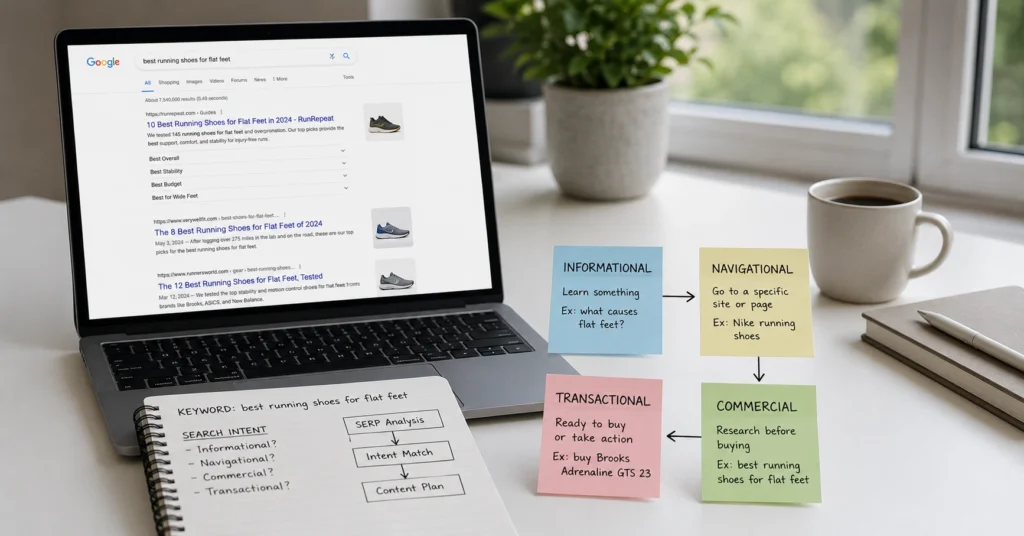
I spent three months in 2024 trying to rank a detailed guide for “best project management software.” The article was thorough, well-researched, better than most competitors. It sat on page three for six weeks.
The problem wasn’t quality—it was intent mismatch. Google’s top results were all comparison tables with pricing and feature matrices. I’d written a narrative guide. Once I restructured it to match the commercial investigation intent with direct comparisons and clear recommendations, it moved to page one in 11 days.
Search intent SEO isn’t about understanding what users type. It’s about understanding what they actually want when they type it. This guide shows you how to identify intent, match your content to it, and stop wasting time on pages that Google will never rank because they answer the wrong question.
You’ll learn the four intent types, how to spot them in under 15 minutes using SERP analysis, and the exact workflow to align your content before you write a single word. No theory. Just the method that separates pages that rank from pages that disappear.
What Search Intent Actually Is (And Why Keywords Alone Don’t Work Anymore)
Search intent is the reason behind a search query—the actual goal someone has when they type words into Google. It’s not the keyword itself. It’s what they want to accomplish: learn something specific, find a particular website, compare options before buying, or complete a purchase right now.
Google’s algorithm has shifted hard toward intent matching over the past three years. The 2023 Helpful Content Update and subsequent refinements made it clear: you can’t rank by optimizing for keywords alone anymore.
Google measures whether your page satisfies the user’s underlying need through behavioral signals—how long they stay, whether they click back to try another result, whether they scroll or bounce.
Here’s the practical reality: two different keywords can have identical intent, and the same keyword can have different intent depending on context. “How to fix a leaky faucet” and “faucet repair tutorial” both signal informational intent. But “buy wrench” could be transactional (ready to purchase) or informational (researching which wrench to buy) depending on the searcher’s stage.
The mistake most beginners make is assuming intent is obvious from the keyword. It’s not. You have to read the SERP—the actual search results—to see what Google thinks users want. That’s your real signal.
The Four Types of Search Intent (and How to Spot Each One)
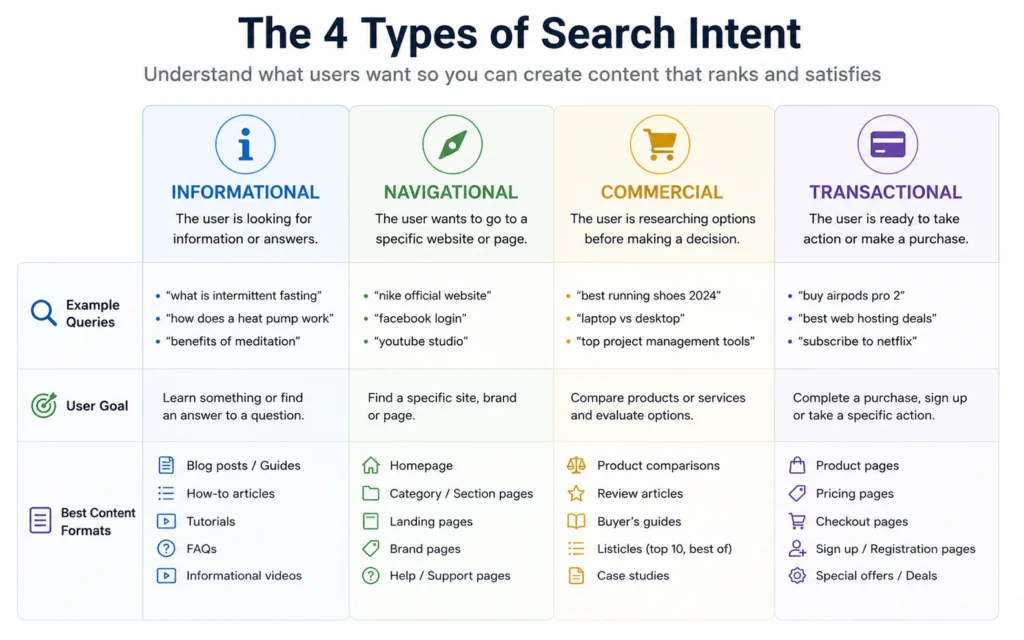
Every search query falls into one of four intent categories. Understanding these isn’t academic—it directly determines what format your content needs to take if you want to rank.
Informational Intent
The user wants to learn, understand, or solve a problem. They’re not ready to buy. They’re in research mode.
Examples: “how to start a vegetable garden,” “what is SEO,” “why does my laptop overheat”
Content Format: How-to guides, tutorials, explanations, listicles, definitions
SERP Signals: Featured snippets, “People Also Ask” boxes, blog posts, YouTube videos, Wikipedia entries
Navigational Intent
The user wants to find a specific website or page. They know where they’re going—they’re using Google as a shortcut.
Examples: “Facebook login,” “Apple support,” “The Skill Journey keyword research guide”
Content Format: Brand homepages, specific product pages, login portals
SERP Signals: The exact brand or site dominates position one, often with sitelinks
Commercial Investigation Intent
The user is comparing options before making a decision. They’re not ready to buy yet, but they’re evaluating.
Examples: “best CRM software 2026,” “Mailchimp vs ConvertKit,” “project management tools comparison”
Content Format: Comparison articles, “best of” lists, reviews, feature matrices, pros and cons
SERP Signals: Review sites, comparison tables, affiliate content, “top 10” lists
Transactional Intent
The user is ready to take action—buy, sign up, download, or complete a specific task.
Examples: “buy running shoes online,” “HubSpot pricing,” “download Photoshop free trial”
Content Format: Product pages, pricing pages, checkout flows, download pages
SERP Signals: E-commerce product listings, pricing tables, “buy now” buttons, shopping ads
The critical insight: you can’t force a keyword into the wrong intent category and expect to rank. If the SERP shows product pages and you write a how-to guide, Google won’t rank you. The format has to match the intent.
I learned this the expensive way. In early 2025, I built a comprehensive tutorial for “email marketing software” assuming informational intent. Three months of work, 4,000 words, detailed screenshots. The page got 12 organic visitors in two months. The SERP was entirely pricing pages and product comparisons—clear commercial and transactional intent. I’d answered a question nobody was asking at that stage of the buyer journey.
How to Identify Search Intent in 15 Minutes (Without Guessing)
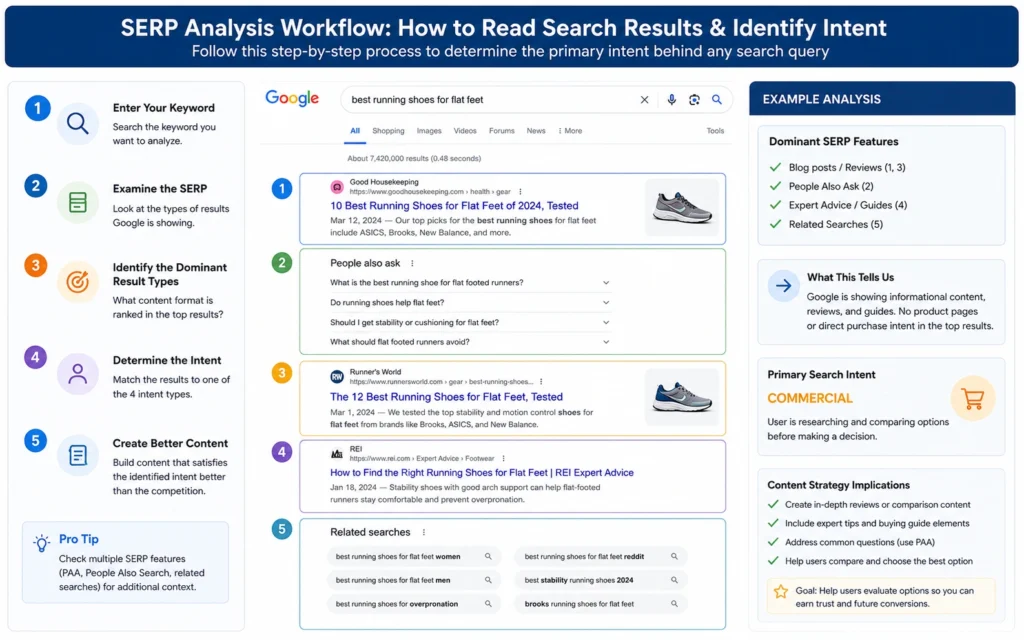
You don’t need expensive tools to identify search intent. You need a systematic way to read what Google is telling you. Here’s the exact workflow I use before writing any new content.
Step 1: Run the Search in Incognito Mode
Open an incognito or private browsing window. This prevents your search history from personalizing results. Type your target keyword into Google. Don’t click anything yet—just look at the first page.
Step 2: Categorize the Top 10 Results
For each result, ask: what type of page is this?
- Blog post or tutorial = Informational
- Brand homepage or specific page = Navigational
- Comparison or “best of” article = Commercial Investigation
- Product or pricing page = Transactional
Count the distribution. If 7 out of 10 results are comparison articles, the dominant intent is commercial investigation. That’s the format you need to match.
Step 3: Check for SERP Features
Look beyond the blue links. Are there featured snippets? Shopping ads? “People Also Ask” boxes? Video carousels? These features are Google’s explicit signal about what format users prefer.
- Featured snippet present = Google wants a direct answer (informational)
- Shopping ads dominant = Transactional intent
- Video carousel = Users prefer visual demonstration (informational/how-to)
Step 4: Read the Titles and Meta Descriptions
Skim the title tags and meta descriptions of the top results. What language are they using?
- “How to,” “guide,” “tutorial,” “what is” = Informational
- “Best,” “top,” “vs,” “comparison,” “review” = Commercial Investigation
- “Buy,” “price,” “discount,” “order,” “free trial” = Transactional
- Brand names, “login,” “official” = Navigational
Step 5: Spot-Check Two or Three Results
Click into the top result and one mid-page result. Scan the content structure. Are they listicles? Step-by-step guides? Product pages with pricing? Comparison tables? The actual content format confirms what the titles suggest.
This entire process takes 12-15 minutes once you’ve done it a few times. It’s faster than writing the wrong piece of content and watching it fail for three months.
The Intent Ambiguity Problem
Some keywords don’t have a single clear intent. Broader terms like “marketing automation” or “fitness tracker” often show mixed results—some informational guides, some comparisons, some product pages.
When intent is mixed, look for the dominant pattern. If 5 results are informational, 3 are commercial, and 2 are transactional, the primary intent is informational with secondary commercial interest.
In these cases, you have two options: create content that serves the primary intent while acknowledging secondary needs (an informational guide that includes a comparison section), or target a more specific long-tail keyword with clearer intent (“marketing automation for small business” vs. “best marketing automation tools 2026”).
Matching Your Content to Search Intent (The Practical Framework)
Once you’ve identified intent, you need to structure your content to match it. This isn’t about copying competitors—it’s about giving users what they expect in the format they prefer.
For Informational Intent:
- Lead with the answer or solution in the first 100 words
- Use clear H2s that map to sub-questions
- Include step-by-step instructions where applicable
- Add visual aids: screenshots, diagrams, videos
- Optimize for featured snippets with concise definitions and numbered lists
- Internal link to related tutorials and deeper guides
- Keep commercial mentions minimal and clearly labeled
For Commercial Investigation Intent:
- Create comparison tables with clear criteria
- Include pros and cons for each option
- Add pricing information (even if approximate)
- Use “best for” categorizations to help readers self-select
- Include real examples or case studies where possible
- Be transparent about affiliate relationships
- Make a clear recommendation based on specific use cases
For Transactional Intent:
- Put pricing and key features above the fold
- Include clear calls-to-action
- Reduce friction: minimize form fields, clarify next steps
- Add trust signals: reviews, guarantees, security badges
- Answer common objections before they arise
- Make the purchase or sign-up path obvious
For Navigational Intent:
You typically won’t create content for navigational queries unless you own the brand. If someone searches for your company name, make sure your homepage and key pages are optimized with clear navigation and the information they’re seeking.
The framework is simple: identify the intent, study what’s already ranking, then create something that serves that intent better—not differently. Different gets ignored. Better gets ranked.
Common Search Intent Mistakes (And How to Fix Them)
Mistake 1: Assuming Your Intent Matches the User’s Intent
You think “CRM software” is informational because you want to educate. The SERP shows it’s commercial because users are comparing options. Fix: Always defer to the SERP, not your assumption.
Mistake 2: Mixing Multiple Intents in One Page
You try to rank for both informational and transactional intent with the same page. The content becomes unfocused and satisfies neither user. Fix: Create separate pages for different intents and link them strategically.
Mistake 3: Ignoring SERP Features
You write a long-form guide when the SERP is dominated by video results. You’re fighting user preference. Fix: Match the dominant format. If video ranks, consider adding video content or embedding tutorials.
Mistake 4: Optimizing for Keywords Without Checking Intent
You target “best running shoes” with a product page when the SERP shows comparison articles. Fix: Run the intent analysis before you write, not after you publish.
Mistake 5: Not Updating Content When Intent Shifts
Search intent evolves. A keyword that was informational two years ago might be commercial now as the market matures. Fix: Re-check intent quarterly for your priority keywords. If the SERP format has shifted, update your content to match.
What to Do When Search Intent Isn’t Clear
Some keywords resist easy categorization. Here’s how to handle ambiguity.
First, segment by modifier. “Project management” is vague. “Project management software” is commercial. “How to manage projects” is informational. “Project management certification” is transactional. The modifier clarifies intent.
Second, consider search volume and competition. High-volume, broad terms often have mixed intent. Lower-volume, specific long-tail keywords usually have clearer intent. If you’re starting out, target the specific queries first.
Third, look at the “People Also Ask” section. These related questions reveal what users actually want to know. If the questions are all “how to” and “what is,” the intent skews informational even if some results are commercial.
Fourth, check multiple devices and locations. SERPs can vary by region and device type. A keyword might show transactional intent on desktop but informational on mobile. Test both before committing to a format.
Finally, accept that some keywords aren’t worth targeting. If intent is genuinely mixed and competitive, you might be better served targeting a clearer, more specific query with lower volume but higher conversion potential.
Continue Exploring
- Start with keyword research fundamentals to build the foundation before optimizing for intent.
- Move to content optimization once you’ve matched intent and need to refine on-page elements.