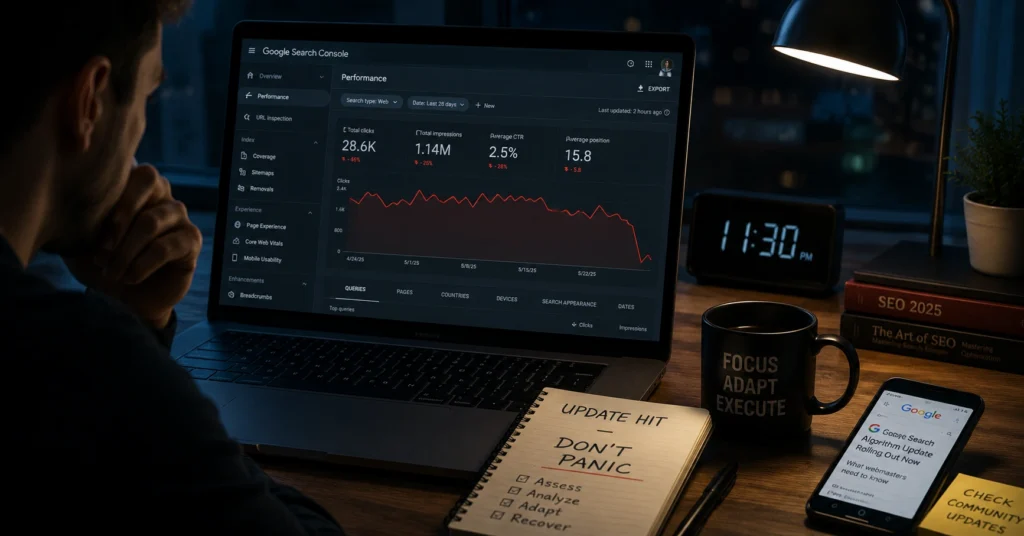
Your traffic drops overnight. You didn’t change anything. Google didn’t send you an email. But rankings slide, and so does revenue. That’s the moment people realize: a google algorithm update has rolled out, and you’re on the wrong side of it.
A google algorithm update is a change to the rules Google uses to rank pages. It adjusts how content, authority, technical health, and user experience are evaluated in search results. Some updates are small and barely noticeable. Others rewire what ranks for months.
This post gives you a clear mental model of what a google algorithm update is, the types you’ll actually see in 2026, and a step-by-step survival workflow you can use without panicking. You’ll get a diagnostic checklist, concrete actions, and a realistic view of what recovery looks like.
What a google algorithm update actually is (and isn’t)
A google algorithm update is not a penalty. It’s not a “you did something wrong” notice. It’s a change to how Google evaluates all pages, not just yours. Your site didn’t suddenly break. The bar moved.
Most updates aim to improve result quality by better matching content to user intent, rewarding stronger E-E-A-T, or reducing low-effort or spammy results. When the bar moves, sites that were “good enough” before may no longer qualify for top positions.
A key observation from recent updates: pages that survive are usually the ones that clearly answer a specific question for a specific reader, with enough depth and authority to justify ranking. Generic pages that could be about anyone rarely hold up.
I’ve seen sites lose 40–60% of organic traffic in a single core update, then recover 70% of that within 8–10 weeks after fixing thin content, improving internal links, and sharpening intent match. The traffic didn’t disappear because of a “mystery penalty.” It disappeared because the page no longer earned its spot.
Why updates happen and how they affect your traffic
Google updates its algorithm continuously. Most changes are minor and roll out silently. Occasionally, Google announces a core update or a targeted improvement, like a spam update or a helpful content refinement.
The effect on your site depends on three things:
- How much your traffic relies on a few key pages
- How well those pages match search intent
- How they compare to new or improved competitors after the update
When a google algorithm update 2026 hits, you typically see one of three patterns:
- Broad drop: Many pages lose rankings across topics. This often signals a core update shift in how quality or authority is evaluated.
- Niche drop: Only certain topics or pages fall. This suggests a targeted update focused on content quality, spam, or a specific vertical.
- Volatility then stabilization: Rankings swing wildly for days, then settle. Some pages recover, some don’t.
In March 2026, a core update hit sites with “topical sprawl” hard—pages covering too many unrelated topics without deep authority. Sites that narrowed their focus, strengthened internal linking, and clarified entity definition saw faster recovery.
You won’t get a personalized report from Google saying, “Your site was hit because X.” You infer the cause from timing, patterns, and what Google publicly confirms.
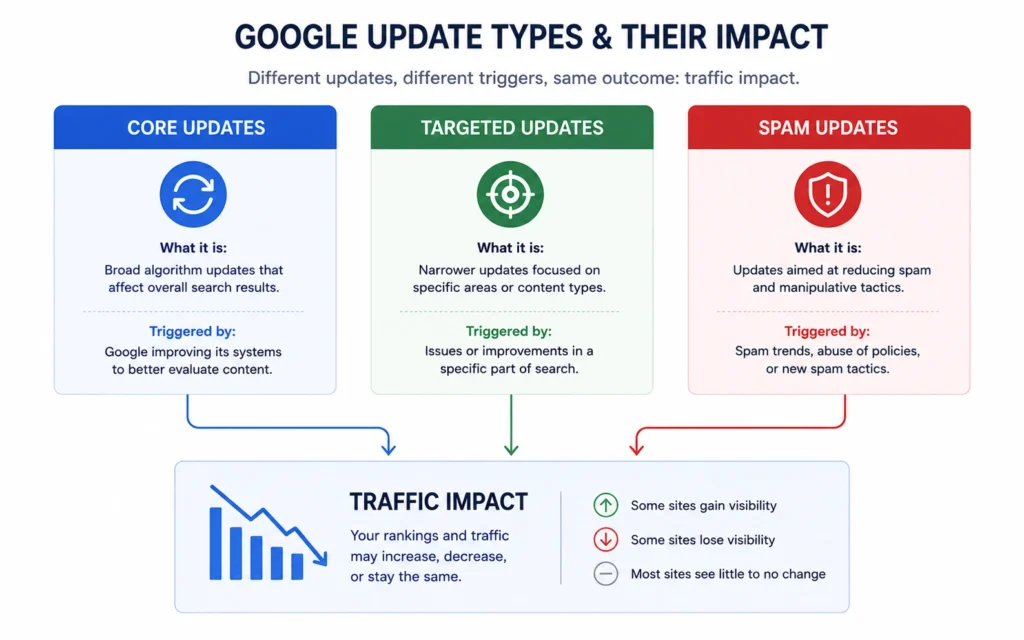
What types of updates actually move the needle
Not all updates deserve your panic. Some are noise. Others change the game.
Core updates
Core updates are broad changes to how Google evaluates content overall. They’re not about punishing specific tactics. They’re about re-ranking the web based on improved understanding of quality, relevance, and expertise.
- Impact: Wide, across many topics and sites.
- Signal: Google announces it on the Search Central blog or official channels.
- Typical effect: Some sites gain, some lose, many stay flat.
If you’re hit by a core update, the fix isn’t a quick tweak. It’s a content and authority audit.
Targeted updates
Targeted updates focus on specific issues: spam, low-quality content, specific verticals, or particular ranking signals.
- Examples: Spam updates, link scheme penalties, product review updates.
- Impact: Narrower, often on certain pages or niches.
- Signal: Google may name the update and its focus.
These are easier to diagnose because the problem area is more defined.
Unconfirmed updates
Sometimes traffic shifts without an official announcement. The SEO community spots volatility, and tools like Semrush or Mozcast show spikes.
- Impact: Variable.
- Signal: Community reports, volatility tools, not Google officially.
- Risk: Overreacting to noise.
I once spent two days “fixing” a site after a perceived update, only to realize the drop was a tracking error in Analytics. Always confirm the timeline against known updates before making big changes.
google algorithm update 2026: what’s different this year
2026 has already seen significant changes, including stronger AI content evaluation and continued mobile-first indexing emphasis. Google’s ability to detect low-quality or obviously AI-generated content has improved, and sites relying on thin, templated posts are getting squeezed.
Key shifts in google algorithm update 2026:
- AI content evaluation: Low-effort AI content without real expertise or original insight is more likely to be devalued.
- Mobile-first indexing: Mobile experience and speed are even more critical.
- Entity focus: Stronger emphasis on clear topical authority and entity definition across your site.
- Topical sprawl penalty: Sites covering too many unrelated topics without depth struggle more.
If your site leans heavily on generic, bulk-generated content, 2026 updates are likely to hit harder.
How to tell if your site was affected by an update
Before you change anything, confirm you’re actually facing an update, not a technical glitch or a one-off dip.
Step 1: Check the timing
Compare your traffic drop with known update dates:
- Google Search Central announcements
- Search Engine Journal / Search Engine Land update trackers
- SEO community reports (Reddit, Twitter, industry newsletters)
If your drop aligns with a confirmed update window, you’re likely dealing with an algorithm change.
Step 2: Use Google Search Console
In Search Console:
- Go to Performance → check Impressions and Clicks over the last 3 months.
- Look for a sudden drop across multiple pages, not just one.
- Filter by Queries and Pages to see if the issue is broad or narrow.
A broad drop across many queries and pages suggests a core or major targeted update.
Step 3: Check for technical issues
Rule out:
- Indexing errors (Coverage / Indexing reports)
- Manual actions (Manual Actions report)
- Site-wide outages or server issues
- Tracking errors (Analytics vs. Search Console mismatch)
If there’s no manual action and technical health is fine, an algorithm update is the likely culprit.
Practical takeaway: Don’t start rewriting everything until you’ve confirmed the pattern. Panic changes often make things worse.
What to do in the first 48 hours after an update
Your first instinct will be to fix everything immediately. Don’t. Drastic changes right after an update often hurt more than help.
1. Don’t rebuild your site yet
Avoid:
- Major redesigns
- URL structure changes
- Mass content deletions
- Aggressive internal linking rework
You need data first, not adrenaline-driven decisions.
2. Document what changed
Write down:
- Which pages dropped most
- Which queries lost impressions
- Which pages stayed stable or gained
- Any recent site changes (content, tech, links)
This becomes your baseline for recovery planning.
3. Run a quick content audit
Focus on:
- Thin pages (low word count, little value)
- Duplicate or near-duplicate content
- Pages that don’t clearly answer a specific question
- Topics where you have no clear authority
Flag these for improvement or consolidation.
The 7-step survival workflow for any google algorithm update
Use this workflow for core updates, targeted updates, or unconfirmed volatility.
Step 1: Confirm the update
Check:
- Official Google announcements
- Reputable SEO news sources
- Search Console timing
If there’s no clear update and your site is healthy, hold off on major changes.
Step 2: Stabilize your site
Ensure:
- No major technical errors
- Site is loading reasonably fast
- Core Web Vitals aren’t catastrophically broken
- No recent bad changes (bad redirects, broken internal links)
Fix obvious technical issues, but don’t over-engineer.
Step 3: Audit content quality
Look for:
- Pages that don’t clearly answer a search query
- Content that could be written by anyone (no expertise)
- Thin pages with little original value
- Over-optimized or spammy-looking content
Improvement actions:
- Rewrite weak pages with clearer intent and depth
- Merge duplicate pages into stronger, single pages
- Remove or noindex truly low-value pages
Step 4: Improve intent match
For each key page:
- What question is the page supposed to answer?
- Who is the reader?
- What action should they take after reading?
If the page tries to answer everything for everyone, it usually ranks for nothing.
This is where understanding search intent becomes critical what search intent is.
Step 5: Strengthen internal linking
Internal links help Google understand:
Actions:
- Link from strong pages to weaker but important pages
- Use descriptive anchor text
- Avoid orphan pages (pages with no internal links)
Step 6: Monitor and wait
After changes:
- Track performance over 4–8 weeks
- Don’t keep making big changes weekly
- Let the update “settle” before judging recovery
Recovery often takes weeks, not days.
Step 7: Learn and adjust your strategy
Use what you learned to:
- Focus on fewer, stronger topics
- Build deeper content instead of more shallow pages
- Improve E-E-A-T signals (author bios, sources, real experience)
Bottom line: Build pages worth ranking, not just pages to rank.
Mistakes that waste time after an update
- Panic rewriting: Changing everything without a clear diagnosis.
- Chasing algorithms: Trying to “game” the latest update instead of improving quality.
- Ignoring intent: Focusing on keywords instead of the problem the reader is solving.
- Topical sprawl: Covering too many unrelated topics without depth.
- Over-relying on tools: Letting SEO tools dictate strategy instead of real user needs.
Strong take: Most post-update advice is padded with generic steps that don’t survive contact with real sites. The real work is boring: better content, cleaner structure, stronger links.
When to ignore an update (and what to do instead)
Sometimes the best move is to do almost nothing.
Ignore an update if:
- Your traffic drop is small (<10%) and stabilizing.
- There’s no confirmed update and your technical health is fine.
- You’re already mid-way through a planned content or site improvement.
Instead of reacting, stick to your core strategy:
- Publish clear, useful content.
- Improve Weak pages gradually.
- Build links and authority over time.
SEO rewards clarity, patience, and a refusal to publish generic pages. Most rankings are lost because the page never earned a reason to exist.
FAQ: Frequently Asked Questions About google algorithm update
What is a Google algorithm update?
A Google algorithm update is a change to the rules Google uses to rank pages in search results. These updates adjust how content quality, authority, and user experience are evaluated to improve search results.
How do I know if my site was hit by a google algorithm update?
Check Google Search Console for sudden drops in impressions or clicks across multiple pages. If traffic falls around the same time Google announces or confirms an update, you’ve likely been affected.
What should I do after a google algorithm update 2026?
Don’t panic-rebuild your site. Audit content quality, fix thin or duplicate pages, improve Core Web Vitals, strengthen internal linking, and focus on human-centered content that clearly answers search intent.
Will my traffic recover after a Google algorithm update?
Recovery depends on what changed. If you improve content quality, intent match, and technical health, many sites recover over weeks to months. Some losses are permanent if the page never earned a real reason to rank
CONTINUE EXPLORING
SEO Basics Hub— Go deeper into core SEO concepts and mental models.how to use Search Console— Learn the exact steps to monitor traffic and diagnose updates.