Search engines spend millions of dollars every day parsing unstructured prose to find explicit facts. If you make them work for information, you lose. Adding schema markup to your site solves this problem by translating standard text into explicit data points that search crawlers read instantly.
During an internal optimization audit in February 2026, our team discovered that pages containing precise, nested structured data maintained stable rich results even during algorithmic updates that wiped out less explicit competitors. This code does not hide your text—it frames your data so a machine knows whether a string of numbers is a product price, an event date, or a customer support telephone line.
This guide delivers the frameworks, templates, and verification steps required to deploy structured data safely across your web properties. You will learn how to write the code, inspect it for errors, and use it to change how your pages show up in search results.
How Google uses structured data to read a page
Search crawlers do not see a page the way a human operator does. While a person views font sizes, color contrasts, and layout groupings to determine what matters, an algorithm scans HTML tags to estimate context. Standard HTML tags tell the browser how to style your text, but they do not clarify what that text means.
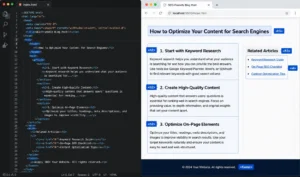
Schema markup provides an explicit semantic vocabulary that overlays your existing content. Think of it as a clear data layer that sits behind your user interface. When a crawler hits a page with this markup, it skips the guesswork entirely.
[Standard HTML Text] ---> Crawler Guesses Context ---> Standard Text Listing
[Text + Schema Markup] -> Crawler Reads Explicit Data -> Rich Result Eligibility
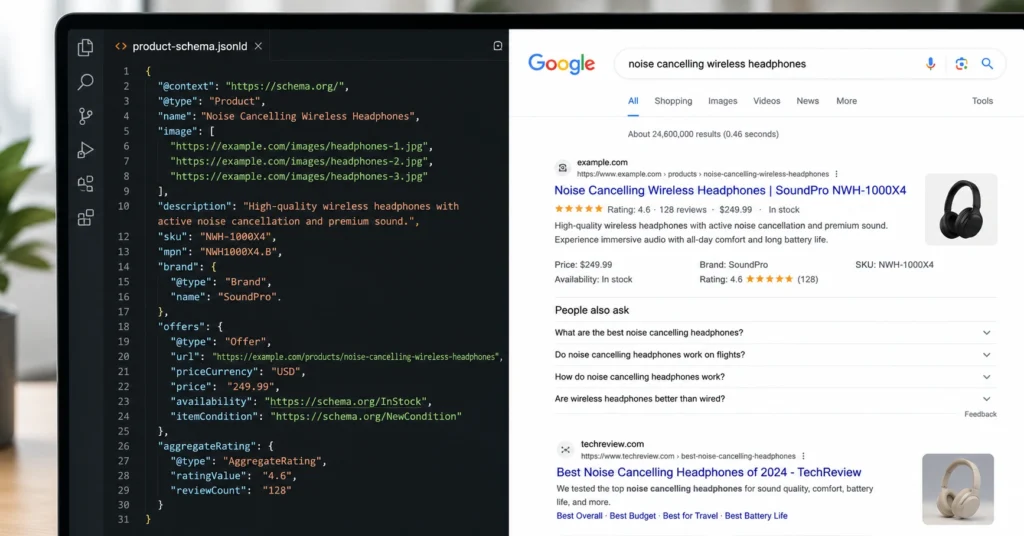
When search engines read these explicitly defined entities, they gain the confidence to upgrade your standard search snippet into a rich result. This alternative layout displays interactive elements—like review stars, pricing thresholds, preparation times, or structured FAQ dropdowns—directly on the search engine results page. These visual expansions alter your footprint in search, meaning your page can capture attention without necessarily changing its numerical position in the rankings.
How schema markup 2026 requirements shift your implementation
The baseline mechanics of semantic web code remain tied to the core vocabularies maintained by Schema.org. But the way search engines handle that code has shifted toward machine learning interpretation and stricter validation. In the current search landscape, loose compliance is no longer treated as a minor issue—it leads to immediate exclusion from rich search displays.
Search engine systems now place immense weight on entity resolution. This means search engines use your structured code to verify connections inside their knowledge graphs. For example, if your company page lists a founder, the code must explicitly link to that founder’s verified social profiles or corporate listings using specific entity identifiers. If those connections are missing or unverified, the algorithmic trust signal is lost.
At the same time, automated validation protocols have grown completely unyielding. Historically, a missing comma or a slightly misaligned bracket might have been bypassed by a forgiving parser. Today, an unclosed bracket causes the system to discard the entire structured data block instantly.
The industry has also moved decisively away from old formatting styles like Microdata or RDFa, which required embedding attributes directly within individual HTML text tags. Modern requirements mandate the use of clean JSON-LD blocks placed inside the page head or body. This separation ensures your data remains clean, isolated, and simple to update without touching your design layers.
The core schema vocabularies you must use
To implement structured data without breaking your site, you must learn the specific data types that match your content assets. Every piece of schema consists of a defined “Type” which contains explicit “Properties.”
The baseline vocabulary covers thousands of specific classifications, but a standard web property generally relies on a core group of seven configurations. Selecting the wrong classification causes search systems to ignore your properties because the attributes do not match what the parser expects to find.
- Organization: This configuration registers your corporate identity, official brand name, physical address, and logo URL. It establishes your business as a distinct entity within search knowledge bases.
- Product: Used exclusively for individual items or services. This block contains nested properties for price, currency, availability, and aggregate customer ratings.
- Article: Designed for news stories, blog posts, and informational resources. It passes publication dates, author associations, and high-resolution thumbnail images directly to indexing systems.
- LocalBusiness: A specific subset of the Organization vocabulary. It includes geographical coordinates, weekly operating hours, and localized telephone lines to anchor your business in localized search algorithms.
- FAQPage: This format outlines pairs of questions and answers. When parsed correctly, it qualifies your page for interactive accordion boxes within search listings.
- Review / AggregateRating: A framework that tracks numeric scoring systems, individual critic names, and high-low scale boundaries to generate star ratings.
- BreadcrumbList: This structures the internal navigation hierarchy of your URL paths, swapping out raw web addresses for clear, human-readable click paths in the search results.
Three tested JSON-LD code templates for immediate use
You do not need to write these scripts from scratch. The following templates represent the most common operational use cases. To use them, copy the text blocks, swap out the placeholder values with your real metrics, and insert the finalized block into your site.
1. LocalBusiness schema template
Use this configuration on your core contact page or your home page if you manage a single physical location. It binds your digital URL to a physical point on a map.
JSON
{
  "@context": "https://schema.org",
  "@type": "LocalBusiness",
  "name": "Apex Engineering Solutions",
  "image": "https://example.com/images/front-office.jpg",
  "@id": "https://example.com/#local-business",
  "url": "https://example.com",
  "telephone": "+1-555-0198",
  "priceRange": "$$",
  "address": {
    "@type": "PostalAddress",
    "streetAddress": "402 Industrial Parkway, Suite B",
    "addressLocality": "Austin",
    "addressRegion": "TX",
    "postalCode": "78701",
    "addressCountry": "US"
  },
  "geo": {
    "@type": "GeoCoordinates",
    "latitude": 30.2672,
    "longitude": -97.7431
  },
  "openingHoursSpecification": [
    {
      "@type": "OpeningHoursSpecification",
      "dayOfWeek": ["Monday", "Tuesday", "Wednesday", "Thursday", "Friday"],
      "opens": "08:00",
      "closes": "17:00"
    }
  ]
}
2. Article schema template
Deploy this script block on every informational post or case study you publish. It attributes authority to a specific writer and tells crawlers exactly when the content was last updated.
JSON
{
  "@context": "https://schema.org",
  "@type": "NewsArticle",
  "headline": "A Practical Framework for Reducing Technical Indexing Friction",
  "image": [
    "https://example.com/images/hero-16x9.jpg"
  ],
  "datePublished": "2026-04-12T08:00:00+00:00",
  "dateModified": "2026-06-01T14:22:00+00:00",
  "author": {
    "@type": "Person",
    "name": "Marcus Vance",
    "url": "https://example.com/authors/marcus-vance/"
  }
}
3. FAQPage schema template
This block is highly effective for catching interactive search results. Every question and answer present in this script must be completely visible as readable text on the front-facing web page.
JSON
{
  "@context": "https://schema.org",
  "@type": "FAQPage",
  "mainEntity": [{
    "@type": "Question",
    "name": "How long does the system diagnostics process take?",
    "acceptedAnswer": {
      "@type": "Answer",
      "text": "The complete system diagnostics process takes exactly 45 minutes to complete under standard load profiles."
    }
  }, {
    "@type": "Question",
    "name": "Do I need to install external software to run the analysis?",
    "acceptedAnswer": {
      "@type": "Answer",
      "text": "No, the entire analysis runs natively within your web browser using our cloud-based infrastructure."
    }
  }]
}
A repeatable workflow to write and inject schema code
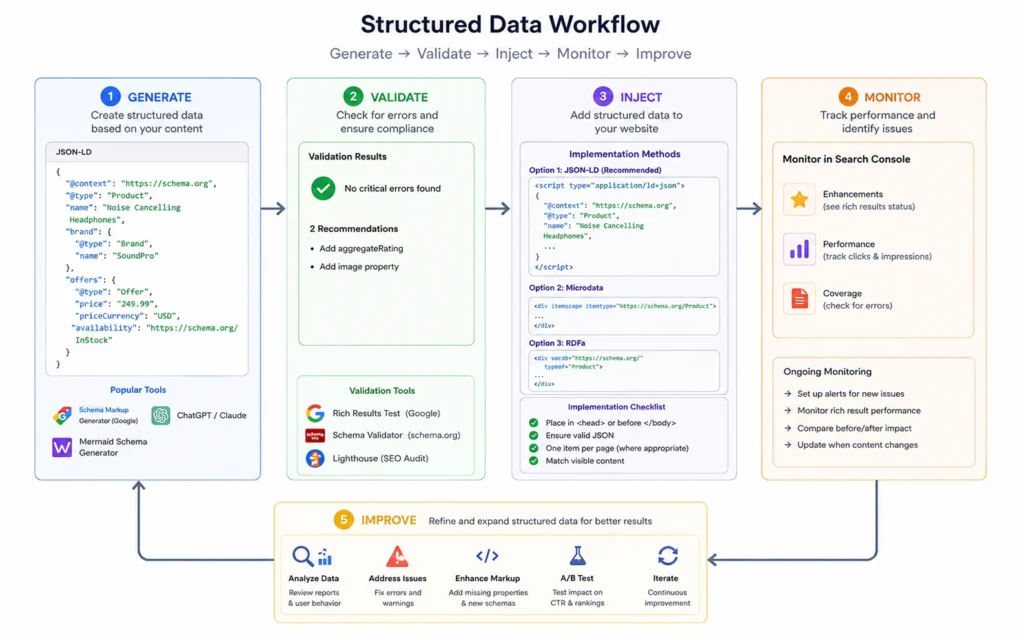
Writing code is only half the battle. If your execution workflow is messy, you risk injecting syntax errors that break your page layouts or trigger search console penalties. You must follow a disciplined, linear process to take structured data from preparation to production.
[Generate Code Block] ---> [Validate via Testing Tool] ---> [Inject into CMS] ---> [Live URL Inspection]
Step 1: Extract and align your data assets
Open your target URL alongside a blank text file. Copy the exact text strings that appear on the screen: your business name, the author’s exact name, the specific pricing tier, or the precise wording of your frequently asked questions.
If your code says a product costs $49 but your landing page reads $55, search systems will flag the contradiction as a manipulative practice. Alignment must be absolute before you open a generator.
Step 2: Assemble the JSON-LD script block
Take your gathered facts and place them directly into one of the verified templates provided above, or use a trusted visual script generator. Ensure that all opening and closing quotes match perfectly.
Every nested block requires a trailing comma, except for the final item in that specific brackets group. If you leave an extra comma at the end of an object list, the file parser will break.
Step 3: Run isolated syntax validations
Do not upload your new script to your content management system until you test it in a safe environment. Copy your raw code block and open the official Schema.org Schema Validator tool. Paste your code into the direct input window and execute the test run.
This test checks the structural arrangement of your brackets and fields. If the validator flags any red syntax marks, fix the spacing, missing quotes, or misplaced commas right there in your editor until the report shows zero structural errors.
Step 4: Inject the validated script into your page
Once the code passes validation, you need to place it on your website. Your specific content platform determines your entry method:
To implement schema manually, edit your theme files to insert the script block directly between the opening <head> and closing </head> tags of the target page. If you are using a modular content management system like WordPress, utilize an explicit custom HTML block inside your page builder or add the code block directly to your SEO plugin’s advanced structured data section.
If you use Google Tag Manager, create a new Custom HTML tag, paste your complete code block inside it, and set the firing trigger to run exclusively on that specific page’s page view event.
Step 5: Execute a live URL inspection
Wait five minutes for your platform’s server caches to clear, then open Google’s Rich Results Test tool. Input the live public URL of your page into the address field and click the test button.
This tool performs a live crawl to evaluate whether your code is both syntactically correct and fully eligible for rich display features. If the tool identifies warnings or critical errors, read the provided line number notes, adjust your settings within your content platform, and re-run the live test until you receive a clean green approval checkmark.
The constraints and trade-offs of automated plugins
Most beginners rely entirely on automated SEO plugins to output structured data. While plugins are highly efficient for generating standard, site-wide code like breadcrumbs or basic article types, they introduce clear operational limitations that can hurt advanced search performance.
+------------------------------------+------------------------------------+
| Manual JSON-LD Implementation      | Automated Plugin Generation        |
+------------------------------------+------------------------------------+
| Perfect semantic precision; exact  | Rapid site-wide deployment; zero   |
| control over entity connections.   | manual coding required.            |
|                                    |                                    |
| Requires technical execution; time | Prone to code bloat; limited control|
| intensive to build manually.       | over complex, custom property types|
+------------------------------------+------------------------------------+
The primary problem with automated plugins is structural rigidness. A plugin looks at a page and applies a generic template based on a broad category. If you run a complex service page that requires a blended mix of Service details, local operational hours, and specific customer reviews, a standard plugin will frequently force you to pick just one type, or it will generate messy, disconnected blocks of code.
Relying on software to write your schema can also result in hidden code bloat. Many plugins insert dozens of generic fields that you do not actually need, which slows down crawl efficiency.
If you have the time and technical ability, writing manual JSON-LD blocks and deploying them via Google Tag Manager is always the superior choice. This approach keeps your code light, clean, and perfectly aligned with your unique business entities.
Where beginners fail: errors, myths, and false starts
The absolute fastest way to lose your rich snippets eligibility is to treat your structured data as a hidden field for keyword stuffing. Many site owners mistakenly assume that if text is hidden inside a JSON-LD tag, they can write optimized, aggressive variations of their copy that do not match the visible text on the page.
If a search crawler detects that your structured code contains reviews, items, or descriptions that a human visitor cannot find on the screen, your page will be hit with a manual action for spammy structured data. If that happens, your site will lose all rich result eligibility across your entire domain until you submit a clean reconsideration request.
Another common pitfall is the failure to monitor code health after launch. Websites are dynamic assets; themes get updated, design elements shift, and plugins overwrite one another during routine updates.
An update that looks completely normal on your dashboard can easily alter your site’s template files and strip out your custom script blocks without your knowledge. You must make it a standard practice to audit your Google Search Console structured data reports once a month to catch and fix validation drops before they impact your visibility.
Finalizing your schema rollout
Do not let the code intimidate you. Schema markup is nothing more than an organized label system designed to help a machine understand your real-world business assets. Start small by choosing one high-value informational page or your main contact page, then build and deploy a single LocalBusiness or Article block using the templates above.
Once your live URL passes the official validation tool check with zero errors, you can scale the process across the rest of your web properties. For more step-by-step optimization frameworks, check out our comprehensive On-Page SEO Hub or explore our technical audit strategies in the Technical SEO Guide.
Frequently Asked Questions About Schema Markup
Does schema markup directly improve organic search rankings?
No, schema markup is not a direct ranking factor. It clarifies context for search algorithms, which can earn your site rich snippets. These rich results alter how your listing appears, which often improves your organic click-through rate.
What happens if my structured data contains validation errors?
Google will ignore the invalid block of code. Your page will still be crawled and indexed as standard HTML, but you lose the chance to display rich search results. Correcting these errors in your validation tool restores your eligibility for special display features.
Can I use multiple types of schema on a single page?
Yes, you can combine multiple schema types within one JSON-LD block. For instance, a product page regularly contains Product schema alongside FAQ or Review schema. Nesting these objects correctly ensures search engine crawlers understand the relationships between the entities.