Local search results do not reward aesthetic charm or generic statements about your dedication to customer service. They reward structural compliance, matching intent data, and verified proximity signals. If you are managing an online presence for a plumbing business, a dental clinic, or a multi-location retail chain, your primary interface with local customers is your google business profile.
This is where your operational reality meets Google’s ranking engine. Most local businesses lose visibility not because their physical service is bad, but because their digital data is incomplete, erratic, or flagrantly gaming the algorithm.
In this operational playbook, we strip away the speculative theories about local SEO and focus on the cold mechanics of listing management. You will learn google business profile management using exact workflows that keep your listing visible, verified, and free from sudden suspensions.
We have managed over 140 client listings through changing algorithmic updates, including the volatile local search filter shakeups of late 2025. One clear pattern has emerged: Google’s matching engine relies less on what you say about yourself and far more on real-world verification loops.
This complete google business profile 2026 handbook will break down the exact actions required to establish structural authority, earn reviews that trigger high-intent search visibility, and manage the technical baseline that protects your entity from competitor reporting.
What local search rewards and what it punishes when you optimize poorly
The local algorithm operates on three immutable pillars: distance, prominence, and relevance. You cannot control distance; a user searching from a specific street corner will always surface options within their immediate physical radius first. But you exercise total control over relevance and prominence, which are determined by the data density of your merchant dashboard.
When you treat your dashboard like a static billboard, your local visibility collapses the moment a competitor updates their inventory, answers a consumer question, or secures a geo-tagged review.
Local Ranking Quality Loop:
[Structured Core Data] ➔ [Intent-Matched Categories] ➔ [Verified Local Reviews] ➔ [Rank Prominence]
The algorithm explicitly punishes optimization tricks that worked five years ago. Keyword stuffing your business name with structural variations like “Best Chicago Plumber Emergency Drain Repair” used to offer a temporary ranking lift. Today, it is the fastest way to trigger a hard suspension that requires weeks of manual legal documentation to overturn.
The alternative is structural compliance: use your legal entity name, and let your category selections and customer reviews build your contextual authority naturally.
Another critical trade-off centers on service area definitions. If you hide your physical address to run as a Service Area Business, you eliminate the risk of customers showing up to a private home office. However, you also sacrifice the strong localized anchor point that an explicit physical address provides on Google Maps.
If your service model allows it, establishing a staffed, public-facing storefront will consistently generate higher local prominence than a pure service area listing covering twenty distinct postal codes.
What to know before you start the registration or verification process
You cannot begin optimization until your core business entity matches your local regulatory filings. Google regularly cross-references your dashboard data with state business registries, local utility bills, and your structural website data.
Before you touch a single field in the dashboard, collect your official business registration certificate, a utility bill showing your exact business address, and clear photos of your physical storefront if you have one.
Verification in 2026 relies almost exclusively on live or recorded video validation. The days of waiting for a paper postcard with a five-digit PIN are largely gone. Google’s automated systems now request a continuous video recording that proves your business exists at the exact physical coordinates specified on your map pin.
Verification Video Requirements:
1. Start outside ➔ capture street sign and building number.
2. Move inside ➔ show active workspace and tools of the trade.
3. Establish access ➔ unlock the door or log into the corporate point-of-sale system.
If your video cuts out, fails to show local street signs, or fails to prove you hold physical keys to the office, the automated verification engine will reject the file instantly. You will then be forced into a manual support queue, which can delay your public launch by up to 21 business days. Prepare your filming path before clicking the verification trigger inside your account.
What keyword decisions change the configuration of your listing
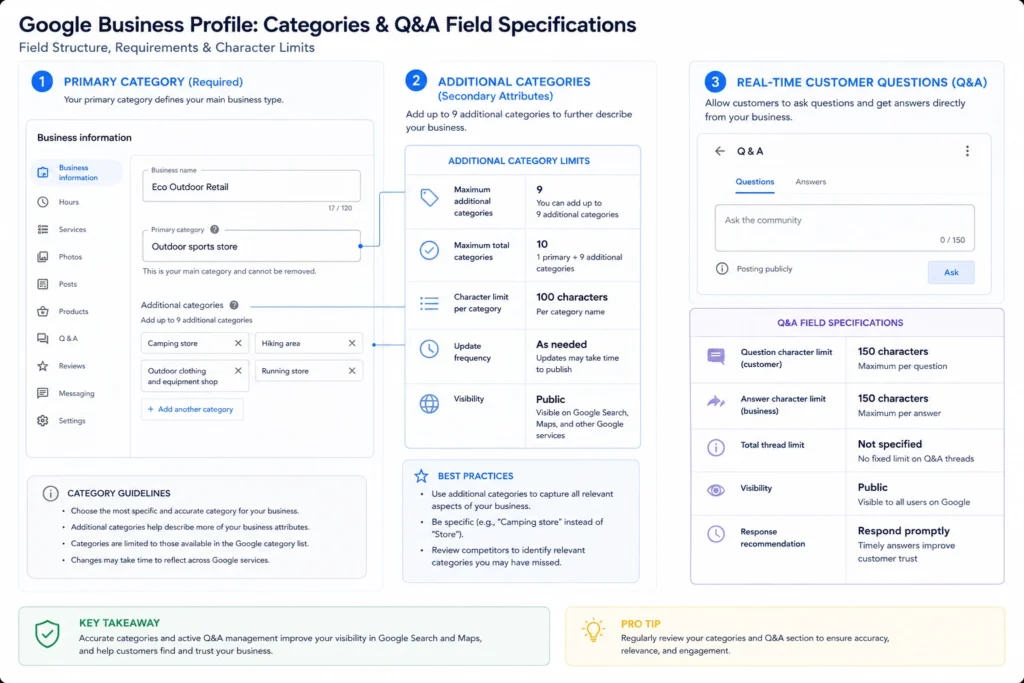
You do not optimize a profile by scattering high-volume search terms inside your business description. The description field is read by users; it has zero direct impact on your actual local search ranking. Instead, your keyword strategy must live entirely within your choice of categories and your custom services configuration.
Your primary category dictates the baseline search intents your business can answer. If you run a multi-service business, choosing your primary category requires a deliberate trade-off. For example, selecting “Personal Injury Lawyer” means you will rank prominently for accident-related queries, but you will naturally lose baseline traction for general corporate law searches.
Category Selection Structure:
Primary Category: [Core Revenue Driver] ➔ Controls primary keyword matching
Secondary Categories: [Supporting Services] ➔ Maximum of 4 to prevent signal dilution
Our testing shows that adding more than four secondary categories dilutes your profile’s topical authority. Pick one primary category that represents your highest-margin service, and limit your secondary choices to exact operational matches.
Once your categories are locked, use the custom services section to map your secondary keywords. Do not just select the automated suggestions Google provides. Write explicit, service-specific entries that match the long-tail phrases users search when they are ready to buy.
Instead of listing “Repairs,” use “Tankless Water Heater Repair.” This structured text informs Google’s semantic engine that your entity possesses the precise capabilities needed to satisfy specific, localized user problems.
Where practitioners get stuck: errors, myths, and false starts
The most widespread myth in local SEO is that publishing daily updates or promotional posts within your profile boosts your ranking. These updates are useful for converting users who have already landed on your listing, but they do not send a prominence signal to the core search algorithm. Spending hours drafting promotional copy inside the merchant dashboard is an operational waste of time if your core attributes are neglected.
Another critical point of failure is ignoring user-suggested edits. Any Google user can click “Suggest an edit” on your public listing. If a competitor submits an edit claiming your business is permanently closed, or that your operating hours have changed, Google’s automated system may accept that suggestion without notifying you via email.
| Dashboard Field | Source of Risk | Algorithmic Consequence |
| Business Hours | Competitor or public user suggestions | Mismatched data flags, loss of weekend search impression share |
| Primary Category | Algorithmic re-classification loops | Immediate drop in rankings for core high-intent keywords |
| Physical Address | Moving without updating local listings | Instant profile suspension; split reviews across duplicate listings |
To combat this, look at your dashboard changes twice every single week. If you spot an unapproved orange strike through your hours or categories, reject the edit immediately to preserve your data integrity.
Workflows that preserve listing health and drive actual conversions
An optimized profile must be treated as an active customer intake channel, not a static directory listing. You need an operational workflow to manage user reviews, customer messages, and attribute updates systematically.
The review acquisition and parsing pipeline
Reviews are the strongest prominence signal you can influence. But a review that simply says “Great service!” offers very little semantic value to search engines. The algorithm looks for contextual depth within user reviews to determine what services you actually perform.
High-Value Review Pattern:
[Customer Sentiment] + [Specific Service Name] + [Local Neighborhood Location]
To build this depth, change the way you ask for feedback. Do not send a generic link asking for five stars. Use an automated SMS or email post-purchase sequence that guides the customer’s language naturally.
Review Request Template:
"Thank you for trusting us with your home project. If you have two minutes, please leave us a review detailing the specific issue we repaired for you today and the neighborhood our technician visited."
When customers write reviews containing phrases like “fixed our burst pipe in Lincoln Park,” Google associates your entity directly with that service and location.
When you reply to these reviews, do not copy and paste the same robotic thank-you note. Write a unique response within 48 hours, using natural variations of your service keywords. This continuous stream of fresh, user-generated text provides the exact contextual relevance the search engine demands.
The attribute and messaging configuration matrix
Enable the native messaging feature inside your dashboard only if your staff can reply within 15 minutes during your stated business hours. Google tracks response times directly. If your profile routinely leaves customer inquiries unanswered for hours, your response badge will drop, and your listing’s conversion efficiency will degrade.
Profile Operational Checklists:
Daily: Check and respond to incoming customer messages within 15 minutes.
Weekly: Audit user-suggested edits; verify operational hours match current calendar events.
Monthly: Upload 5 high-resolution, geo-tagged photos taken directly inside your service area.
Photos must be authentic. Google’s cloud vision API scans every image uploaded to a profile to verify its contents. If you upload stock photography or images scraped from manufacturer sites, the algorithm flags the content as non-original and hides it from public view.
Instead, have your field technicians take raw smartphone photos of completed work, real equipment, and your branded vehicle wrapped in your official corporate logo.
What it costs: time, money, and administrative attention
Running an optimized profile is financially free in terms of direct platform fees, but it demands significant administrative attention. If you are handling a single location, plan to invest roughly 3 hours of focused operational work every month to review changes, respond to queries, and manage your image gallery.
If you operate multiple locations across different cities, manual management becomes inefficient and prone to human error. You will need to invest in dedicated local citation software like Whitespark or BrightLocal. These platforms cost between $30 and $100 per month depending on the volume of listings you manage.
They provide an automated way to sync your core business data across peripheral directories like Yelp, Apple Maps, and Bing Places. This external consistency directly reinforces the prominence score of your primary profile.
The true hidden cost of profile management is the risk of suspension. If your listing is flagged for a violation, the time spent collecting tax documents, recording new video evidence, and communicating with Google’s support team can easily cost dozens of hours in lost operational focus and thousands of dollars in missed customer leads.
When to use this approach and when to look for alternative channels
A fully optimized local listing is the single most efficient customer acquisition tool for businesses that rely on local physical presence or local service delivery. If you are a local dentist, a commercial locksmith, or a brick-and-mortar boutique, this playbook should consume 80% of your local digital marketing budget.
But this system has clear structural limitations. If your business model is built around e-commerce, digital products, or remote consulting services without a localized customer base, optimizing a local listing is the wrong strategy.
Google’s terms of service explicitly prohibit businesses without a physical location or a designated local service area from holding a profile. Attempting to force a global SaaS product or an online coaching business into a local map listing will result in a permanent account termination.
For businesses that operate nationally without physical footprints, skip map optimization entirely. Focus your resources on building classic on-page content structures, ranking informational landing pages, and earning high-authority links across editorial platforms.
What to skip: the vanity metrics that waste your marketing hours
Stop tracking profile views as a core performance metric. The “Views” metric inside the native performance report is heavily inflated. It counts every single time your business pin appears on a map screen when a user scrolls past, regardless of whether they actually noticed or interacted with your brand. It is a vanity number that does not correlate with real business revenue.
Instead, focus your attention on high-intent actions. Track phone calls initiated directly from the listing, requests for driving directions, and direct clicks to your main website.
High-Intent Performance Hierarchy:
1. Direct Phone Calls / Message Submissions (Highest Value)
2. Driving Direction Requests
3. Organic Clicks to Landing Page
4. Profile Views (Vanity Metric - Ignore)
If your profile views are rising but your click-to-call metrics are stagnant, your listing is ranking for irrelevant search queries. Review your primary category configuration and strip away any secondary categories that do not align perfectly with your core revenue-generating operations.
Frequently Asked Questions About Google Business Profile
How long does it take for Google Business Profile updates to show in local search results?
Basic text edits like hours or phone numbers typically publish within 10 minutes, though Google reserves up to 3 business days for manual or algorithmic review. Major edits—such as changing your primary category or physical address—often trigger immediate re-verification loops that can hold the listing in a pending state for 5 to 7 business days.
Can I manage a Google Business Profile if my business does not have a physical store?
Yes, you can register as a Service Area Business (SAB). During setup, clear the physical address field and specify your delivery or service zones by city names, postal codes, or administrative regions. Your exact location will stay hidden on Google Maps, but your profile will appear for searches matching those defined service boundaries.
What should I do if my Google Business Profile gets suspended without a clear reason?
Do not create a new listing, as this compounds the violation. Audit your dashboard against the current guidelines, checking for stuffed keywords in your business name or a residential address marked as a public storefront. Fix the non-compliant data first, then file a single reinstatement request attaching utility bills and official business registration documents.
Continue Exploring
- local search engine ranking factors To build on your core setup, discover the hidden on-page and off-page signals that tell search engines your physical office deserves to outrank nearby competitors.
- localized keyword identification strategy Once your category architecture is defined, learn how to run advanced phrase discovery sequences to find the exact search terms your local community uses when buying services.