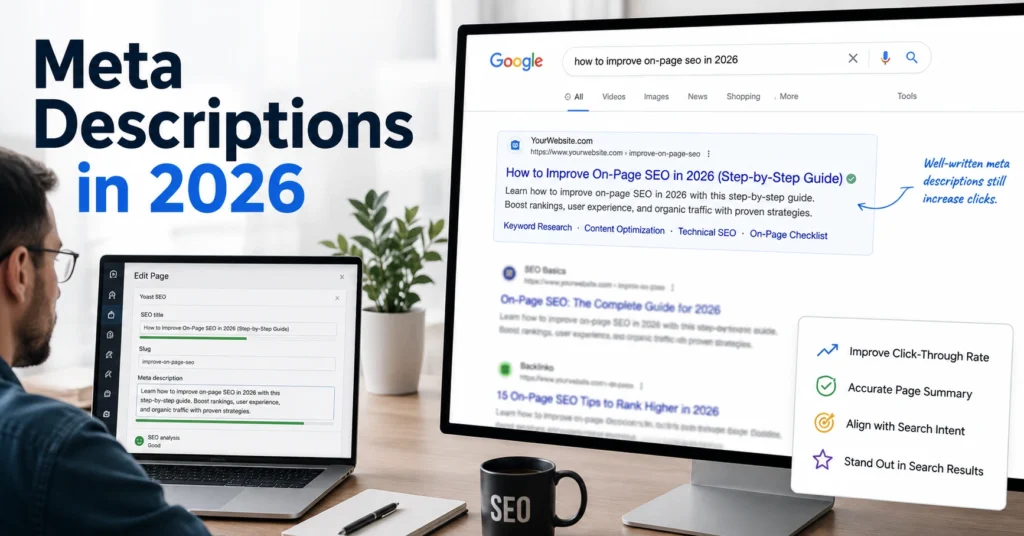
Meta description SEO is one of the most misunderstood parts of on-page optimization.
Not because it’s complicated. Because the advice around it is usually stuck in a version of search that no longer exists.
A few years ago, many SEO checklists treated meta descriptions like ranking factors. Then the conversation swung too far in the other direction, with people claiming they don’t matter because Google often rewrites them.
Both positions miss the point.
I’ve audited pages where changing a weak meta description increased click-through rate without touching rankings. I’ve also spent time writing descriptions that Google ignored completely because the search query demanded a different snippet. The lesson was simple: the goal isn’t to control Google’s snippet. The goal is to increase the chance that your page earns the click.
That’s what meta description SEO means in 2026.
This page explains what meta descriptions actually do, how Google uses them, when they’re worth writing, and the templates beginners can use immediately.
What a meta description actually controls in modern search
A meta description is a short summary stored in a page’s HTML.
It does not directly improve rankings.
Google has repeatedly stated that meta descriptions are not a ranking signal. What they influence is the searcher’s decision after your page appears.
Think of the search result as three separate elements:
- Title tag
- URL or breadcrumb
- Description snippet
The title earns attention.
The description earns consideration.
Then the click happens.
A weak title can hurt visibility. A weak description can hurt click-through rate.
That’s why good meta description SEO is really about communication, not rankings.
The three jobs a meta description should perform
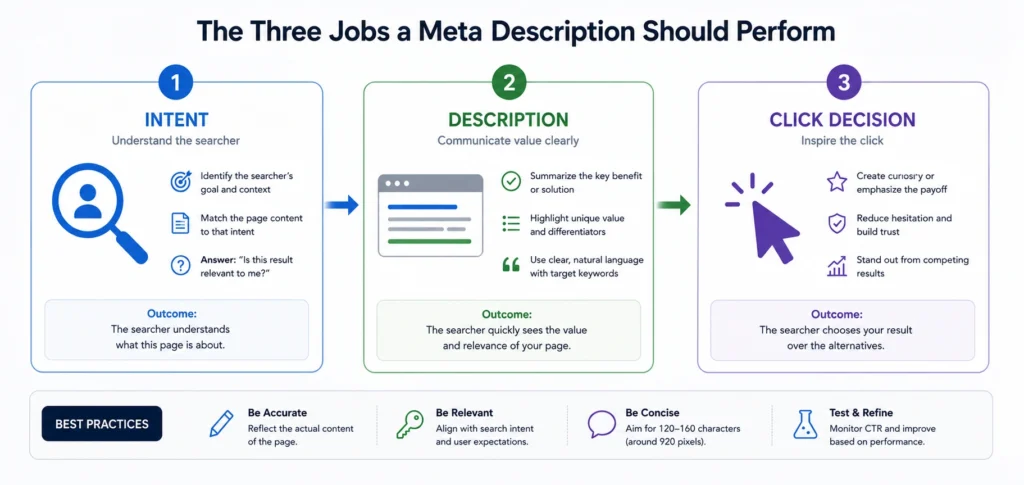
Most descriptions fail because they’re trying to sound optimized instead of useful.
A good description performs three jobs.
Job 1: Confirm relevance
The searcher should immediately recognize that the page answers their question.
If someone searches:
“how to write meta descriptions”
and your description discusses digital marketing in general, you’ve already lost them.
Specificity wins.
Job 2: Reduce uncertainty
Searchers hesitate when they don’t know what’s inside the page.
A description should remove that hesitation.
For example:
Weak:
“Learn everything you need to know about meta descriptions.”
Stronger:
“Learn how to write meta descriptions that improve click-through rate, avoid common mistakes, and match search intent.”
The second version tells the reader what they’ll get.
Job 3: Create a reason to click
Not hype.
Not exaggerated promises.
A reason.
Examples include:
- Templates
- Examples
- Checklists
- Case studies
- Step-by-step instructions
Those details create value before the click.
Why Google rewrites more descriptions than most people realize
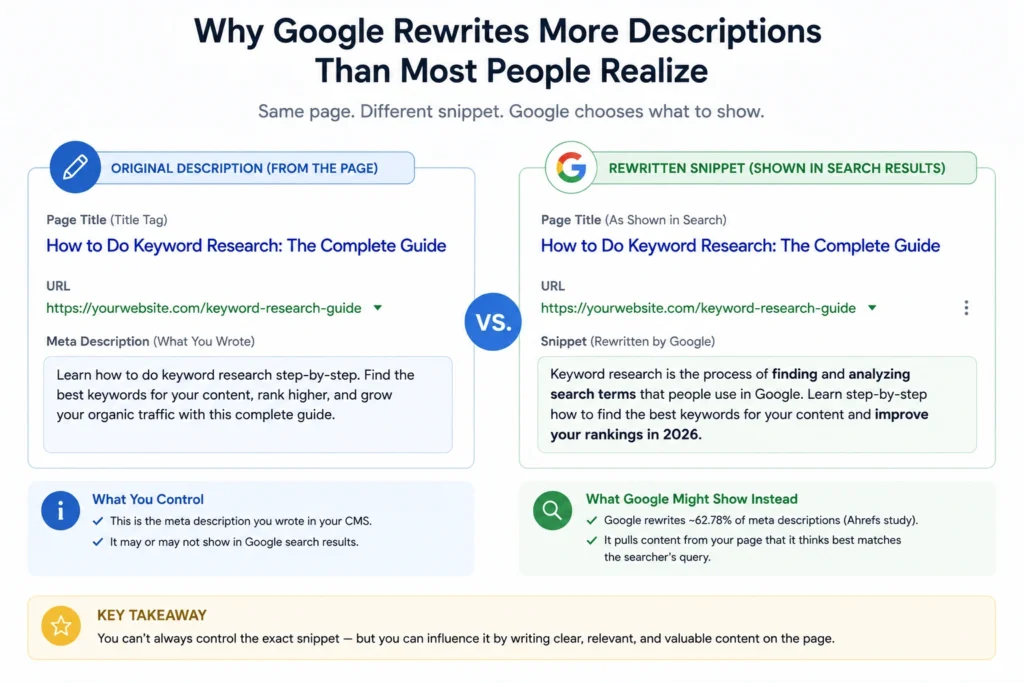
One of the biggest mistakes beginners make is assuming Google always shows the description they wrote.
It doesn’t.
Google frequently generates its own snippet from page content when it believes another passage better matches the search query.
This creates confusion.
People see Google rewriting snippets and conclude descriptions are pointless.
That’s the wrong conclusion.
The better conclusion is this:
Your description competes with Google’s alternative.
If your description accurately summarizes the page and aligns with likely queries, Google is more likely to use it.
If it doesn’t, Google often substitutes another section.
A practical observation from content audits: pages with vague, generic descriptions tend to experience more snippet rewriting than pages with clear descriptions that closely match page intent.
That doesn’t guarantee preservation. It increases the odds.
What keyword research should decide before you write the description
Many people write descriptions after publishing.
That’s backwards.
The description should be informed by the same keyword research that shaped the page itself.
Before writing anything, answer three questions:
What is the primary intent?
Is the searcher trying to:
- Learn?
- Compare?
- Buy?
- Find a local business?
The description should reflect that intent.
What promise does the page make?
Every page has an implied promise.
A comparison article promises evaluation.
A tutorial promises instruction.
A product page promises information about a purchase decision.
Match the description to that promise.
What result does the reader want?
Searchers rarely want information for its own sake.
They want an outcome.
Focus on the outcome.
Not the topic.
A simple workflow for writing meta descriptions in under five minutes
Most descriptions don’t need twenty minutes of editing.
Use this process.
Step 1: Identify the page’s core outcome
Ask:
“What will the reader be able to do after reading this page?”
Write that answer in one sentence.
Step 2: Add a specific deliverable
Include:
- Examples
- Templates
- Frameworks
- Comparisons
- Checklists
Specific deliverables increase clarity.
Step 3: Mention the primary topic naturally
Include the keyword where it fits.
Don’t force it.
Step 4: Cut unnecessary words
Most descriptions improve after removing 10–15 words.
Shorter often reads stronger.
Example
Before
“Learn everything there is to know about meta descriptions and how they can be used for search engine optimization.”
After
“Learn how to write meta descriptions that match search intent, improve click-through rate, and give searchers a clearer reason to visit your page.”
The second version says more while using fewer words.
Meta description templates beginners can use immediately
Templates are useful when they provide structure.
They’re harmful when copied without thinking.
Use these as starting points.
Educational Page
Learn how to [solve problem] using [method]. Includes examples, common mistakes, and step-by-step instructions.
Comparison Page
Compare [option A] and [option B] across [criteria]. See differences, trade-offs, and which choice fits your situation.
Tool Review
See what [tool] does well, where it struggles, and whether it’s worth using for [job].
Beginner Guide
Understand [topic] without jargon. Learn the core concepts, practical steps, and common pitfalls.
The structure matters more than the exact wording.
Common meta description mistakes that reduce clicks
Some mistakes appear in almost every content audit.
Writing for algorithms instead of humans
Searchers decide whether to click.
Not crawlers.
Descriptions stuffed with keywords rarely read naturally.
Repeating the title tag
The title and description should work together.
If both say the same thing, you’ve wasted valuable space.
Making vague promises
“Complete guide.”
“Everything you need to know.”
“Ultimate resource.”
These phrases communicate very little.
Specific outcomes perform better.
Ignoring intent
A tutorial should sound like a tutorial.
A comparison should sound like a comparison.
Misaligned intent reduces clicks.
What length works best for meta description SEO in 2026
There is no perfect character count.
That’s the reality.
Search snippets vary based on device, query, and presentation format.
Still, practical ranges exist.
For most pages:
- Aim for roughly 140–160 characters.
- Prioritize clarity over length.
- Avoid writing filler just to reach a target count.
A description that communicates value in 125 characters is stronger than a padded version at 160.
The constraint isn’t character count.
The constraint is usefulness.
When writing a custom meta description is not worth the effort
This is the trade-off most guides ignore.
Not every page deserves custom copy.
Pages that receive little organic visibility often have higher-priority problems.
Examples:
- Weak content
- Poor internal linking
- Indexation issues
- Thin topical coverage
I’ve seen teams spend hours polishing descriptions on pages that received fewer than ten impressions per month.
That work produced almost nothing.
The better investment was improving page quality.
Blunt verdict: if a page isn’t earning impressions, fix visibility before obsessing over snippet copy.
How meta descriptions fit into a larger on-page SEO system
A description cannot rescue a weak page.
It sits downstream from more important factors.
The hierarchy usually looks like this:
- Search intent alignment
- Content usefulness
- Internal linking
- Technical accessibility
- Title tag quality
- Meta description quality
That doesn’t make descriptions unimportant.
It puts them in context.
Think of them as conversion copy for search results.
The page still has to earn visibility first.
Readers often focus on the snippet because it’s visible. Search engines focus on whether the page deserves to appear at all.
Both matter.
They’re simply different jobs.
Frequently Asked Questions About Meta Description SEO
Does a meta description help rankings?
Not directly.
Meta descriptions are not considered a ranking signal. They influence how people interact with a search result, which can affect click-through rate and overall search performance.
Should every page have a meta description?
Most important pages should. High-value pages, commercial pages, category pages, and articles that receive search traffic benefit from custom descriptions. Low-priority pages may not justify the effort.
Why does Google ignore my meta description?
Google may determine that another passage on the page better matches the search query. This often happens when the written description is too generic or doesn’t closely reflect page content.
How long should a meta description be in 2026?
Aim for approximately 140–160 characters, but prioritize clarity over length. A concise description that communicates value is stronger than one padded to hit a number.
Should I include keywords in my meta description?
Yes, when they fit naturally. Including the primary topic can reinforce relevance for searchers, but forcing keywords into awkward sentences usually makes the description weaker.
Continue Exploring
- On-Page SEO Hub: If you’re building pages that deserve rankings, the next step is understanding how headings, internal links, entities, and content structure work together.
- Keyword Research for Beginners: Most weak meta descriptions start with weak keyword decisions. Learn how to identify search intent before you write the page.