A good keyword research template doesn’t save you time because it’s organized. It saves you time because it stops you from publishing pages nobody needed in the first place.
That’s the mistake most beginners make. They collect hundreds of keywords, sort them by search volume, then start writing. Three months later, they have twenty pages and no clear understanding of why some rank and others disappear into Google’s index.
I’ve seen keyword spreadsheets with 5,000 rows that couldn’t answer one simple question: Which page should be created next?
The purpose of a keyword research template is not storage. It’s decision-making.
A useful template helps you identify search intent, group related topics, prioritize opportunities, and map keywords to actual pages. Once you understand that shift, keyword research becomes much easier to execute consistently.
This article walks through the structure, logic, and workflow behind a practical keyword research template you can start using immediately.
What a keyword research template should decide before you publish
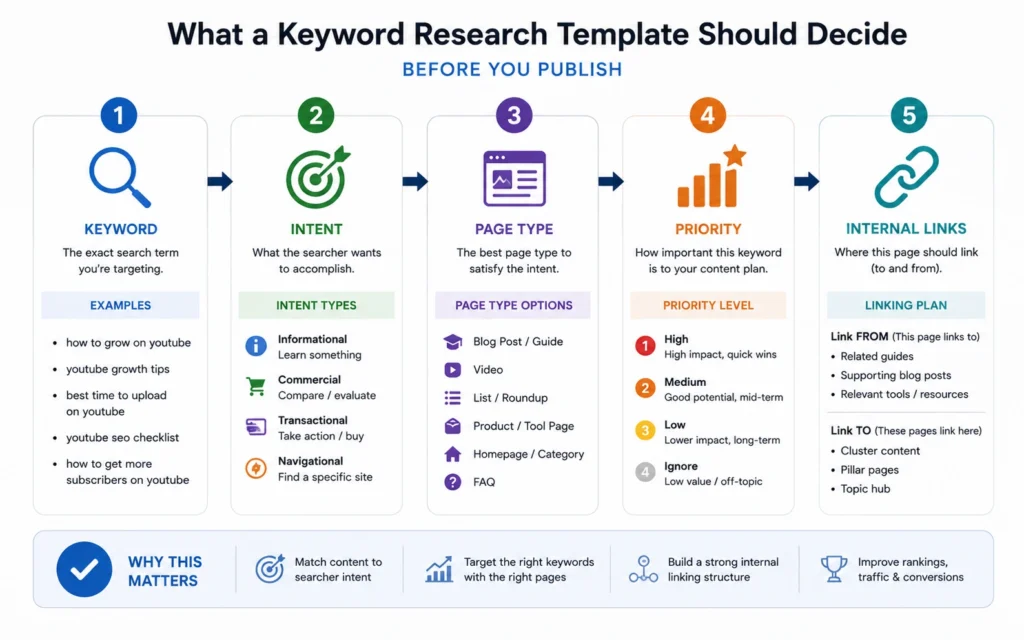
Before a keyword enters your content calendar, your template should answer four questions:
- What is the searcher trying to accomplish?
- Does the topic deserve its own page?
- How difficult is the opportunity?
- Where does the page fit within the site?
Most keyword sheets answer only one of those questions.
Usually it’s search volume.
That’s a problem because volume rarely tells you whether a topic deserves a page.
A keyword with 300 monthly searches can generate more business value than one with 10,000 searches if the intent is stronger and the competition is weaker.
Your template should force decisions rather than collect data.
At minimum, every keyword should have:
| Column | Purpose |
|---|---|
| Keyword | The search phrase |
| Search Intent | What the user wants |
| Search Volume | Demand estimate |
| Difficulty | Competition estimate |
| Page Type | Blog, category, landing page, guide |
| Topic Cluster | Related content group |
| Priority Score | Publishing order |
| Notes | SERP observations |
The goal is simple: every row should help determine whether a page should exist.
The template structure that works for beginners
Beginners often build templates that are too detailed too early.
A 30-column spreadsheet looks impressive. It usually becomes abandoned after two weeks.
Start with eight columns.
That’s enough to make useful decisions without turning keyword research into administration.
Core Template Layout
| Keyword | Intent | Volume | Difficulty | Cluster | Page Type | Priority | Status |
|---|
Each column serves a specific job.
Keyword records the target phrase.
Intent identifies whether the search is informational, commercial, navigational, or transactional.
Volume estimates demand.
Difficulty estimates competition.
Cluster groups related topics.
Page Type determines content format.
Priority controls publishing order.
Status tracks progress.
The blunt verdict: most beginners need better prioritization, not more keyword data.
Search intent belongs above search volume
One of the fastest ways to improve keyword selection is moving intent ahead of volume in your workflow.
Volume tells you how often people search.
Intent tells you why.
And intent usually matters more.
Consider these two examples:
| Keyword | Volume |
|---|---|
| what is keyword research | 9,000 |
| keyword research template | 3,000 |
The first search often attracts learners.
The second attracts people actively trying to complete a task.
Those users are usually closer to taking action.
When I review poorly performing content plans, one pattern appears repeatedly: keywords were selected because the volume looked attractive, not because the searcher had a clear problem to solve.
A strong keyword research template forces intent classification before prioritization.
That small change improves topic selection more than most tool upgrades.
How to build keyword clusters without creating duplicate pages
Keyword clustering sounds technical.
In practice, it’s simply deciding which keywords belong on the same page.
Many SEO problems start when websites create five articles targeting variations of the same search intent.
Examples:
- keyword research template
- SEO keyword research template
- keyword research spreadsheet
- keyword planning template
Those may not require four separate pages.
Google often treats them as closely related intents.
A better approach is clustering them into a single comprehensive resource.
When building your template, include a cluster column and assign every keyword to a broader topic group.
Example:
Cluster: Keyword Research Templates
- keyword research template
- keyword research spreadsheet
- SEO keyword template
- keyword planning template
This process reduces content overlap and strengthens topical coverage.
It also makes internal linking much easier later.
Trust signal: One of the most common content audit findings is multiple pages competing against each other for nearly identical searches. Consolidation often produces faster gains than publishing additional content.
The priority scoring system that prevents random publishing
Most content calendars become random after the first month.
The reason is simple.
Nobody defined a scoring system.
Instead of choosing topics based on intuition, assign scores.
A beginner-friendly model:
| Factor | Score |
|---|---|
| High intent relevance | 1–5 |
| Business value | 1–5 |
| Ranking difficulty | 1–5 |
| Existing authority | 1–5 |
Total score:
Maximum = 20
Higher scores move to the top of the publishing queue.
For example:
| Keyword | Score |
|---|---|
| keyword research template | 18 |
| keyword density checker | 12 |
| SEO glossary terms | 9 |
Now decisions become objective.
Not perfect. But consistent.
Consistency beats guesswork.
The worksheet most people forget: SERP observations
This is the tab many templates skip.
It’s also one of the most useful.
Create a section called:
SERP Notes
For each keyword, record:
- Dominant content type
- Average content depth
- Featured snippets present
- Video results present
- Forum results present
- Common headings used
This takes a few minutes.
It can save hours of writing.
A page competing against product pages requires a different approach than one competing against tutorials.
The search results tell you what Google currently considers useful.
Ignoring that information is like taking an exam without reading the questions.
Why the best keyword research template 2026 focuses on topics, not isolated keywords
The shift toward topical authority has changed how keyword planning works.
Publishing isolated articles is becoming less effective.
Search engines increasingly evaluate whether a site demonstrates useful coverage around a subject.
That’s why modern keyword planning starts with topics.
Then expands into supporting pages.
For example:
Main Topic
Keyword Research
Supporting Topics
- keyword research template
- keyword clustering
- search intent analysis
- keyword difficulty
- content mapping
- topic clusters
This structure creates relationships between pages.
And those relationships support stronger internal linking.
The result is a site architecture that helps both users and search engines understand your expertise.
Common keyword research template mistakes that waste weeks of work
The biggest mistakes aren’t technical.
They’re workflow mistakes.
Tracking too many metrics
If a metric never influences a decision, remove it.
Creating pages before clustering
This often produces duplicate content.
Ignoring page type
Not every keyword deserves a blog post.
Some require category pages, tools, landing pages, or comparison pages.
Trusting difficulty scores blindly
Tool scores are estimates.
Always inspect the search results manually.
Treating every keyword equally
Some keywords drive revenue.
Others drive curiosity.
Your template should distinguish between them.
Honest admission: I once spent nearly an entire afternoon expanding a keyword list by several hundred terms before realizing most belonged to three existing pages. The spreadsheet grew. The content strategy did not.
A simple workflow for using the template every week
Keep the process repeatable.
Monday
Collect keyword opportunities.
Tuesday
Classify intent.
Wednesday
Build or refine clusters.
Thursday
Assign priority scores.
Friday
Choose next week’s content targets.
This rhythm keeps research connected to publishing.
That’s the point.
A keyword database without publishing decisions attached to it becomes digital storage, not strategy.
Frequently Asked Questions About Keyword Research Templates
What is a keyword research template?
A keyword research template is a spreadsheet or database used to organize keywords, search intent, difficulty, page types, and prioritization data. The best templates help determine what content should be published next rather than simply storing keyword lists.
What columns should a keyword research template include?
Start with keyword, search intent, search volume, difficulty, topic cluster, page type, priority score, and publishing status. These columns provide enough information to make practical content decisions without creating unnecessary complexity.
How often should I update my keyword research template?
Weekly is usually enough for most websites. Regular updates keep new opportunities visible while ensuring the template remains connected to actual publishing activity.
Should beginners use complex SEO templates?
No. Simpler templates are easier to maintain and often lead to better decisions. A focused eight-column template usually produces more useful outcomes than a large spreadsheet filled with metrics that never influence action.
Is search volume the most important metric?
No. Search intent often matters more. A lower-volume keyword with strong intent can outperform a high-volume keyword that attracts readers who are not looking for the solution your page provides.
Continue Exploring
- keyword clustering guide: Understanding clustering helps you decide which keywords belong together and which deserve separate pages.
- search intent guide: Intent analysis improves keyword selection long before content creation begins.