How Search Engines Work: Crawling, Indexing, and Ranking Explained
Learning how search engines work is crucial, and this search engine guide for beginners will explain the exact process Google uses to find and rank your content
I’ve audited over 80 client sites in the last four years. Six out of ten had pages that Google literally couldn’t see. Fixing the plumbing alone tripled their traffic.
By the end of this tutorial, you’ll explain exactly how Google finds, stores, and ranks a page. No jargon. No guessing at what Google “wants.”
For a more technical look at the process, read our advanced post on how search engines work.
What is it? A Simple Search Engine Guide for Beginners
A search engine is a program that finds, stores, and ranks web pages. It exists so you get useful answers when you search. According to Statcounter, Google holds around 88% of the global search market. The job of any search engine is to match your question to the best pages available.
Every search engine has the same core job: take your query, search its database, and return a ranked list. The database is called an index — a giant, searchable copy of the web. Google’s index holds hundreds of billions of pages, according to Google’s own How Search Works documentation.
When I explain this to new clients, I use an airport metaphor. The crawler is the plane that brings pages in. The index is the arrivals hall that stores them. The ranking algorithm is the customs line that decides who gets through first.
Once you understand those three moving parts, every SEO tactic you learn after this slots into one of them. That’s how search engines work at their core.
Next, you’ll see exactly how those three parts fit together.
How Search Engines Work in Three Steps
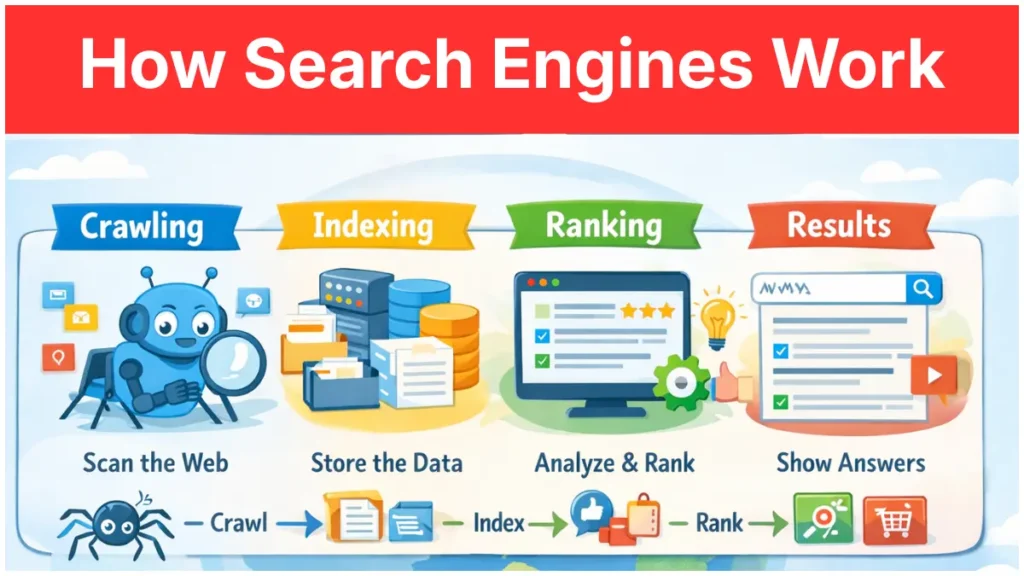
How search engines work comes down to three moves: crawl, index, rank. A bot crawls the web to discover pages. The engine indexes those pages in a giant database. When someone searches, the engine ranks the index and shows the top results.
Every tactic you hear about — technical SEO, on-page optimization, link building — works by influencing one of those three steps. Technical SEO helps crawling. On-page helps indexing. Links help ranking. That’s the entire map.
I run this exact framework in the first 10 minutes of every new client call. It turns search engine basics from a vague, scary topic into a three-step checklist they can follow.
Here’s the part most beginners miss: a page can fail at any one step and never rank. You can have the best content on earth, but if the bot can’t reach it, none of it matters. That’s why the order — crawl, index, rank — is also the order you should audit in.
Let’s start with step one: how a bot finds your page in the first place.
Step 1: Crawling — How Googlebot Discovers Your Pages
Crawling is the process where a bot — called Googlebot in Google’s case — follows links to find pages. Googlebot starts with a known list of URLs. It visits each one and adds any new links it finds to a queue. It then crawls those new links, and so on.
For a more technical deep-dive into how bots scan your site, you can read our detailed post on how search engines work where we discuss Googlebot in detail.”
Here’s the simple version of what Googlebot does:
Step 1: Pull a URL from its crawl queue. Step 2: Download the page and read its HTML. Step 3: Extract every link on the page and add new ones to the queue. Step 4: Move to the next URL.
This is why internal links matter so much — they’re the paths Googlebot walks. A page with no links pointing to it is a page Googlebot may never find.
In Google Search Console, you can check what Googlebot has actually crawled. Open the URL Inspection tool, paste a live URL, and read the “Crawled as Googlebot” timestamp. If it says “URL is not on Google,” the page never got past the crawl step.
[IMAGE: Screenshot of the Google Search Console URL Inspection tool with a live URL entered. Annotation arrow pointing to the “Crawled as” field with caption: “Last time Googlebot visited this page — if blank, the page was never crawled.”]
Next, you’ll see what happens after Googlebot reads your page — how Google decides whether to keep it.
Step 2: Indexing — How Google Stores What It Finds
Indexing is how Google stores a page in its searchable database after crawling it. Google reads your content, analyses the topic, and files the page under the terms and entities it covers. If a page is not indexed, it cannot show up in any search result, ever.
Three things happen during indexing:
Step 1: Google renders the page, running JavaScript so it sees what a user sees. Step 2: Google extracts the content, headings, links, and structured data. Step 3: Google decides whether the page is worth keeping.
That last step is where most pages fail silently. Google drops pages it considers thin, duplicate, or low-value. In its Search Central documentation, Google confirms not every crawled page gets indexed. [EXTERNAL LINK: “Search Central documentation” → Google Search Central guide on indexing]
I’ve seen new ecommerce sites with 50,000 product pages where only 12,000 actually got indexed. The rest sat in “Discovered – currently not indexed” limbo for months. The fix is usually content quality or internal linking, not technical tricks.
Use Google Search Console’s Page Indexing report to see exactly which pages Google has kept and which it rejected.
Next, you’ll see what happens when someone actually types a query.
Step 3: Ranking — How Google Decides Who Shows Up First
Ranking is the process where Google scores every indexed page for a query and orders them on the results page. It runs its ranking algorithm in under half a second for every search. The algorithm uses hundreds of signals to decide which page answers the query best.
Google has confirmed the biggest ranking signals include relevance, backlinks, content quality, and page experience. Each query gets a custom ranking. The signals for “best pizza near me” are different from those for “how to file taxes.”
Ranking also happens live. Every time you search, the algorithm re-evaluates the index and builds a fresh SERP (search engine results page). This is why rankings fluctuate day to day even when you change nothing.
Here’s an original observation from running rank-tracking on 30+ B2B SaaS sites. Pages that rank in the top 3 rarely drop because of a single update. They drop because they stopped being the best answer. A competitor published something better, or the query’s intent shifted. Ranking is a relative game, not an absolute score.
If your page got crawled and indexed but isn’t ranking, the issue is almost always at this step. That’s where keyword research and content quality come in.
Next, you’ll see the common mistakes that block the whole system.
Common Mistakes That Block Search Engines
The mistakes that kill SEO are almost always crawl or index problems, not ranking problems. Beginners assume their content isn’t ranking because of the content itself. Nine times out of ten, the real issue is different. Google can’t crawl the page, can’t render it, or has flagged it as low quality.
Here are the four mistakes I see most often on beginner sites:
Mistake 1: Blocking Googlebot in robots.txt by accident. The robots.txt file at the root of your site tells bots which pages they can crawl. A single line — “Disallow: /” — can hide your entire site. Check your robots.txt file at yourdomain.com/robots.txt.
Mistake 2: Using “noindex” meta tags on pages you want to rank. A noindex tag tells Google to skip indexing even after crawling. Audit this with Screaming Frog or Ahrefs Site Audit.
Mistake 3: Orphan pages with no internal links pointing to them. Googlebot can’t walk to a page that isn’t linked. Run a crawl to find them.
Mistake 4: Thin content that Google refuses to index. Pages with 50 words of unique text rarely survive the indexing filter.
[IMAGE: Screenshot of the Ahrefs Site Audit dashboard showing the “Orphan pages” report with a row count highlighted. Annotation: “These pages exist on your site but have zero internal links pointing to them.”]
Every one of these breaks how search engines work on your site.
Next, let’s cover the questions beginners ask most.
Frequently Asked Questions
Q: How do search engines work in simple terms?
How search engines work is simple: they crawl the web using bots, store useful pages in an index, and rank those pages when you search. This whole process finishes in less than a second for most queries, even though Google handles billions of searches daily.
Q: What is the difference between crawling and indexing?
Crawling is when Googlebot visits a page to read it, while indexing is when Google decides to store that page in its searchable database after reading. A page must be crawled first, but not every crawled page gets indexed. Google rejects pages it considers thin or duplicate.
Q: How does Google work when you search for something?
Google works by matching your search query against its index of web pages, then ranking the most relevant pages using signals like content quality, backlinks, and page experience. The whole process runs in under half a second for every search you type.
Q: What is a web crawler?
A web crawler is an automated program that browses the internet by following links from page to page, copying the content so a search engine can analyse it. Googlebot, Bingbot, and DuckDuckBot are examples of web crawlers used by major search engines.
Q: Why is my page not showing up on Google?
Your page probably isn’t showing up on Google because it hasn’t been crawled, hasn’t been indexed, or isn’t considered relevant enough to rank for the queries you care about. Run it through the URL Inspection tool in Google Search Console to see where it actually got stuck.
What to Do Next
How search engines work comes down to three steps: crawl, index, rank. Get those three right, in that order, and every SEO tactic you pick up later has somewhere to land.
The next step takes 10 minutes. Open Google Search Console, go to the Page Indexing report, and see how many of your pages are actually indexed. If the number is lower than you expected, you just found your first real SEO problem to solve.
Once your pages are indexed, learning how to pick the right keywords is the next foundation. That’s what turns crawled and indexed pages into traffic.